
Growform Multi Step Form Builder
  • Use cases
    • Finanz- & Versicherungs-Leadgenerierung
    • Generierung von Leads
    • Juristische Lead-Generierung
    • Immobilien Seite
    • Solar & Energie – Leadgenerierung
    • Lead-Generierung für Bau und Handwerk
  • Schablonen
  • Integrationen
  • Preisgestaltung
  • Kontakt
  • Log in
  • Free trial

Wie man einen Bildschirmaufzeichnungs-Tag oder ähnliches abfeuert

You’ll need to complete our basic GTM container setup before starting this guide.

Table of Contents

    • 🎉 This guide is available in video form!
  • 1 – Get a Fullstory account and code
  • 2 – Create a new tag in your GTM child container
  • 3 – Add “run in iFrame” code to your Fullstory tag

🎉 This guide is available in video form!


Let’s assume we want to add a Fullstory screen recording tag to our form.

As you may remember from our carefully crafted diagram in the basic GTM setup guide, everything in your Growform form is inside an iFrame, so is effectively invisible to everything outside the iFrame:

This means that if you add a screen recording tag to your main website, it will not be able to “see” inside the iFrame, so will not be able to see your form.

First, you need to make sure you’re set up according to our basic GTM setup guide.

Then, simply add the screen recording tag to your custom child tag container, and hit save/publish.

This will fire the screen recording tag inside the iFrame, and let you see what your users are doing on your form!

1 – Get a Fullstory account and code

You should be able to get a free Fullstory account here. Look for “Free forever”, or the free trial plan.

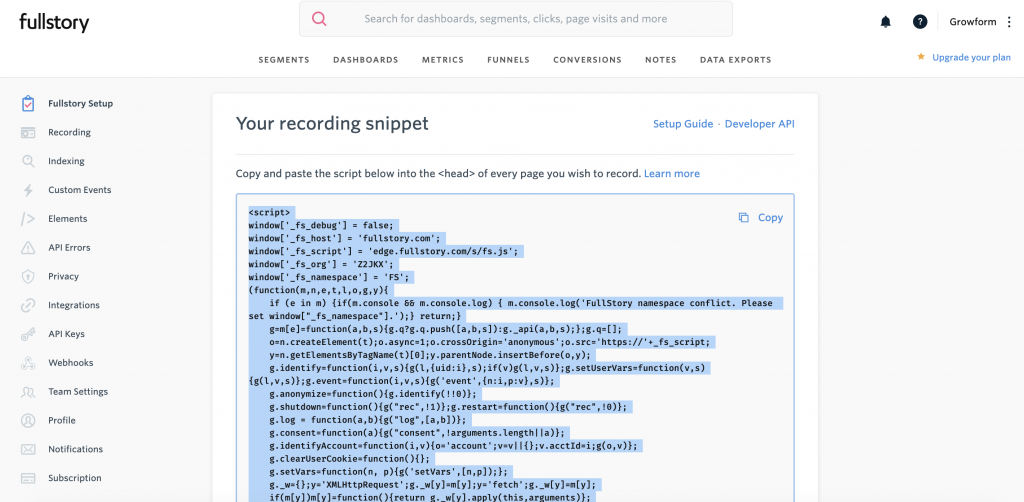
You’ll immediately see the code when setting up your account.

Hit “Copy” and copy the long HTML code snippet to your clipboard:
2 – Create a new tag in your GTM child container

Open up your GTM child container and create a tag called Fullstory.

Choose “Custom HTML tag” out of the list of tag types and paste your Fullstory tag in.

Set your tag to fire on “All pages”.

3 – Add “run in iFrame” code to your Fullstory tag

In order to get Fullstory to work, you’ll need to copy the following code to your clipboard…
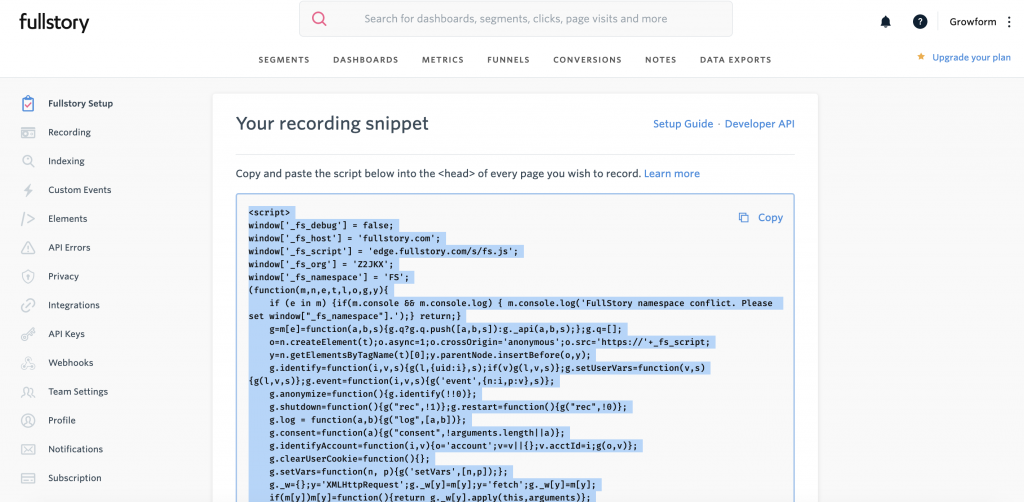
window['_fs_run_in_iframe'] = true;

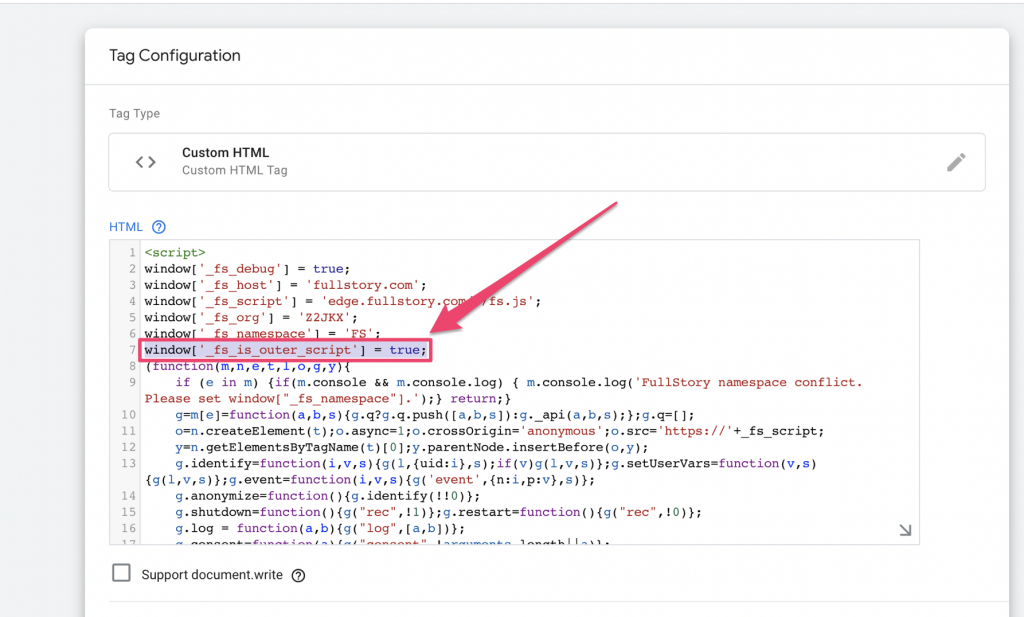
… and add it to the top of the HTML script, underneath the other configuration variables.

It’ll need to look like this:
Hit save and publish the container.

You’ll now start to see Growform form users in your Fullstory account!

Need help with custom GTM containers? Our support are experienced in tracking & tagging, and can help via online chat.

Post a Comment

Recent Posts

  • Landing Page vs. Website: When to Use Each & What Works Best
  • What Makes a Good Landing Page: 10 Key Elements That Turn Visitors Into Leads
  • The Ultimate Guide to Conversational Form Builders for Higher Engagement
  • We Review 7 Best Dynamic Form Builders to Transform Your Data Collection
  • We Review the Best Drag and Drop Form Builders for High-Converting Lead Capture

Categories

  • Compliance
  • Convertri
  • CRO
  • Formgestaltung
  • Generierung von Leads
  • Google Tag Manager
  • Hubspot
  • Immobilien
  • Integration
  • Marketing
  • Mehrstufiges Formular-Design
  • Prospektion
  • Specials zur Lead-Generierung
  • TrustedForm
  • Tutorials
  • Unbounce
  • Unbounce-Tutorials
  • Unkategorisiert
  • Verwendung von growform
  • Werkzeuge

Try Growform Multi Step Form Builder »

Guides

  • Wie Sie schöne Asana-Formulare ohne Code erstellen
  • So erstellen Sie Hubspot-Mehrschrittformulare (ohne Code)
  • Wie man ein Growform-Mehrschrittformular zu Instapage hinzufügt
  • Wie man ein Growform-Mehrschrittformular zu Leadpages hinzufügt
  • Wie man ein Growform-Mehrschrittformular zu Unbounce hinzufügt
  • Wie Sie mehrstufige Webflow-Formulare erstellen (+ klonbare Vorlagen und Designs)
  • Wie man ein mehrstufiges Growform-Formular zu WordPress hinzufügt

Features

  • Alle Merkmale
  • Master Conditional Logic Forms: Ein Leitfaden mit Beispielen
  • Leitfaden für konversationelle Formulare: Einfach ansprechende Formulare erstellen
  • Einbettbare Formulare für Ihre Website
  • Lead Capture Formulare, die im Jahr 2023 konvertieren: 5 leistungsstarke Tipps + Beispiele
  • Bleiverifizierung: Echtzeit- und Bulk-Methoden für akkurate Daten
  • Logische Sprünge: Erstellen Sie dynamische Formulare für eine bessere Benutzerbindung
  • TrustedForm von ActiveProspect: Der ultimative Leitfaden für 2024
  • Wie man Jornaya mit Growform einrichtet (ein Jornaya-Formular erstellt)
  • Wie man ein Wizard-Formular erstellt: Schritt-für-Schritt-Anleitung
  • FCC-Regeln zur Lead-Generierung: Wie Sie die Einhaltung der 1-1-Zustimmung sicherstellen
  • Alternativen

More

  • Affiliierte Partner
  • Allgemeine Geschäftsbedingungen
  • Datenschutz & GDPR
  • Service status
  • Blog
  • Help docs
  • Climate pledge
  • Growform Glossar: Master Conversion Forms Today
© 2020 - 2024 Growform Ltd. All rights reserved. Growform is a company registered in England and Wales. Company No. 13097518. Registered office: Kemp House, 160 City Road, London, United Kingdom, EC1V 2NX , UK
  • English
  • Français
  • Español
  • Italiano
  • Deutsch