
Quiz Funnel Builder Guide for Paid Traffic and Lead Quality
Most advice about a quiz funnel builder starts with the wrong question. It asks how to increase quiz starts, reduce friction, or collect more email addresses. Those metrics matter, but a paid lead funnel can produce attractive front-end numbers while quietly losing the information that makes each submission attributable, contactable, compliant, and saleable.
A quiz funnel is the handoff point between an ad click and a revenue process. It captures answers, identity, consent, source data, qualification signals, and routing instructions in one journey. If any of that information disappears between screens or fails to reach the buyer, CRM, or ad platform, the funnel hasn't performed well, even if the opt-in count looks healthy.
The strongest operators therefore treat the builder as infrastructure. They design the questions around downstream acceptance, preserve UTMs and click IDs, verify contact details before delivery, record consent evidence, and monitor every webhook hop. The result is a funnel optimized for EPC, acceptance, contactability, and lead quality, not just a cheap form submission.
Table of Contents
Table of Contents
- Why a Quiz Funnel Builder Is Really a Data Integrity Layer
- Planning the Funnel Before You Open the Builder
- Building the Quiz Structure, Logic and UX
- Verification, Disqualification and Consent Evidence
- Attribution Plumbing That Survives the Multi-Step Flow
- Delivery, Webhooks and Speed-to-Lead
- Testing, Optimisation and Launch Checklist
Why a Quiz Funnel Builder Is Really a Data Integrity Layer
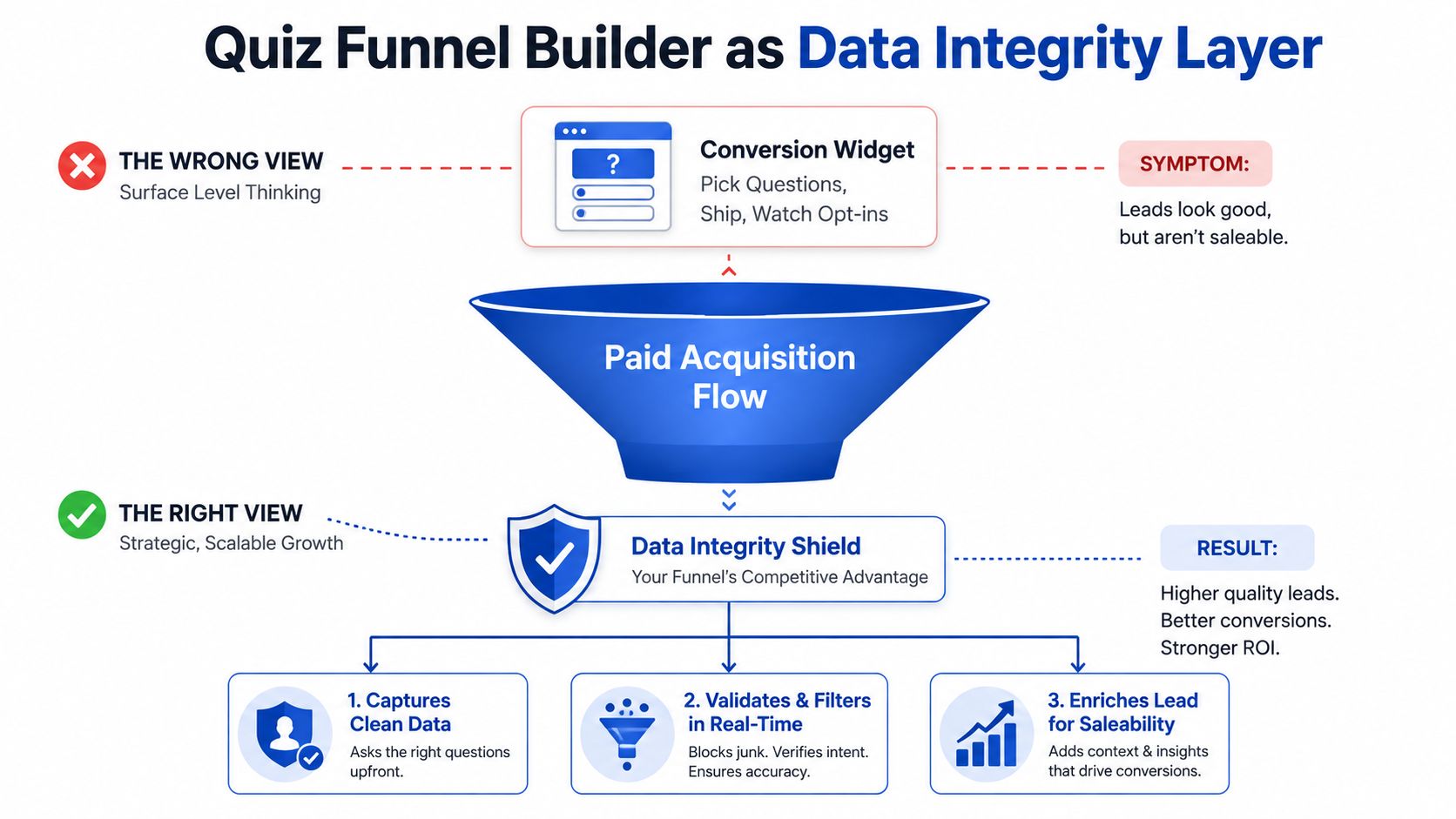
A quiz funnel builder is often treated like a conversion widget. Pick a template, add questions, connect an email tool, and watch opt-ins climb. That approach focuses on the visible interface while ignoring the part that determines whether paid traffic becomes usable pipeline.
The builder is the only layer in the journey that can capture identity, intent, consent, attribution, and qualification data together. It also decides whether those fields survive the transition into a CRM, lead distribution platform, buyer endpoint, or advertising platform. A visually polished quiz with broken field mapping is still a failed acquisition system.
Practical rule: Optimize the lead record, not just the completion screen.
The broader discipline of data management platforms insights becomes useful. A funnel should have a clear data contract. Every field needs an owner, a format, a retention rule, and a destination. That includes the obvious fields, such as name, email, phone, and answers, as well as less visible fields, such as campaign parameters, click identifiers, consent metadata, and event IDs.
The hidden cost of a broken handoff
Suppose a visitor arrives through a paid social ad. The landing page records the campaign source, but the embedded quiz loses that information when the visitor moves to the next step. The lead may still appear in the CRM, yet the acquisition team can no longer tell which ad created it. That weakens reporting and makes optimization less reliable.
The same failure appears in compliance workflows. If the form captures a checkbox but doesn't preserve the exact disclosure, timestamp, or user context, the team may have a contact record without defensible evidence of consent. A buyer can reject that lead even if the phone number is valid.
A data-integrity mindset changes the build process:
- Every question earns its place: Ask only for information that improves qualification, routing, personalization, verification, or reporting.
- Every field has a destination: Map answers to CRM fields, buyer payloads, ad events, and internal reporting before launch.
- Every submission passes a gate: Separate completion from a verified, consented, deliverable lead.
- Every event can be reconciled: Use stable IDs so the ad platform, form, CRM, and buyer refer to the same lead.
Growform describes this form-layer approach in more detail in its guide to lead intelligence starting at the form layer. The principle is simple. The earlier you capture and structure intelligence, the less manual cleanup sales and operations teams need later.
Planning the Funnel Before You Open the Builder
Don't begin by choosing a question template. Begin with the commercial definition of a good lead.
Write down the condition that makes a submission saleable. In one campaign, that might be a homeowner seeking a relevant service in an active territory. In another, it might be a prospect with the right business profile, a defined problem, and a realistic buying window. The answer determines which questions belong in the quiz and which fields are unnecessary decoration.
Your planning document should also define the traffic context. Cold paid social visitors need enough explanation to understand the promise before they commit. Retargeting visitors may already know the offer and can usually move through a more direct flow. Search traffic often arrives with clearer intent, but that doesn't mean it should bypass verification or consent gates.
Set stage-level expectations
Use checkpoints rather than one blended conversion target. Interact's 2026 quiz conversion report reports an average 40.1% start-to-lead conversion rate and says 65% of users complete the quiz once they start. Those figures show why starts and completions should be monitored separately from lead capture.
Another benchmark framework recommends a 35–60% visitor-to-start rate, 60–85% completion from starts when the quiz stays under 7 questions and includes a progress bar, and 25–45% lead capture from finishers. It places overall visitor-to-lead performance around 10–25% on cold traffic, with warmer audiences and stronger performers reaching higher ranges. These are planning references, not guarantees, and each stage needs its own owner and diagnosis. (Interactive Form benchmark guidance)
| Metric | Cold Traffic Target | Warm Retargeting Target |
|---|---|---|
| Visitor-to-start rate | Use the 35–60% benchmark range as a planning reference | Expect stronger starts when the promise and audience already align |
| Completion from starts | Use the 60–85% range when the experience stays concise and shows progress | Test a shorter path if prior engagement is clear |
| Lead capture from finishers | Use the 25–45% range as a qualification-stage reference | Test a stronger result-value exchange and more direct CTA |
Decide the handoff before the questions
Choose what the result should do. A lead magnet, appointment booking, price reveal, quote request, and buyer distribution flow each require different data. Then define every outcome, including the non-fit path. A disqualified visitor might receive educational content, a different offer, or no commercial follow-up, but the system should still preserve attribution and record the reason for the branch.
Finally, list every destination the submission must reach. Include the CRM, lead router, buyer endpoint, analytics layer, alerting system, and ad platform. Confirm the consent language and disclosure requirements with the appropriate legal owner before building logic. Retrofitting consent after launch creates gaps that a higher conversion rate won't fix.
Building the Quiz Structure, Logic and UX
The most reliable structure separates identity capture, qualification, outcome, and delivery. It doesn't force every visitor through the same path, and it doesn't hide the commercial purpose of the quiz behind unnecessary theatrics.
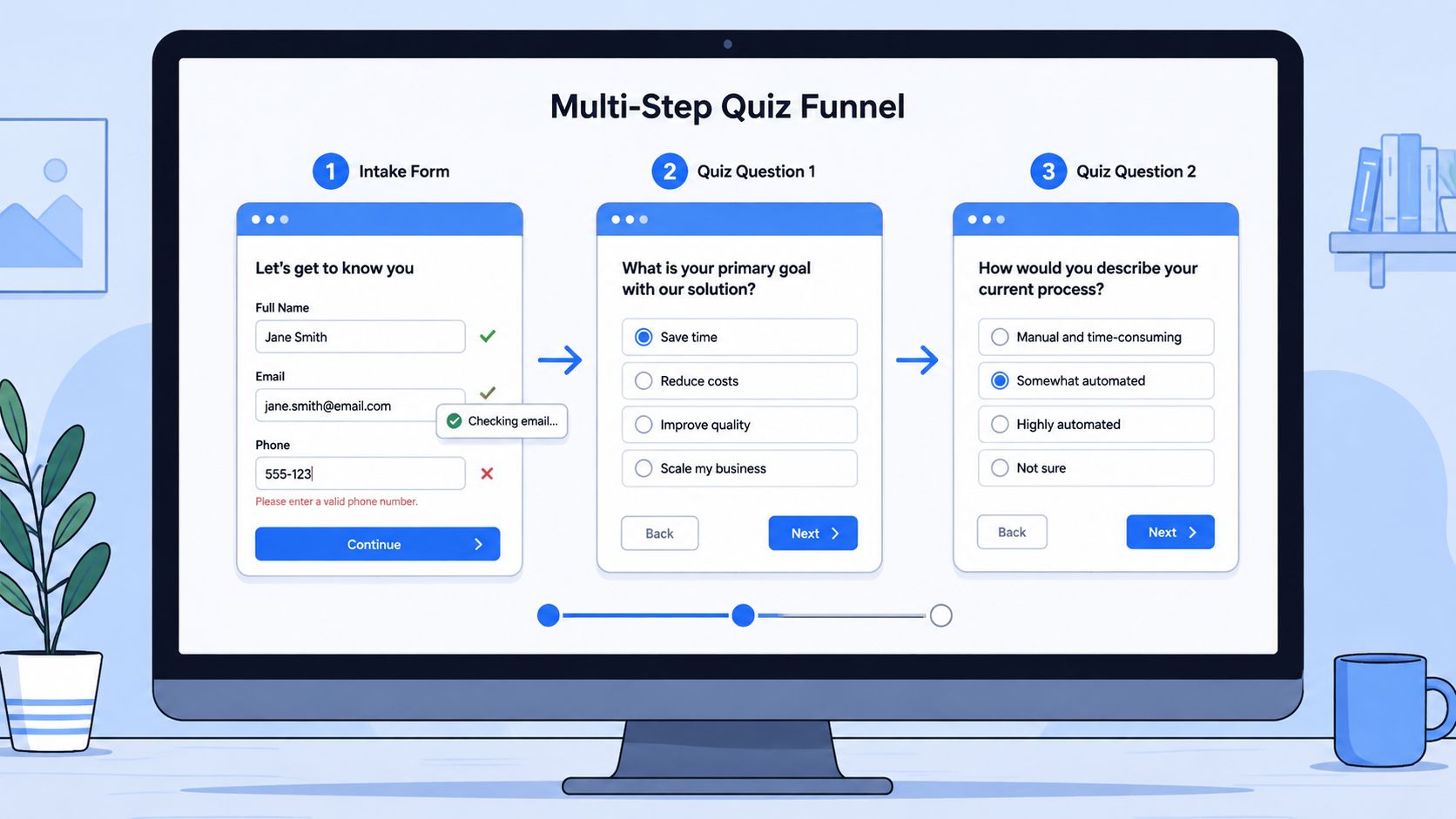
Start with an intake screen that captures the minimum identity fields required for the campaign. If name, email, and phone are all necessary, place them together with field-level validation. Make the error state specific. “Enter a valid mobile number” gives the visitor a useful correction path, while a generic submission error only creates frustration.
A disposable-email check can run during entry, but it shouldn't block the interface or create a long delay. The validation service should return a clear result to the form, while the visitor experience stays responsive.
Ask questions in commercial order
After identity capture, use a compact group of qualifying questions. The exact count depends on the market, but each question should answer one of four operational needs:
- Fit: Does the person match the product, geography, property, business, or service criteria?
- Intent: Are they exploring, comparing options, or actively trying to take the next step?
- Value: Does the likely opportunity justify the intended sales path or payout tier?
- Routing: Which team, buyer, product line, or follow-up sequence should receive the record?
Place easy, relevant questions before heavier qualification. The visitor needs to understand the exchange before answering questions that feel invasive or disqualifying. Multi-step layouts become more useful as field count rises. One benchmark set reported 14% higher conversions for multi-step forms, while another reported 13.85% conversion for multi-step versus 4.53% for single-step, described as a 206% improvement. The same source cautions that short forms can still favor a single-page layout, so the structure should match the length and complexity of the path. (Digital Applied form benchmarks)
Make outcomes useful
A result page should reflect the visitor's answers. Show a recommendation, next step, or explanation that makes the opt-in feel like a fair exchange. Keep the page focused on one CTA, such as booking, calling, requesting a quote, or continuing to a relevant offer.
For disqualifiers, use a polite exit rather than a dead end. Record the branch reason, preserve the campaign metadata, and send a conversion signal where the traffic source needs one. That keeps optimization data connected to the actual journey without presenting a non-fit lead as saleable.
For embedding, test both JavaScript and iframe implementations. Check mobile viewport behavior, keyboard navigation, browser back behavior, and reload handling. Defer nonessential pixel and tag loads until the lead record is logged, so tracking scripts don't delay rendering or interfere with completion.
Verification, Disqualification and Consent Evidence
A completed quiz isn't automatically a valid lead. It is only a submission that now needs to pass quality and compliance gates.
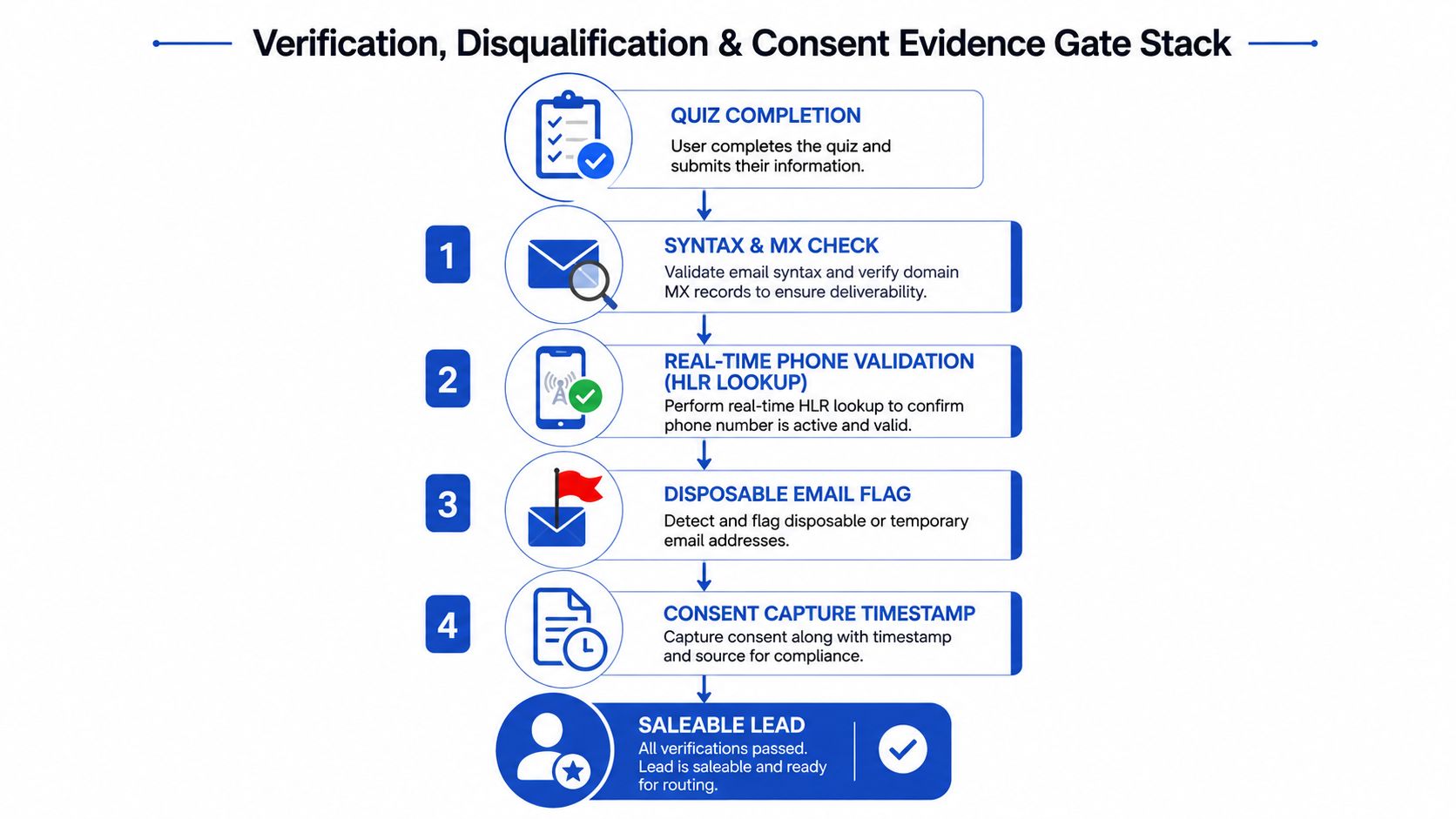
Begin with email validation. Syntax checks catch malformed addresses, while domain and mailbox checks help separate plausible addresses from obvious failures. Disposable-domain suppression should happen before delivery, not after the buyer complains. Store the validation result and provider response in the lead timeline so operations can distinguish an invalid contact from a rejected routing attempt.
Phone validation needs similar treatment. A real-time lookup can check whether the number is structurally valid, whether the line appears reachable, and what type of carrier service it uses. In compliance-sensitive campaigns, the workflow may also need to flag numbers that deserve additional review. Don't use a single opaque “valid” label. Save the underlying status values that explain why the lead passed or failed.
Build a staged quality gate
A practical gate stack looks like this:
- Email gate: Check syntax, domain status, disposable-domain risk, and address existence signals.
- Phone gate: Validate the number and review line type, reachability, and campaign-specific risk flags.
- Qualification gate: Apply the branch rules that identify fit, intent, geography, product, or service eligibility.
- Consent gate: Confirm that the visitor selected the relevant channel permission and that the evidence record is complete.
- Delivery gate: Send only the fields and routing instructions the destination is authorized to receive.
The threshold for acceptance should reflect the buyer agreement and payout tier. A lead that might be acceptable for a lower-friction nurture path may not satisfy a buyer requiring verified contactability and explicit channel consent. The important point is to make that decision before the outbound request.
For teams formalizing sales handoffs, a guide to scoring models for sales teams can help separate fit scoring from engagement scoring. That distinction prevents a highly active but commercially unsuitable visitor from outranking a quieter lead with stronger purchase conditions.
Preserve evidence, including failed paths
Consent evidence should sit beside the lead payload, not in a separate system that cannot be reconciled later. Capture the visible wording, selected channel, timestamp, IP address, user agent, and a hash of the terms shown at submission. If SMS, email, telemarketing, and prerecorded contact have different permissions, map them separately.
A missing consent record makes the submission non-billable, regardless of how accurate the contact details look. That rule protects the business from treating compliance as a cosmetic checkbox.
The same principle applies to disqualification. Exit the visitor respectfully, preserve the source and branch reason, and keep the record available for audit or suppression logic. A verification workflow should filter bad leads without erasing the history needed to explain what happened.
The following video provides additional context for the verification workflow:
Attribution Plumbing That Survives the Multi-Step Flow
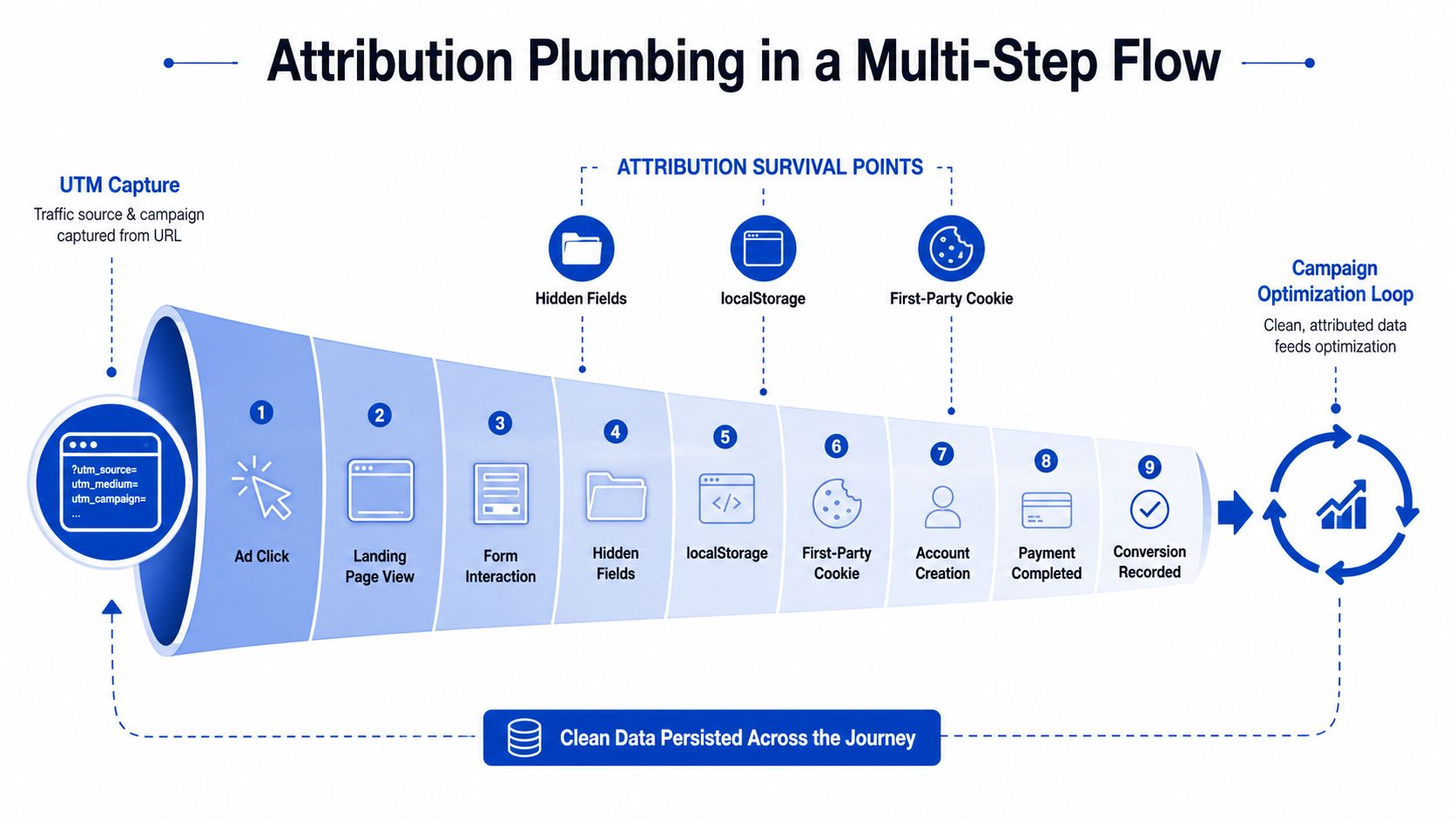
Attribution should be captured before the first question appears. Read the landing-page parameters, normalize them, and write them into hidden fields that travel with the submission. Keep a browser-side fallback as well, because visitors can reload, move between pages, or encounter an embedded form that uses a separate origin.
UTMs need to survive alongside click identifiers. Depending on the channel, that may include Meta identifiers such as FBC or FBP, Google GCLID and related identifiers, TikTok TTCLID, Microsoft msclkid, or other network-specific values. Don't assume the form platform will preserve them automatically. Test the complete path from ad URL to final CRM record.
Treat events as a sequence
A useful event model distinguishes the visitor's progress from the business outcome:
- Quiz start: Shows that the ad and opening promise generated initial intent.
- Qualified completion: Indicates that the visitor reached the relevant outcome and passed the required logic.
- Marketing-qualified lead: Records a contact that meets the campaign's initial fit rules.
- Sales-qualified lead: Records a downstream status after buyer or sales review.
Use a stable event_id for browser and server events so the receiving platform can deduplicate them. Consent should govern any event that requires permission, and the lead payload should resolve before downstream conversion events claim a completed outcome. A browser pixel can support immediate feedback, while server-side conversion API events provide a second delivery path when browser conditions are less reliable.
GTM works best as an orchestration layer rather than a dumping ground for unstructured tags. Push a data layer event at meaningful steps, sequence tags deliberately, and hold conversion events until the verified payload exists. Legacy pixels may require custom HTML, but every tag should have a documented trigger and owner.
Test the silent failures
The most damaging attribution problems don't always create visible errors. A reload can wipe parameters. An iframe can operate outside the cookie context you expected. A consent banner can block a pixel before permission is granted, or prevent it from firing at all. A form can submit successfully while the analytics event references a different identifier.
Use a lead-level audit to compare the landing URL, hidden fields, browser storage, event log, CRM record, and buyer payload. The campaign attribution guide offers useful context for thinking about this as a full journey rather than a last-click report.
Attribution is only useful when the same lead can be recognized across every system that touches it.
Delivery, Webhooks and Speed-to-Lead
The final form submission starts an operational workflow. It shouldn't end in a thank-you page and a vague promise that someone will follow up.
Define the outbound schema before connecting the endpoint. A flat payload is often easier for older lead buyers and routing systems, while a nested structure can preserve richer answer groups. Either way, document field names, permitted values, PII handling, consent fields, source data, validation results, and the unique lead ID.
Secure the webhook with a signature that the receiver can verify. Add retries with backoff for transient errors, and send permanently failed records to a dead-letter queue. Without that queue, a timeout can become a lost lead with no obvious owner.
Teams reviewing webhook best practices for marketers should pay particular attention to authentication, replay protection, idempotency, and failure visibility. A webhook isn't reliable because it worked once in a test. It's reliable when the system can recover, explain, and replay a failed delivery.
Route by business rules
Routing usually depends on more than a score. Geography, product line, consent status, qualification outcome, and buyer eligibility can all change the destination. Put those rules in a decision matrix that operations can review without reading application code.
| Lead Attribute | Condition | Destination | SLA |
|---|---|---|---|
| Qualification outcome | Meets the campaign's fit rules | Primary CRM or buyer endpoint | Immediate |
| Qualification outcome | Fails a defined eligibility rule | Disqualification or nurture path | Immediate record update |
| Consent status | Required channel evidence is complete | Authorized sales or buyer route | Immediate |
| Consent status | Evidence is missing or ambiguous | Compliance review or suppression queue | Hold delivery |
| Product or territory | Matches an assigned lane | Relevant team, buyer, or distribution route | Immediate |
| Delivery status | Endpoint returns a temporary failure | Retry queue | According to retry policy |
Protect the first contact
After delivery, alert the assigned closer through the channels the team monitors. SMS, email, or internal notifications can all work, but the alert should contain enough context to start a relevant conversation, including the outcome and critical answers.
Round-robin assignment is a reasonable baseline. Weighting assignment by recent conversion performance can be useful when the team has enough reliable data to support it, but keep the rule transparent. Every assignment, alert, retry, and response should appear in one lead timeline.
If a buyer disputes quality, the operator should be able to replay the journey. That means showing the original source, answers, validation responses, consent evidence, routing decision, delivery request, endpoint response, and follow-up activity. Speed matters, but speed without observability only makes errors happen faster.
Testing, Optimisation and Launch Checklist
A launch checklist should test the entire lead path, not just whether the quiz submits.
Run every major conditional branch in a fresh incognito session. Test the journey on iOS Safari, Android Chrome, and desktop browsers, then repeat it under throttled mobile conditions. Check that the first screen renders without waiting for tracking scripts, that keyboard navigation works, and that a back-button action doesn't corrupt the session or duplicate the lead.
Use dummy spend before opening the full budget. Follow the record from ad parameters through hidden fields, validation, consent capture, CRM creation, webhook delivery, ad events, and buyer routing. A successful thank-you page isn't evidence that the system works.
Review the right signals
Review the funnel on a defined cadence, especially immediately after launch. Separate the following measures:
- Start rate: Whether the ad and opening promise earn a first interaction.
- Completion rate: Where visitors abandon the question path.
- Lead-capture rate: Whether the result exchange is compelling enough.
- Verification pass rate: How many submissions survive contact checks.
- Acceptance rate: Whether buyers or sales teams accept the records.
- EPC and CPL: Whether the campaign economics justify continued spend.
Set named owners for each metric and agree on kill criteria before launch. Don't let a strong front-end conversion rate override poor acceptance or missing consent evidence. The profitable unit is the accepted, contactable lead that can be traced back to its acquisition source.
Use this pre-flight checklist
- Consent text: Confirm channel-specific permissions and visible disclosures.
- Suppression lists: Load current exclusions before traffic arrives.
- Duplicate handling: Define how the CRM and buyer endpoint treat repeat submissions.
- Fallback routing: Test what happens when the primary endpoint is unavailable.
- Event deduplication: Verify shared event IDs across browser and server signals.
- Spend controls: Set daily caps, pause rules, and named approval owners.
- Evidence retention: Confirm that consent and validation records remain attached to the lead timeline.
Compliance evidence isn't a launch task you complete once. It belongs in every subsequent form edit, traffic-source test, routing change, and buyer review.
A quiz funnel builder should make the paid acquisition system more accountable, not merely more interactive. If the form improves starts but loses attribution, consent, or delivery reliability, it has shifted the problem downstream rather than solved it.
Growform provides a no-code front end for building multi-step and quiz-style lead funnels with conditional qualification, disqualification, hidden-field pass-through, and real-time delivery to CRMs or lead distribution platforms. Visit Growform to build a funnel that treats conversion, lead quality, attribution, and compliant handoff as one operating system.