
Auto Address Fill: Setup, Optimization, and Measurement
A paid lead reaches your form on a phone, taps the address field, and sees a blank line waiting for a street number, street name, city, state, and postal code. Each extra keystroke creates another chance to abandon the funnel, mistype the address, or submit data that sales can't use. Auto address fill can reduce that friction, but the implementation choice matters: a fast suggestion that produces a reliable CRM record is more valuable than a magical-looking fill that creates bad leads.
Table of Contents
Table of Contents
- Why Auto Address Fill Matters in Lead Capture
- Choosing an Address Lookup Provider
- Wiring the Lookup Into a Multi-Step Lead Funnel
- Auto-Suggest vs Auto-Fill and the Conversion Tradeoff
- Validation, Errors and Graceful Fallbacks
- Measuring Conversion and Lead Quality
- Compliance, Privacy and the 30-Day Rollout Plan
Why Auto Address Fill Matters in Lead Capture
Address capture sits between two systems that often get optimized separately. The front end needs to feel quick on a small screen, while the back end needs structured, recognizable data for routing, deduplication, territory assignment, and follow-up. A lookup field can help with both, but only when it distinguishes between suggesting an address and validating an address.
The historical progression of Google's Places tools shows that distinction clearly. Legacy autocomplete returned predictions as users typed, including addresses, businesses, plus codes, and points of interest, then treated the session as complete when the user selected a place. Newer Places documentation pairs autocomplete with address validation for shipping-oriented workflows, moving the feature beyond simple type-ahead assistance and toward structured address capture. Google's legacy Android autocomplete documentation describes that selection-centered model.
The two problems operators need to separate
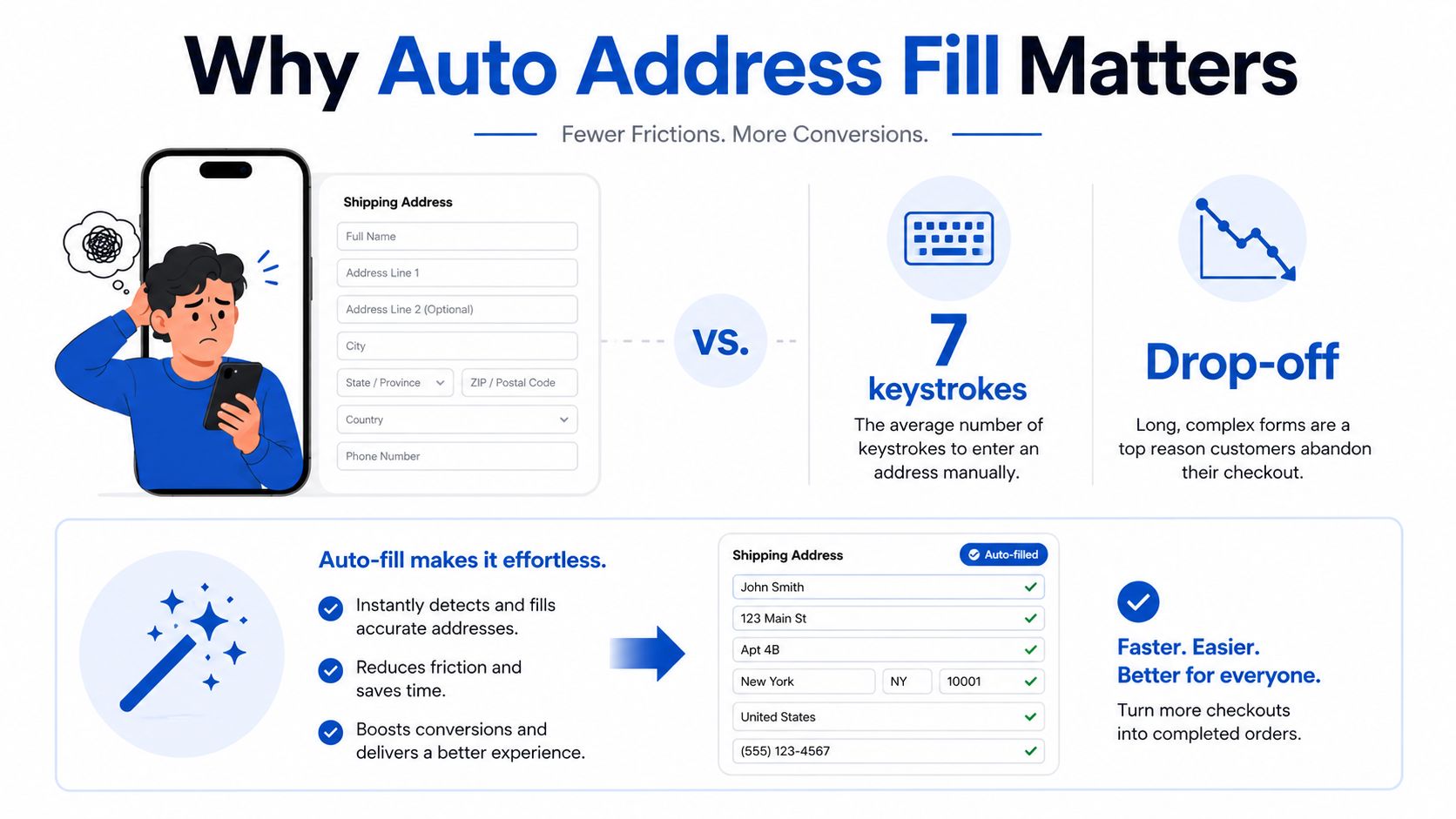
Front-end friction is the obvious problem. A mobile visitor doesn't want to type a complete address into several fields while moving between keyboards, dropdowns, and a long qualification flow. Native browser autofill can help when the markup is correct. Chrome's field study across millions of address and credit-card form page loads found that autofill users abandoned forms 75% less often and spent about 35% less time completing them than users who entered everything manually. Chrome's 2024 autofill field study connects those outcomes to practical implementation details such as correct labels, autocomplete attributes, and uncomplicated field structures.
Back-end data quality is less visible but just as important. A user can complete a form quickly and still give you an address that fails CRM matching, lands in the wrong sales territory, or can't be rechecked by an operations team. The selected prediction should therefore populate normalized fields, retain a provider reference where available, and remain distinct from a paid verification result.
The strongest rollout treats auto address fill as lead-quality infrastructure. It isn't merely a visual enhancement. It changes what your CRM receives, how your buyer or sales team evaluates the record, and how confidently you can connect a submission to a real location.
Choosing an Address Lookup Provider
Provider selection should start with the geography and the downstream decision you need to make, not with the prettiest dropdown. Google, Smarty, Loqate, USPS services, and open-source geocoders can all support address entry, but they don't provide the same coverage, billing behavior, or validation depth.
| Provider | Coverage | Pricing Model | Validation Depth | Lead-Gen Fit |
|---|---|---|---|---|
| Google Places | Broad international place and address coverage across major markets | Session-oriented autocomplete and related API usage, with product-specific pricing rules | Strong prediction experience, with validation handled through the relevant Places workflow | Useful for international funnels and campaigns already using Google Maps infrastructure |
| Smarty | Primarily US-focused address lookup and validation | Lookup or verification usage, depending on the product and request | Strong US street-level normalization and validation options | A practical choice for US-only paid lead funnels where clean routing matters |
| Loqate | International address coverage | Provider usage and verification pricing | International address capture and validation depth | Suitable for mixed-geography acquisition where one global provider is operationally simpler |
| USPS services | US postal address context | Service-specific access and usage rules | Valuable for USPS-oriented standardization, but not a complete global autocomplete layer | Helpful as a US validation component or enrichment step |
| Nominatim, Pelias, and similar open-source tools | Dependent on the underlying map dataset and deployment | Software may be free, but hosting, maintenance, limits, and add-ons still create operational cost | Geocoding is not the same as certified postal validation | Appropriate for controlled, budget-sensitive builds that can add a separate validation layer |
Google's next-generation Autocomplete became generally available on May 28, 2024, after a February preview, across the Places API, Maps JavaScript API, and Places SDKs for Android and iOS. Google says its model receives more than 50 million daily updates and covers more than 250 countries and territories, details that make it compelling for broad geographic coverage. Google's announcement of next-generation Autocomplete also highlights a billing path where an incomplete address session can apply pricing only to the first 12 requests, so request behavior matters when users type without selecting.
That session model is the hidden cost axis many teams miss. Compare per-session, per-keystroke, and per-lookup pricing against your actual behavior. A provider that looks inexpensive at the request level can become costly if your form sends requests too early or keeps querying after the user has already made a selection.
For a US-only paid funnel, a US-focused validation provider can be more suitable than a global place database when undeliverable or poorly normalized records are the main business cost. International and mixed-geography campaigns generally need broader coverage, while an open-source stack may work when the team can manage hosting, rate limits, and a separate postal validation service. For a practical overview of implementation choices, see this guide to Google address autocomplete.
Wiring the Lookup Into a Multi-Step Lead Funnel
A multi-step funnel should show the visitor one clear address task at a time. Put street line one in its own step, keep the keyboard uncluttered, and let the lookup selection populate city, state or region, postal code, country, and any provider reference in the form state.
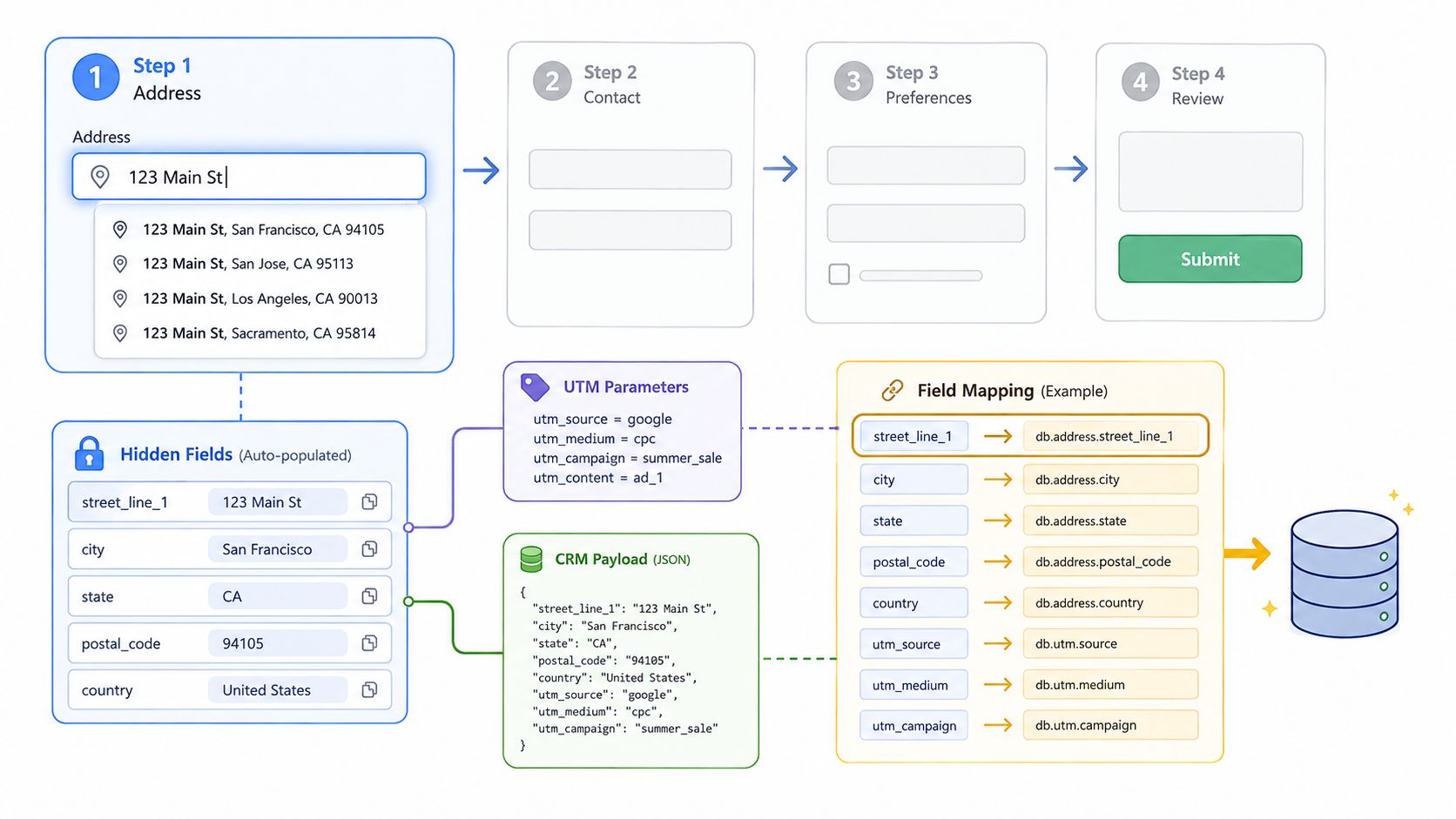
A useful field map looks like this:
- Visible input:
address_line_1 - Optional visible input:
address_line_2, shown only when the user needs an apartment, suite, or unit - Hidden structured fields:
city,state,postal_code, andcountry - Provider metadata:
place_id, verification token, match status, and provider name - Attribution fields:
utm_source,utm_medium,utm_campaign, click IDs, and campaign-specific sub-IDs - Audit field:
raw_address_dump, preserving the provider response or selected component data
The implementation sequence matters. Initialize the lookup when the address step becomes visible, not on the first page load if the visitor may never reach it. Restrict suggestions to the campaign's intended country where appropriate, parse the selected result into structured fields, and clear those fields if the visitor edits the visible street input after making a selection.
With Google Places Autocomplete, the selection handler should capture the returned place_id and address components. With Smarty's single-line lookup, store the returned verification or lookup reference alongside the normalized result. Neither a dropdown selection nor a browser autofill event should automatically set a field called verified to true. Prediction is not verification, and many providers perform the deeper verification step through a separate request.
Keep attribution in the same state object as the address fields. If UTM parameters disappear between steps, the CRM may receive a valid address with no reliable acquisition context. The final payload should contain normalized fields for routing and a raw response for audit, rather than forcing sales or engineering to reconstruct what the user originally selected.
For patterns that keep longer forms usable on small screens, review these multi-step form UI patterns that reduce mobile drop-off.
The later-stage handoff should be explicit. Send the normalized address, provider reference, verification outcome, consent record, and attribution values to the CRM or lead router in one payload, then let the downstream system decide whether another verification pass is required.
Auto-Suggest vs Auto-Fill and the Conversion Tradeoff
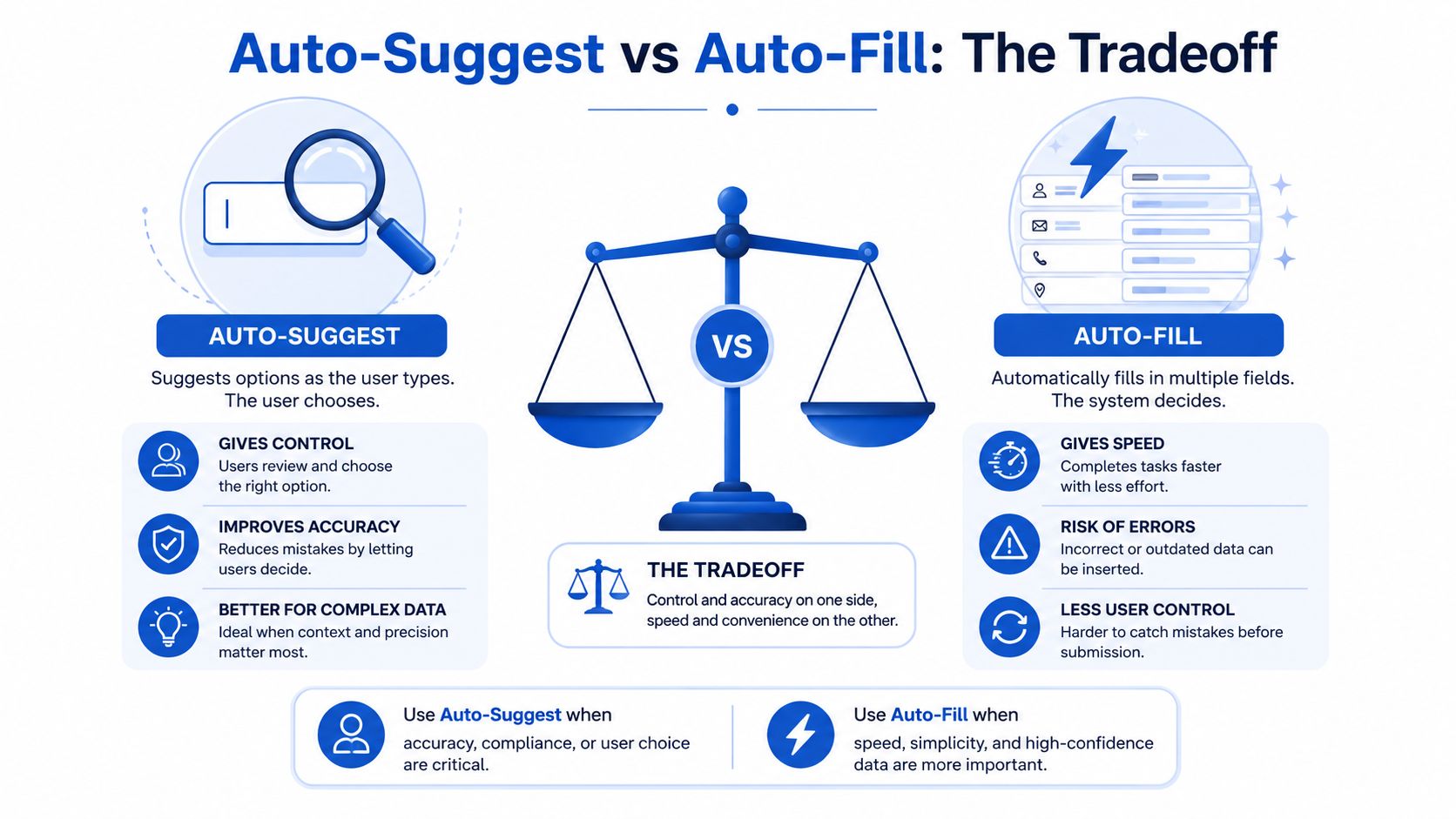
Zero-keystroke completion sounds like the obvious winner. It isn't always. A system that fills every field after one tap may reduce effort while increasing the chance that the visitor accepts the wrong saved profile, an incomplete unit number, or a location that resembles the intended address.
Independent address-data guidance recommends “always auto-suggest, never auto-fill”, because a controlled suggestion list gives the user a chance to confirm the predicted location before the form commits structured data. Smarty's address autocomplete best-practices guidance makes the core trade-off clear: speed and control aren't the same thing.
Three useful interaction states
Dropdown only keeps the address input visible and presents matching suggestions without populating other fields until the user chooses one. This is the safest default for paid social traffic on mobile, where campaign targeting can be broad and users may be moving quickly.
Dropdown plus structured fill lets the user select an address, then fills city, region, postal code, and country while leaving the result editable. This usually offers the best balance for lead forms because it reduces typing without pretending that the provider's prediction is a final verification.
Full address fill may use browser or platform data to populate several fields immediately. It can suit returning users or desktop-heavy B2B requests, but it needs careful field labeling, visible confirmation, and a clear correction path.
Chrome's field study found strong completion and time differences for users who rely on browser autofill, but the result depends on preserving native autofill behavior with correct labels and attributes. Chrome's implementation guidance warns indirectly against custom structures that suppress the browser's ability to recognize fields. Zuko's form analytics adds an important qualification: autofill was triggered by 23% of users in its dataset, and autofill users completed forms at a 71% rate versus 59% for non-users. Yet roughly 10% of forms showed a negative relationship between autofill and completion, so the technique can fail when prefilled values conflict with masks, validation rules, or mandatory-field design. Zuko's autofill conversion analysis supports testing rather than assuming.
Mobile details decide whether the feature helps
Use inputmode="text" for the main street field and postal-code field when the market requires letters, or an appropriate numeric mode where the postal format is numeric. House-number inputs can use a numeric or tel-numeric keyboard when that matches the expected value. The point isn't to force a universal keyboard choice. It's to stop asking a visitor to switch keyboards unnecessarily.
A fixed-bottom suggestion sheet often works better than a native select on iOS. Native controls can move the viewport and obscure the form CTA, while a positioned suggestion layer can remain visible above the keyboard. Debounce requests after the user pauses typing, and cancel stale responses so an older result can't overwrite a newer selection.
Slow networks need a graceful path. Set a practical request timeout, preserve the plain text fields, and let the visitor continue manually if the provider doesn't respond. A client-side format check can catch obvious errors, but server-side validation should remain the authoritative fallback.
Don't preselect a country from a vague location guess in a cross-border funnel. A single-market campaign can hardcode the country and remove the field, while a mixed campaign should ask for country and pass the appropriate ISO 3166 code to the provider. Also set the address input font size to at least 16px to avoid iOS auto-zoom during entry.
Teams that use generative tools for UX copy can also review AI-powered content suggestions, but the interface still needs human testing with real keyboards, slow connections, and correction behavior. A stronger test compares completion rate, time to submit, address acceptance, and CRM correction rate, not just suggestion clicks or the percentage of visitors who trigger autofill.
Validation, Errors and Graceful Fallbacks
A lookup service will sometimes return no result, several plausible results, or a result whose postal code doesn't match the street the visitor intended. The form shouldn't turn any of those states into a silent failure.
Use four fallback tiers:
- No suggestions: Keep the plain text input open and allow submission. Fire a lookup-failed event, but don't block a legitimate lead merely because the provider lacks a match.
- Ambiguous result: Show the alternatives in an inline picker or a follow-up step. Never choose the first result when multiple locations are plausible.
- Postal-code mismatch: Display the conflict before submission, reformatting the postal code for the selected country where appropriate. US ZIP and ZIP+4, UK alphanumeric postcodes, and Canadian
A1A 1A1formatting should not be treated as interchangeable strings. - Timeout or network failure: Degrade to manual entry and run server-side address validation when the lead submits.
Country handling deserves its own rule. A US-only campaign can hardcode the country and skip an unnecessary selector. A cross-border funnel should collect the country and pass its ISO 3166 code to prevent the provider from interpreting the address in the wrong market.
Use an error hierarchy that tells analytics what happened. An inline field error indicates a correctable formatting problem. A step-level message indicates that the selected components need review. A full-form fallback means the lookup service failed and the visitor is continuing manually. Those states help distinguish a soft provider miss from a hard abandonment.
Measuring Conversion and Lead Quality
A completed form is only the first checkpoint. The event stream should show whether address lookup reduces effort, creates correction work, or sends weaker records into the CRM. Track lookup behavior separately from submission and revenue outcomes.
| Event / Metric | What It Tells You |
|---|---|
form_view |
How many eligible visitors entered the experience |
step_advance |
Whether the address step causes unusual progression loss |
lookup_initiated |
How often visitors engage with the address control |
lookup_suggested |
Whether the provider returns usable results |
lookup_accepted |
Whether visitors select a prediction |
lookup_failed |
How often no result, timeout, or provider error occurs |
submit |
The front-end completion outcome |
lead_accepted_by_crm |
Whether the final record passes downstream intake |
| Address match rate | Whether CRM or validation logic recognizes the submitted location |
| Contact rate per 1,000 submits | Whether faster completion produces reachable leads |
Segment completion, correction rate, and time to submit by device, traffic source, and UTM campaign. Paid social visitors can behave differently from organic quote seekers. Google, Smarty, and Loqate may also produce different mobile suggestion quality, response times, and normalized address fields, so report provider performance separately rather than blending it.
Measure session-based lookup costs alongside conversion. A single session may trigger several searches as the visitor edits a street or postal code, and a lower cost per submitted lead can hide higher lookup spend or poorer lead quality.
Compare suggest-only, structured fill, and manual entry against front-end and downstream outcomes. The Zuko analysis shows why completion rate alone can mislead: autofill may improve overall completion while creating negative results on some forms. Review correction, CRM matching, duplicate records, and contact outcomes before choosing a default behavior.
Build one dashboard that joins lookup_accepted to provider match data, CRM acceptance, source attribution, and sales disposition. A form that submits more records but sends sales undeliverable or mismatched addresses has not necessarily improved the funnel. For paid acquisition measurement and conversion handoff, use this guide to track Google Ads conversions with Growform.
Compliance, Privacy and the 30-Day Rollout Plan
An address lookup sends personally identifiable information, including street, city, and postal data, to a third-party service. The legal and contractual impact depends on the lead's location, your organization, the provider, and the vertical. A healthcare campaign may need to consider requirements that don't apply to a general home-services funnel, while EU traffic may require a different data-processing decision from US traffic.
Browser autofill introduces another privacy concern. Academic research into browser form autofill found that browsers may populate matching fields, including hidden inputs, creating a path for private information to be exposed without the user's awareness or consent. The academic analysis of browser autofill behavior is why hidden fields should never be used as traps for data you didn't explicitly request.
Use consent language that matches the actual flow, name relevant providers in the privacy documentation, and decide whether regional traffic needs a region-specific endpoint or processing arrangement. Don't retain the complete raw provider response indefinitely when the normalized fields and an audit reference are sufficient.
A practical 30-day rollout
Week one: Benchmark current completion, address-step abandonment, time to submit, CRM acceptance, correction rate, and contact outcomes. Establish the baseline before changing the form.
Week two: Shortlist providers by campaign geography, validation depth, session or lookup billing, retention terms, and CRM requirements. Test representative addresses, including apartments, rural locations, international formats, and intentionally ambiguous entries.
Week three: Add event instrumentation and run a controlled test on one paid traffic source. Keep the experiment narrow enough that device, campaign, and provider behavior remain interpretable.
Week four: Roll out the winning interaction, watch lead acceptance by source, and tune debounce, minimum-character thresholds, timeout behavior, and fallback copy. Keep manual entry available until the data shows that the lookup is reliable for your audience.
Review the integration quarterly. Address datasets, provider pricing tiers, API policies, and campaign geographies change, and a configuration that once protected margin can later create unnecessary requests or weaker matching.
Growform provides a no-code multi-step lead form builder with address lookup, hidden-field attribution, conditional logic, and real-time CRM or lead-routing delivery. If you want to test auto address fill without rebuilding the entire paid acquisition funnel, visit Growform and evaluate the address step alongside your completion and lead-acceptance data.