
How to Create a Local SEO Landing Page (Our Step-by-Step Guide)
Quick Summary
Building a high-converting local SEO landing page requires targeting specific local keywords, creating location-focused content with local testimonials, and using a smart, multi-step form to capture qualified leads. On-page SEO ensures visibility, while post-launch tracking and optimization maximize your ROI from local search traffic.`
Are Your Local Landing Pages Leaving Money on the Table?
Imagine a potential customer searches for your service nearby, clicks your page, and… leaves without contacting you.
Your website attracts local visitors, but without the right structure, copy, and conversion tools, those opportunities vanish, while competitors scoop up the leads you could have captured.
In this Growform guide, we’ll show you how to create a high-converting local SEO landing page that turns local traffic into paying customers.
But first…
Why Listen to Us?
At Growform, we’ve helped hundreds of businesses boost leads with high-converting multi-step forms and optimized landing pages. Our experience in lead generation for local businesses gives us a clear understanding of what works. This insight allows us to guide you in creating landing pages that attract and convert customers effectively.
What is a Local SEO Landing Page?
A local SEO landing page is a focused web page built to do two things well:
- Rank highly for location-based searches
- Convert local visitors into qualified leads.
It uses clear local SEO signals like a consistent name, address, and phone number, city-based keywords, and a connected Google Business Profile. At the same time, it speaks directly to people in that area.
These pages act as a digital storefront for a city, town, or neighborhood, addressing area-specific pain points, highlighting local landmarks, and featuring reviews from nearby customers.
See our top local lead generation strategies for boosting conversions.
How To Build a High-Converting Local SEO Landing Page
Step 1: Understand Your Local Audience and Identify The Right Keywords
Before you design a page or write a headline, you need clarity. People in your area are actively searching for services like yours, but if you don’t understand how they search, your page will miss the mark.
Local searches generally fall into two categories:
- Explicit searches, like “plumber in Austin” or “roof repair Dallas TX”
- Implicit searches, like “plumber” or “roof repair,” where Google uses the searcher’s location automatically
Knowing how people search is only the first step; you also need to see how your audience is actually finding your site.
Start with the data you already have rather than guessing. In GA4, navigate to Demographic Details under User > User Attributes to see where your visitors are coming from. This shows you:
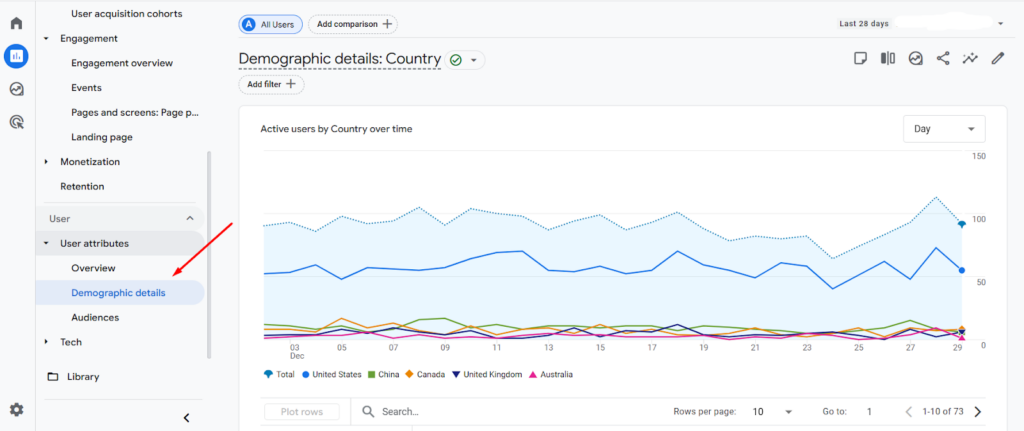
This shows you:
- City: the specific city a visitor accessed your site from.
- Region: usually the state in the U.S., or province/territory elsewhere.
While GA4 doesn’t track neighborhoods directly, you can approximate this by analyzing the most granular city-level data.
These insights help you decide which locations deserve their own landing pages.
Refine Keywords With Intent-Based Modifiers
Once you know where your audience is and how they search, it’s time to refine your keyword strategy to attract users who are ready to take action. Layer intent-driven modifiers onto your location keywords to make your page more relevant and high-converting.
Focus on modifiers like:
- Location-based terms: city names, neighborhoods, ZIP codes, landmarks
- Example: “plumbing services in Hyde Park Austin”
- Urgency or service type: 24-hour, emergency, commercial, residential
- Example: “emergency plumber in Austin” or “residential roof repair Dallas TX”
- Commercial intent: cost, price, best, near me
- Example: “best roofing contractor near me” or “roof repair cost in Dallas TX”
At this stage, tools like Mangools can help validate the demand for these local keywords and even uncover additional relevant terms you may not have considered.
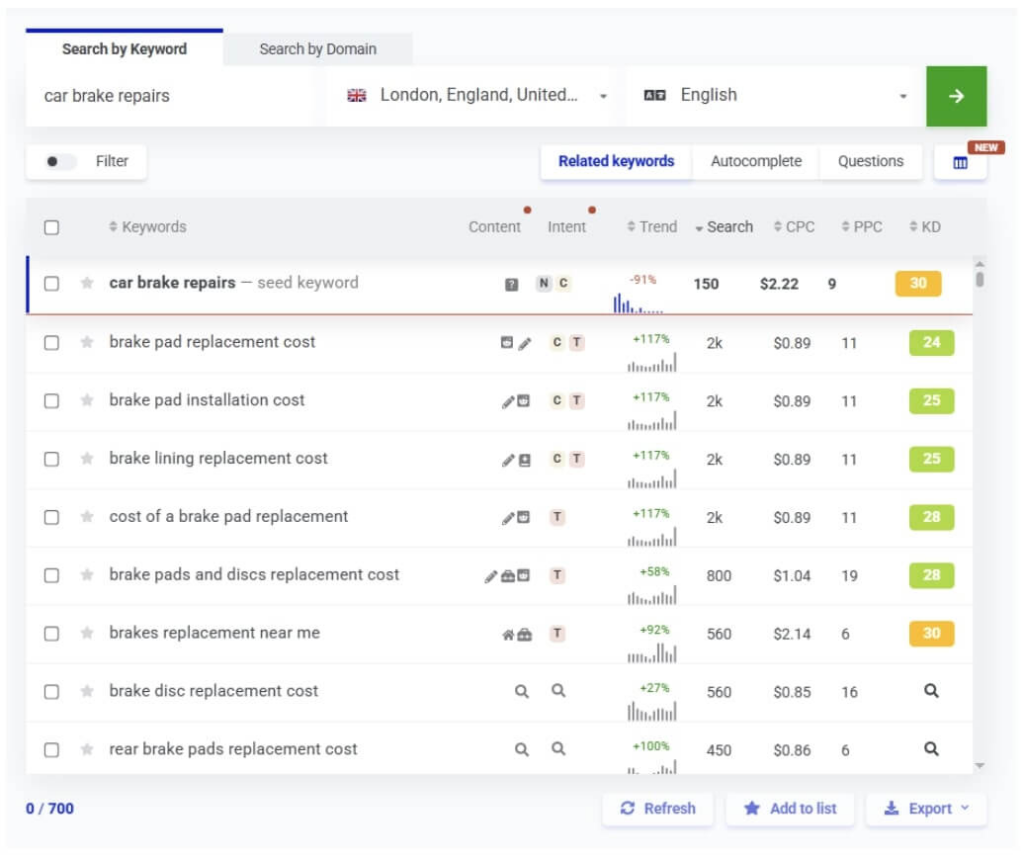
You can also use other local SEO tools, such as BrightLocal or Whitespark, to see how competitors are performing in local search, including their rankings, visibility, and online business listings.
Reviewing these competitor insights helps you understand what’s already working in your area. Examine their top pages and pay attention to:
- Questions answered in FAQs
- Local landmarks or neighborhoods mentioned
- City rules, permits, or local conditions referenced
Combining search intent, visitor data, keyword modifiers, and competitor insights gives you a clear picture of who your page is for, where they are, and what matters to them. This research forms the foundation for your page structure, copy, and conversion strategy in the next steps.
Step 2: Organize Your Page and URL Structure For Clarity
Once you know who the page is for, the next step is organizing your content in a way that’s easy to navigate for both users and search engines.
A key part of this is creating a logical URL hierarchy that mirrors your page structure, so every page has a clear place within your site.
Avoid flat URLs like /dallas-plumber/ and /fort-worth-plumber/ at scale. They quickly become hard to manage. Instead, use a parent-child hierarchy:
- For multi-location businesses: /locations/dallas-tx/

- For single-location, multi-service businesses: /services/roof-repair/dallas-tx/
This approach not only keeps your URLs clean but also signals the relationships between pages, making your site easier to navigate and understand.
With this structure in place, each local landing page can act as a central hub for its area, linking out to related content and receiving links back.
Examples of supporting pages include:
- Service-specific pages for that city
- Local pricing or cost guides
- Blog posts about area-specific problems or regulations
Internal linking in this way strengthens topical authority and shows search engines that your business is a trusted option in that location.
Step 3: Build A Strong Above-The-Fold Section
The moment visitors land on your page, they decide whether to stay or leave. Your above-the-fold section must immediately show that this page is relevant and worth exploring.
Start with a headline that matches local search intent precisely. Combine the service and location so visitors instantly know they’re in the right place. For example:
- Roof Repair In Dallas, TX
- Emergency Plumber Serving Austin Homes
Support this with a subheadline that highlights your main value. Focus on specific like speed, trust, or guarantees, not vague claims.
- Same-Day Service With Free Inspections
- Trusted By 1,000+ Local Homeowners
Take a look at Upright Roofing and Construction. Their above-the-fold section clearly states the service and location, then reinforces trust with strong value-driven messaging.
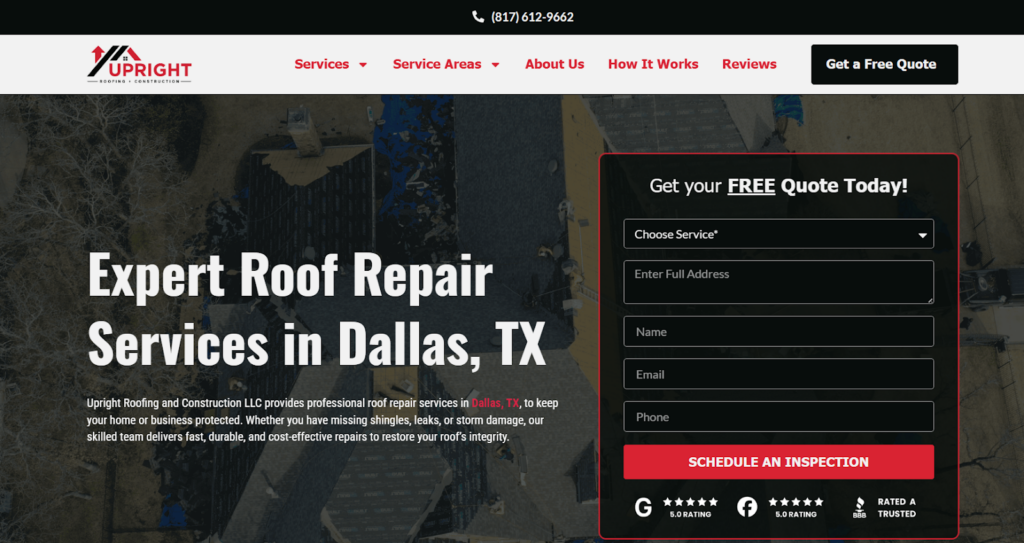
Visual proof helps build credibility quickly. Avoid stock photos that feel generic. Instead, highlight real, local visuals:
- Your team on the job
- Service vehicles with branding
- Work completed in the area
- Your local office or storefront
(More on visuals in the next section.)
Finally, guide visitors toward action with a single, clear CTA. Don’t overwhelm users with multiple buttons or long forms.
Replace generic labels like “Contact Us” with action-focused options such as “Get Your Free Quote” or “Check Availability in Your Area.”
If your form requires several questions, a multi-step layout can make it feel easier and more engaging. We’ll cover this in detail in Step 5.
Step 4: Strengthen Your Page With Local Content and Reviews
Once visitors know they are in the right place, they want proof. This section, placed right after the hero, builds confidence by showing clear local experience, relevance, and trust.
Generic copy does not convert, so your content should clearly reflect the area you serve. Weave in details like:
- Neighborhood and community names
- Nearby landmarks or service areas
- Local rules, permits, or climate issues
- Common regional problems customers face
For example, mentioning clay soil issues in Dallas or coastal weather concerns in Florida shows real local understanding. These details not only signal relevance to search engines but also help visitors feel that you truly understand the challenges in their area.
Building that trust goes beyond content; people trust people, not brands alone. Highlight the team members who actually serve that location by including:
- Short bios with names and photos
- Years serving the local area
- Local licenses or certifications
- Memberships in local trade groups or associations
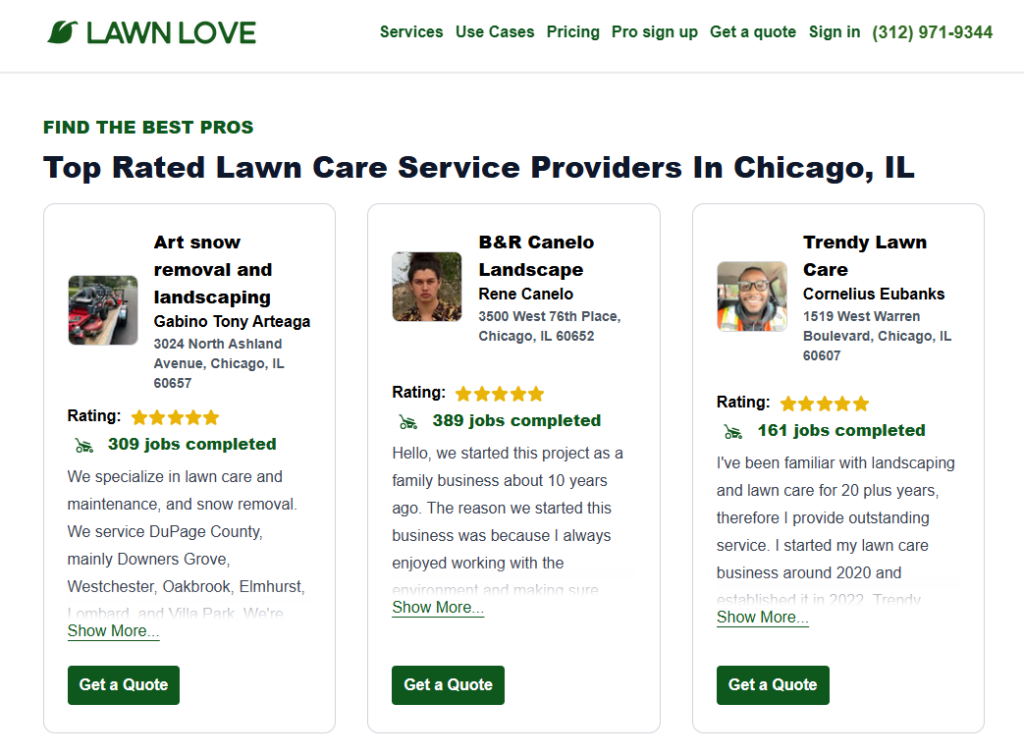
Lawn Love showcases this brilliantly by displaying local pros with names, photos, ratings, and total jobs completed. Visitors immediately see the real people behind the service and their experience in Chicago neighborhoods.
Building on that trust, reviews are one of the strongest signals that show potential customers your credibility. Focus on testimonials from customers in the same city or nearby areas, such as:
- A Google review from a named customer
- Mentions of the neighborhood or city
- Quotes tied to a specific service
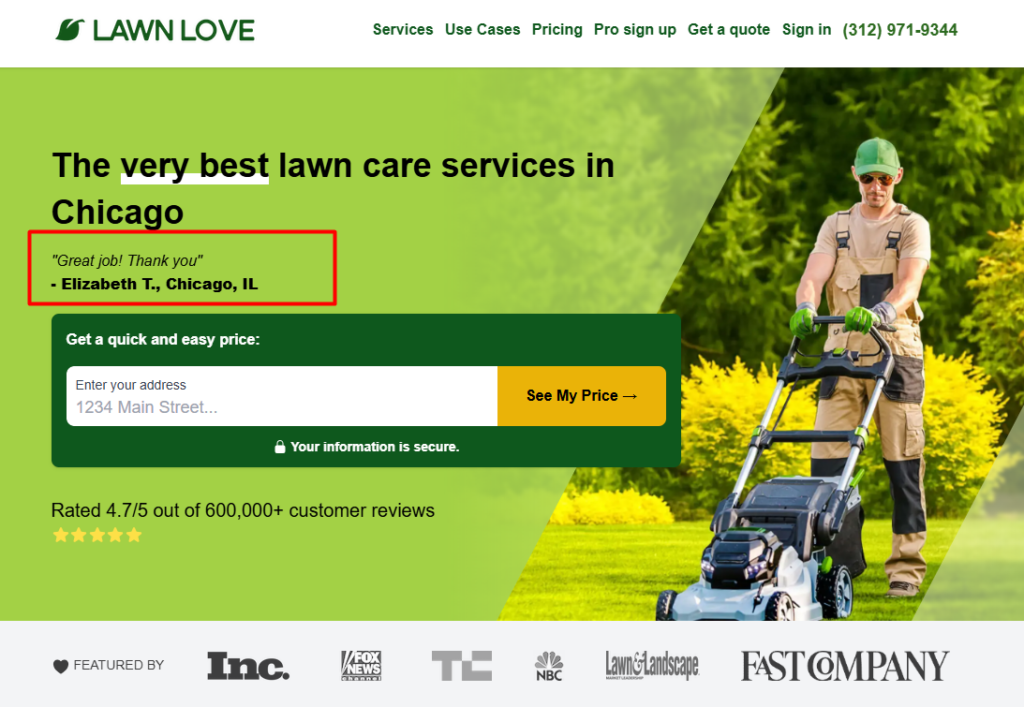
Lawn Love also excels here. For example, a Google review from “Elizabeth T., Chicago, IL” is placed near the main CTA, tying the testimonial to a specific location and service.
If you have a physical location, embed a Google Map showing your office. It reassures visitors that you are real and local.
For service-area businesses, embed a map showing your coverage zone. This still signals relevance and helps users confirm you serve their area.
Together, these elements turn your page from informative to trustworthy. They give visitors the confidence to move forward and convert.
Step 5: Turn Visitors Into Leads With A High-Converting Form
The lead capture form is where interest becomes action. Even the best local landing page can fail if the form is confusing, long, or generic.
Start by asking only for essential details at the beginning. This lowers resistance and gets more people through the door. Include fields such as:
- Name
- Phone number
- Email address
If your form has multiple questions, break it into 2-3 steps to make it feel easier and less overwhelming. For example, a service inquiry form could contain:
- Your Needs
- Your Property
- Contact Info
Using multiple steps improves completion rates and makes the process feel natural. Growform makes it easy to create mobile-friendly multi-step forms that guide users through a smooth, engaging experience.
Once the form is structured, integrate conditional logic to make it conversational and tailored:
Building on the earlier service inquiry form example:
- Residential: show questions about home type or ownership
- Commercial: ask about business type or building size
- Industrial: show fields related to site scale or project scope
Conditional logic works seamlessly with multi-step forms, asking the right questions at the right time. This boosts lead quality and makes visitors feel understood.
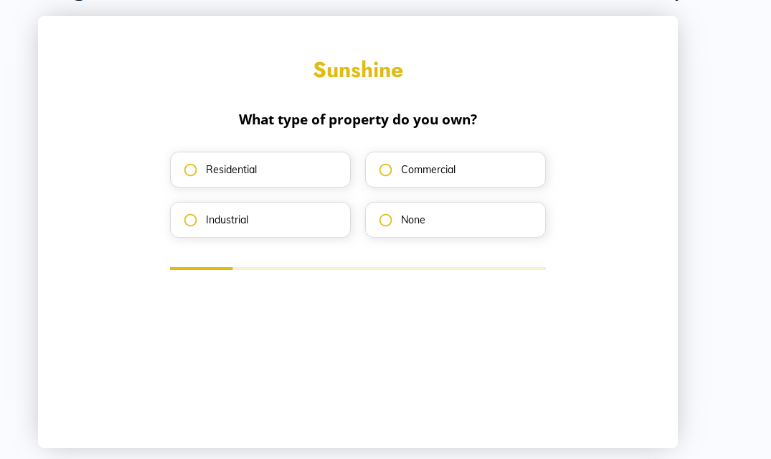
For faster setup, use our ready-to-use templates for local businesses like roofing, solar, HVAC, and more. These templates are optimized for conversion and can be customized to fit your unique services and location.
You may also want to capture important marketing data from URLs to better track leads. Growform’s hidden fields make it easy to track:
- UTM parameters like utm_source, utm_medium, utm_campaign
- Page location or referrer
- Campaign or offer tags (e.g., campaign=winter_sale, offer=freetrial)
Data is passed via URL query strings and can even be set dynamically with JavaScript before the form loads. This ensures you know exactly where leads came from, helping agencies and businesses measure ROI accurately.
See our full guide on how to use hidden fields with Growform
Step 6: On-Page Essentials
Even the best content and design won’t perform without solid on-page SEO. Focus on elements that help search engines understand and rank your page while improving user experience.
Here are the basics:
- Optimize Title Tags & Meta Descriptions: Treat them as your search “ad copy.” Include the primary keyword and a local value proposition. Example: Dallas Roofing Contractor | Free Inspections & 5-Star Reviews
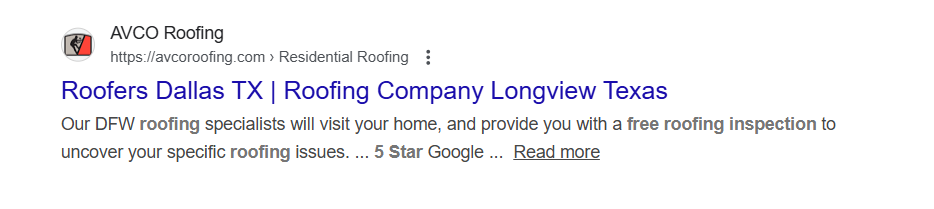
- Implement Structured Data: Use LocalBusiness schema to show your hours, service area, and reviews in search results. This can boost visibility and click-through rates.
- Optimize Images: Use descriptive file names and alt text for all local images. Example: alt=”Acme Roofing team installing shingles in Dallas, TX”
- Internal Linking: Link to related local pages and your main service area hub. This spreads authority across your site and guides users to relevant content.
Step 7: Post-Launch Implementation, Integration, and Measurement
Form Embedding
If you’ve built a Growform multi-step form as recommended, embedding it is simple. Copy and paste the code into WordPress, Unbounce, Webflow, or any site that supports custom HTML. No developers are needed, saving time and avoiding technical headaches.
Automate Lead Flow
Integrate with Zapier or set up direct email notifications to instantly send leads to your CRM, Google Sheets, or team chat. This ensures no lead goes cold and helps your team act fast.
Measure What Matters
- SEO Performance: Track rankings for target keywords and monitor organic traffic from the city using Google Search Console and GA4. We covered this briefly in Step 1
- Conversion Metrics: Monitor form completion rates, cost per lead from ads, and lead quality feedback from sales teams.
Optimize With A/B Testing
A/B testing feature lets you test different form variants, headlines, or CTAs. This helps refine your page for higher conversions and better ROI. For a deeper dive, see our guide on landing page A/B split testing.
Streamline Your Local Lead Generation With Growform
Creating a high-converting local SEO landing page can feel overwhelming, but the payoff is huge: more visibility in search, higher-quality leads, and stronger trust from your local audience.
With Growform, you can simplify the entire process. Our multi-step forms, conditional logic, and ready-to-use templates make it easy to capture qualified leads while integrating seamlessly with your CRM, Google Sheets, or marketing stack. Start turning local visitors into loyal customers today. Sign up for Growform.