
Typeform Pricing (2026): Plans, Features & Alternative Explained
Quick Summary
Typeform pricing plan has three categories: Core plans for general users, Growth plans for marketers, and Talent plans for HR teams.
- Core plans start at $29 per month and cover standard form-building needs.
- Growth plans start at $199 per month with advanced analytics, lead gen, and automations.
- Talent plans start at $149 per month for hiring, onboarding, and employee feedback.
- The free plan is very limited, offering only 10 responses per month.
Growform is a stronger choice for lead generation thanks to simpler, more transparent pricing. All plans include unlimited forms, custom branding, and high-converting templates, with lead allowances from 300 to 3,000 per month and a 14-day free trial.
Typeform Pricing Plans: Overview
Typeform is one of the most popular form builders out there, and it’s easy to see why: It simply works!
You get a ton of features, nice UX, and it fits into so many use cases. But we won’t be going into that rabbit hole today.
The elephant in the room is their PRICES.
Basically, they have three pricing categories.
- Core Plans,
- Growth Plans,
- and Talent Plans.
You might also see these as:
- Plans for everyone
- Plans for marketers
- Plans for HR on their website
…respectively.
You already get the idea, but just to be clear:
The Core plans = for general use
Growth plans = for marketing team that need advanced features, scalability, and collaboration tools.
Talent Plans = for HR Teams
Let’s take a quick look at what each plan has to offer before we go into the details.
1. Core Plans or Plans for Everyone
As the name suggests, Typeform’s Core Plans cover the essential features: forms, surveys, branding, and basic analytics.
They include Basic, Plus, Business, and Enterprise Plans, all of which you can scale up or down based on response limits, user seats, and integrations.
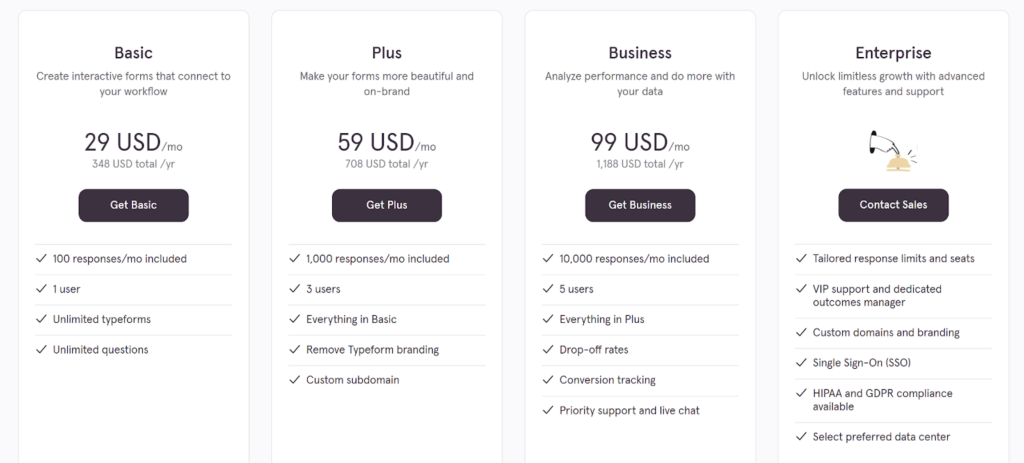
The table below summarizes the plans available and the features they cover:
| Feature | Basic | Plus | Business | Enterprise |
|---|---|---|---|---|
| Monthly Price | $29 | $59 | $99 | Custom |
| Users | 1 | 3 | 5 | Custom |
| Responses per Month | 100 | 1,000 | 10,000 | Custom |
| Receive File Upload | 1GB | 2GB | 4GB | Custom |
| Remove Branding | No | Yes | Yes | Yes |
| Custom Subdomain | No | Yes | Yes | Yes |
| Integrations | No | Yes | Yes | Yes |
| Analytics | Minimal | Basic | Drop-off + Conversion | Advanced/Custom |
| Support | Standard | Standard | Priority + Live Chat | Dedicated Manager |
| Security Features | No | No | No | SSO, HIPAA, etc. |
| Smart Insights and AI | No | No | No | Yes |
Basic Plan
The Basic Plan is Typeform’s entry-level paid option, designed for personal use or internal feedback collection. It offers access to unlimited forms and questions, but comes with several limitations:
- 100 responses per month
- 1 user only
- No integrations or branding control
However, you’re stuck with Typeform branding, and there’s no way to automate workflows or analyze performance beyond basic response counts.
This plan works for hobby projects or testing, but most businesses will find it restrictive, especially when working with clients or collecting leads.
Plus Plan
The Plus Plan provides the flexibility that small teams and solo professionals need. At $59/month, it removes some restrictions and unlocks essential features for real business use:
- 1,000 responses per month
- 3 users
- Remove Typeform branding
- Connect apps like Google Sheets, HubSpot, and Slack
- Set a custom subdomain
This plan is great for small teams or consultants who need branded, automated forms but don’t require advanced analytics or heavy data tracking. It’s particularly relevant for startups or agencies managing client forms.
Business Plan
For teams collecting data at scale, the Business Plan offers deeper insights and support. At $99/month, it provides:
- 10,000 responses per month
- Up to 5 users
- Drop-off rate tracking
- Conversion analytics
- Live chat and priority support
This plan is ideal for businesses running regular marketing campaigns or collecting large volumes of customer data. It includes actionable insights for optimizing form performance.
Enterprise Plan
The Enterprise Plan is tailored for large organizations with advanced needs. Pricing is custom, and it offers:
- Custom response volumes and seats
- Full branding and domain control
- SSO, HIPAA compliance, 2FA
- Dedicated success manager
This plan is designed for regulated industries and large teams with complex data and security requirements.
2. Growth Plans or Plans for Marketers
Typeform’s Growth Plans were launched to meet the needs of marketing and revenue teams looking for more than just form-building.
They include Growth Essentials, Growth Pro, and Growth Custom.
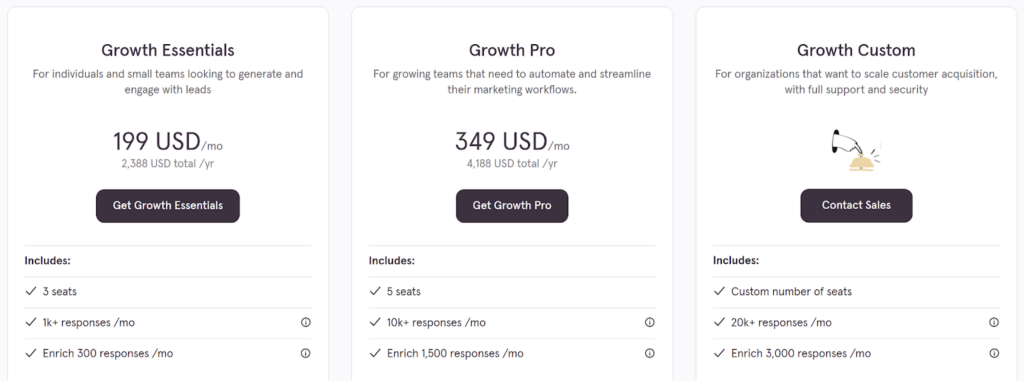
These plans layer in enrichment tools, advanced analytics, and AI features to help teams capture, qualify, and convert leads at scale. The table below summarizes the available plans and what you get with each:
| Feature | Growth Essentials | Growth Pro | Growth Custom |
|---|---|---|---|
| Monthly Price | $199 | $349 | Custom |
| User Seats | 3 | 5 | Custom |
| Monthly Responses | 1,000+ | 10,000+ | 20,000+ (Custom) |
| Lead Enrichment | 300/month | 1,500/month | 3,000/month (Custom) |
| Video Questions | Yes | Yes | Yes |
| Receive File Uploads | 2GB | 4GB | 4GB |
| Video Responses | Yes | Yes | Yes |
| Multi-language Forms | No | Yes | Yes |
| Advanced Analytics | No | Yes | Yes |
| Custom Domain | No | No | Yes |
| Compliance Features | No | No | SSO, 2FA, HIPAA |
| Support Level | Standard | Priority | Dedicated Manager |
| Best For | Lead gen campaigns | Marketing teams | Large orgs & agencies |
Growth Essentials
Growth Essentials is the entry-level Growth Plan, priced at $199/month. It’s aimed at small teams or individuals running lead-gen or outreach campaigns, providing valuable features not available in the Core Plans:
- 3 user seats
- 1,000+ responses per month
- Lead enrichment for 300 responses
- Video questions and video responses
- reCAPTCHA for spam prevention
- AI tools like Smart Insights and Ask AI
This plan is ideal for teams looking to collect high-value leads, qualify them, and pass them to downstream tools. It’s particularly useful for those running paid ads or outbound campaigns.
Growth Pro
Growth Pro is built for mid-sized marketing teams needing advanced tracking and automation. At $349/month, it expands upon the Essentials plan with:
- 5 user seats
- 10,000+ responses per month
- Lead enrichment for 1,500 responses
- Multi-language forms
- Conversion analytics and drop-off insights
- Integrations and priority support
This plan is designed for teams using forms at the heart of their marketing operations, whether for lead segmentation, retargeting, or syncing with CRMs.
Growth Custom
Growth Custom is designed for large organizations or agencies with custom needs. Pricing is customized based on requirements, with features including:
- Custom response and enrichment limits
- Unlimited viewer seats
- Dedicated success manager
- SSO, 2FA, and HIPAA compliance
- Custom domains and activity logging
This plan is perfect for high-volume lead generation and agencies needing full control over user management, data privacy, and branding at scale.
3. Talent Plans or Plans for HR
Typeform’s Talent plan is a dedicated bundle for HR and People teams. It’s built to cover the full employee lifecycle in one place: hiring, onboarding, engagement, and ongoing feedback, with AI and video layered on top of the standard Typeform experience.
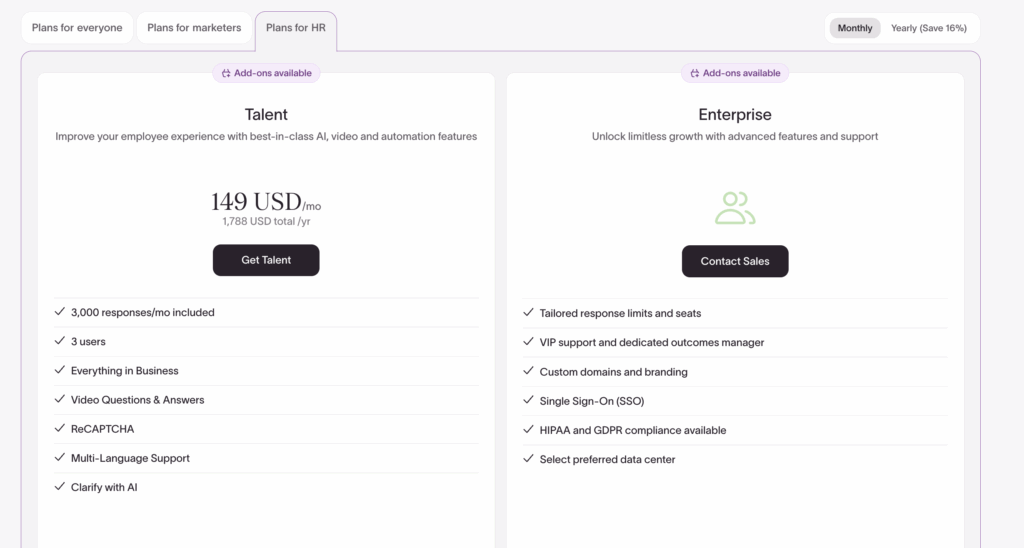
In other words, it’s Typeform Business + a prepackaged set of HR-specific features and allowances (video questions/answers, AI clarifying questions, Smart Insights) rather than a generic survey plan.
What the plans for HR include:
| Base Allowances | |
|---|---|
| Seats | 3 seats (3 team members included) |
| Monthly Responses | 3,000 responses per month by default |
| Upgrade Option | Option to upgrade to 7,500 responses per month from the billing screen |
| Hiring and Candidate Experience | |
| Video Questions | Up to 4,500 video question views per month |
| Video Answers | Up to 1,500 video answers per month |
| AI Clarifying Questions | Auto follow-ups based on candidate answers |
| Multi-language Forms | Supported |
| Recruiting Operations | |
| Scheduler | Built-in scheduling to book interviews directly out of forms |
| Spam Prevention | reCAPTCHA included |
| File Uploads | CVs, portfolios, supporting documents |
| Email Follow-ups | Automatic confirmations or next steps |
| Onboarding and Employee Experience | |
| Knowledge Quizzes | Useful for onboarding and training |
| Dynamic Scoring | Grades answers and surfaces knowledge gaps |
| HR Templates | Access to templates for candidate experience, engagement, onboarding, development |
| AI and Analytics (Smart Insights) | |
| Topic Analysis | Analyses open-ended responses |
| Sentiment Analysis | Supported |
| AI Summaries | Ask AI to summarise or highlight key points from responses |
| Integrations | |
| Zapier | Supported |
| Slack | Supported |
| Microsoft Teams | Supported |
| ATS or HRIS | Not included, but Talent feeds data and context into external systems |
| Pricing | |
| Estimated Price | ~$149/month |
| Included | 3 seats and 3,000 responses/month, upgrade available to 7,500 |
| Positioning | Sits above the $99/month Business plan and below Growth Essentials |
Typeform Talent is best suited for teams that want:
- More human job applications
Conversational, one-question-at-a-time flows with video intros and file uploads. - Lightweight video screening without a separate platform
Enough capacity for early-stage screening using asynchronous video answers. - Onboarding and engagement in the same tool
New-hire onboarding flows, engagement surveys, and training quizzes. - AI-assisted analysis
Topic, sentiment, and AI summarization to quickly interpret open responses.
Does Typeform Offer a Free Plan?
Yes, Typeform offers a Free Plan, which is a good starting point for testing the platform with limited needs. It’s best for personal use or simple projects that don’t require high volume or advanced features.
So what does Typeform free plan include?
- Unlimited typeforms
- Up to 10 questions per form
- 10 responses per month
- Basic templates and design options
- Access to core question types
- Embedding feature on web pages
- Integrations with Zapier, HubSpot, MailChimp, etc.
However, the Free Plan comes with clear limitations. A 10-response monthly cap makes it unsuitable for serious data collection, and features like custom branding, detailed analytics, and support are locked behind paywalls.
As your needs grow, upgrading becomes less of an option and more of a requirement.
Is There a Free Trial for Typeform’s Paid Plans?
No, there isn’t. Typeform doesn’t offer a full-featured free trial of its paid plans. Instead, you can build forms using premium features in “trial mode,” but you won’t be able to share them or collect responses until you upgrade. It’s more of a preview than a usable trial.
Comparing Growform to Typeform (Based on Price and Value)
If you’re looking for a form builder that simplifies lead generation with transparent pricing, Growform provides a straightforward approach. Built for teams focused on conversions, compliance, and simplicity, Growform delivers everything you need in clear, value-packed tiers.
Unlike Typeform, which places certain features behind higher-tier plans, Growform’s pricing structure is designed to be simple and accessible.

What Do You Get?
Every Growform pricing plan includes unlimited forms, access to high-converting templates, and customized branding, even on the entry-level plan. You won’t pay extra for basic features or hit usage caps as quickly.
- Basic Plan ($59/month): For 300 leads per month, 1 domain, unlimited forms, and no Growform branding.
- Professional Plan ($99/month): For 1,000 leads per month, unlimited domains, phone/email validation, priority support, and more.
- Scale Plan ($199/month): For 3,000 leads per month, advanced marketing features like ad network tracking, Google Tag Manager integration, and real-time lead validation.
- Custom Plan: For agencies generating thousands of leads per month; tailored pricing with custom integrations, SLA, and 99.9% uptime guarantee.
Additional Features
Features like phone and email validation, TrustedForm and Jornaya support, custom domains via CNAME, and real-time lead delivery are included at the Pro level, not hidden behind enterprise pricing.
Plus, every plan comes with a 14-day free trial and no credit card required.
Why Listen to Us?
At Growform, we help marketers and teams build beautiful multi-step forms that convert. Our platform is trusted by hundreds of businesses seeing real results, like doubled conversion rates and lower cost-per-lead. With simple pricing, fast support, and features built for growth, we know what makes a form tool worth paying for.
Experience Easy Lead Generation with Growform’s Straightforward Pricing
While Typeform offers a range of plans, its pricing structure can be complex and restrictive for many teams. Hidden costs, usage caps, and the need to upgrade quickly can leave you feeling frustrated.
Growform, on the other hand, simplifies the pricing process with transparent, value-packed plans designed specifically for lead generation. With unlimited forms, no hidden fees, and all the essential features included, Growform is a smarter alternative for teams focused on conversions and growth.
Tired of hidden fees and confusing pricing? Start your 14-day free trial with Growform today and see how easy lead generation can be.
Frequently Asked Questions
What are the limitations of Typeform free plan?
- You only get up to 10 responses per month total across all forms.
- Advanced features like branding removal, custom subdomains, and more advanced logic or integrations are locked behind paid plans.
- The free tier is really only suitable for testing or low-volume feedback, not serious or high-volume survey use.
Is Typeform better than SurveyMonkey?
It depends on what you need:
- Typeform tends to offer a nicer, more engaging “one-question-at-a-time” user experience and cleaner design, making it good for higher completion rates and better user engagement.
- SurveyMonkey generally outperforms for data analysis, reporting, and wide-scale research capabilities, making it better for enterprise or research-heavy use cases.
Does Typeform limit responses?
Yes. On the free plan you get 10 total responses per month. Higher paid plans increase this limit (for example: 100, 1,000, or more responses depending on the tier).
How much is Typeform vs SurveyMonkey?
- Typeform paid plans start at about $29/month.
- SurveyMonkey plans are generally more expensive, especially if you need higher respondent volume or enterprise-grade analytics.
Is Typeform better than Google Forms?
Yes — if you care about form design, user experience, and conversions. Typeform offers far more polished, interactive, and customizable forms.
For quick, simple, and completely free forms with minimal setup, Google Forms is still the easier and more accessible option.