
What Is Cloudflare CDN and How Does It Actually Work

Cloudflare CDN is a globally distributed network of 335+ data centers that sits between visitors and a website's origin server, caching content close to users and absorbing traffic so pages load faster and stay online under load. In practice, it's an edge delivery and request-routing platform, not merely a place to store copies of images and scripts.
You may be asking because a paid campaign is about to launch, a landing page feels slow in another region, or your hosting server struggles whenever traffic rises. The important question isn't only whether Cloudflare can make a page faster. It's whether the layer in front of your site can handle caching, security, form requests, tracking, invalidation, and sudden demand without creating new operational problems.
Table of Contents
Table of Contents
- What Cloudflare CDN Is and Why Marketers Care
- How a CDN Actually Works
- What Cloudflare Adds on Top of the Basic CDN Model
- Setting Up Cloudflare the Right Way
- Cloudflare Compared to Fastly, Akamai and AWS CloudFront
- A Real-World Scenario for Lead-Gen Teams
- Benefits and Honest Limitations
- Common Questions About Cloudflare CDN
What Cloudflare CDN Is and Why Marketers Care
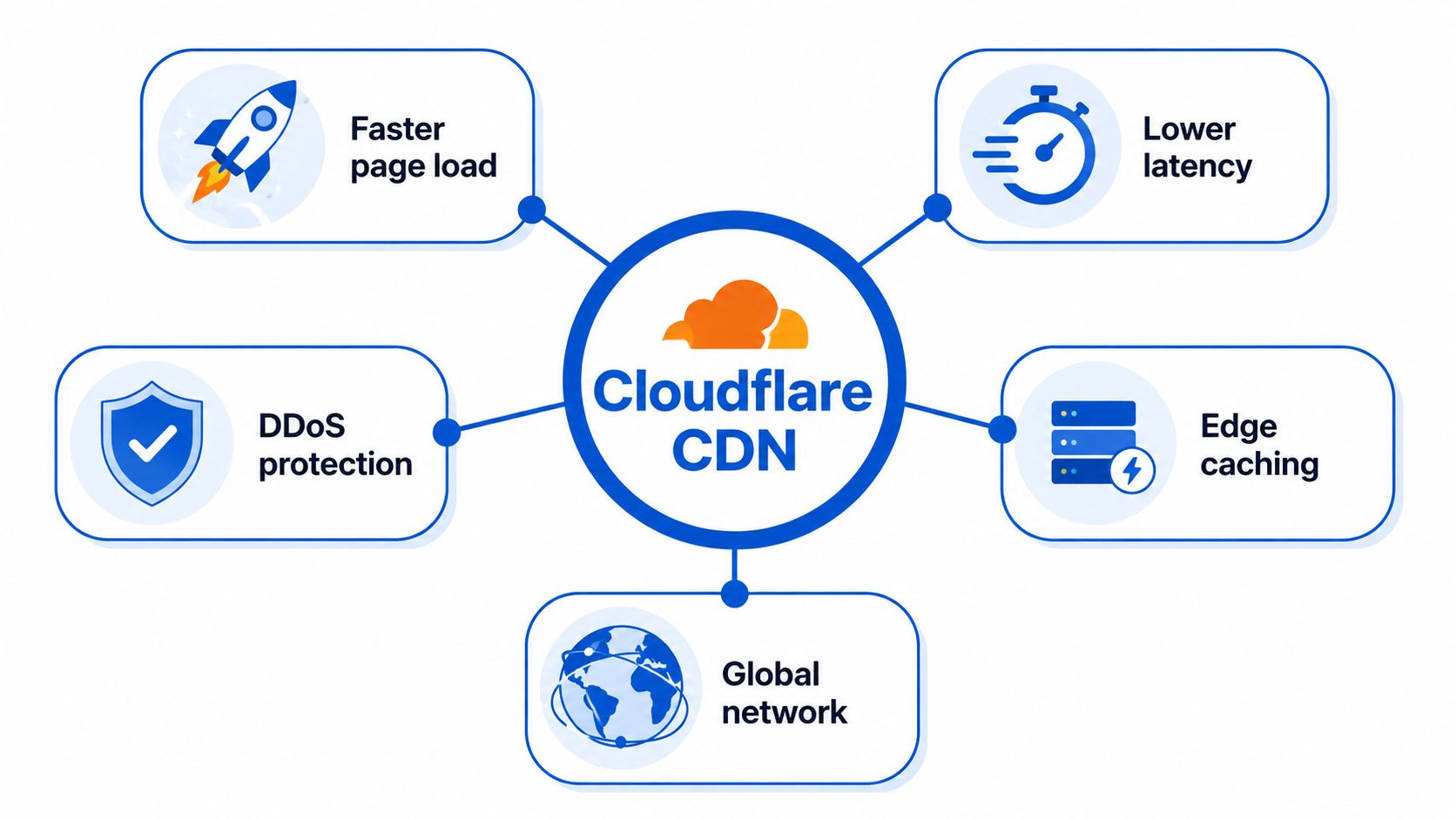
CDN means content delivery network. Instead of sending every visitor to one origin server, a CDN places edge locations around the world and serves eligible content from a location closer to each visitor. Cloudflare says 95% of the world's Internet-connected population is within 50 milliseconds of one of its data centers, with most users within 20 milliseconds, as described in its CDN reference architecture.
For a marketer, that architecture affects more than a technical speed score. A landing page may contain JavaScript, images, fonts, analytics requests, a form embed, and calls to third-party systems. Cloudflare can serve cacheable assets from the edge while forwarding requests that need the origin or an external application to the right destination. That separation helps your web server spend less effort repeatedly delivering the same static files.
The network also provides over 405 Tbps of capacity, according to Cloudflare's architecture documentation. That doesn't guarantee that every page or application will perform well, because cache rules, origin configuration, code, and third-party services still matter. It does explain why the platform can help absorb traffic spikes before they reach customer infrastructure.
The practical meaning for a campaign team
Suppose an agency sends visitors from several countries to one campaign page. Without a CDN, browsers may request page assets from the same origin location, even when the visitor is far away. With Cloudflare in front, cached assets can come from a nearby edge location, while requests that contain form data or account-specific information can continue to the application.
That's why Cloudflare belongs in the same infrastructure conversation as landing page best practices. It can improve the delivery layer, but it won't repair a confusing offer, a broken form, poor mobile layout, or unreliable attribution. The CDN is part of the funnel, not a substitute for funnel design.
How a CDN Actually Works
Think of an online store shipping every order from one warehouse. A customer in another region waits for the long route, and the warehouse has to process every package even when thousands of customers want the same product. A CDN creates smaller distribution hubs, called edge locations, that can hold commonly requested web content.
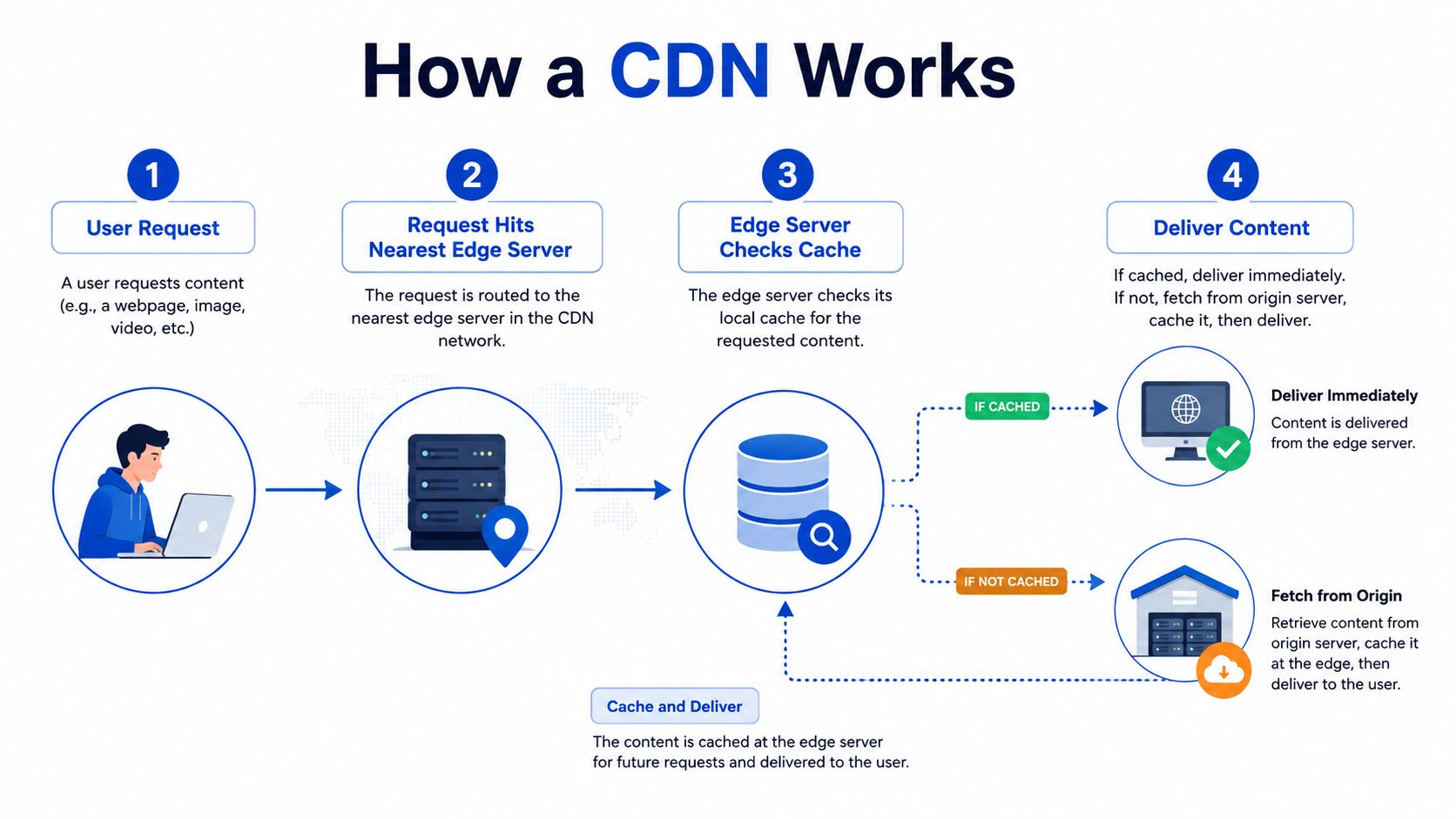
The request path usually looks like this:
- DNS directs the visitor. When someone enters your domain, DNS helps determine where the request should go. With a reverse-proxy CDN, the visitor reaches the CDN's network before the origin server.
- The edge receives the request. Routing systems select an appropriate edge location based on network conditions and proximity. The edge becomes the public front door for the website.
- The edge checks its cache. If it has a valid copy of the requested asset, it can return that copy without asking the origin. This is a cache hit.
- The edge contacts the origin when necessary. If the object isn't cached, or if the request must be handled dynamically, the edge asks the origin for a response. It may then store an eligible response and return it to the visitor. This is a cache miss.
Four pieces that make the model work
Caching is the local stockroom. Images, stylesheets, scripts, and other cacheable responses can remain at the edge for later visitors. The browser receives the content from a nearby location rather than making the full trip to the origin each time.
The reverse proxy is the receptionist in front of your server. Visitors talk to the proxy, and the proxy decides whether to answer from cache, forward the request, apply a rule, or pass the response back. Your origin address stays behind that front door, subject to your DNS and security configuration.
DNS is the routing directory. It connects the public hostname with the network that should handle the request. Changing DNS delegation is therefore a foundational onboarding step, not a cosmetic setting.
TLS termination is where the encrypted HTTPS connection from the browser is handled. The CDN can establish a secure connection with the visitor, then use a separately configured connection to the origin. The encryption mode matters because the edge-to-origin leg still needs to match your security requirements.
Practical rule: Treat the CDN as a traffic checkpoint, not a transparent pipe. Every cache, security, and routing decision can change what reaches the origin.
What Cloudflare Adds on Top of the Basic CDN Model
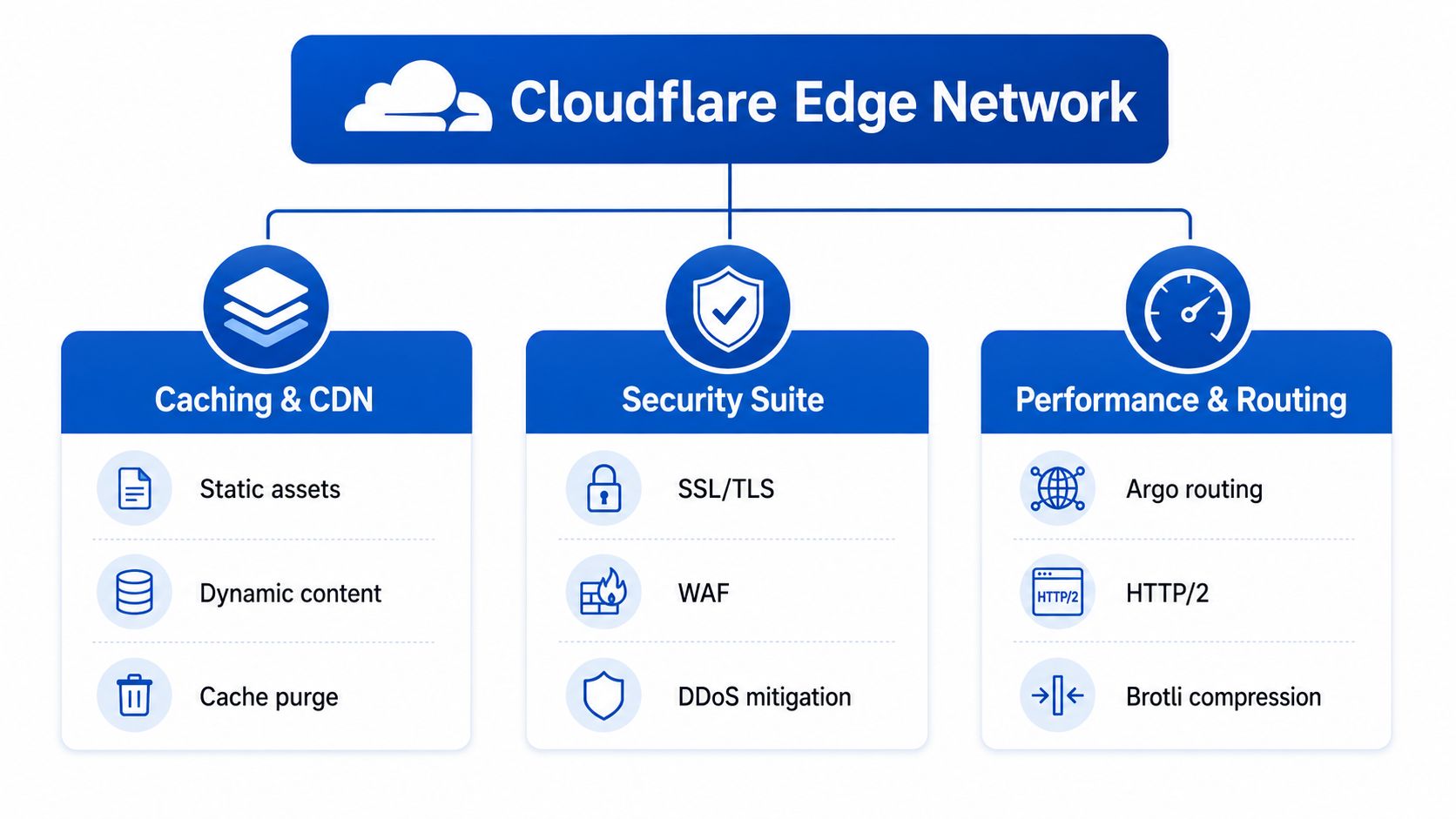
A paid campaign can send a sudden wave of visitors to one landing page. At that moment, Cloudflare is doing more than serving nearby files. Its network overview presents a network where delivery, security, routing, and edge execution work as connected layers. For marketers, Cloudflare is better understood as a programmable front door for the site, not just a warehouse for static assets.
The layers marketers notice first
DNS provides the public entry point and directs a hostname to the service handling the request. It does not cache page assets or protect application requests by itself.
Caching serves content that can be reused safely. Versioned images, stylesheets, scripts, and fonts are straightforward examples. Dynamic responses require more care because cookies, authorization, personalization, and form state may make one visitor's response unsafe to reuse for another.
The Web Application Firewall checks requests against security rules. Suspicious traffic can be challenged or blocked before it consumes application resources. Rules still need testing, since an overly broad rule can disrupt legitimate visitors, form integrations, or webhook traffic.
DDoS mitigation helps absorb hostile request floods at the network edge. That matters when paid traffic and public campaign URLs rely on the same landing-page infrastructure. Filtering can reduce pressure on the origin, although it does not prevent every application failure.
Workers add code execution at the edge. A Worker can inspect a request, rewrite a URL, add headers, route traffic, or return a response without sending every decision to the main server. This flexibility brings operational work too, including deployment, logging, testing, and debugging.
Caching is becoming a routing problem
Cloudflare describes its cache as running on a Pingora-based proxy, with stale-while-revalidate operating asynchronously and Smart Tiered Cache helping improve hit rates while reducing origin load. Smart Tiered Cache can send an edge miss through a selected intermediate tier, rather than letting many edge locations request the same object independently.
During a launch, the edge decides more than whether an object exists locally. It can determine where to fetch it, whether an older response can serve visitors while a fresh copy is retrieved, and how many requests reach the origin. Cache behavior therefore affects uptime, form performance, tracking persistence, and the origin's ability to handle campaign spikes.
Cloudflare CDN is best understood as an edge delivery and request-routing platform with caching as one layer. Caching, invalidation, security checks, and edge code can influence the same request, so marketers should evaluate the complete request path rather than speed alone.
Setting Up Cloudflare the Right Way
A basic setup is straightforward, but the defaults shouldn't replace a deliberate configuration review. Start by adding the domain to Cloudflare, checking the imported DNS records, and updating the nameservers at your registrar so Cloudflare becomes authoritative for the domain. Review every record before changing traffic, especially records used for email, verification, APIs, and third-party services.
Secure the connection before tuning cache
Choose an SSL/TLS mode that matches the certificate installed at the origin. Flexible encrypts the browser-to-Cloudflare connection but doesn't provide the same protection between Cloudflare and the origin. Full uses encryption to the origin but accepts a broader range of origin certificates. Full Strict requires a valid certificate at the origin and is generally the safer target when your server is correctly configured.
Don't switch modes blindly. A mismatch can produce origin certificate errors, redirect loops, or a site that appears secure to the visitor while the upstream connection is weaker than expected.
Start with obvious cache candidates
Create rules for assets that are safe to reuse, such as versioned CSS, JavaScript, images, and fonts. Keep account pages, checkout flows, dashboards, personalized responses, and form submission endpoints outside broad page caching unless you've designed and tested the behavior carefully.
Use origin Cache-Control headers where possible. They let the application communicate freshness intent, while Cloudflare rules can provide a controlled override for known asset paths. Versioned filenames are useful because a new filename naturally avoids serving an older cached object.
The purge decision deserves its own operational policy. Cloudflare warns that a full purge sends new requests back to the origin, can substantially increase origin traffic, and may slow heavy-traffic sites. Its cache changelog recommends single-file purges instead when you only need to replace particular objects.
Freshness is an availability decision. Clearing everything may make content look clean in a dashboard while sending a sudden wave of work back to the server you were trying to protect.
Cloudflare's cache-status behavior also matters during debugging. The platform now returns BYPASS for uncacheable responses, making it easier to distinguish a deliberate bypass from a missing or expired cache entry.
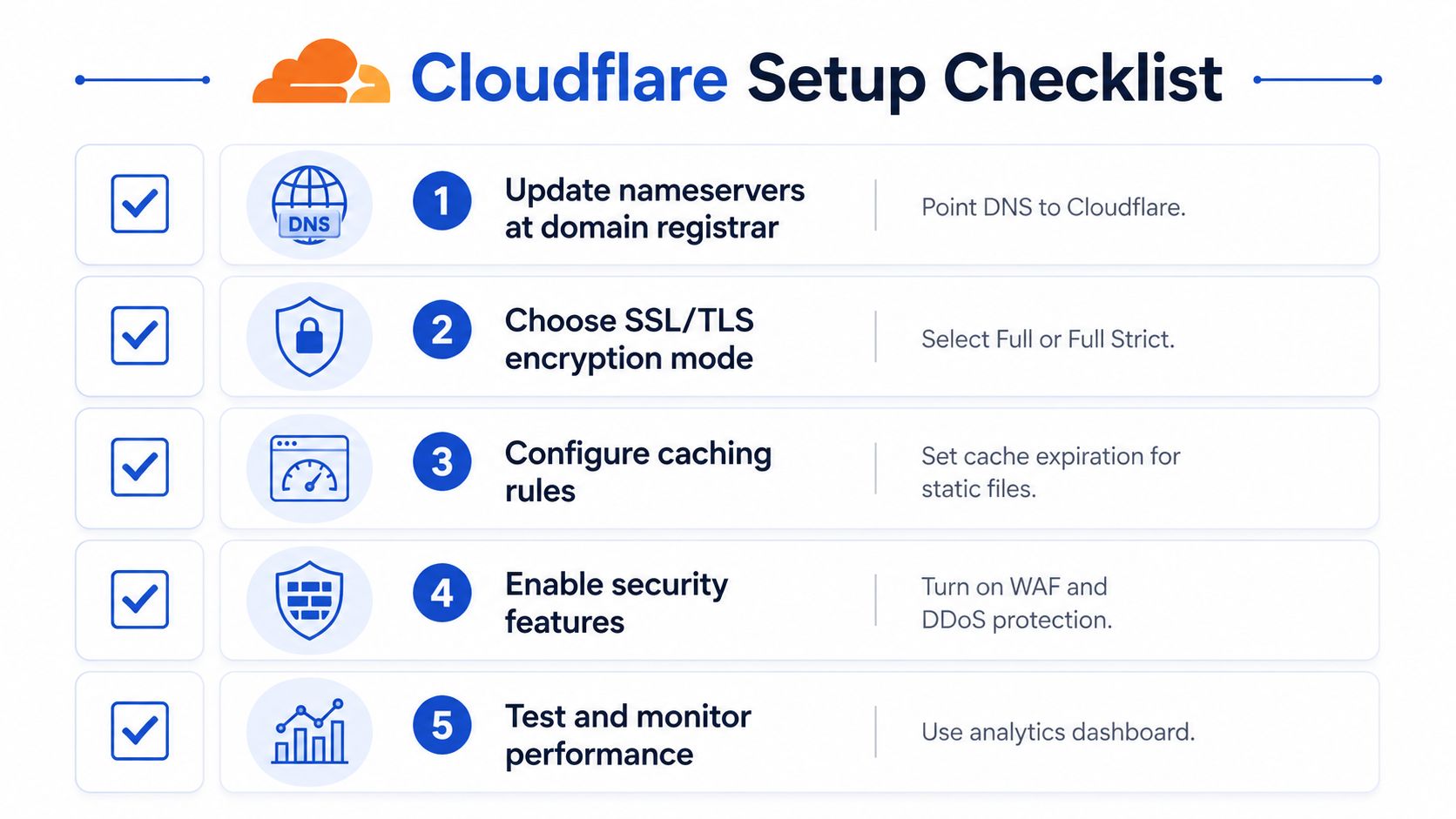
Finally, test from the visitor's perspective. Load the page in a clean browser, submit every form path, check pixels and consent tools, inspect redirects, and confirm that origin logs still show the requests your application needs. If a lead funnel uses a hosted capture layer such as a white-label form builder, confirm that the custom domain, embed, and submission handoff work through the intended proxy path.
Cloudflare Compared to Fastly, Akamai and AWS CloudFront
The right CDN depends on who will operate it after launch. Cloudflare is often attractive to mid-market teams because the entry path is accessible and its DNS, CDN, security, and edge tools sit in one product family. Fastly tends to appeal to teams that want highly programmable delivery and detailed control over caching behavior. Akamai is a long-established enterprise option with a broad delivery and security portfolio. AWS CloudFront fits naturally when the rest of the stack already lives in AWS.
Pricing changes by product, usage, contract, and configuration, so a simple “cheapest CDN” label is unreliable. Compare the total operating model, including support, logging, security controls, engineering time, and the consequences of a misconfigured cache.
| Provider | Free Tier | Onboarding Effort | Edge Compute | Best Fit |
|---|---|---|---|---|
| Cloudflare CDN | Available entry-level option | Usually accessible for a standard domain | Workers and related edge services | Teams wanting one front door for DNS, delivery, and security |
| Fastly | Plan-dependent | More engineering-led for advanced setups | Strong programmable edge surface | Developers needing granular control and fast configuration changes |
| Akamai | Typically enterprise-led | Higher coordination and procurement effort | Broad enterprise edge capabilities | Large organizations with complex global delivery requirements |
| AWS CloudFront | AWS usage model and account setup | Straightforward for established AWS teams, more involved otherwise | Lambda@Edge and CloudFront Functions | Products already integrated with AWS services and operations |
Cloudflare is the sensible starting point when a team wants to place a domain behind a CDN without building a large delivery operation first. Fastly, Akamai, or CloudFront may justify the additional work when you need a particular enterprise agreement, AWS-native architecture, advanced edge programming model, or specialized support arrangement.
The comparison should end with a test, not a logo preference. Put a representative page, API path, form flow, and invalidation process through the candidate platform. A CDN that looks powerful on a feature page may still be a poor fit if your team can't safely operate its cache and security rules.
A Real-World Scenario for Lead-Gen Teams
A lead-generation team launches a Meta campaign for a multi-step quiz funnel. The campaign performs better than expected, and traffic rises sharply above the team's normal baseline. Everyone watches the same operational signals: page loading, quiz completion, form submissions, CRM delivery, and speed-to-lead.
Cloudflare can serve the reusable parts of the page, such as images, stylesheets, fonts, and JavaScript, from edge locations. That reduces repeated origin work for assets that don't change per visitor. The reverse proxy also gives the team a place to apply security rules and absorb unwanted traffic before it reaches the application server.
The form itself needs more care. A submission containing personal data, a session token, or a qualification state shouldn't be treated like a public image. The team must keep submission endpoints and personalized responses from broad caching, then verify that the proxy forwards them correctly.
What happens to tracking and embeds
Tracking pixels often call third-party endpoints, while embedded forms may load scripts from a hosted provider and submit data to a separate service. Cloudflare doesn't automatically make those systems first-party or guarantee that attribution will survive. The team must test query parameters, cookies, referrers, consent behavior, cross-origin requests, and server-side conversion events.
For a funnel that uses a hosted form on a custom domain, the CNAME and proxy settings deserve the same attention as the landing page itself. A page can load quickly while the submission handoff fails, which makes conversion rate and speed-to-lead the true acceptance tests.
Operational test: Don't declare the campaign protected until a fresh visitor can load the page, complete every branch, preserve attribution, submit successfully, and reach the CRM under the same proxy configuration used in production.
During the spike, cached assets can continue serving from the edge while the origin handles the requests that require application work. The security layer can filter abusive traffic, but the team still needs rate limits, origin capacity, third-party monitoring, and a rollback plan. Cloudflare improves the traffic path. It doesn't eliminate the need to understand the traffic path.
Benefits and Honest Limitations
Cloudflare's strongest benefit is its combination of global delivery, traffic handling, DNS, and security controls on one edge network. Cloudflare's timeline records that the service crossed one billion requests per day in June 2011, later reached 100 cities across 49 countries by its sixth birthday, and now reports an average of over 84 million requests per second, with a peak above 116 million HTTP requests per second. Those milestones appear in the company's public timeline, and they help explain the platform's infrastructure scale.
That scale doesn't turn every response into a cache hit. Dynamic content, personalized pages, cookies, cache headers, and third-party dependencies still determine what the edge can safely reuse. Teams that cache too broadly risk serving stale or incorrect content, while teams that bypass too much leave origin performance on the table.
Where the trade-offs appear
- Accessible entry point: A free starting plan can reduce the cost and procurement barrier for testing. The limitation is that teams still need to understand plan-specific controls, quotas, support expectations, and security behavior before relying on it for a critical acquisition channel.
- Fast static delivery: Edge caching works well for reusable assets. The limitation is that cache invalidation and versioning become part of release management.
- Built-in security: WAF and DDoS controls can reduce unwanted origin traffic. The limitation is that custom rules can block legitimate bots, integrations, or form requests if nobody monitors them.
- Programmable edge: Workers can keep selected logic close to users. The limitation is that edge code adds another runtime, deployment path, and debugging surface.
- Modern protocols: An independent HTTP/3 measurement study found that HTTP/3 improved Cloudflare TTFB by 12.4% compared with HTTP/2, but page-load time was 1% to 4% worse for Cloudflare in that specific study and workload, as reported in the ICDCS HTTP/3 research paper. Teams should measure their own traffic types instead of assuming a protocol setting guarantees an end-to-end improvement.
The sensible approach is measurement by request category. Track cache status, origin response time, form completion, script errors, and conversion behavior separately. A faster static asset is useful only if the complete lead journey remains reliable, which is the same principle behind mobile conversion optimization.
Common Questions About Cloudflare CDN
Is Cloudflare CDN free?
Cloudflare offers a free entry-level plan, which makes it practical for testing a domain's DNS, proxy, caching, and basic protection before a larger commitment. “Free” doesn't mean unlimited or operationally complete, so review the controls and support included for the plan you choose.
Takeaway: Start with a low-risk domain or campaign environment, then validate the limits that matter to your traffic and security model.
What are the free-plan limits?
The limits depend on the specific Cloudflare product and plan. Don't assume that a free CDN plan includes every advanced security policy, support path, analytics capability, enterprise routing option, or dedicated network feature.
Takeaway: List the features your campaign requires, especially custom rules, logs, origin protection, and support, before treating the free plan as a permanent architecture.
Will Cloudflare break forms, embeds, or tracking?
It can, if caching or security rules treat dynamic requests like public assets. A correctly configured reverse proxy should pass legitimate form submissions and embedded scripts, but you need to test redirects, cookies, query parameters, consent tools, pixels, webhooks, and CRM delivery after enabling it.
Takeaway: Exclude submission paths from broad caching and test the complete conversion journey with real browser conditions.
Do I need a CDN if my hosting is already fast?
Not every site needs one. A small, local site with modest traffic and a capable host may see limited benefit, while a global website, paid acquisition funnel, or origin that needs protection has more reason to add an edge layer.
Cloudflare's deeper value is its combination of request routing, caching, security, and edge execution. It's not just a static file accelerator. If your site serves a global audience, your uptime is tied to paid acquisition, or your forms and tracking share the same domain as your content, Cloudflare's free tier is a sensible default to test first.
The memorable answer to “what is Cloudflare CDN?” is simple: it's the traffic control layer between your visitors and your infrastructure. Use it deliberately, measure the full journey, and keep caching, invalidation, and dynamic requests under operational control.
Growform provides no-code multi-step and quiz-style forms for lead generation, with conditional qualification, attribution capture, custom-domain support, and real-time delivery into CRMs and lead distribution tools. If your CDN setup needs a dependable form layer behind paid traffic, visit Growform to evaluate the capture and handoff workflow.