
Add the TOS Checkbox field
Add the “TOS Checkbox” field to the step where you collect contact details.

Feature
The TOS Checkbox is a required tick box that carries your own consent wording and links to your terms and privacy policy. Every lead you receive has agreed to your wording before submitting the form.
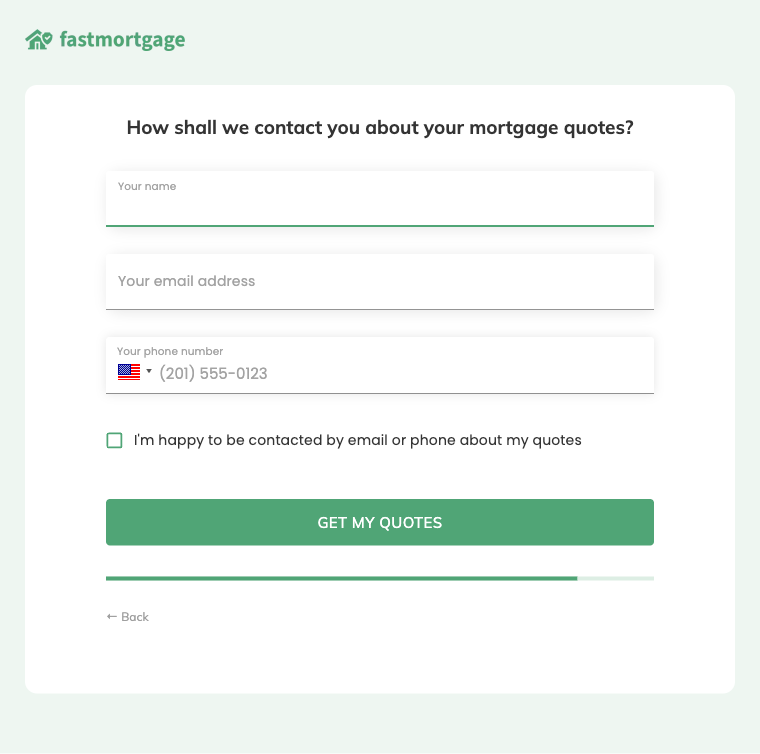
A consent checkbox is a box the lead ticks to agree to something before they submit your form. The agreement might cover calls and text messages, which is what most people mean by TCPA consent, or it might cover your terms of service. In Growform the field is called “TOS Checkbox”. You write the wording, link to the documents it mentions and decide whether the form can be submitted without it.
Both settings are yours to control. The checkbox is required by default, so the form cannot be submitted until the box is ticked. A separate “Pre-checked by default” option shows the box already ticked when the step loads. Many buyers expect the lead to tick the box themselves, so confirm what applies to you before you switch that option on.
A checkbox alone does not decide compliance. It records that the lead agreed, but valid consent also depends on your wording, your industry, where your leads live and what your buyers ask for. Requirements vary, and each buyer sets its own. Growform provides the field for consent capture and leaves the language to you and your legal advisor.
You keep proof of consent by pairing the checkbox with an independent record of the session. TrustedForm creates a certificate for each submission and stores its URL with the lead. Jornaya LeadiD stores a LeadiD with each lead and offers an optional “Jornaya TCPA Disclosure” field. Both can run on the same form, and conditional logic lets you show the consent step only to the leads you intend to contact.
Add the “TOS Checkbox” field to the step where you collect contact details.
Type your wording into the label. The label is rich text, so you can link to your terms and your privacy policy.
Keep “This field is required” switched on, and leave “Pre-checked by default” off if the lead must tick the box personally.
Complete the form once and confirm that the wording and links appear exactly as you approved them.
The field is required by default, so the form cannot be submitted around it.
The rich-text label places your consent language and its links beside the box the lead ticks.
A legal claims firm or insurance agency buying your leads can see what each lead agreed to.
TrustedForm and Jornaya LeadiD attach their own evidence to the same submission.
You get the TOS Checkbox field on every Growform plan.
Yes. The label is rich text, so you can add links to any page your wording refers to.
No. You can use it for any agreement, including terms of service and privacy policy acceptance.
Place it on the step where you collect contact details, directly above the button that submits the form. The lead reads your wording at the moment they agree to it.
Create beautiful multi-step forms that convert, with a 14-day free trial. No credit card required.


