Skip to content
Growform Multi Step Form Builder

GoHighLevel vs Growform

A GoHighLevel alternative for the form, not the CRM

Keep GoHighLevel for the CRM, pipelines and workflows. Growform does one job: a multi-step form on your funnel that turns more clicks into qualified, verified leads.

Prices and limits checked on 6 October 2026

Rated 5.0 by marketers on Capterra, G2, Software Advice 5.0 5.0 5.0

Where GoHighLevel's own form costs you leads

GoHighLevel's reviewers rate its support and its all-in-one value highly, but its form is one page of fields and the drawbacks below share one cause: it was built as a piece of a CRM, not for a paid click.

  1. 01 of 05

    A form is one page of fields, and steps live in surveys

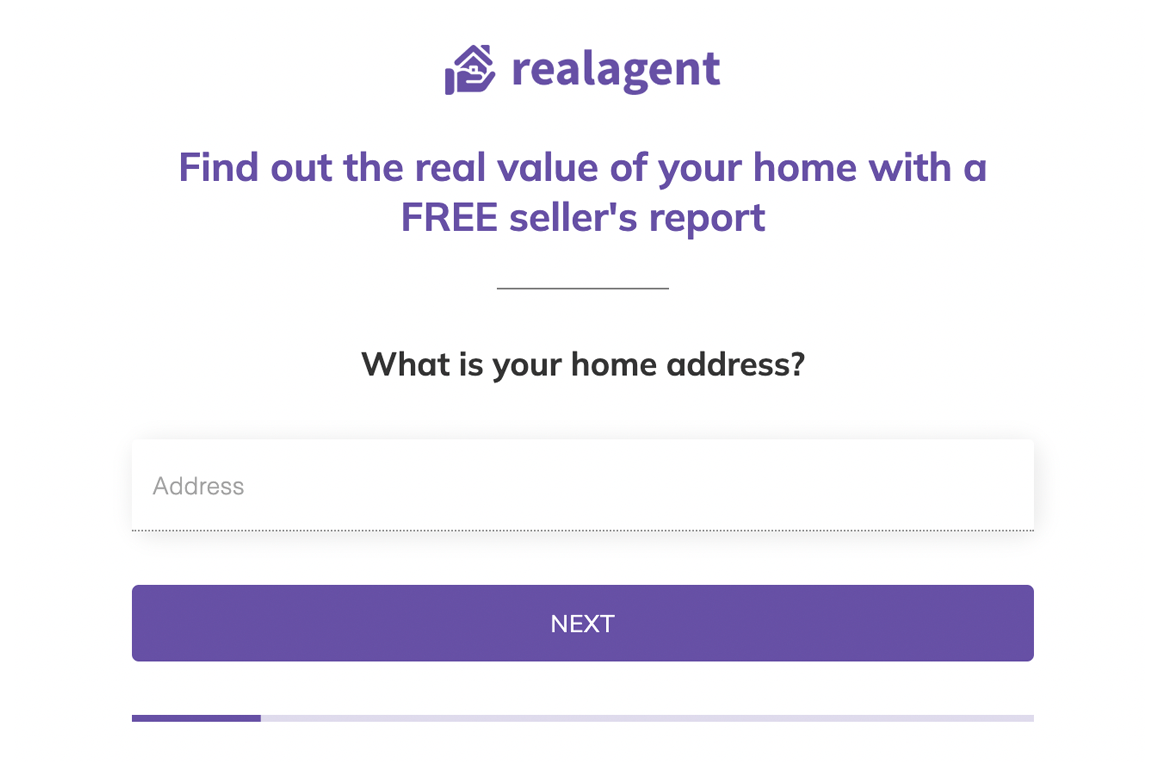
    On GoHighLevel, the form builder offers single-column, two-column and single-line layouts, and the progress bar belongs to surveys and quizzes, on phones only. Growform forms are built on UX research and psychology, with one or two questions per step and picture buttons, and capture up to 2x more leads than a single-page form.

    Source: HighLevel help center, enhanced form builder (31 July 2024) and mobile progress bar (21 July 2025), captured 6 October 2026, and Growform's own published figure
  2. 02 of 05

    A disqualified lead is stopped, not saved

    On GoHighLevel, the Disqualify Lead action in Conditional Logic V2 stops the submission when its rule matches. Growform saves every disqualified lead with the reason, lets you choose whether they finish the form or see their own ending, keeps them out of your webhook and CRM, and reports qualified leads only to your ad platforms.

    Source: HighLevel help center, Conditional Logic V2 in forms and surveys (12 May 2026), captured 6 October 2026

  3. 03 of 05

    Verifying a lead means the visitor types a code

    On GoHighLevel, a Verify Phone button sends an SMS code billed at standard messaging rates, and a Verify Email button sends a code to the inbox for the visitor to type back. Growform checks the number with Twilio Lookup and the address with ZeroBounce in the background, before the form is submitted.

    Source: HighLevel help center, SMS verification (26 August 2024) and email validation (22 January 2025), captured 6 October 2026

  4. 04 of 05

    TrustedForm is a pasted script, and Jornaya is not listed

    On GoHighLevel, a TrustedForm certificate takes a custom field named xxTrustedFormCertUrl, an HTML element with a pasted script, an inspected field ID and custom CSS to hide the field. Growform switches TrustedForm on with one toggle, runs Jornaya LeadiD and Contact State on the same form, and sends the certificate URL in every webhook.

    Source: HighLevel help center, ActiveProspect consent tracking (24 September 2024), captured 6 October 2026, and a help-center search for Jornaya and LeadiD the same day

  5. 05 of 05

    The form's own tracking is a Facebook pixel

    On GoHighLevel, the tracking setting inside a form, survey or quiz is a Facebook pixel ID and its events. Growform's Tracking & tagging panel takes Google Ads, Meta, Microsoft, X and GA4 IDs, each with a qualified leads only switch, and your own GTM containers hear every completed step.

    Source: HighLevel help center, quiz builder guide (6 October 2026) and its Facebook pixel article for forms and surveys, read 6 October 2026

GoHighLevel vs Growform at a glance

  • Multi-step lead forms with picture answers

    GoHighLevel

    Picture answers in progress

    Growform

    Yes
  • Sits on your GoHighLevel funnel page

    GoHighLevel

    Yes

    Growform

    Yes
  • Every lead lands on the GoHighLevel contact

    GoHighLevel

    Yes

    Growform

    Yes
  • UTMs and click IDs on the contact

    GoHighLevel

    Yes

    Growform

    Yes
  • Progress bar on desktop and phone

    GoHighLevel

    On phones only

    Growform

    Every plan
  • Disqualified leads kept, with their reason

    GoHighLevel

    Submission stopped

    Growform

    Saved and held back from your CRM
  • Phone and email checked with no code to type

    GoHighLevel

    A code sent by SMS or email

    Growform

    Twilio Lookup and ZeroBounce
  • Ad conversions set inside the form

    GoHighLevel

    Facebook pixel

    Growform

    Google Ads, Meta, Microsoft, X and GA4
  • Your own GTM containers, firing on every step

    GoHighLevel

    No

    Growform

    Yes
  • TrustedForm certificate with every lead

    GoHighLevel

    Custom field and pasted script

    Growform

    One toggle
  • Jornaya LeadiD and Contact State

    GoHighLevel

    No

    Growform

    Yes
  • Included
  • Higher plan or paid add-on
  • Not offered

Prices and limits as of 6 October 2026. Sources: GoHighLevel pricing page, HighLevel help center, captured 6 Oct 2026: forms inside the site builder (30 Apr 2026), conditional logic in forms (12 May 2026), inbound webhook trigger (8 Apr 2025), attribution source (26 Aug 2026), progress bar on mobile (21 Jul 2025), SMS verification (26 Aug 2024), email validation (22 Jan 2025), ActiveProspect consent tracking (24 Sep 2024), quiz builder guide (6 Oct 2026), HighLevel ideas board, Forms category (6 Oct 2026).

How it works

How does a Growform form sit on a GoHighLevel funnel page?

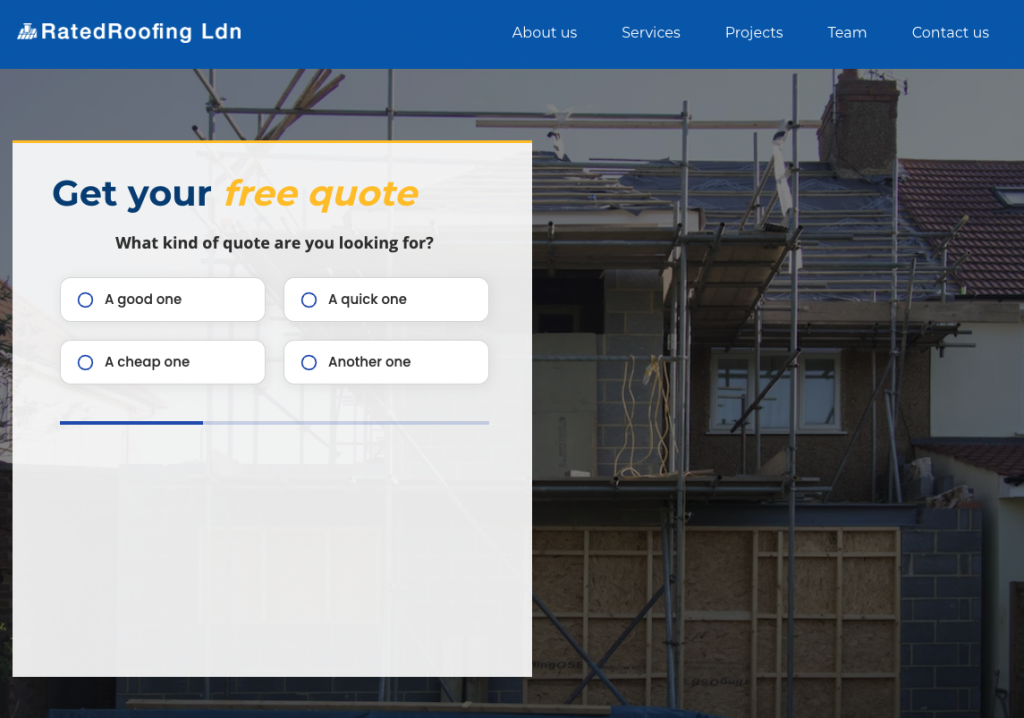
The form is embedded in a Code element on the funnel page, or opened as a pop-up from any button, and it takes the page's colors, font and width from the Theme panel, so it reads as part of the page.

  • Inline in a Code element, or a pop-up from a button with a custom class
  • Colors, Google Font and width matched to the funnel in Theme settings
  • The form reads the page URL, so UTMs and click IDs arrive with every lead
A Growform multi-step quote form embedded on a roofing company's GoHighLevel landing page

How do leads reach the GoHighLevel contact?

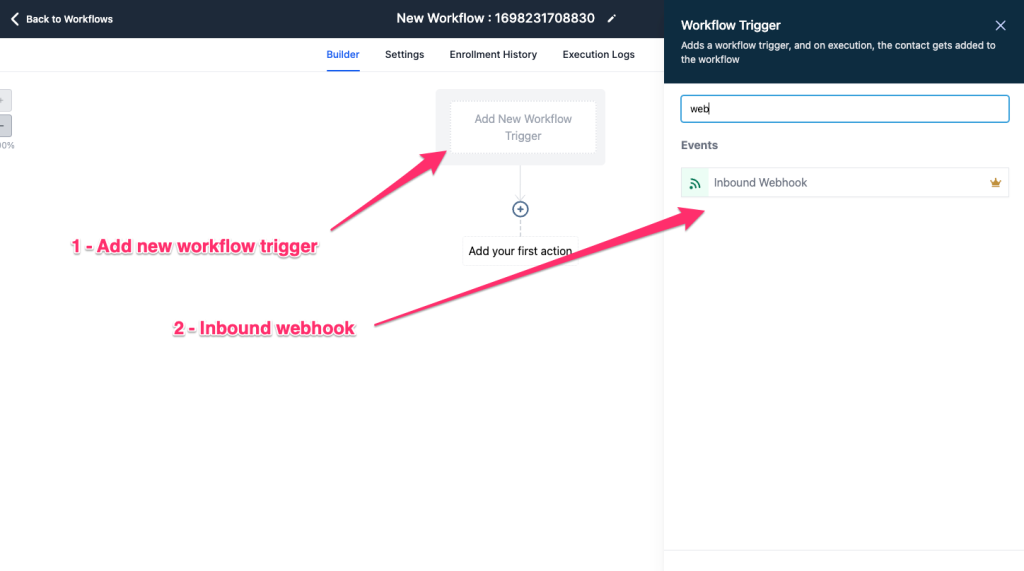
Every completed form posts to a GoHighLevel workflow through its Inbound Webhook trigger, where a Create/Update Contact action writes the record and the rest of the workflow runs as before. LeadConnector on Zapier does the same job without a workflow trigger.

  • Inbound Webhook at $0.01 an execution after 100 free ones per sub-account
  • LeadConnector on Zapier with Add/Update Contact, Add/Update Opportunity and Add Lead to Workflow
  • Hidden fields map to custom contact fields, so the network, campaign and ad reach the record
Choosing the Inbound Webhook trigger for a new workflow in GoHighLevel

How are leads qualified and validated before GoHighLevel sees them?

Lead disqualification rules act on the answers while the lead is still in the form, and Twilio Lookup and ZeroBounce check the phone number and email address in the background. A lead that fails is corrected or ruled out before the webhook fires.

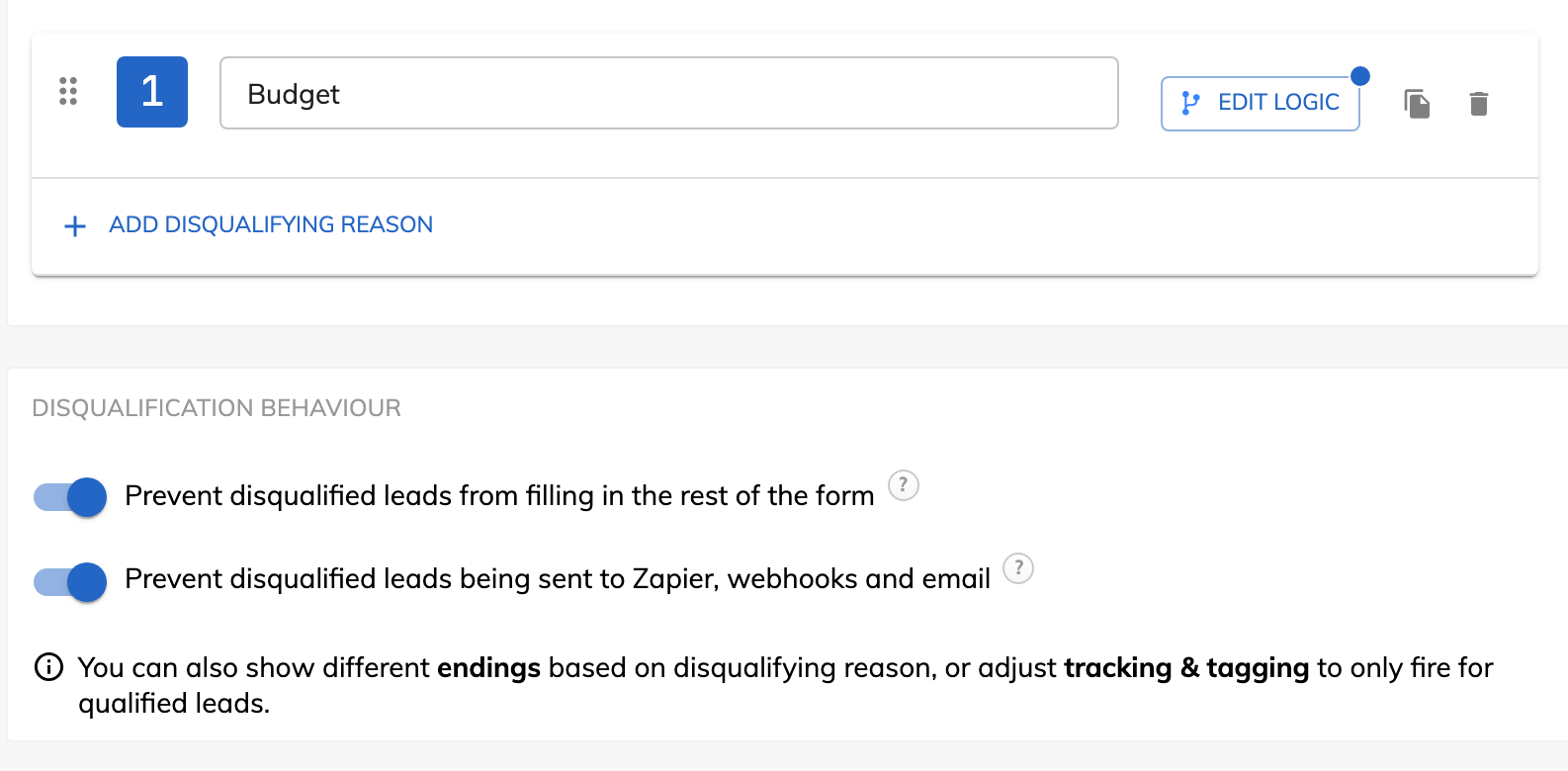
  • Disqualification reasons you name, each with its own ending for the lead
  • Twilio Lookup on the phone field and ZeroBounce on the email field, from Professional
  • A qualified leads only switch for Google Ads, Meta, Microsoft and X
Lead disqualification settings in Growform, with a Budget reason and both behavior switches on

What does tracking and tagging look like in Growform?

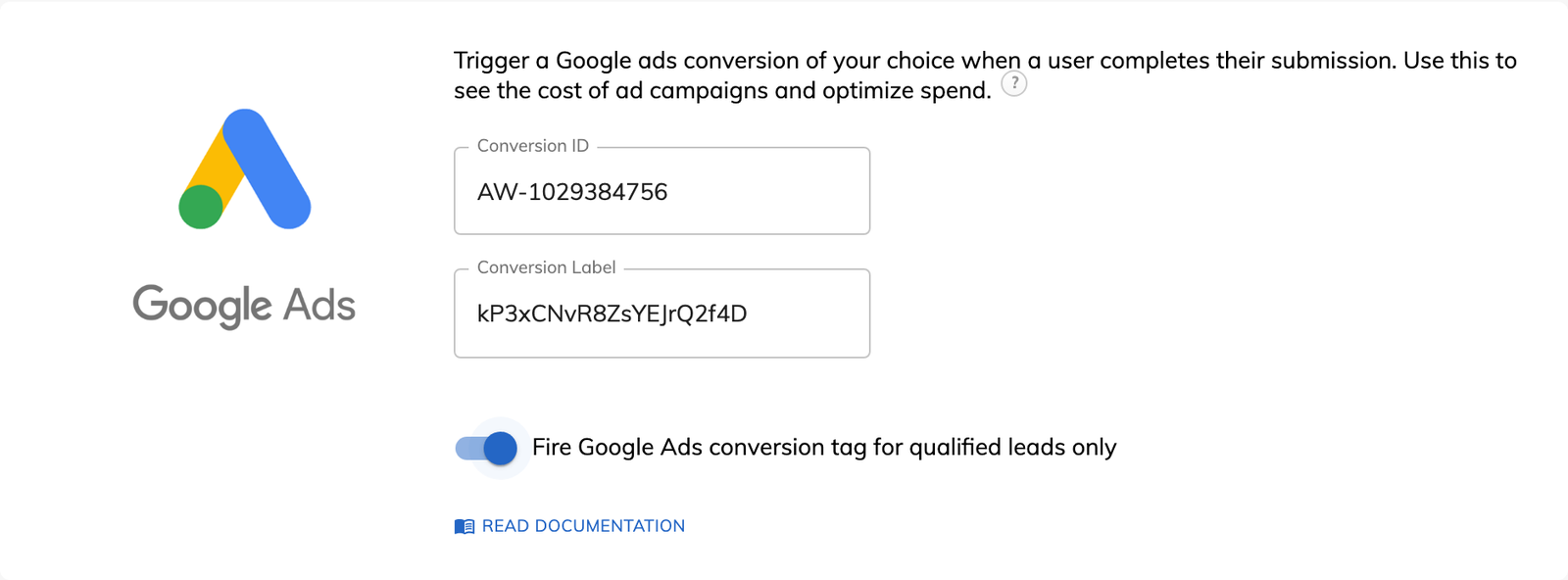
Every ad platform is a card under Tracking & tagging. You paste in the ID, choose whether every lead or only qualified leads count, and the conversion fires when the form completes. TrustedForm and Jornaya sit in the same panel.

  • Google Ads, Meta, Microsoft Advertising, X and GA4 key events on every plan
  • TrustedForm in one toggle, Jornaya and Contact State with your account codes
  • Your own GTM containers hear every completed step, from Professional
The Google Ads card in Growform tracking settings, with a conversion ID, a label and the qualified leads only switch

When GoHighLevel's own forms are enough

Use the GoHighLevel form when the job is a short contact form on a funnel page. It writes straight to the contact, records UTMs and click IDs on its own, fires the pixel on submission and costs nothing beyond the plan. Its surveys cover a few steps with jump logic, a progress bar on phones and a contact created from the first slide, and its forms take a booking calendar and a payment inside the form.

Pick it too when a survey has to save progress for a visitor who leaves and returns, when a scoring quiz needs a results page, or when every asset must sit inside a snapshot the agency resells. The CRM, the funnels, the calendars, the SMS and email marketing and the automations stay where they are in every case. Growform replaces none of them.

How to put a Growform form on a GoHighLevel funnel

Three steps, each documented in Growform's help center and in the GoHighLevel multi-step form guide.

Build the form from a template

Start from the roofing, solar or home services template that matches the campaign and paste your questions into the steps. In Theme settings set the container background to None and the form width to about 520, then match the funnel's color and font.

Embed it in a Code element on the funnel page

Copy the snippet from Share form, add a Code element to the GoHighLevel page, open the code editor and paste it, then check the page preview. For a pop-up, give a button a custom class and place the pop-up code in the footer tracking code. Remove the native form element.

Connect the leads and map the hidden fields

Create a GoHighLevel workflow with the Inbound Webhook trigger, paste its URL into a Growform webhook, send one test lead and fetch the sample request. Map the fields in a Create/Update Contact action, with an email or phone field required, and map each hidden field to a custom contact field. Or use LeadConnector on Zapier.

Growform is built for the industries that live on leads

Pick your industry to see what the form asks, how the leads arrive qualified, and about the live template you can start from today.

Finance & insurance

Qualified applicants, with the consent certificate attached.

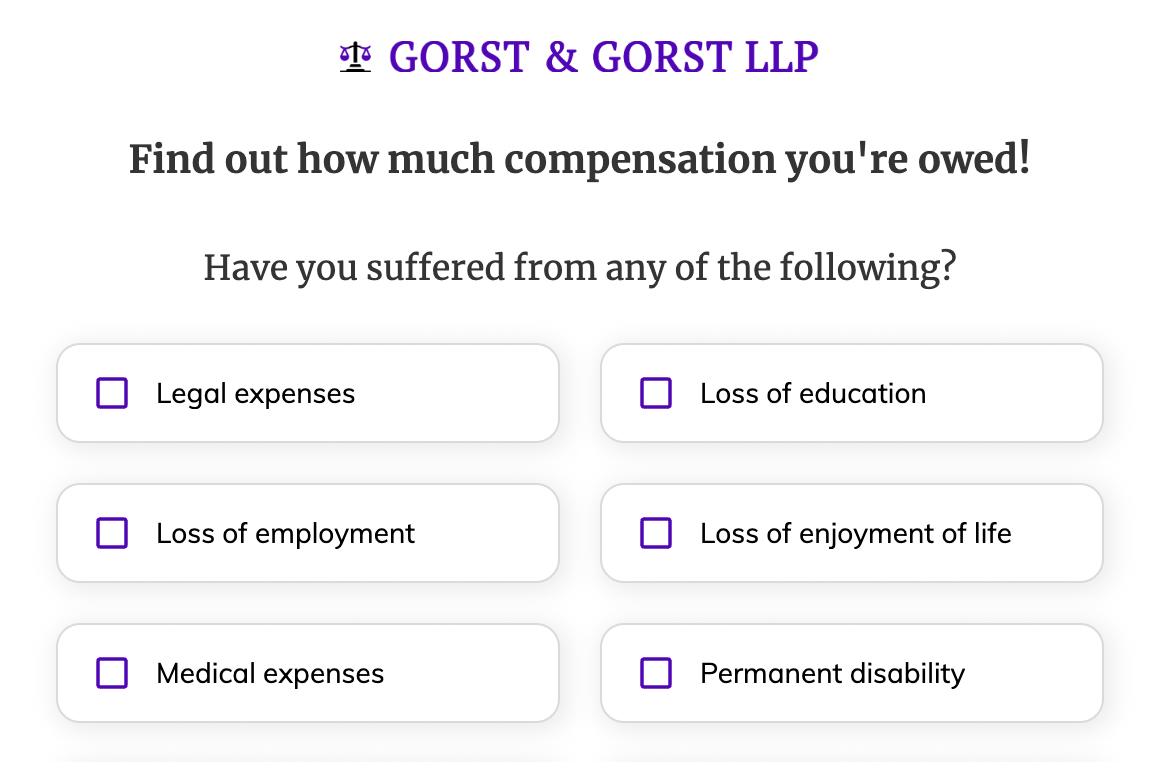
Lead buyers want proof of consent, and call centers want fewer people who were “just researching prices”. Our best-practice life insurance template first asks about coverage, health and stage before anything personal, can verify the phone number before it’s submitted, and can record a TrustedForm or Jornaya certificate with every submission.

Live template · Life insurance
First step of the Life insurance template
  • TrustedForm and Jornaya consent certificates in one click
  • Asks about a second applicant only when there is one
  • Phone and email verified before the lead is submitted

GoHighLevel alternative FAQ

Why does a Growform form convert more than a GoHighLevel form?

Because it is built for the click rather than the CRM. GoHighLevel forms are one page of fields in a single-column, two-column or single-line layout. A Growform form spreads the questions across short steps, asks one or two at a time with picture buttons and a progress bar on every device, and leaves the contact details until last, which is the order UX research and psychology favor. Growform's own figure is up to 2x more leads than a single-page form, with a 20 to 30% uplift the usual result. See multi-step forms.

Does Growform work with GoHighLevel?

Yes, by two documented routes. The form is embedded in a Code element on a GoHighLevel page or opened as a pop-up, and each lead is sent either to a workflow with the Inbound Webhook trigger or through LeadConnector on Zapier, which can add or update a contact, add an opportunity and add the lead to a workflow. The step-by-step guide takes a few minutes to follow.

Can GoHighLevel forms be multi-step?

Its surveys and quizzes are, with one question per slide, jump logic and a progress bar on phones. GoHighLevel forms are documented as one page of fields, and multi-page forms have been an open request on its ideas board since August 2023. A Growform form adds the steps and the picture buttons to the same funnel page. Our round-up of GHL multi-step form alternatives compares seven options.

Does GoHighLevel have lead disqualification?

Yes, as a Disqualify Lead action in Conditional Logic V2 that stops the submission when a rule matches. Growform's lead disqualification keeps the record. You name each reason, the lead is saved with it, you choose whether they finish the form or go straight to their own ending, and one setting keeps them out of Zapier, webhooks and email so GoHighLevel only receives the contacts worth a call. The same rules drive the qualified leads only switch on your ad conversions.

Does GoHighLevel validate phone numbers and email addresses?

It verifies them by sending a code. A Verify Phone button texts the visitor a code, billed at standard messaging rates, and a Verify Email button sends one to the inbox, and the visitor types it back before the form is accepted. Growform runs Twilio Lookup on the number and ZeroBounce on the address as they are typed, with nothing for the visitor to do, and an invalid value is corrected on the step where it was entered. Both come with Professional and above.

Does Growform do TrustedForm and Jornaya?

Yes, on Professional and Scale. TrustedForm is one toggle in the form's tracking settings, with no script to paste and no account code, and the certificate URL travels in the webhook payload as TrustedForm_certUrl, ready to map to a GoHighLevel custom field for the buyer. Jornaya LeadiD and Contact State run on the same form with your own account codes.

Do UTMs and click IDs reach the GoHighLevel contact?

Yes. Hidden fields in the Growform form read utm_source, utm_medium, utm_campaign, gclid and fbclid from the page URL, and presets fill the referrer, the page URL and the Meta click ID without any code. Each one arrives in the webhook payload as a field of its own and is mapped to a custom contact field in the workflow, so the GoHighLevel contact shows the network, campaign and ad behind every lead.

What does Growform cost on top of GoHighLevel?

A Growform plan is paid on top of your GoHighLevel plan. GoHighLevel's Starter is $97 a month, Unlimited $297 and Agency Pro $497, with the forms included, and Growform Basic adds $79 a month for 300 leads and 3 forms, Professional $139 for 1,000 leads with Twilio, ZeroBounce, TrustedForm and Jornaya, and Scale $249 for 3,000 leads. On the GoHighLevel side the inbound webhook is a premium workflow trigger at $0.01 an execution after 100 free ones for each sub-account, about $9 a month at 1,000 leads, or a Zapier task does the job. GoHighLevel prices from gohighlevel.com/pricing and its help center on 6 October 2026.

Can one Growform account serve several GoHighLevel sub-accounts?

Yes. Each client gets a form of its own, and each form posts to the webhook URL of a workflow in that client's sub-account, so leads never cross between clients. Basic holds 3 active forms, Professional 15 and Scale 50, and Custom plans are built for agencies above that.

Is it HighLevel or GoHighLevel?

Both names are in use. The company calls itself HighLevel and its pricing page footer names the parent as GoHighLevel Inc., while agencies say GHL. Searches for a go high level alternative, for gohighlevel alternatives or for a GHL alternative all describe the same product, and this page uses GoHighLevel because that is how most people type it.

Start your free trial

Create beautiful multi-step forms that convert, with a 14-day free trial. No credit card required.