Skip to content
Growform Multi Step Form Builder

Volunteer registration form template

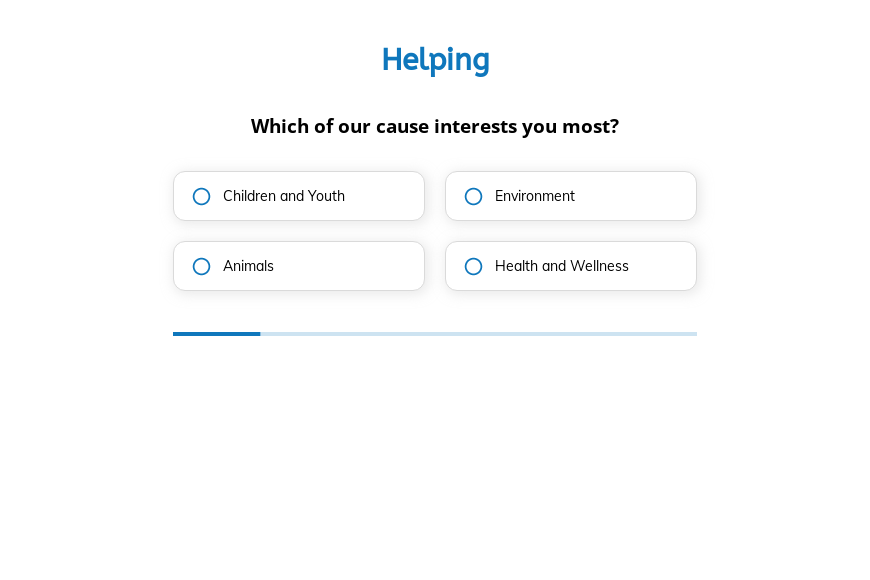
This five-step volunteer registration form asks the volunteer’s cause, how often they can help, the work they prefer and when they are free, followed by the contact details. Clone it into your Growform account and add your causes.

What the form asks, step by step

Volunteers stay when they are placed in work they care about. These questions match each new volunteer to a cause, a schedule and a type of activity.

  1. Step 1: “Which of our cause interests you most?”

    Children, environment, animals or health tells you which program lead to notify.

  2. Step 2: “How often would you like to volunteer?”

    Weekly helpers and yearly event volunteers need different onboarding.

  3. Step 3: “What type of volunteering work do you prefer?”

    Outdoor, indoor or remote preferences match people to real roles.

  4. Step 4: “What is the best time for you to volunteer?”

    Weekday mornings, afternoons or weekends shows which shifts a volunteer can cover.

  5. Step 5: “How shall we contact you?”

    Name, email and phone come last.

  6. After submitting

    A default thank-you follows, which a nonprofit would rewrite to explain the volunteer orientation.

Who it’s for

Nonprofits, charities and community groups use this simple volunteer form to recruit helpers from their website and social posts. It asks what the volunteer cares about and when they are free, which is what a coordinator needs to place them. Longer volunteer applications with references and background checks can follow once someone has shown interest.

Why this structure converts

  • The first question is about the cause, which reminds volunteers why they wanted to help.
  • Remote work is an option, so people who cannot travel can still sign up.
  • Four quick taps before the contact step keep the form short enough for a phone.
Use this template

14-day free trial, no credit card

Make it yours

  • Fix the first question

    The first header reads “Which of our cause interests you most?”. Change it to “Which of our causes interests you most?” before publishing.

  • Clarify “Bimonthly”

    Bimonthly can mean twice a month or every two months. Replace it with the wording you mean.

  • Send to your donor CRM

    Connect the form to Little Green Light, NeonCRM or Virtuous so volunteers sit alongside your donors.

Frequently asked questions

What should a volunteer registration form ask?

It should ask what the person wants to help with, how often, what kind of work and when. References and background checks can come later for roles that need them.

Can volunteers choose more than one cause?

Not in the template. Make the first step multi-select if you run several programs and want to offer volunteers a choice.

Can volunteers go straight into my donor database?

Growform sends sign-ups to Little Green Light, NeonCRM, Virtuous and NationBuilder, as well as Mailchimp.

What happens next?

  1. Step 1: Clone this form template

    Clone this template into your Growform account (create one first if you don’t already have one).
  2. Step 2: Edit your form

    Get creative and adjust your form's theme options, questions or layout in the Growform form builder.
  3. Step 3: Share or embed your form

    Share a link to your form, or embed it in your existing website. Receive new submissions by email or send them to 7,000+ apps via Zapier.

Start your free trial

Build multi-step forms just like this one. 14-day free trial, no credit card required.