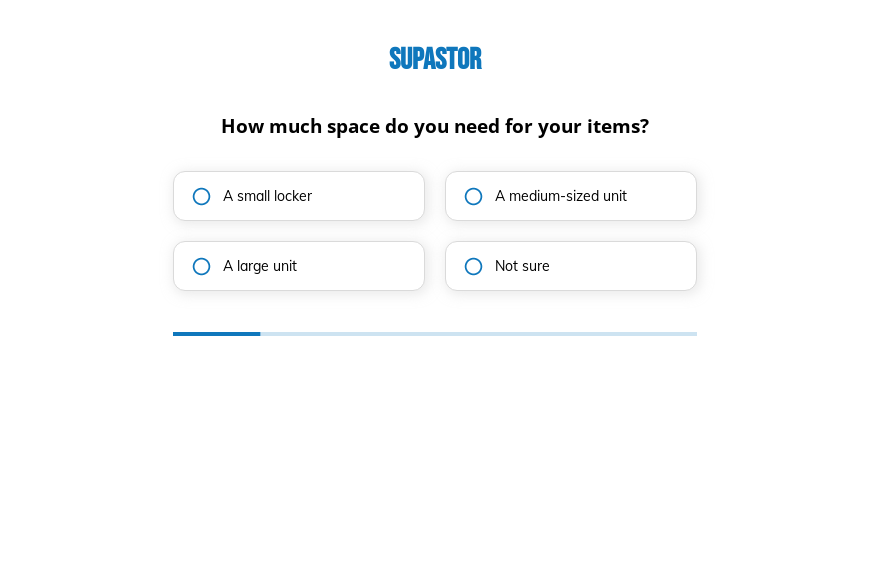
Self storage rental inquiry form template
This six-step self storage rental inquiry form asks the space needed, what will be stored, for how long, whether climate control matters and any notes, followed by the contact details. Clone it into your Growform account and add unit prices.
What the form asks, step by step
The answers point a customer to the right unit size and a realistic rental term. “Not sure” is offered where customers often guess.
-
Step 1: “How much space do you need for your items?”
Locker, medium or large unit narrows the units you can offer.
-
Step 2: “What type of items are you planning to store?”
Household goods, business stock and vehicles need different unit types.
-
Step 3: “How long do you plan on using our storage facility?”
Short and long stays can be priced with different offers.
-
Step 4: “Do you require a climate-controlled unit?”
Climate control affects availability and price, so it is settled early.
-
Step 5: More information
Customers can mention move-in dates or access needs here.
-
Step 6: “How shall we contact you?”
Name, email and phone come last.
-
After submitting
Change the thank-you text to promise a storage unit quote and a reserved unit if the customer replies quickly.
Who it’s for
Self storage facilities, vehicle storage lots and business storage providers use this template on their units page. Customers answering “Not sure” about size still get through, and your team replies with a recommended unit and a self storage quote. Business inventory and vehicle inquiries are identified on step two.
Why this structure converts
- “Not sure” options on size and length keep uncertain customers moving through the form.
- The items question helps staff recommend the right unit without a phone call.
- Climate control is a single yes or no, which avoids jargon about temperature and humidity.
14-day free trial, no credit card
Make it yours
-
Show unit sizes with images
Use image buttons on the first step to show what fits in a locker, a medium unit and a large unit.
-
Ask for a move-in date
A date field tells you when to hold a unit and which inquiries to call first.
-
Quote on the thank-you screen
Calculate a monthly price from size and climate control and show it after submission.
Send every lead where your team works
Frequently asked questions
How do I choose a storage unit size?
The form asks what is being stored and how much space the customer expects, and staff recommend a unit in the reply. Image buttons can make the size choice easier.
Can customers reserve a unit through the form?
The template sends an inquiry. You can add a move-in date and redirect to your reservation page after submission.
Which tools can receive storage inquiries?
Growform sends inquiries to HubSpot, Zoho CRM, Pipedrive or a Google Sheet, and alerts staff in Slack.
What happens next?
-
Step 1: Clone this form template
Clone this template into your Growform account (create one first if you don’t already have one). -
Step 2: Edit your form
Get creative and adjust your form's theme options, questions or layout in the Growform form builder. -
Step 3: Share or embed your form
Share a link to your form, or embed it in your existing website. Receive new submissions by email or send them to 7,000+ apps via Zapier.
Start your free trial
Build multi-step forms just like this one. 14-day free trial, no credit card required.