Skip to content
Growform Multi Step Form Builder

Videography inquiry form template

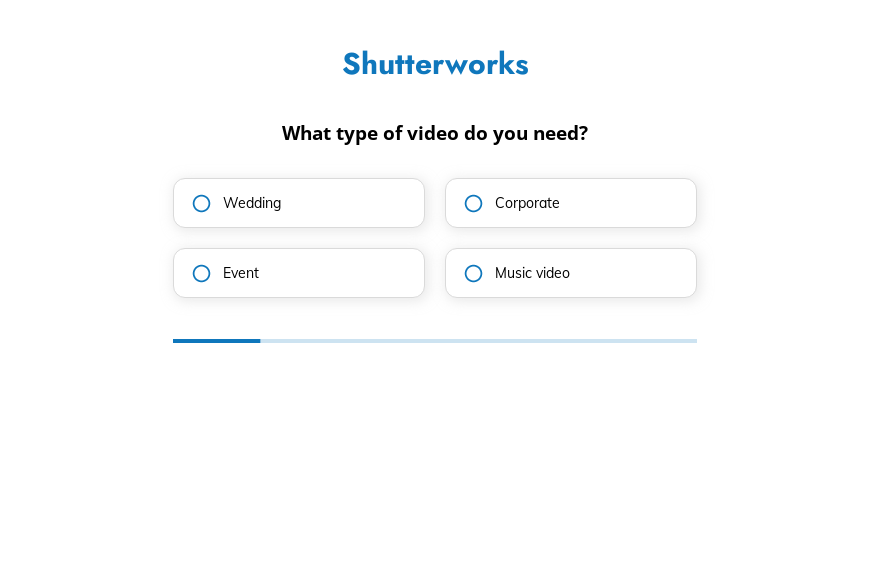
This six-step videography inquiry form asks the type of video, the filming style, the final length, the deadline and any notes, followed by the contact details. Clone it into your Growform account and add your showreel.

What the form asks, step by step

Videographers are hired for their style, so this form asks about style directly. Length and deadline complete the information needed for a quote.

  1. Step 1: “What type of video do you need?”

    Weddings, corporate films, events and music videos each have their own packages.

  2. Step 2: “What’s your preferred filming style?”

    Cinematic, documentary, storyboarded or freestyle shows whether your style is a fit.

  3. Step 3: “How long should the final video be?”

    Final length drives editing time more than any other answer.

  4. Step 4: “When do you need the video by?”

    Short deadlines can be flagged and priced before you reply.

  5. Step 5: Notes

    Clients can share the date, the venue or a reference film here.

  6. Step 6: “How shall we contact you?”

    Name, email and phone come last.

  7. After submitting

    After submitting, clients see a default thank-you, which a videographer might replace with their showreel.

Who it’s for

Freelance videographers and small production companies use this template as the video request form on their website. It works for weddings, corporate shoots, events and music videos in one form, because the first step splits them. Each inquiry tells you the style the client wants and how much editing the final cut will need, so your first reply can include a price.

Why this structure converts

  • The style question helps clients describe what they want in words they already know.
  • Length and deadline together give you the information to price editing time.
  • Clients add notes only after the structured questions, so the notes add detail rather than repeat it.
Use this template

14-day free trial, no credit card

Make it yours

  • Add the event date

    For weddings and events, add a date field so you can check availability before replying.

  • Show style examples

    Use image buttons or short descriptions on the style step so clients see what each style looks like.

  • Link your portfolio

    Redirect clients to your portfolio after they submit so they watch your work while you prepare a quote.

Frequently asked questions

What should a videography questionnaire ask?

It should ask the type of video, the preferred style, the final length and the deadline. Dates, locations and references can be added in the notes.

Can one form cover weddings and corporate work?

Yes. The first step separates them, and you can route each type to a different package or calendar.

Which tools can receive inquiries?

Growform sends inquiries to HoneyBook, Dubsado, Tave or a Google Sheet, and can post alerts in Slack.

What happens next?

  1. Step 1: Clone this form template

    Clone this template into your Growform account (create one first if you don’t already have one).
  2. Step 2: Edit your form

    Get creative and adjust your form's theme options, questions or layout in the Growform form builder.
  3. Step 3: Share or embed your form

    Share a link to your form, or embed it in your existing website. Receive new submissions by email or send them to 7,000+ apps via Zapier.

Start your free trial

Build multi-step forms just like this one. 14-day free trial, no credit card required.