
Open with a button question
Add a “Buttons” field for the first question. A single-choice button advances the form when it is clicked, so the first step takes the lead one click.

Feature
A lead qualification form asks about the property, the budget and the timing before it asks for a phone number. Your sales team or lead buyer receives each lead with the answers that decide what it is worth.
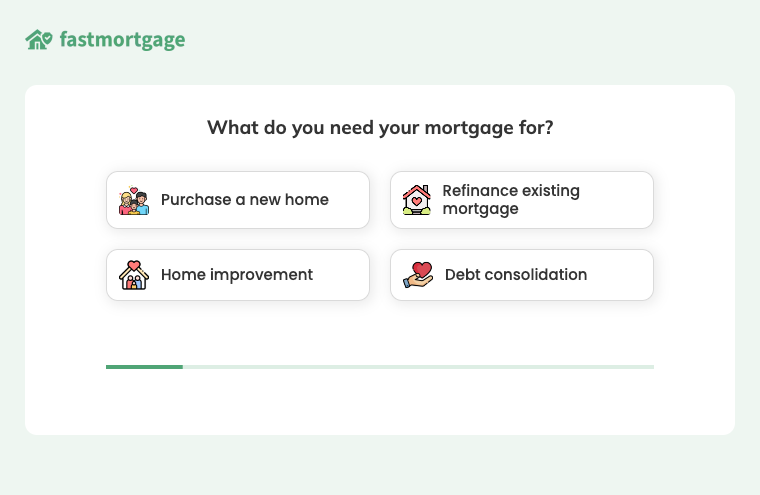
The first question is a row of buttons, and the follow-up depends on which button the lead chose.
This is the mortgage template, running live. It asks about the purpose, the product, employment and the down payment before it asks for contact details.
A lead qualification form is a form that collects the facts that decide how much a lead is worth, as well as the contact details. The lead arrives with the answers a salesperson would otherwise spend the first call collecting.
In Growform you spread these questions across the steps of a multi-step form, so the lead sees one or two questions at a time.
The best lead qualification questions are the ones where the answer changes what you do with the lead. It might change who receives the lead, what the lead is worth, or whether you can help at all. These examples show what that looks like in eight industries.
Leave a question out if no answer to it would change the price of the lead, its routing or your sales pitch.
You can change the rest of the form, the ending the lead sees and where the lead is delivered. Conditional logic uses an answer to show the next relevant question and skip the steps that do not apply.
Growform saves every answer with the lead and includes it in email alerts, webhooks and Zapier, so your CRM or lead distribution platform can route on it. Answers that rule a lead out are handled by lead disqualification, where you name each reason and choose what happens to those leads.
Add a “Buttons” field for the first question. A single-choice button advances the form when it is clicked, so the first step takes the lead one click.
Select a field, open “Conditional logic” and choose “Edit logic” to show that field only after a particular answer. Whole steps can be shown or skipped the same way.
The “Slider” field has a minimum, a maximum, an increment size and a unit symbol. Switch on “Add '+' at top of range” for answers such as $50,000+.
The “Date of birth” field supports the rules “Is older than” and “Is younger than”. Address and ZIP code fields support distance rules that test whether the lead is inside your service area.
The salesperson already knows the property, the budget and the timing, because those answers arrive with the lead.
A refinance lead and a purchase lead carry different answers, so your CRM can send them to different people.
The attributes a buyer asked for are attached to the lead as the answers the lead gave.
An answer that rules the lead out can end the form early and keep the lead away from your CRM.
Buttons, sliders, conditional logic and lead disqualification come with every Growform plan.
Yes, in your CRM. Growform sends every answer and any disqualification reasons through webhooks or Zapier, where your own scoring rules apply.
Yes. Conditional logic shows or hides single fields and whole steps, so a refinance lead and a purchase lead can follow different paths through the same form.
They appear in your leads table in Growform and in the CSV export. They are also included in every email alert, webhook and Zapier delivery for that lead.
Yes. Add a “Date of birth” field and use the rules “Is older than” or “Is younger than” in conditional logic or in a disqualification reason.
Create beautiful multi-step forms that convert, with a 14-day free trial. No credit card required.


