
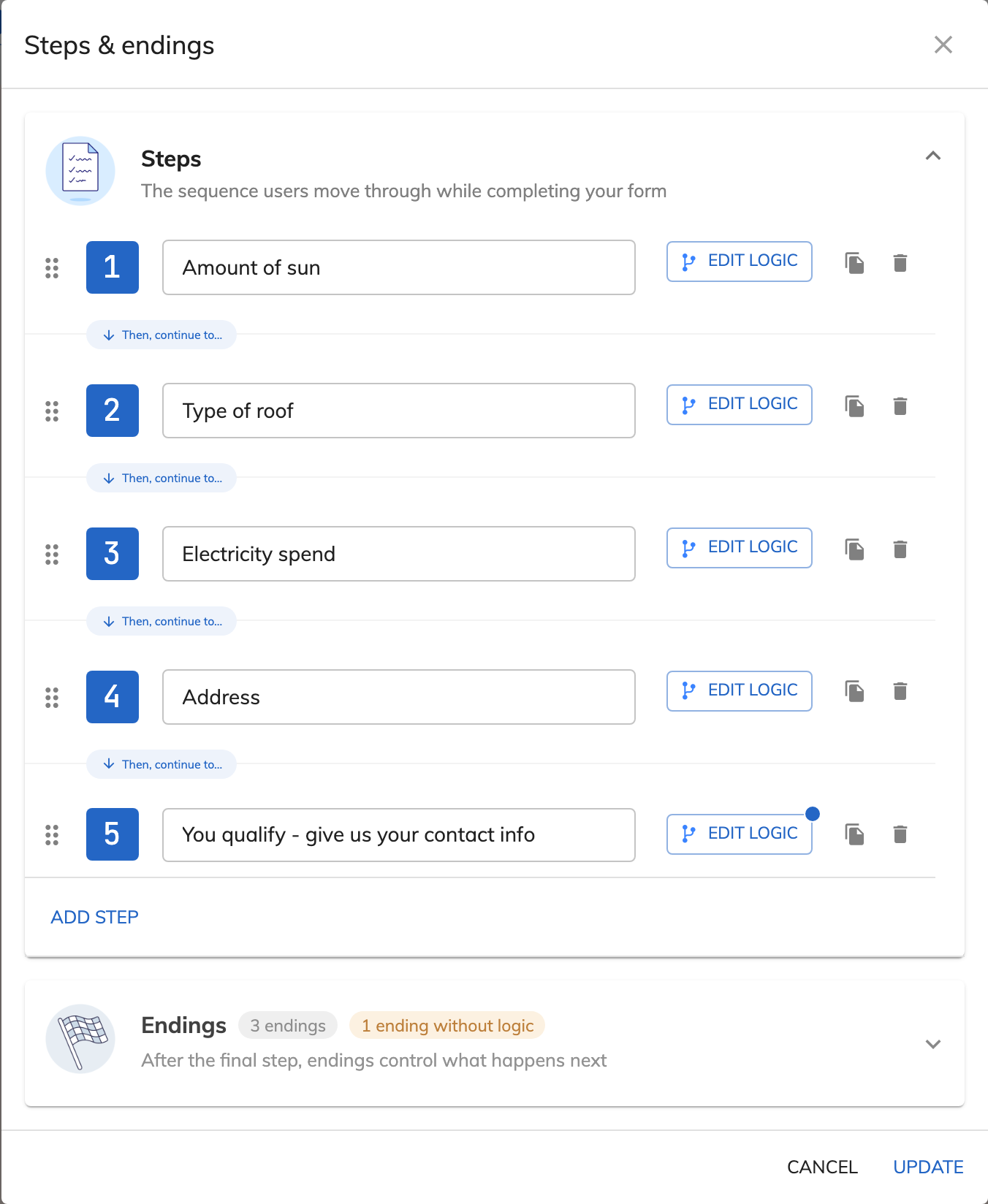
Open the step manager
Click the step dropdown in the top-left corner of the builder and choose “Edit steps”.

Feature
Growform spreads your questions across short steps and asks for contact details on the last one. You get more completed forms from the traffic you already pay for, and each lead arrives with the answers your sales team needs.
This is a Growform lead form being filled in. Each step asks for one thing, and the form moves on as soon as the question has been answered.
This is the solar template, running live. Answer the first question to see how the form moves from step to step.
A multi-step form is a form that asks its questions across several short screens, with a button to move from one to the next. Your lead sees one easy question at the start, where a single-page form would show every field at once.
Every Growform form is built as a sequence of steps followed by an ending. You add as many steps as your questions need, and conditional logic can show or skip whole steps based on earlier answers. A homeowner and a business owner can then take different routes through the same form.
They get more completions because each step asks for very little. A single-page lead capture form on a phone means scrolling past a dozen empty fields before typing anything. A step fits on one screen and can often be answered with one tap.
The order of the questions matters as much as the layout. A roofing form that opens with “What type of roof do you have?” is easier to start than one that opens with a phone number field. When the contact details sit on the final step, the lead reaches them having already described what they need.
The lead moves on by clicking the continue button or, on many steps, by clicking an answer. A single-choice Buttons field advances the form on click and hides the continue button automatically. When “Can select multiple” is switched on, the continue button stays in place so several answers can be picked first.
A step that holds a loading animation advances by itself after a delay you set, from 0.5 to 5 seconds. A progress bar shows how much of the form is done, and you choose the transition that plays between steps, such as “Fade - fast” or “Swipe”.
The form shows an ending, which is either a thank-you screen you design inside the form or a redirect to a URL. One form can have several endings, and each ending has its own logic. Growform checks them in order and uses the last one as the fallback. A qualified lead can be sent to your booking page while everyone else reads a thank-you message.
Click the step dropdown in the top-left corner of the builder and choose “Edit steps”.
Choose “Add step” and give each step a name. The names are for your own reference and are never shown to the lead.
Drag a step to a new position, or duplicate it to copy every field, header and paragraph it contains. Deleting a step removes everything inside it.
Choose “Update” to close the step manager, drag your fields onto each step and save the form.
A single-choice Buttons field moves the form forward on click, so starting the form asks for no typing at all.
You control the order of the steps, so the name, email and phone number can wait until every other question is answered.
Conditional logic skips the steps that are irrelevant to the answers already given.
Growform sends an event to Google Analytics and the Meta Pixel whenever a step is completed, which gives you a funnel for every form.
Every Growform plan lets you build forms with as many steps as you need.
You see it in your own analytics. Growform sends a step-completed event to Google Analytics and the Meta Pixel, and you build the drop-off funnel there. A drop-off report inside Growform arrives in 2026.
No. You paste one script tag into your page, or you share the link to the form that Growform hosts for you.
Yes. Growform has 250+ templates, and you can edit every step of a template after you choose it.
Create beautiful multi-step forms that convert, with a 14-day free trial. No credit card required.


