
What Is a Lead Capture Form and How It Converts Traffic
A lead capture form is a focused web form that trades value for contact and qualification data to create a sales-ready lead. 74% of businesses use online forms for lead generation, and nearly 50% say forms are their highest-converting lead source (PrimeView).
You've paid for the click. The ad is relevant, the landing page loads, and the visitor reads enough to understand the offer. Then they leave without sharing an email address, phone number, or any detail your sales team can use. The campaign still records a visit, but the opportunity disappears.
That's the gap a lead capture form fills. It turns anonymous interest into an identifiable contact by offering something useful in return, such as an insurance quote, a solar savings estimate, a downloadable guide, a consultation, or a product demo. The form's job isn't only to collect data. It must make the exchange feel worthwhile, ask for information the business can act on, and move the submission into the next system quickly.
Table of Contents
Table of Contents
- Introduction What a Lead Capture Form Really Does
- How Lead Capture Forms Work Behind the Scenes
- Main Types of Lead Capture Forms Explained
- Why Lead Capture Forms Drive Paid Acquisition and Mobile Results
- Best Practices for Attribution Validation and Delivery
- How Growform Solves Common Lead Capture Challenges
- Key Takeaways and Next Steps for High Converting Forms
Introduction What a Lead Capture Form Really Does
A practical answer to what is a lead capture form starts with the exchange. A visitor gives a business permission and information, while the business provides immediate value or a clear next step. The resulting record can support email follow-up, a sales conversation, appointment booking, lead distribution, or qualification against an ideal customer profile.
Forms are widely used because they give paid acquisition a destination. Search and social campaigns can bring people to a page, but the form creates the handoff from media to marketing and sales. The visitor stops being only a browser session and becomes a lead record with a source, a stated need, and a possible route through the funnel.
A form isn't the finish line. It's the front door to the sales process.
Consider a home services campaign. A headline offering a roof inspection may attract attention, but a useful form asks enough to determine the property type, service area, and preferred contact method. A software demo form follows a different logic. It may need a work email, company name, role, and use case, because the sales conversation depends on context.
The visible fields are only one part of the system. Behind them sit validation rules, consent records, hidden campaign parameters, routing logic, and integrations. If those pieces fail, a completed form can still become an untraceable or unusable lead.
Marketers who are designing the surrounding page can also benefit from guidance on lead-generation website design from Digital Skyrocket, especially when the page must focus attention on one action. For practical examples of different layouts and offers, review these lead capture form examples.
By the end, you'll be able to choose between single-step, multi-step, and quiz-style forms, reduce avoidable friction, preserve attribution, document consent, and route each submission to the right destination. That's how you build a form that produces more than a database entry.
How Lead Capture Forms Work Behind the Scenes
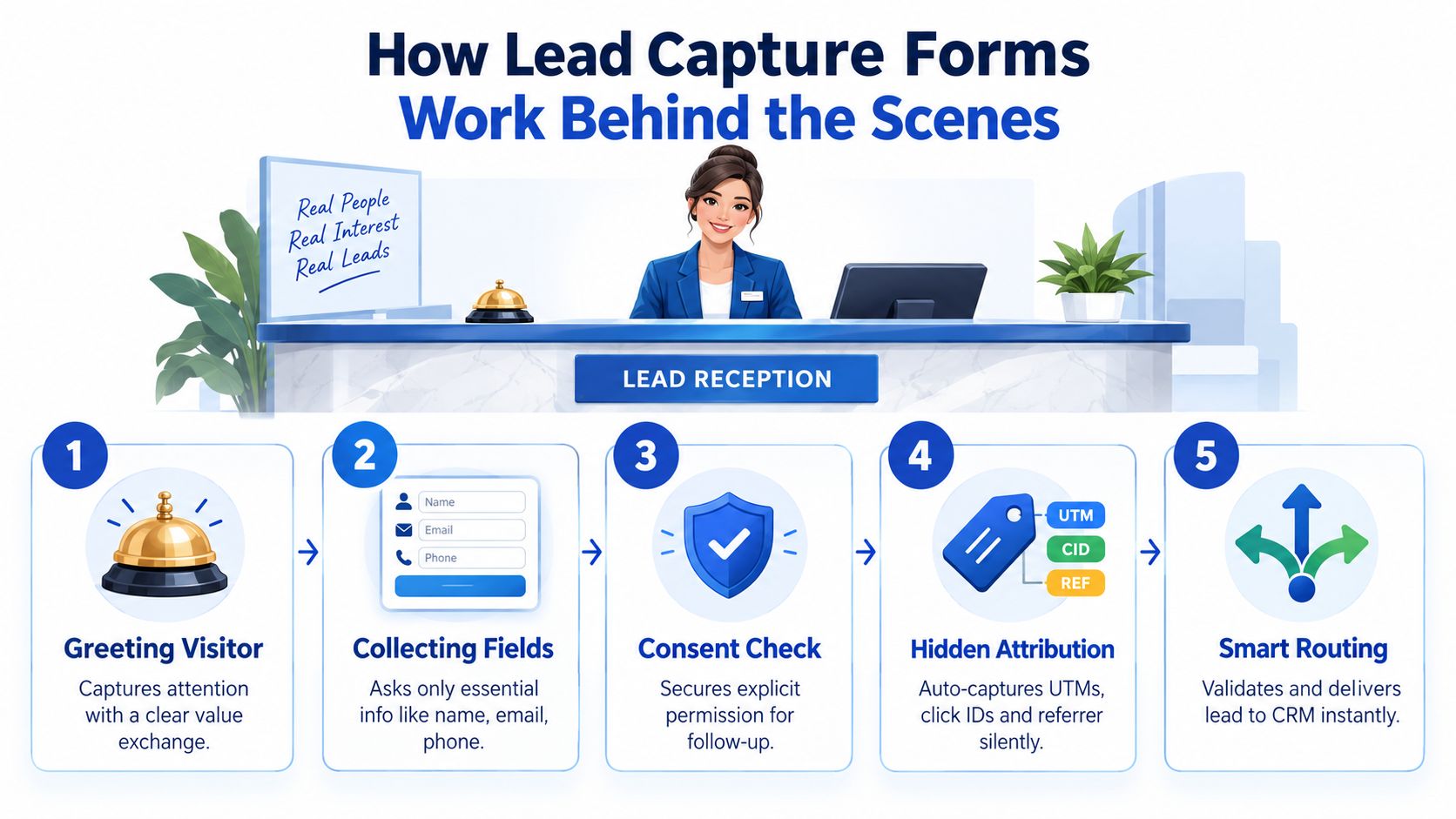
Think of a lead capture form as a digital reception desk. A receptionist greets a visitor, asks what they need, records useful details, checks whether the request belongs to the business, and sends the visitor to the right person. A well-built form follows the same sequence, only the work happens across a browser, a form platform, and downstream systems.
The visible and invisible parts
The visitor sees labels, input boxes, a button, and perhaps a progress indicator. The form may collect:
- Contact details: Name, email, and phone when direct contact is part of the offer.
- Qualification answers: Service area, company information, product interest, or project requirements.
- Consent information: Disclosure text, checkbox state, and permission for the stated follow-up.
- Validation signals: Checks that identify malformed emails, invalid phone entries, or incomplete required fields.
- Attribution data: UTMs, click IDs, referrer information, and page URL captured without asking the visitor to type them.
The difference between contact collection and qualification matters. An email address lets a team follow up, but a qualifying answer helps determine what should happen next. A local HVAC campaign may need the property location and service type, while a B2B software campaign may care more about role and use case.
What happens after submission
When the visitor selects the call to action, the form validates the visible inputs and packages them with hidden data. The submission can then move to a CRM, email platform, lead distribution system, spreadsheet, or notification workflow.
A real-time handoff allows the next team to act while the visitor's interest is still fresh. A delayed or broken handoff creates a dangerous illusion: the dashboard shows a conversion, but nobody receives the record or knows which campaign generated it.
For teams planning the page itself, Wojo Media's guidance on conversion-focused landing pages offers useful context on aligning page structure, message, and action.
The plumbing view changes how you evaluate a form. You don't ask only whether it looks good. You ask whether it preserves the journey from ad click to qualified lead, including the evidence needed to understand, contact, and legally process that lead.
Main Types of Lead Capture Forms Explained
The right format depends on the visitor's intent, the offer's complexity, and the amount of qualification your sales process requires. A newsletter signup and an insurance quote shouldn't feel identical, because they ask for different levels of commitment.
Single-step forms
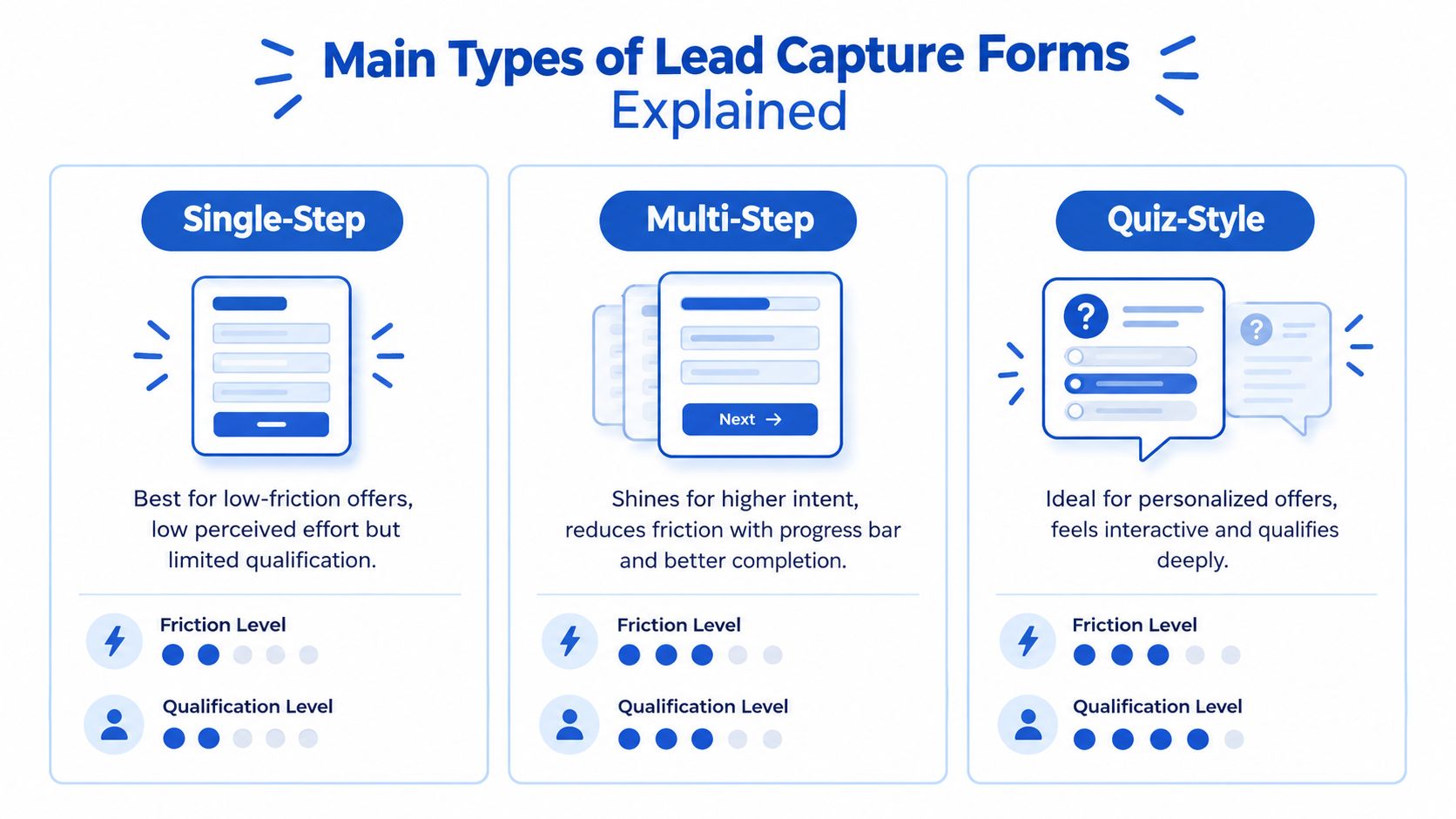
A single-step form puts the complete request on one screen. It works well when the exchange is simple, such as receiving a guide, joining an email list, or requesting a basic callback.
Its strength is clarity. Visitors can see the full task immediately, and there's no uncertainty about how many screens remain. Its weakness appears when qualification requires many questions. A long page of fields can look demanding, particularly on a phone, and visitors may abandon it before they understand why every answer matters.
A low-friction home services inquiry might ask for name, phone, email, and service type. The business can collect deeper details during the follow-up conversation rather than making the first interaction feel like an application.
Multi-step forms
A multi-step form distributes questions across separate screens. The total information collected may be substantial, but each interaction feels smaller. A progress bar can make the remaining effort visible, while conditional logic can prevent irrelevant questions from appearing.
This format fits an insurance quote, mortgage inquiry, or solar assessment where the business needs meaningful qualification. Benchmark data reports that two- to three-step forms convert at 28% to 35%, and another benchmark reports that multi-step forms can outperform equivalent single-page forms by about 14% overall, with a lead-generation-specific lift around 21% (Foundry CRO).
Quiz-style forms
A quiz-style form frames data collection as a guided assessment. Instead of opening with a block of fields, it asks a sequence of questions that appears to personalize the result.
A solar campaign might ask about property ownership, energy usage, roof characteristics, and location before presenting an estimated next step. The format can feel more relevant because each answer shapes what comes next, but it needs careful logic. A confusing question or an irrelevant branch can reduce trust quickly.
| Form Type | Best For | Friction Level | Qualification Power |
|---|---|---|---|
| Single-step | Simple downloads, callbacks, and newsletter signups | Low when the field count is limited | Basic |
| Multi-step | Quotes, consultations, and complex service inquiries | Moderate, with effort spread across screens | Strong |
| Quiz-style | Personalized recommendations and guided assessments | Interactive, but dependent on clear questions | Deep |
Use a single-step form when the offer is easy to understand and qualification can happen later. Split the journey when the business needs more context or when a long list of fields would make the first screen feel intimidating. Teams comparing implementation options can use this guide to the best form builder software for 2026, while this overview of different form types can help connect formats to use cases.
Why Lead Capture Forms Drive Paid Acquisition and Mobile Results
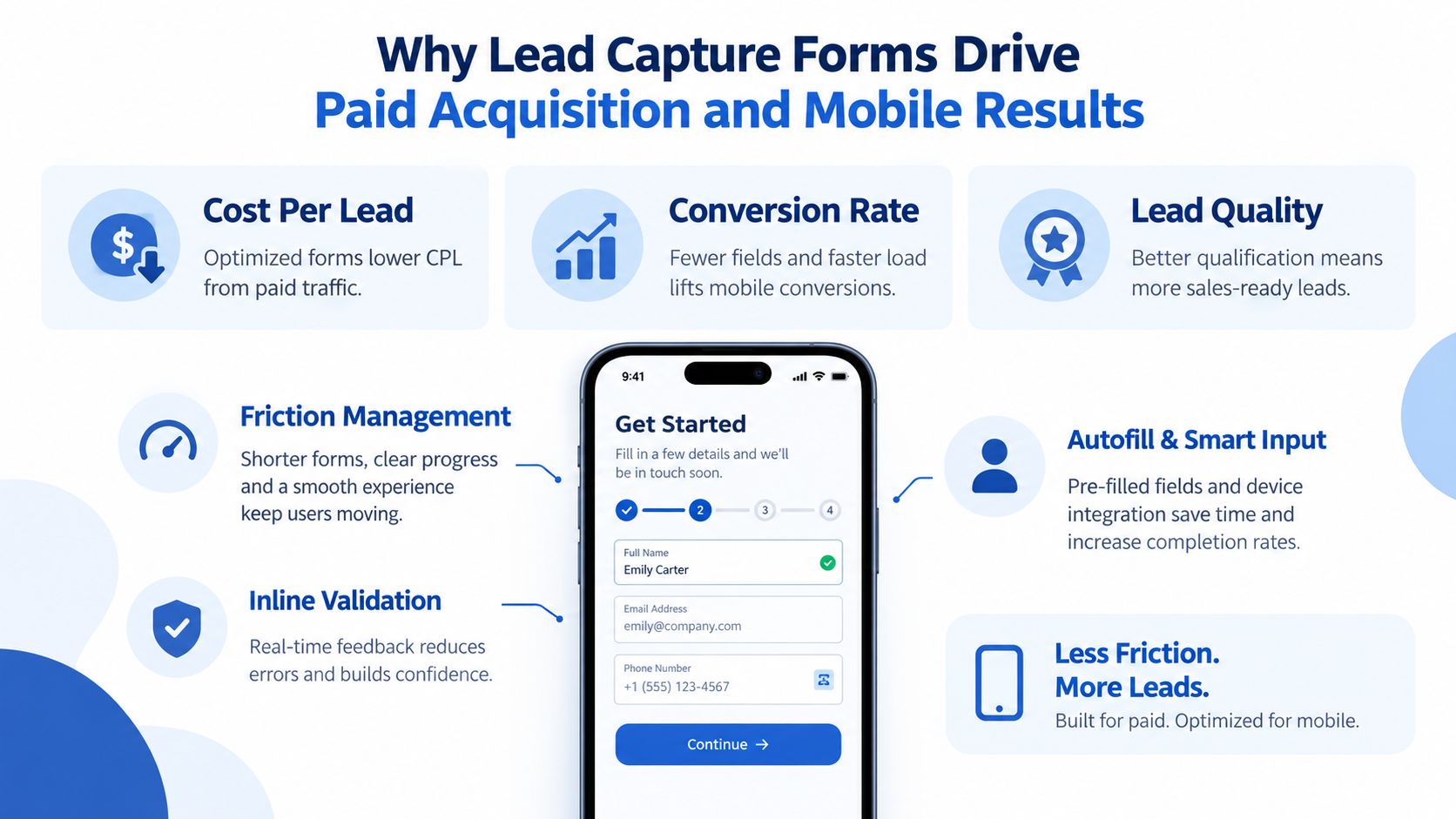
A paid ad sends a visitor to a page, but the lead capture form controls what happens to that acquisition. It collects contact details, preserves the handoff into the funnel, and can qualify the inquiry while the visitor is still engaged. In that sense, the form is the front end of the paid acquisition stack, the plumbing between ad spend, attribution, consent, sales action, and revenue.
The key measures are conversion rate, cost per lead, and lead quality. Conversion rate shows how many visitors complete the intended action. Cost per lead connects those completions to media efficiency. Lead quality shows whether sales or a buyer can use the submission. A high conversion rate has limited value if the form produces records that cannot be contacted, routed, or accepted.
Field count affects this balance. A controlled lead-generation experiment recorded a 13.4% conversion rate and a $31.24 cost per lead for a five-field form. Adding fields lowered conversion to 12% and then 10%, while cost per lead increased to $34.94 and $41.90 (PrimeView). The lesson is not to remove every question. Each field should justify its place by improving qualification, routing, or follow-up.
Mobile friction is usually perceived effort
A phone user has less space to inspect the page, enter information, and fix mistakes. Repeated scrolling, small tap targets, and manual address entry can make a reasonable desktop form feel demanding on a narrow screen. A clear mobile form UI guide can help teams review these interactions before launch.
Useful friction controls include:
- Progress indicators: Show visitors where they are in a multi-step journey.
- Inline validation: Flag an invalid email or phone entry before the final submission.
- Autofill support: Reduce typing in common contact fields.
- Address lookup: Let users complete location details with less manual entry.
- Single-column layouts: Keep the next action visible and easy to follow.
Abandonment makes these details commercially important. One 2026 benchmark summary reported a 67.4% average lead-generation form abandonment rate and a 68.7% overall form abandonment rate, while another compilation reported that 81% of people had abandoned a form after beginning it (GreetNow). The same compilation associated abandonment with security concerns for 29% of respondents and form length for 27%.
A shorter form is not automatically better. A phone number may support appointment scheduling, while a service area may keep a local campaign from producing unusable inquiries. Test the complete mobile journey on an actual phone, from ad click through confirmation and the next sales action.
Best Practices for Attribution Validation and Delivery
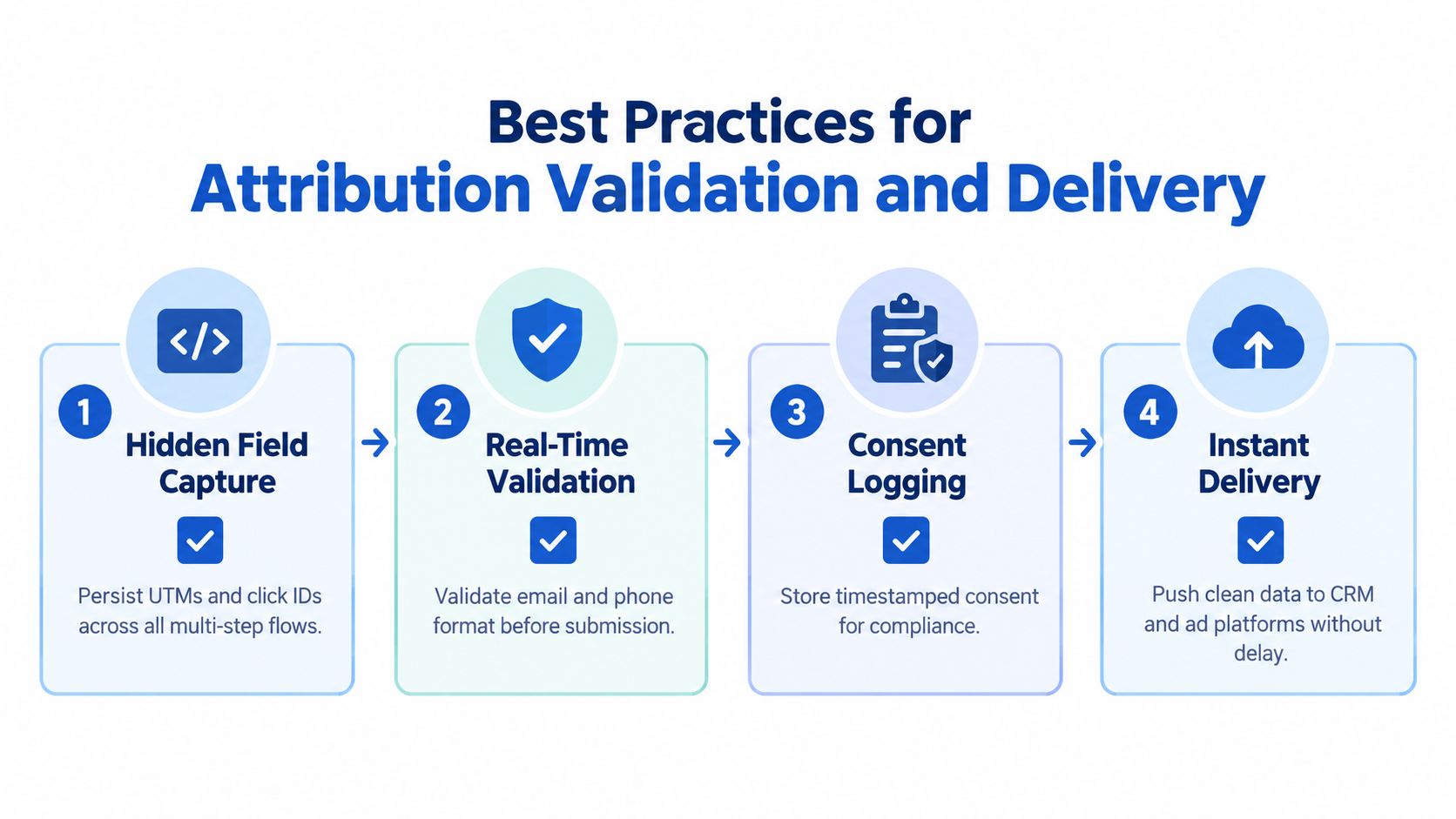
A form can convert well and still damage campaign measurement if it drops the information that explains where the lead came from. Paid acquisition teams need the submission to carry its context from the original click into the CRM, buyer payload, and reporting layer.
Preserve the source through every step
Capture UTMs, referrers, and click IDs as soon as the visitor arrives. Store them in hidden fields or an equivalent session layer, then pass them through every step of a multi-step or quiz-style flow.
If a visitor arrives from a paid search ad and the click ID disappears before submission, the CRM may show a lead without a reliable campaign connection. That makes budget decisions harder and can prevent ad platforms from receiving useful conversion feedback.
Server-side conversion signals can add resilience when browser-based tracking is limited. The implementation should align the event with the same lead record and preserve the identifiers needed for matching, rather than firing a disconnected success event.
Validate before the record travels
Validation protects both conversion reporting and downstream teams. Check email structure, phone format, required answers, and logical conditions before the submission enters a CRM or distribution platform.
A validation failure should explain what needs fixing beside the relevant field. If the form resets or shows a vague error, a genuine visitor may leave, while bad data can still enter if the rules are too loose.
Treat consent as part of the payload
Regulated and high-value lead workflows need more than a contact record. Compliance guidance recommends storing the exact UTC timestamp, IP address, user agent, page URL, form version, exact disclosure text shown, checkbox state at submission, and a cryptographic hash or signature of the record (SB Help Group).
The purpose is reconstruction. A team should be able to determine what the visitor saw, what they agreed to, when the action happened, and which form version produced the record. If the disclosure or seller identity can't be recovered, the lead may be difficult to use in TCPA- or one-to-one-consent-sensitive workflows.
Deliver immediately
Use webhooks or native integrations to send clean records to the CRM, lead distribution platform, notification channel, and relevant ad systems. Instant delivery supports speed-to-lead, prevents manual copying, and gives buyers the information they need to accept or reject a lead.
A useful operational test follows the entire chain. Submit a controlled test lead, verify every field and attribution value, confirm the consent evidence is attached, and check that the receiving system triggers the intended alert or workflow. A form isn't operationally complete until the record arrives correctly at its destination.
The broader industry gap is often operational rather than visual. Guidance on lead-generation compliance and capture infrastructure emphasizes preserving consent and source details alongside the lead, which is why the form belongs at the front of the acquisition stack.
How Growform Solves Common Lead Capture Challenges
A purpose-built lead capture layer connects the visitor experience to the systems that qualify, measure, and distribute leads. Growform is one option for teams that need multi-step and quiz-style flows, conditional logic, hidden-field pass-through, validation, consent evidence, and real-time delivery in one capture workflow.
The practical benefit is coordination. Progress bars, address lookup, inline validation, and mobile-oriented components reduce the perceived burden of longer forms. Conditional logic can show a relevant question based on an earlier answer, while disqualification rules can keep unsuitable records away from sales teams and buyers.
Attribution needs the same continuity. UTMs, referrers, and click IDs can pass through the form instead of being lost between the landing page and CRM. Server-side conversion integrations can support the advertising feedback loop, while phone and email verification through Twilio and Zerobounce can identify entries that need attention before delivery.
Consent evidence also belongs in the initial record. Integrations with TrustedForm and Jornaya support workflows where buyers or carriers require proof attached to the lead. That proof is more useful when the form stores the disclosure and submission context at capture time rather than asking an operations team to reconstruct it later.
Delivery determines whether the capture process creates a conversation. Webhooks and integrations can send submissions to systems such as HubSpot, Salesforce, GoHighLevel, Google Sheets, and lead distribution platforms. Notifications through email, SMS, or WhatsApp can help the assigned team respond without waiting for a batch export.
This setup differs from a native CRM form or a general landing page builder. Those tools may handle basic contact collection, but they can become restrictive when a campaign needs quiz paths, disqualification, buyer-specific payloads, verification, or consent documentation. A no-code capture layer lets marketers adjust the funnel without making every field change a development project.
The key is to evaluate the handoff, not just the editor. Ask whether the system preserves attribution, validates the record, stores consent evidence, and delivers the lead to the right destination without manual intervention.
Key Takeaways and Next Steps for High Converting Forms
A lead capture form is a value exchange, a qualification interface, and a data handoff. The visible form matters, but the hidden plumbing determines whether the submission can be measured, contacted, routed, and defended.
Use this decision framework:
- Choose single-step when the offer is simple and the first interaction needs minimal commitment.
- Choose multi-step when the form needs several answers and the task would look intimidating on one screen.
- Choose quiz-style when personalization helps visitors understand the offer and the answers determine the next path.
- Keep essential fields only when a question doesn't improve qualification, routing, or follow-up.
- Preserve attribution and consent so every lead carries its source and the evidence behind permission.
- Test delivery end to end by confirming that the CRM, buyer, notification, and reporting systems receive the expected record.
The strongest form doesn't end when someone clicks the button. It ends when a qualified lead reaches the right person or buyer with enough context to take action. Start with one paid campaign, remove the clearest friction point, and verify the full path from ad click to downstream delivery.
Growform gives performance marketers a no-code way to build multi-step, quiz-style, and single-step lead capture forms with qualification logic, attribution pass-through, consent integrations, verification, and real-time delivery. Visit Growform to create a capture flow that turns paid traffic into usable sales opportunities.