
25 lead generation form examples to steal in 2026
From one-field newsletters to mortgage forms, we filled out 25 lead generation forms of every type. Here's what works in 2026, and what to learn from them.

Published 8 min read
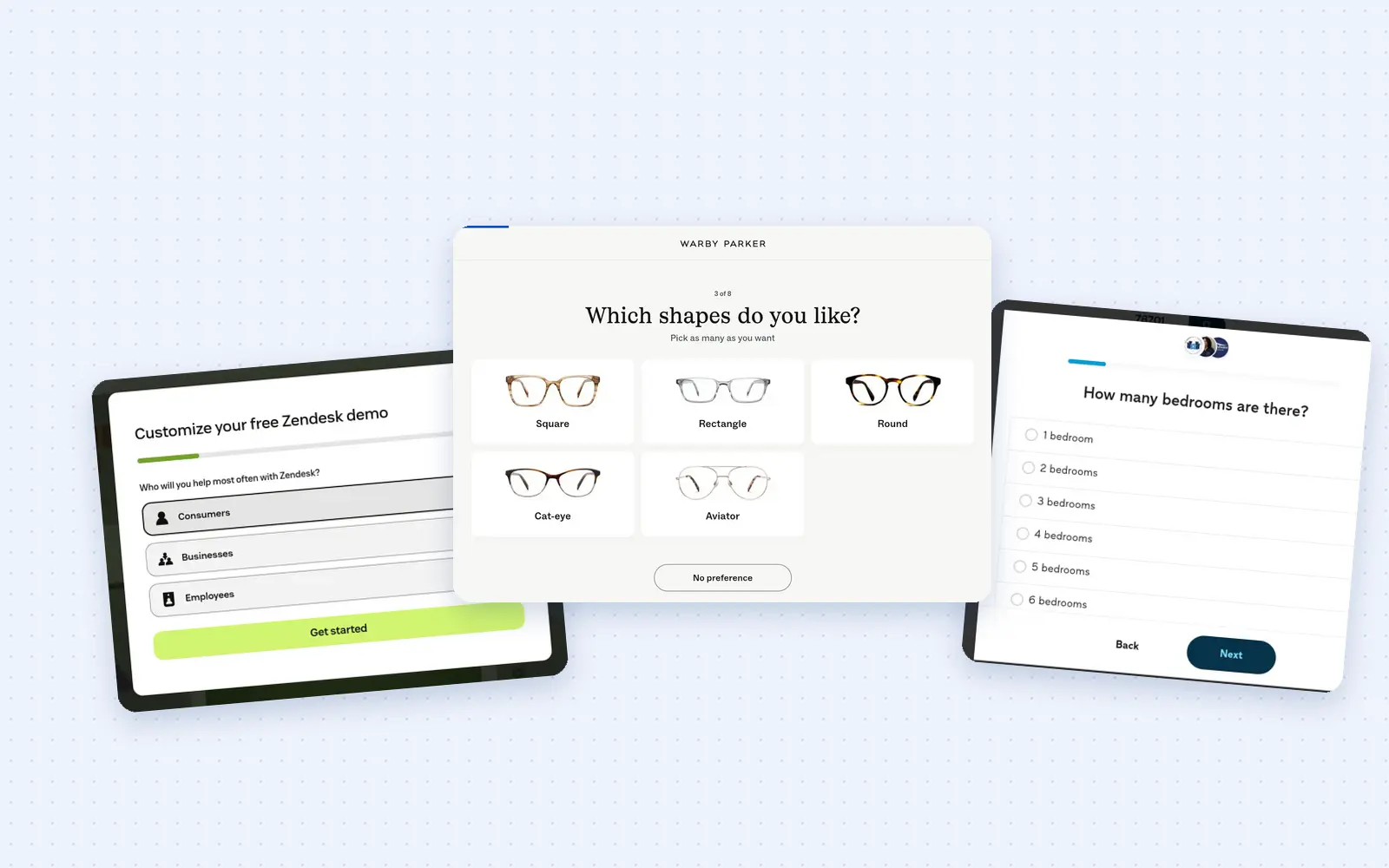
Every lead generation form is a trade: you'll hand over your phone number or an email address in return for a quote, a demo or an eligibility check. The most successful lead gen forms make that trade feel fair.
We spent a day filling out lead generation forms across insurance, home services, healthcare, legal, education, SaaS, media and retail, screenshot by screenshot, so you don't have to.
Inspired by our multi-step form examples post, this post covers every type of lead gen form, from a one-field newsletter box to a chat that pre-qualifies a mortgage, and it shows every screen of each one.
A lead generation form is any form whose purpose is to turn a visitor into a contact you are allowed to follow up with. That includes quote forms, quizzes, demo requests, free trial sign-ups, gated downloads, newsletter boxes, popups and the native lead forms inside LinkedIn and Meta ads.
We sorted the examples by type, because you probably already know what sort of form you're planning and need inspiration. This is probably the most comprehensive collection of lead generation forms on the Internet, so get that bookmark bar ready.
What the best lead generation forms get right
We noticed nine lead generation form best practices that kept showing up in the forms that felt easiest to finish. We recommend reading these first so you know what you're looking for in the examples.
The best practices:
1. Open with a question that changes the answer. The first screen should ask the thing your quote, match or routing actually depends on, and nothing else. Thumbtack opens with the project and a ZIP code, Optima Tax Relief with how much you owe, and A Place for Mom with a location. Each one is a question the visitor already knows the answer to, and each one makes the next screen relevant.
2. Pay before you ask. Hand over something before the contact fields: a discount, a match, a "you qualify". AG1 prints "You've earned 20% off" above its email field, hear.com says "YOU QUALIFY!" before it asks for a ZIP code, and Thumbtack shows the matching cleaners before it asks for anything. Once the visitor has been given a result, the email field reads as the way to keep it.
3. Show how far there is to go. A step count on the first screen turns an open-ended form into a short task with a visible end. Warby Parker shows "1 of 8" above its first question, Invisalign numbers its quiz 1/5 to 5/5, and Morning Brew labels its profile steps "1 of 3". A visitor who can see the end of a form is far more likely to reach it.
4. Ask for the phone number last, by name. Zendesk's demo form asks "Thanks Test, what's your phone number?" on its own screen, after the email and the name. Thumbtack puts the phone on the final screen with the ZIP check. The phone field is where lead forms die, and putting it last, with the visitor's own name on the screen, is the cheapest fix there is. Growform's callouts drop an earlier answer into any later heading the same way.
5. Give every optional ask a visible exit. Warby Parker labels its email screen "No, thanks. Let's skip it." AG1 offers "Skip & see results", and Thumbtack puts a Skip button on every question that does not change the match. A skip button loses a few emails and keeps the people who would otherwise have closed the tab.
6. Make the submit button promise the outcome: "See if you qualify", "Get my results", "Get your free quote", "See your options". None of the best forms here say Submit. The button is the last thing the visitor reads before deciding, and it should name what they get.
7. Write the consent line like a person and keep it beside the button. Sunrun, Morgan & Morgan and CarShield all put a plain-English sentence under the button saying who will call and that consent is not a condition of purchase. It reads as honesty, and the Telephone Consumer Protection Act (TCPA) leaves them no choice.
8. Say what happens next, on the thank-you screen or just before it. Notion's last screen says "We'll be in touch with [your email] to schedule a call." Cleveland Clinic says the request is processed in one to two business days. A visitor who knows what happens after the button has no reason left to abandon it.
9. Fork the path when you have more than one offer. Rocket Mortgage opens with three cards (refinance, access equity, buy), and Zendesk's demo form opens by asking who you will help most. The answer routes the rest of the form, and the rest of the form gets shorter.
Lead generation form examples by type
Quote form examples
Thumbtack · Sunrun · Peddle · HomeBuddy
Quote and estimate forms are the lead generation forms our customers run most, and nearly all of them are multi-step, because the format converts so well. We tore down 21 of them in our multi-step form examples post. The four below show the range, from a two-screen solar form to a marketplace that shows the match before the contact screen.
Thumbtack: house cleaning request
Thumbtack asks for the project and a ZIP code on its home page, then runs the questions in a modal while the matching cleaners sit on the page behind it. The visitor can see the reward the whole time.
1Home page search
2Frequency
3Timeline
4Results page
5Confirm details
6Bedrooms
7Cleaning type
8Extras
9Start date
10Message
11Email
12Name
13Contact
What we like
- The match comes before the contact fields. Three cleaners with ratings and response times are on screen before Thumbtack asks for an email. The form is not a gate in front of the results, it is the way to message the people you can already see.
- A promise on the first screen. "No calls or text until you message a pro" sits under the search box. That one line answers the fear that stops most people typing into a home services form.
- Email first, phone last. Screen 13 asks "Where should we send the pro's response?" with "We don't share your email with pros" under it, and the phone number only arrives on the final screen, next to a ZIP check and a reason.
What we'd test
Dropping the "Confirm some details" screen, which repeats two answers the visitor gave thirty seconds earlier, and moving the optional "Send a message to the pro" box to after submit.
Sunrun: solar quote
Sunrun's quote form is two screens. The first asks for a ZIP code and whether you own your home, the second asks how to reach you. It is the shortest form in this post that still qualifies the lead.
1ZIP and ownership
2Contact
What we like
- The two questions that decide everything. Solar is sold to homeowners in service areas, so ZIP plus "Do you own your home?" screens out the leads a rep cannot sell to before any contact detail is typed.
- "Great!" before the contact fields. The second screen opens with a one-word reward and "No obligations" in the subhead. The visitor has passed a test they did not know they were taking.
- A plain consent paragraph. The text under the button names the calls and texts, caps them at ten a month, and says consent is optional. Nothing is hidden behind a link.
What we'd test
A third screen between the two, asking about the monthly electric bill. It would let the thank-you page show a savings estimate instead of a generic message, and the bill is a number homeowners know.
Peddle: instant car offer
Peddle asks seventeen questions about the car, prints a cash offer with the car's own name on it, and only then asks for an email. The offer is the reason to finish the form.
1Vehicle
2Pickup ZIP
3Ownership
4Title
5Wheels and tires
6Battery
7Key
8Starts and drives
9Mileage
10Exterior damage
11Damage location
12Panels
13Mirrors and glass
14Catalytic converter
15Airbags
16Interior
17Flood or fire
18Offer
19Email
What we like
- A number before a name. Screen 18 reads "We'd love to buy your 2015 Toyota Corolla LE for" and then the figure. The email screen after it is the way to keep an offer, not a request for personal details.
- Every condition question is a tap. Tires, battery, damage "bigger than a baseball", flood or fire: each is a card with a full-sentence answer, so a seller never wonders whether their situation counts.
- The ownership and title questions come third and fourth. They screen out the cars Peddle cannot buy before it spends money on a call or an offer.
What we'd test
A line under the offer saying how long it is valid. A deadline on a cash figure is the strongest reason to finish the email screen now rather than later.
HomeBuddy: walk-in shower quote
HomeBuddy asks a ZIP code and sixteen icon-tile questions before a single contact field, then asks for the name and email on one screen and the phone number on another, with a reason under it.
1ZIP code
2Project
3Replacement
4Floor
5Plumbing
6Water heater
7Shower condition
8Motivation
9Bathroom update
10Shower issues
11Shower type
12Glass
13Showerhead
14Project status
15Property type
16Insurance
17Authorization
18Name and email
19Phone
What we like
- "Not sure" on nearly every screen. A homeowner who cannot name their water heater keeps moving instead of leaving.
- The phone screen explains itself. "A valid phone number is required to issue a formal estimate." sits under the field with a lock icon inside it. After sixteen taps, the phone becomes a condition of the estimate the visitor has earned.
- A mascot that marks progress. The cartoon contractor's speech bubble changes from "Let's get started" to "Almost there…" to "And the final step!". A character telling you the end is close beats a bar.
What we'd test
Cutting the lowest-value questions (glass type, showerhead) and measuring how many estimates the contractors accept, not only how many forms complete.
Quiz funnel examples
Warby Parker · AG1 · Invisalign
A quiz funnel is a lead generation form that pays with a recommendation. The visitor answers six or seven easy questions about themselves, and the email field at the end is the way to keep the result. Retail brands run them to segment, and our customers run them to qualify.
Warby Parker: frames quiz
Warby Parker's quiz is seven questions with a progress count on every screen and a skip button on every optional one. The email field comes last, and it is skippable too.
1Product type
2Style set
3Shapes
4Colors
5Materials
6Head size
7Contacts
8Email capture
What we like
- "1 of 8" on the first screen. The visitor knows the size of the task before they start, and the count never lies.
- "No preference" on every taste question. Shapes, colors and materials all offer a way out. Forcing a choice on a question the visitor does not care about produces a wrong answer and a worse recommendation.
- The email ask is honest about the trade. "Save quiz results for later" says what the email is for, and the marketing opt-in is a separate, pre-checked box the visitor can untick. We would have it unchecked, but the two asks are at least separate.
What we'd test
A preview of two or three recommended frames on the email screen, under the headline. Showing part of the result makes "save this" a far stronger ask than "we'll send you your quiz results".
AG1: product match quiz
AG1 greets new visitors with a "Try your luck" popup, then runs a six-question quiz that ends with "You've earned 20% off your first subscription order" and an email field.
1Offer popup
2Quiz intro
3Health journey
4Supplement habits
5Priorities
6Health goal
7Email gate
What we like
- The reward is earned, not offered. The 20% is framed as the prize for finishing the quiz, so the email field reads as where the coupon gets sent rather than as a sign-up.
- Every answer has a one-line explanation. "Brand new: I am starting a new health journey and don't know where to begin." The visitor self-selects accurately, and AG1 gets a cleaner segment.
- A progress bar that reaches 100% on the email screen. The contact ask is inside the quiz, not after it, so it does not feel like a second form.
What we'd test
Showing the matched product above the email field. The visitor has just answered six questions about their health, and the result is the thing they came for.
Invisalign: smile quiz
Invisalign's five-step quiz asks who you are, what your smile looks like, your biggest question and where you are in the process, then asks for full contact details with a date of birth.
1Opener
2Smile type
3Top question
4Journey stage
5Contact details
What we like
- Picture cards for the smile question. Overbite, underbite, crossbite and gap teeth are drawn, not described, so a visitor who does not know the word can still answer.
- "What's the number one question you have?" The answer (cost, time, will it work, in-person visits) tells the local provider what to lead with on the first call.
- The journey question sorts the lead. "I've just started my research" and "I'd like to set up an appointment" are different leads, and the form captures that before the phone number.
What we'd test
Dropping the date of birth from the contact screen. It is the one field that makes the form feel medical rather than curious, and the age question could be a range on screen one.
Eligibility and qualification form examples
hear.com · A Place for Mom · Optima Tax Relief
These forms exist to find out whether the visitor is a lead at all. They ask the disqualifying questions first, pay the visitor with a "you qualify", and only then ask how to reach them.
hear.com: trial eligibility
hear.com runs a long questionnaire to qualify visitors for a 45-day hearing aid trial. Between the questions it drops testimonials, financing news and a "YOU QUALIFY!" screen, and it asks for the phone number on the very last screen.
1Opener
2Tinnitus
3Motivation
4Hearing goals
5Credit score
6Good news
7You qualify
8ZIP code
9Name
10Phone
What we like
- Good news as an interstitial. "Good news! You're eligible for flexible financing options from 12-60 months" appears right after the credit score question. The form answers the fear it just raised.
- Testimonials between questions. Two short customer quotes with star ratings sit inside the flow, each where a visitor might be wavering. Social proof mid-form is rare and it works here.
- The phone number is the only contact field. No email, no address. hear.com sells by phone, so it asks for the one thing it will use and nothing else.
What we'd test
Collapsing the "Saving..." screens. There is one after almost every answer, and each is a beat where the visitor can leave. A progress count would do the same job without stopping the flow.
A Place for Mom: care finder
A Place for Mom asks eleven questions about the person who needs care, from mobility to monthly budget, then shows "We are tailoring your list..." and asks for contact details to see the options.
1Location
2Who needs care
3Age
4Urgency
5Current home
6Care type
7Mobility
8Cognition
9Budget
10Contact
What we like
- The answers rewrite the questions. Choose "Mom" on screen 2 and every later screen says "your mom". It is a small thing that makes an eleven-question form feel like a conversation.
- "Good news" after the timeline question. Answer "Immediately" and the next headline says "We can help you find care upon very short notice." The visitor's worry is met before the next question.
- The budget question comes last and explains itself. "This includes rent, food, and care. You can always edit this later." It is the hardest question, so it comes after ten easy ones, with a reason and an escape hatch.
What we'd test
A count on the progress bar. The bar only appears from screen 8, and a visitor on screen 4 has no idea how much is left.
Optima Tax Relief: free consultation
Optima's form opens in a popup with two dropdowns, how much you owe and which state you live in, and then declares "You Qualify for a Free Consultation!" above the contact fields.
1Debt range
2State
3Contact details
4Consent and submit
What we like
- Two questions, both disqualifiers. Debt amount and state are the two things that decide whether Optima can take the case, and they are the only two things asked before the contact screen.
- A three-segment progress bar in a popup. The visitor can see the whole form is three steps before they pick an answer.
- The qualifying headline does the selling. "You Qualify" turns the contact fields from an application into a claim.
What we'd test
Choosing a dropdown advances the form by itself, with no button. We would test option cards instead, so the visitor sees all four debt ranges at once and taps one.
Conversational form examples
Rocket Mortgage · Lemonade
A conversational form asks one question at a time in a message thread, with answer chips instead of fields. It is the most conversational type here, and it is also the easiest to make too long.
Rocket Mortgage: chat pre-approval
Rocket Mortgage runs its pre-approval form as a chat. Three cards open it, each question arrives as a message with tappable answers, and the contact fields appear as a card inside the thread.
1Opener
2Military status
3Property type
4Buying stage
5Location
6Down payment
7Credit profile
8Contact details
What we like
- Every message acknowledges the last answer. "Single-family homes are a popular choice." "Nice, house hunting is always exciting." "Austin's got a lot to offer." It is scripted, and it still reads as attention.
- The down payment chips do the math. Pick a $450k target and the options become "3% ($13,500)", "5% ($22,500)" and so on. The visitor never has to calculate.
- A reason before the contact card. "Before diving in, can you please provide your contact info so we can guide you with the right next steps?" is a because, and it comes after eight questions have been answered.
What we'd test
A progress line in the chat header. The opening screen promises "about 3 minutes", and nothing after that tells the visitor how far along they are.
Lemonade: chat renters quote
Lemonade's renters quote is a chat with a step list beside it. It opens with "Hey there! I'll help you get a quote in no time", asks one question per screen, and uses the visitor's name and address in the questions that follow.
1Opener
2Product picker
3Name
4Address
5Bundle offer
6Reason
7Building type
8Safety features
9Household
10Dog name
11Tech value
12Final details
What we like
- The product picker is the first real question. Renters, homeowners, car or pet, as icons, and the rest of the chat is built for the one you tap.
- A bundle offer that uses the answers. "Great news, Test! Our renters in Texas save money when bundling with car" arrives right after the address, with the visitor's name and state in it. The upsell reads as a reply, not an interruption.
- Icons for the inventory questions. Building type, safety devices, who lives with you and which pets are all picture tiles, so a form that asks a lot stays a form you tap through.
What we'd test
Moving "Do you already have a renters policy for this address?" to the first screen. Lemonade can only switch or sell, and the answer changes which chat the visitor should be in.
Single-step and contact form examples
Morgan & Morgan · SNHU · CarShield
Not every lead form needs steps, and a good contact form is still a lead form. When the visitor already knows what they want and the business needs four or five facts to call them back, one screen with a strong headline and an honest consent line is the right form. The three below are the kind our customers run beside a phone number, and there are five more in our post on lead capture form examples.
Morgan & Morgan: case evaluation
Morgan & Morgan puts a seven-field "free case evaluation" form in the hero of its home page, with a case type dropdown, a details box and a "See if you qualify" button, and a chat prompt offering a free consultation beside it.
1Chat overlay and form
2Case evaluation form
What we like
- "See if you qualify" instead of Submit. The button turns a form into a test the visitor might pass, which is exactly how a personal injury lead thinks about their case.
- Case type is a dropdown, not a text box. Car accident, slip and fall, workers' compensation and the mass tort campaigns are all listed, so the lead routes to the right intake team without a human reading the details first.
- Two ways in. The form and the chat sit side by side, and a visitor who would rather type a question than fill fields has somewhere to go.
What we'd test
Splitting the form in two, with the case type and details first and the contact fields second. The details box is where the visitor explains the thing that happened to them, and it is a better opener than a name field.
SNHU: request info
Southern New Hampshire University's request-info form is one long page: four program dropdowns, then name, phone, email, a full postal address and a military question, with the consent paragraph and a phone number under the button.
1Request info form
What we like
- Program before person. The form opens with how you want to attend, the degree level, the area and the program. The visitor is asked about their plan before their name, and the admissions team gets a routed lead.
- A phone number as the alternative. Under the consent text, SNHU says consent is not required and gives a number to call instead. That line satisfies the TCPA and offers the visitor a second path.
- The dependent dropdowns stay short. Choosing an area of study narrows the program list, so nobody scrolls through every degree SNHU offers.
What we'd test
Moving the street address off the form. It is the longest ask on the page, and a ZIP code gives admissions the same routing with one field.
CarShield: warranty quote
CarShield's quote form is two columns in the hero, vehicle on the left and contact on the right, with a celebrity endorsement beside it and the consent paragraph under a green "Get your free quote" button.
1Quote form
2Button and consent
What we like
- Two labelled halves. "Vehicle information" and "Contact information" tell the visitor the form is two small jobs, not eleven fields.
- The car dropdowns depend on each other. Pick the year and the makes load, pick the make and the models load, so there is no typing and no impossible combination.
- A reason to answer "How'd you hear about us?" It sits last, after the promo code, where it costs nothing. Attribution questions belong at the end or nowhere.
What we'd test
A two-step version, with the three car dropdowns and the mileage on screen one and the contact fields on screen two, keeping everything else the same. In our experience that split alone lifts completion on forms like this.
Appointment request form examples
Cleveland Clinic
A booking form is a lead form with a calendar at the end. It has to collect enough to route the request, and it has to be honest about how long it takes.
Cleveland Clinic: appointment request
Cleveland Clinic's appointment request is fourteen screens, opening with a checklist of what you will need, and ending with a review page and the offer of a callback time.
1Intro
2Who for
3Care history
4Patient details
5Contact
6Reason
7Language
8Specialty
9Provider
10Day and time
11Payment method
12Review
13Callback
What we like
- The first screen sets the terms. "To fill out this form, you'll need" a list of three things, "This should take about 10 minutes", and the request is processed in one to two business days. Nobody starts this form under a false impression.
- Picture tiles for the yes-or-no questions. "Who is this request for?" and "Have you received care here in the last three years?" are illustrated tiles, and the avatar on the progress bar walks along the top as you go.
- A review screen before the end. Fourteen screens of answers are shown back in full before the request goes in. On a medical form, that is the difference between a lead and a correction call.
What we'd test
Moving "What is the reason for this appointment?" to screen 2. It is the question the visitor arrived with, and it currently waits behind the name, gender and address screens.
Demo request form examples
Zendesk · Notion
A demo request is the B2B lead form, and the best ones have stopped looking like contact forms. They ask one thing on the first screen and let the rest wait.
Zendesk: demo request
Zendesk's demo form is a four-screen modal that opens with "Who will you help most often with Zendesk?", then asks for the work email, the name and the phone number, one per screen, under a progress bar.
1Audience
2Work email
3Name
4Phone
What we like
- A routing question first. Consumers, businesses or employees decides which demo the visitor gets, and it is a question with no wrong answer.
- "Thanks Test, what's your phone number?" The phone screen uses the first name the visitor just typed. It is the single best example in this post of using an answer back at the visitor.
- Four fields, four screens, one progress bar. The form asks for nothing it will not use, and the bar is full on the phone screen, which it should be.
What we'd test
A company size question after the routing one. It would cost a tap and let sales decide who takes the demo before the phone rings.
Notion: contact sales
Notion's contact sales form asks for a work email alone on the first screen, a company size on the second, and the full details on the third. The fourth screen says the call is being scheduled and asks two optional questions while you wait.
1Work email
2Company size
3Contact details
4Final details
What we like
- One field, then one tap. Email, then company size as four buttons. Two screens in, Notion knows whether this is a lead worth a rep, and the visitor has typed one thing.
- The phone number is optional and says so. "Phone number (optional)" on the details screen is the right call for a company that schedules by email.
- The thank-you screen keeps working. "We'll be in touch with [your email] to schedule a call. While you wait, feel free to share more details." The two questions after submit are answered by people who have already said yes.
What we'd test
Showing the company-size buttons on the first screen beside the email field. For a visitor on a desktop it is one screen instead of two, and for Notion it is the same data.
Free trial and sign-up form examples
Zendesk · Shopify
A free trial sign-up form competes with the product itself. Every field is a field between the visitor and the thing they came to try.
Zendesk: free trial
Zendesk's trial sign-up asks for the work email first, then the name, then the phone, then a password, with "No credit card required" under every button and a review score under the headline.
1Work email
2Name
3Phone
4Password
What we like
- The same four-screen rhythm as the demo form. Email, name, phone, then the final ask. A visitor who has seen one Zendesk form knows how the other one goes.
- Proof above the first field. A 4.3 rating from 11,726 reviews sits between the headline and the email box. That is where a doubt would otherwise sit.
- "No credit card required" on every screen. The sentence that stops most trial sign-ups is answered before it is asked, four times.
What we'd test
Asking for the phone number after the account exists, inside the product, rather than between the name and the password. The trial is the reward, and the phone is the only field on the way to it that a visitor might refuse.
Shopify: free trial
Shopify's free trial starts with one email field in the hero and nothing else. Type it, and the next screen asks for the six-digit code it just sent.
1Email in hero
2Verification code
What we like
- One field on the whole page. The hero is a headline, an email box and an arrow. There is no decision to make except typing.
- Verification is the second step, not the tenth. The code screen confirms the email before Shopify asks anything else, so every later answer belongs to a real inbox.
- The arrow button. It has no label, and it does not need one. The field tells you what it wants.
What we'd test
A line under the email field saying what happens next ("We'll send a code, then set up your store"). The code screen surprised us, and a surprise on step two is a reason to check a different tab.
Gated content and webinar registration examples
Salesforce · Semrush
Gated content, from a report to a webinar seat, is the classic lead magnet, and the form in front of it sells the download. The visitor has already decided they want the thing, so the form's only job is to not get in the way.
Salesforce: State of Marketing report
Salesforce gates its State of Marketing report behind an eight-field form: name, job title, company, company size, country, email and phone, with "Get the report" as the button.
1Report access
What we like
- The button names the reward. "Get the report" is what the visitor came to do, and it is the last thing they read.
- The form sits on the report page. The headline above it says "Looking for the full report? Get access using the form below." The visitor has read the preview, and the form is the next paragraph.
- Company size as a dropdown of ranges. Nobody types a headcount, and sales gets a clean segment.
What we'd test
Cutting the phone field, or marking it optional, and measuring downloads against the sales-qualified leads the phone actually produced. Eight required fields for a PDF is a toll.
Semrush: webinar registration
Semrush's webinar registration asks for a name, a business email, an organization type, what you want to learn, a company URL and a marketing opt-in, all on one screen with "Register Now" as the button.
1Registration form
What we like
- "What are you looking to learn today?" An open question that costs the visitor ten seconds and gives the presenter a list of what to cover.
- Agency or brand as a two-option dropdown. It is the segmentation Semrush actually uses, and it is one tap.
- The marketing opt-in is a separate, unchecked box. Registering for the webinar and agreeing to the newsletter are different decisions, and the form treats them that way.
What we'd test
Making the email the only required field. The organization type and the learning question are worth more as optional fields that most people answer than as required fields that some people refuse.
Newsletter and email popup examples
Morning Brew · Fabletics
A newsletter sign-up box asks for one thing, and an email popup asks for it uninvited. The best ones treat the email as the beginning of a relationship rather than the end of a form.
Morning Brew: newsletter
Morning Brew's home page has an email field and a Subscribe button in a blue bar. Once you subscribe, a three-step profile form opens, asking for your name, your job and your company.
1Subscribe bar
2Welcome
3Job profile
4Company profile
What we like
- The subscription is done before the questions start. The email goes in first and the profile is asked after, so no question can cost a subscriber.
- The profile form explains itself. "To help us provide you with the most relevant content, news & event opportunities, just answer a few quick questions." A reason, then three numbered steps.
- Dropdowns that reveal a follow-up. Pick a job function and a "Which best describes your role?" question appears. Each answer earns one more question, never a whole page.
What we'd test
A Skip link on the profile steps. A new subscriber who closes the modal on step two has still subscribed, but a visible skip would make that obvious and keep the goodwill.
Fabletics: welcome popup
Fabletics greets new visitors with a welcome popup, then a gift-box game that reveals an 80% off offer, then a size question, and then an account form to claim the discount.
1Welcome popup
2Gift box
3Sizes
4Account
What we like
- The first screen is a segmentation question dressed as navigation. Shop women's, men's or scrubs tells Fabletics which catalog you want before any offer appears.
- The gift box is a tap before the ask. "Tap a gift box to unwrap your exclusive discount" is a tiny commitment, and it makes the offer feel won rather than pushed.
- Sizes before email. Three size grids come before the account form, so the first email Fabletics sends can show clothes that fit.
What we'd test
Asking for the email alone on the offer screen and creating the account later. The password and "How did you hear about us?" fields turn a discount claim into a registration, and that is where the popup gets heavy.
Free tool form examples
HubSpot Website Grader
A free tool trades a result for an email. The result has to be real, and it has to arrive quickly enough that the email field feels like a receipt rather than a toll.
HubSpot Website Grader
HubSpot's Website Grader asks for a website and an email on one screen, shows a loading message while it runs, and then prints a score out of 100 with four sub-scores and a CTA to build a faster site.
1Grader form
2Loading screen
3Score panel
4Result page
What we like
- Two fields, and the first is the fun one. The website field is the tool. The email field is the price, and it is asked at the same moment, before the visitor has had time to think about it.
- A loading screen with a voice. "No, it's not your internet connection. The software is just slow sometimes. Sorry." Twenty seconds of waiting becomes a line people quote.
- The result sells the product. A score of 87 is followed by "This site is good" and a button to create a high-speed website. The report is the pitch.
What we'd test
Asking for the email on the result screen instead of before it, with the score visible behind a blurred report. The grader would lose some emails and gain the ones that currently bounce at the first screen.
LinkedIn and Meta native lead forms
A native lead form opens inside the ad platform, pre-filled from the member's profile, and never sends the visitor to your website. On LinkedIn the form holds up to 12 fields including up to 3 custom questions, LinkedIn's own guidance is to use 5 or fewer, and its playbook puts the average Lead Gen Form conversion at 13%. On Meta, an instant form holds up to 15 questions and comes in a "More volume" version and a "Higher intent" version that adds a review screen and only runs on mobile. LinkedIn's Help Center says the profile data it collects is stored for one year, and Meta's says leads expire after 90 days, so both need a sync into your own systems on day one.
We put the native forms in a post of their own, with every screen a member sees and the field choices that cost conversion: LinkedIn lead gen form examples. The short version is that the same rules apply. Ask fewer questions than the platform allows, make the custom questions multiple choice, and write the thank-you screen as the next step rather than a receipt.
When a lead generation form is the wrong choice
A form earns its place when the visitor has questions to answer and the business needs the answers to respond well. When neither is true, a form is friction.
A visitor who wants to talk now wants a phone number, and the best forms above keep one on screen. Morgan & Morgan puts its number in the header beside the form, and SNHU prints one under the consent text.
A visitor who is buying at a stated price is a customer, and a checkout is not a lead form. We left every checkout out of this post.
A visitor who is not ready to be contacted needs a reason to come back, and a newsletter box or a saved result (Warby Parker's "Save quiz results for later") does that better than a contact screen they will abandon.
Everything else, from a solar quote to a demo request, is a lead form job, and the type you pick should follow the trade you are offering: a quote form when the price depends on the answers, a quiz when the reward is a recommendation, a single screen when you need five facts and a phone number, and a native form when the visitor is already inside an ad.
Lead generation form FAQs
What is a lead generation form?
A lead generation form is a form on a website, a landing page or inside an ad that collects a visitor's contact details in exchange for something the visitor wants, so the business can follow up. The something is the whole design problem: a quote, a quiz result, a demo, a download, a discount or a newsletter. The 24 examples above are sorted by that reward, because the reward decides how many questions the form can ask and where the contact fields belong.
Which type of lead generation form converts best?
The one whose reward matches what the visitor came for: a quote form for a homeowner comparing prices, a quiz for a shopper who does not know what they need, a one-field box for a reader who only wants the newsletter. Whatever the type, the order that worked across these forms was easy questions first, the reward next and contact details last. We measured the order on 114 multi-step lead forms in our 2026 study: the median form asked 5 screens of questions before the first contact field.
How many fields should a lead generation form have?
As many as the follow-up needs. Sunrun qualifies a solar lead with two questions and three contact fields, and Zendesk books a demo with four. Long forms like hear.com's survive because each question is one tap with a visible reason. Anything that does not change your quote, match or routing can wait until after submit.
How do you use website forms for lead generation?
Put the form where the intent is, give it a reward, and send its answers somewhere useful. The forms above sit in heroes, popups, quiz endings, report pages and chat panels, each at the moment the visitor is ready, and each feeds a CRM, an intake team or a matching engine.
What makes lead generation forms effective?
Nine things, listed at the top of this post: open with the question that changes the answer, pay before you ask, start with the email, ask for the phone last and by name, give optional asks a skip, make the button promise the outcome, write the consent like a person, say what happens next, and fork the path when you have more than one offer. Two of those, the reward before the contact screen and the phone number on its own screen with a reason, moved completion more than anything else we have tested on our own customers' forms.
How do you build a lead generation form without code?
Pick the type from the list above, start from the matching Growform template (quote request, lead generation quiz, B2B webinar and 250 more), swap in your questions and your branding, and paste one embed snippet onto the page. Branching, picture cards, callouts that use an answer back at the visitor, a phone screen with its own reason line and a thank-you screen that says what happens next are all settings, not development work. Our guide to creating a multi-step form with no code in five minutes shows each step.
Related articles
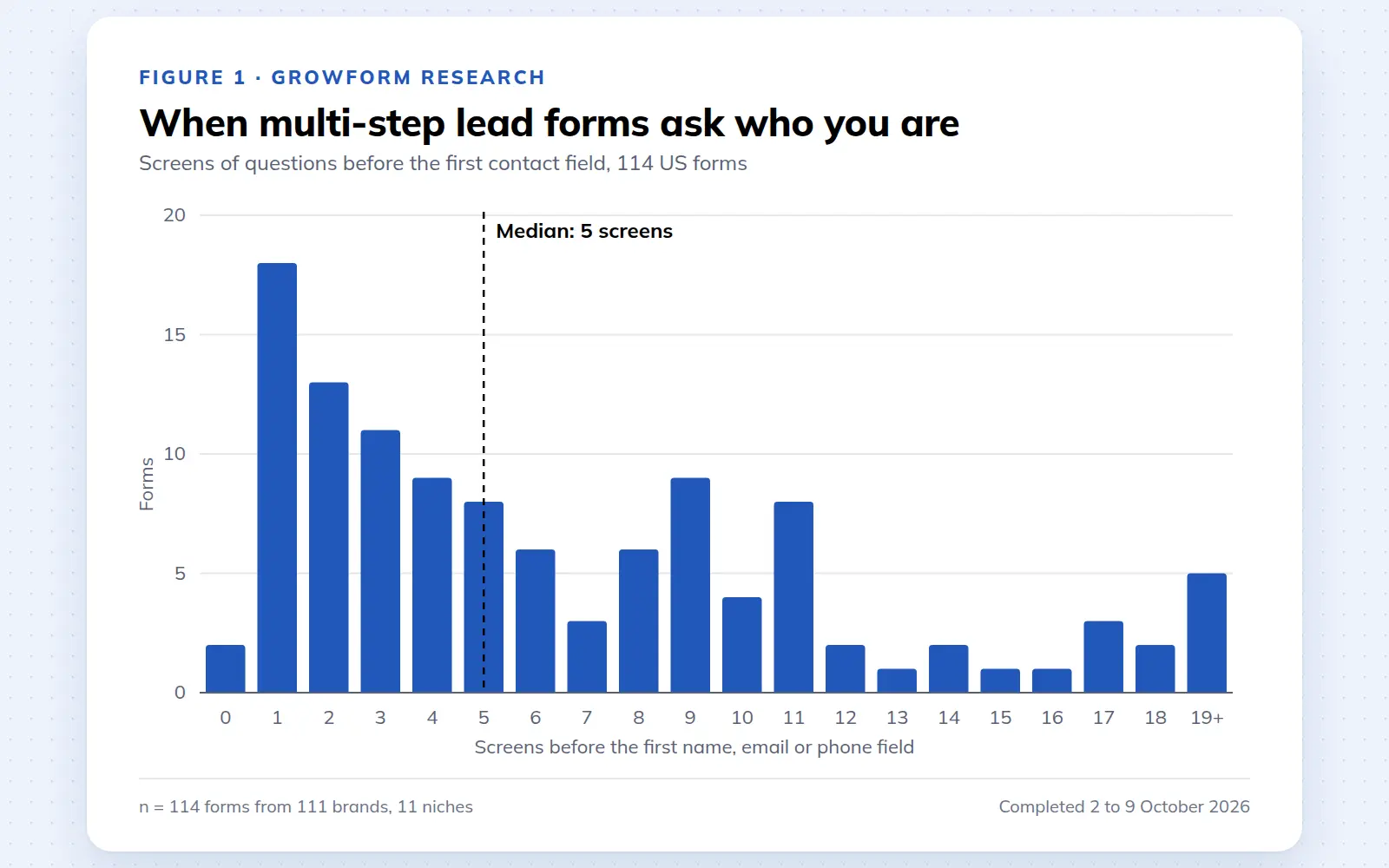
Multi-step lead forms: a 2026 study of 114 forms
We completed 114 US multi-step lead forms screen by screen in October 2026 and counted how long they are, what they ask first, how they show progress, when they ask for contact details and how they ask for consent.
October 9, 2026
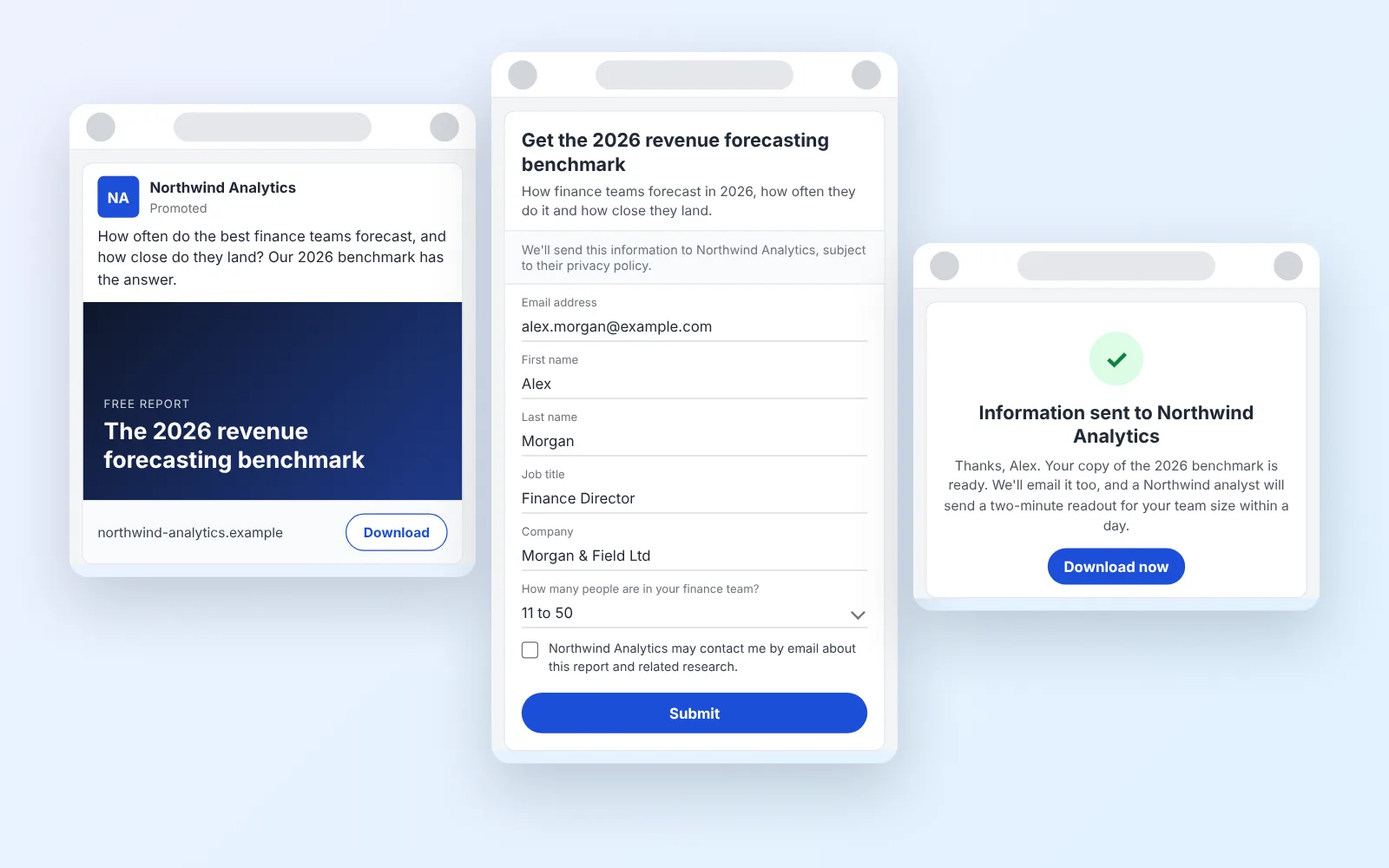
14 LinkedIn lead gen form examples worth stealing in 2026
We painstakingly searched across hundreds of LinkedIn lead gen forms, collated reams of data and worked out what's worth drawing inspiration from in 2026.
October 9, 2026
Form testing priorities for higher quality paid leads
October 8, 2026