

A lead stack can lose more value after the form is completed than before it. A submission that reaches the wrong buyer, drops its UTM data, lacks consent evidence, or arrives after a sales team has moved on isn't a successful conversion. The strongest API integration examples protect the entire handoff from ad click to qualified lead delivery.
That means treating every connection as a lead-capture decision. Should the submission go straight to HubSpot through a webhook, pass through a ping/post marketplace, trigger phone and email verification, or stay inside a no-code workflow? The answer depends on data mapping, qualification, consent, attribution, delivery speed, and the operational safeguards behind each request.
The examples below cover eight practical patterns, including CRM delivery, multi-buyer syndication, TrustedForm and Jornaya evidence, Twilio and ZeroBounce validation, hidden-field attribution, server-side conversion tracking, conditional routing, and Zapier automation. Growform fits into this architecture as the capture layer, feeding CRMs, verification services, ad platforms, and lead-distribution systems without forcing every campaign into the same integration pattern.
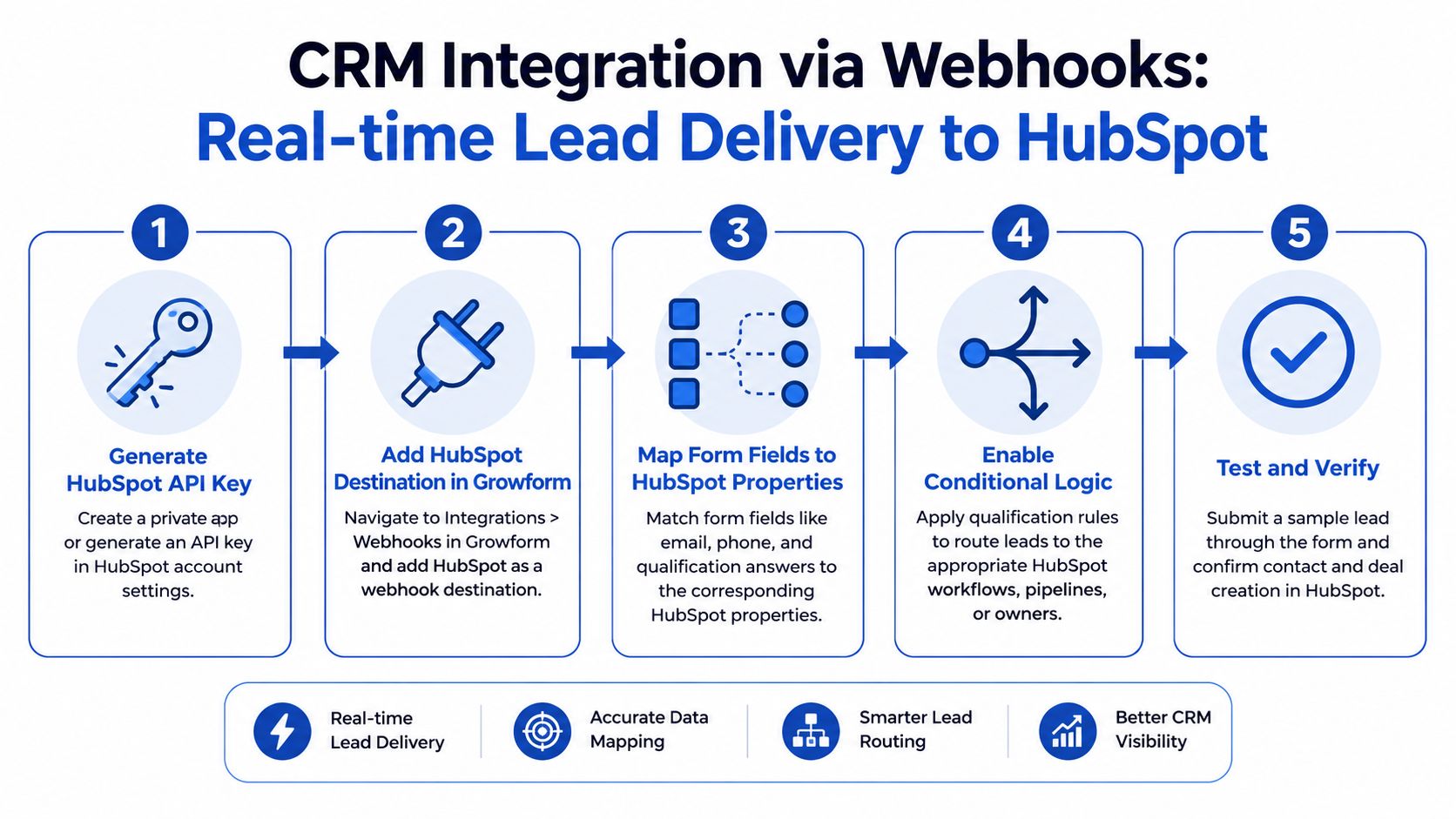
1. CRM Integration via Webhooks for Real-Time Lead Delivery
A CRM webhook integration turns a completed Growform submission into an immediate HubSpot record. The form captures the lead, maps each answer to a HubSpot property, and sends a structured request to HubSpot's REST API. The workflow can create a contact, associate a deal, preserve campaign metadata, and trigger follow-up without manual exports.
For an in-house demand-generation team or an agency managing roofing, HVAC, insurance, or mortgage funnels, this creates a direct lead-capture decision. Conditional logic can write a quality result to a HubSpot property such as lead_quality. Offer IDs, verticals, sub-sources, and UTM values can become custom properties for routing, qualification, and reporting.
Strategic lesson: Real-time delivery creates value only when the CRM receives a complete, correctly typed payload.
Separate identity, qualification, attribution, and compliance data in the payload. Contact details belong in contact properties, homeowner status belongs in qualification fields, and campaign metadata should remain available for source-based workflows. Keep consent evidence mapped to its own field so sales and compliance teams can verify how the lead entered the system.
Build the handoff around failure
Cache the HubSpot property schema locally so a renamed or deleted field does not cause a runtime mapping failure. Test the webhook against HubSpot's Activities log, inspect the response, and confirm that text, number, Boolean, and date fields use the format HubSpot expects.
Use a HubSpot workflow triggered by contact creation to notify sales, create a task, or send an SMS confirmation. If delivery fails, log the request ID, response code, and retry status. A form completion becomes a delivered lead only after HubSpot acknowledges the request, giving the team a reliable signal for qualification, attribution, and follow-up speed.
2. Lead Distribution via Ping Post API for Multi-Buyer Syndication
A ping/post flow turns each submission into a commercial routing decision. The ping sends selected fields, such as geography, vertical, qualification signals, and attribution data, to potential buyers. Their response determines whether the system sends the full post payload, including contact details and complete answers.
This model fits insurance aggregators, solar networks, mortgage marketplaces, and legal lead distributors. Platforms such as Boberdoo, Phonexa, LeadsPedia, and LeadByte can apply buyer caps, exclusivity rules, qualification criteria, and geographic filters before delivery.
Parallel routing improves placement speed, but simultaneous responses require deterministic winner selection. Sequential routing gives the first buyer priority while making timeout handling more important. Set the order from acceptance history and commercial priority, then define the fallback path for each timeout, rejection, and duplicate.
Strategic lesson: Treat the ping as a commercial eligibility check rather than a truncated lead post. It answers whether a buyer should receive the lead, while the final post carries the mapped data required for fulfillment and follow-up.
Keep dispositions usable
Run ping-only tests first. This lets the team validate field mapping, buyer rules, qualification logic, and response handling without sending the full lead through the production delivery path. After the rules pass testing, enable ping/post and store dispositions such as accept, reject, duplicate, and max_leads for reporting.
Set buyer-level daily caps and a short verification timeout. A slow response should trigger the fallback list instead of holding the submission indefinitely. Record the buyer ID, accepted price or commercial result where applicable, response time, and final disposition beside the original submission so operations can distinguish routing outcomes from data or delivery failures.
For how the distribution side works, see this guide to lead distribution software.
3. Compliance and Consent Capture with TrustedForm and Jornaya
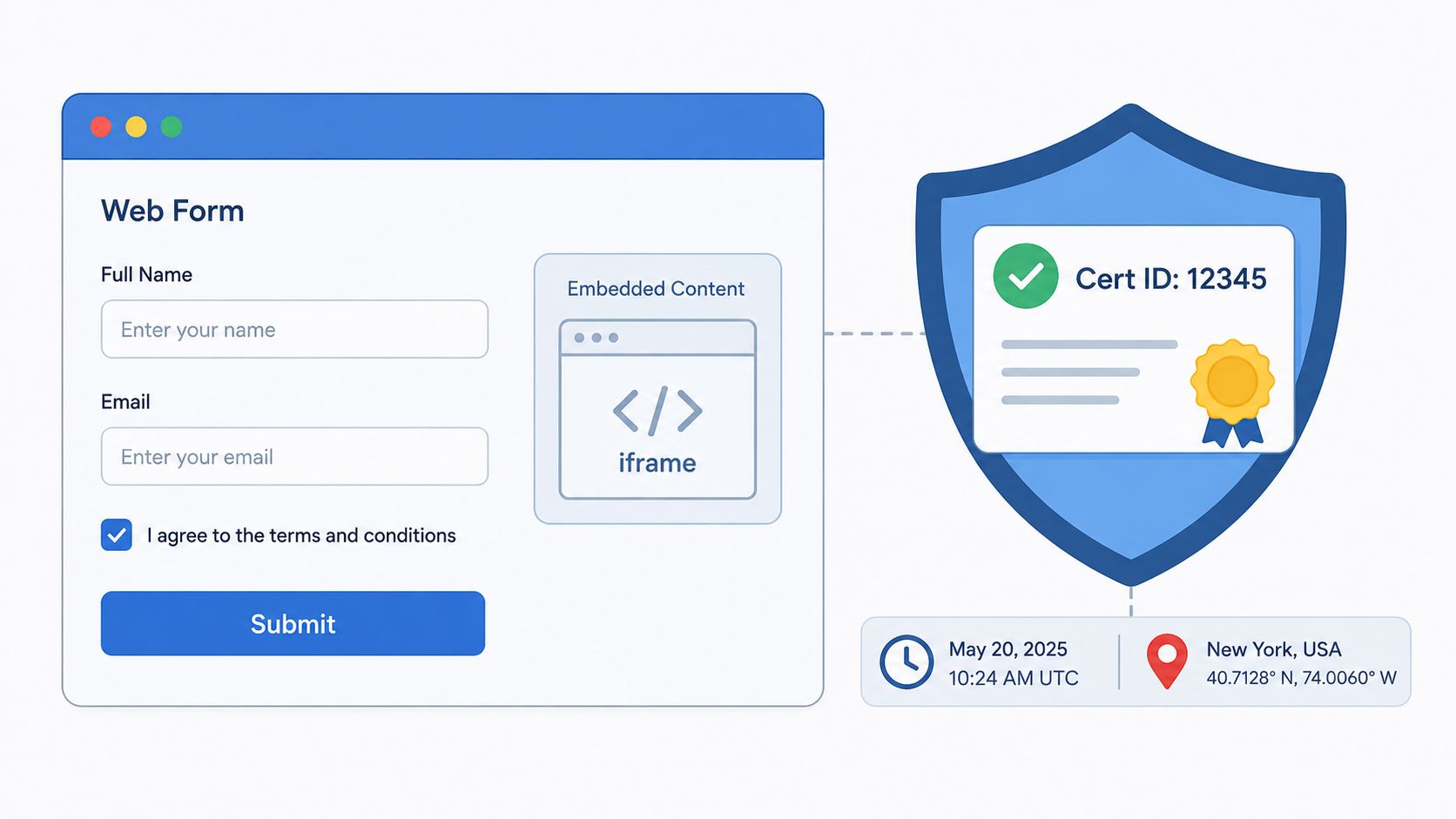
In regulated lead generation, the consent record is part of the lead. A buyer may need to verify the disclosure shown, the submission context, and the certificate associated with that specific person. Sending contact data without the evidence that authorizes outreach creates a downstream dispute that a clean CRM record can't resolve.
Growform can connect the form submission to TrustedForm or Jornaya, capture the resulting certificate ID, and carry that identifier into the CRM or buyer payload. The lead record should store the certificate ID beside the submission ID, campaign information, disclosure version, and routing result. That gives operations and compliance teams a traceable path when a buyer questions consent.
The disclosure itself must match the campaign and market. Conditional logic can display the appropriate consent language based on state or offer, rather than relying on one generic statement across every funnel.
Make evidence mandatory in routing
Treat the certificate as a required field for regulated buyer delivery. A ping/post buyer should reject the lead when the certificate is missing, invalid, or unavailable, and your system should record that rejection separately from a commercial rejection.
- Store certificate identifiers: Keep the TrustedForm or Jornaya ID in the internal lead record for audit lookup.
- Validate end to end: Test the certificate in staging with the actual downstream buyer payload, not only inside the form builder.
- Monitor certificate availability: Request certificate snapshots periodically and alert the team when a certificate can no longer be retrieved.
- Version disclosures: Record which consent language the visitor saw, especially when state-specific logic changes.
The practical distinction between the two consent services and their lead-generation use cases is covered in Jornaya versus TrustedForm for lead generation.
4. Real-Time Lead Verification with Twilio and ZeroBounce
Verification belongs at the point where the lead becomes actionable. A phone number can be syntactically valid but unreachable, and an email address can look correct while belonging to a risky or disposable inbox. Sending every submission directly to sales or buyers shifts the filtering problem downstream, where it costs more to investigate.
A practical flow uses client-side checks for immediate feedback, then calls Twilio for phone intelligence and ZeroBounce for email validation only after the visitor submits the final form step. The response can produce a pass, fail, or review status. A failed result might block a buyer post, while a risky result can remain available for manual review.
Don't call validation services on every keystroke or field blur. That adds latency, consumes external requests, and creates a poor mobile experience. Validate once at submission, then cache the result for repeat attempts involving the same contact data.
Fail safely when vendors fail
A circuit breaker protects the form when Twilio or ZeroBounce becomes unavailable. For many lead programs, failing open is safer than blocking every legitimate submission during a vendor outage. Mark the lead as unverified, queue it for later review, and prevent it from entering a high-value buyer route until validation completes.
Use confidence tiers rather than a simplistic valid or invalid rule. Some risky emails are still usable in particular verticals, while certain phone types may be unsuitable for a specific buyer. Store the validation result, vendor response, and decision reason so the team can compare verification status with downstream contact and acceptance outcomes.
5. Attribution and UTM Preservation Across Multi-Step Flows
Attribution data often disappears between the ad click and the final submission. A visitor may enter through a Meta or Google campaign, complete several qualification steps, and arrive at a form endpoint with no reliable record of the original source. The lead still exists, but the marketing team can't confidently connect it to the campaign that generated it.
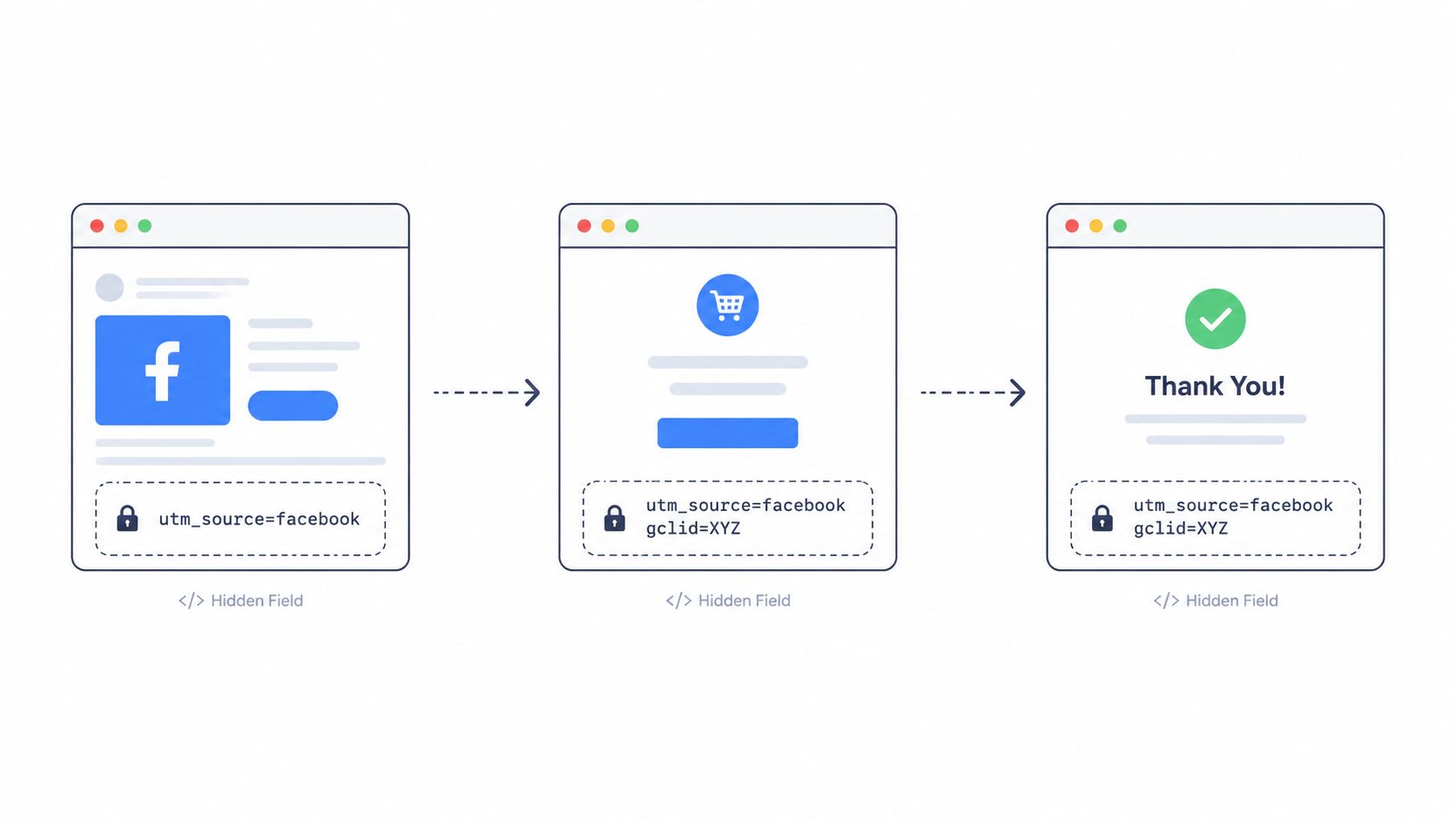
Hidden fields solve this by capturing UTM parameters, click IDs such as gclid and fbclid, affiliate IDs, source values, and sub-IDs when the visitor first loads the page. Growform can preserve those values through a multi-step flow and include them in webhook or downstream integration payloads.
Strategic lesson: Attribution fields aren't decorative metadata. They determine how you route, value, and optimize the lead.
Use a defined schema. Keep utm_source, utm_medium, utm_campaign, utm_content, gclid, fbclid, affiliate ID, offer ID, and sub-source distinct rather than combining them into one campaign string. Add a fallback such as direct or unknown when a parameter is absent, so a missing value doesn't become impossible to distinguish from genuine direct traffic.
Test the entire parameter path
Trace the values through custom domains, iframe embeds, redirects, and every form step. Browser developer tools can show whether the parameters arrive on the initial page, persist in the form state, and appear in the outbound request. A CRM segment can then route Facebook traffic differently from affiliate traffic, while buyer reports can retain the original campaign context.
Custom hidden fields can also carry internal decisions, such as a high-intent solar homeowner segment. That lets the same payload support qualification, buyer routing, and campaign analysis without asking the visitor to repeat information.
6. Conversion Tracking and Pixel Firing with Meta CAPI and Google
A lead-capture integration isn't complete if the ad platform receives only a browser-side event. Client-side scripts can be blocked, interrupted, or disconnected from the final CRM outcome. Server-side conversion APIs give the advertising platform another path for receiving submission and qualification events.
For a Growform funnel, the first event can represent a completed lead submission. A later event can represent qualification or conversion after the CRM updates the record. That distinction matters because a raw form completion and a sales-ready lead aren't the same business outcome.
Normalize email and phone values before hashing. Lowercase email addresses, trim spaces, and apply consistent phone formatting before sending hashed identifiers to Meta or Google. A formatting mismatch can prevent the platform from matching the event to the original visitor, even though the underlying person is the same.
Separate submission from business value
Use event names and properties that reflect the actual funnel. A Lead event can fire when the form is submitted, while a later qualified event can carry the lead segment, campaign, and CRM status. Avoid sending more personal information than the ad platform needs, and review account settings, consent language, and data-processing requirements before enabling matching.
Test events in Meta Events Manager and inspect the Google-side diagnostics before optimizing campaigns around the new signal. Check event deduplication, timestamps, hashed fields, event IDs, and the relationship between browser and server events. The guide to sending conversions to Facebook through the Conversions API provides a relevant implementation path for this workflow.
7. Conditional Logic and Lead Disqualification for Smart Routing
A qualification question changes the destination of the lead. A solar form might ask whether the visitor owns the home, then show roof-condition questions only to homeowners. A mortgage funnel can ask about income range, credit profile, and loan purpose, while a legal intake flow can screen for incident timing and prior representation.
Conditional logic prevents every visitor from receiving the same route. Qualified homeowners can reach installer buyers, while renters can receive an education path or a different offer. An out-of-scope legal claim can exit gracefully with a referral resource instead of entering a buyer queue that can't serve it.
The trade-off is friction. Hard disqualification protects buyer quality but can reduce the number of completed submissions. Soft disqualification keeps the visitor engaged, records the reason, and offers an alternative route. Test both approaches against downstream outcomes, not only form completion.
The best qualification question is one that changes a real operational decision.
Score from outcomes, not intuition
Capture the answer values and disqualification reasons in the lead payload. If certain combinations consistently produce sales-ready contacts, increase their routing priority. If a supposedly poor segment still converts during manual review, don't permanently exclude it based on an untested assumption.
Progressive disclosure helps keep the opening steps approachable. Capture basic contact information first, then ask deeper questions once the visitor has demonstrated intent. Test the flow with personas such as a qualified homeowner, an ineligible renter, and a low-intent visitor. Each should see the correct questions, message, destination, and recorded reason.
Review the score model against CRM outcomes on a recurring basis. A lead score is a routing hypothesis until actual sales and buyer data confirms it.
8. Zapier Integration for No-Code Lead Workflows
Zapier is useful when the destination is operational rather than buyer-critical. A new Growform submission can create a Google Sheets row, post a high-intent notification in Slack, add a record to Airtable, or send an internal email and SMS alert. Small teams can connect these systems without building and maintaining a custom REST client for every workflow.
The main advantage is speed of deployment. A marketing manager can map a trigger to an action, test a real submission, and inspect the run history when a field arrives incorrectly. That makes Zapier a strong fit for campaign reporting, internal notifications, lightweight lead boards, and temporary operational workflows.
It isn't the right default for every lead. A regulated buyer may require strict payload control, certificate handling, lower latency, or an auditable direct connection. In those cases, use a direct webhook or the buyer's supported API, and reserve Zapier for notifications that don't expose unnecessary personal information.
Keep no-code workflows controlled
Use Filters and Paths so expensive or sensitive actions run only for qualified leads. A Slack alert might include a lead segment and callback task without exposing the full submission, while a direct destination receives the complete record only when it needs it.
- Protect personal data: Remove or mask PII before sending records to broad-access spreadsheets, chat channels, or documentation tools.
- Watch task usage: Batch non-urgent writes when operational reporting doesn't require immediate row creation.
- Test real mappings: Submit representative leads and review the Zap run history, including empty fields, conditional answers, and special characters.
- Use custom webhooks selectively: A Growform webhook is often preferable when Zapier lacks the destination, introduces unwanted delay, or needs a more controlled payload.
Treat each Zap as a production dependency. Give it an owner, document its fields, and create an alert for failed runs. A no-code workflow still needs operational discipline.
Turn Examples Into a Reliable Lead Pipeline
These api integration examples work best as complementary layers, not isolated features. Hidden fields protect attribution from the first page load through the final payload. Meta CAPI and Google conversion tracking return submission and qualification signals to advertising platforms. Webhooks deliver accepted leads to a CRM with low latency, while conditional logic and verification improve the quality of what sales teams and buyers receive.
Consent integrations belong in the capture path for regulated campaigns. TrustedForm and Jornaya evidence should travel with the lead, and downstream systems should reject or quarantine records when the required certificate is missing. Ping/post is the better fit when one submission must be evaluated against several buyers, with buyer caps, response times, fallback logic, and disposition codes recorded for later analysis.
Zapier fills a different role. Use it for lightweight workflows such as Google Sheets logging, Slack alerts, Airtable boards, internal email, and SMS notifications. Don't send sensitive lead data to every connected application just because a connector exists. Limit each destination to the fields it needs, and use direct integrations where compliance, latency, or commercial routing requires tighter control.
Every integration should pass more than a happy-path test. Submit valid and invalid contact data, missing attribution values, alternate qualification paths, duplicate records, slow vendor responses, rejected buyer pings, and destination failures. Check field names, property types, authentication, response codes, retry behavior, and idempotency. Then confirm that the submission appears correctly in the CRM, buyer platform, analytics dashboard, consent system, and ad destination.
Production monitoring should expose failed requests, delayed deliveries, validation outcomes, buyer dispositions, and disqualification reasons. Measure both front-end conversion and downstream quality. A funnel that produces more submissions but more buyer rejects may need better qualification or routing, not a larger traffic budget.
Growform complements CRMs and lead-distribution platforms as the front-end capture layer. Its role is to collect and qualify the lead, preserve attribution, attach consent evidence, verify contact data, and deliver the resulting payload to the systems responsible for sales, monetization, and reporting. Choosing the right integration pattern keeps those responsibilities clear.
Growform provides multi-step lead-generation forms with conditional logic, hidden-field attribution, real-time delivery, verification, consent integrations, and connections to CRMs, lead-distribution platforms, ad tools, and Zapier workflows. If you're rebuilding a lead handoff or trying to make your existing funnel easier to qualify and route, start a free trial to see how the capture layer can fit your stack.
Related articles

7 Form Builders With Hidden Fields for Attribution
September 30, 2026

Zapier Webhook to Google Sheet How to Connect Fast
You've paid for the click, a prospect has completed a multi-step form, and the sales team is waiting for the lead.
September 30, 2026
Campaign Attribution: A Complete Guide
Your Meta Ads dashboard says 150 conversions. Google Ads claims another 80. Then the CRM reports only 90 qualified leads for the same period.
September 30, 2026