
What is Landing Page Split Testing? (Our Definitive Guide)
Quick Summary
Landing page split testing removes guesswork, letting you compare versions, optimize headlines, CTAs, forms, and visuals, and increase lead quality and quantity. Marketers can test changes using data, Growform’s multi-step forms and analytics, learn from the results, and keep improving conversions.
Still Guessing Which Landing Page Converts Best?
Many marketers believe that a strong headline or a flashy design alone will drive conversions. While these elements matter, relying on intuition or guesswork often leads to wasted traffic and missed opportunities.
Landing page split testing removes the uncertainty, letting you compare versions, understand what drives leads, and optimize every element for better results.
In this Growform article, we’ll break down landing page split testing, explain why it matters, and guide you step by step on how to test, analyze, and implement changes that increase both lead quantity and quality.
But first…
Why Listen to Us?
At Growform, we live and breathe conversion rate optimization and lead generation. We work with hundreds of businesses and agencies using multi-step forms and split testing to get more leads from the same traffic. We know what works, what fails, and what actually moves conversion rates. This hands-on experience gives us a clear, practical view on how to test landing pages the right way.
What is Landing Page Split Testing?
Landing split testing, also called A/B testing, is a simple but powerful way to see which landing page version actually converts better. You create two versions of a page and show them to similar visitors at the same time.
One is your control (your current page). The other is your variant, where you change one specific element. You then split your traffic between them, gather data, and see which page drives more conversions.
The key is focusing on one change at a time: test your headline, CTA button, or form layout individually. Change too many things at once, and you’ll never know what really made the difference.
Why Landing Page Split Testing is Important
- Increase Conversion Rate (CVR): The main advantage of split testing is clear: turn more visitors into leads without increasing traffic.
- Reduce Cost-Per-Lead (CPL): A higher conversion rate lowers the cost of each lead, improving the ROI on your ad spend.
- Improve Lead Quality: Testing form fields, questions, or using conditional logic lets you qualify leads earlier and capture more valuable prospects. With Growform’s multi-step forms, it’s easy to experiment with different formats and questions, helping you attract leads that are more likely to convert.
- Make Data-Driven Decisions: Remove guesswork and internal debates with hard evidence about what actually works.
- De-risk Major Changes: Test a full redesign or new element before implementing it across your entire page.
How To Split Test Landing Pages (Our 6-Step Framework)
Step 1: Define Your Goal
Every successful split test starts with a clear goal. Without one, you’re just changing things randomly and hoping for the best. A defined goal turns your test into a focused experiment and guides every decision you make.
Ask yourself: what business problem are we trying to solve?
Your goal should tie directly to real impact, not just vanity metrics. Common examples for landing pages include:
- Increase form submissions
- Improve lead quality
- Reduce cost per lead
- Remove friction in the signup flow
Be specific. Saying “improve conversions” is too vague. Instead, set a measurable target, like “increase completed form submissions by 15%.” This gives your test direction and makes it easy to know if it succeeds.
Use supporting metrics like bounce rate, time on page, or form abandonment to understand why your page performs a certain way, but never let them replace your primary goal.
Step 2: Analyze Current Page Performance
Before you can test anything, you need a clear picture of how your landing page is performing today. Analysis is about uncovering what’s working, what’s not, and where visitors drop off so you can run tests that actually move the needle.
Start with overall metrics in Google Analytics 4 (GA4). Key numbers include:
- Conversion Rate: The ultimate KPI. Compare your performance against industry benchmarks to see where you stand. You can find current benchmarks here.
- Bounce Rate & Time on Page: High bounce or short visits signal mismatches between visitor intent and your content.
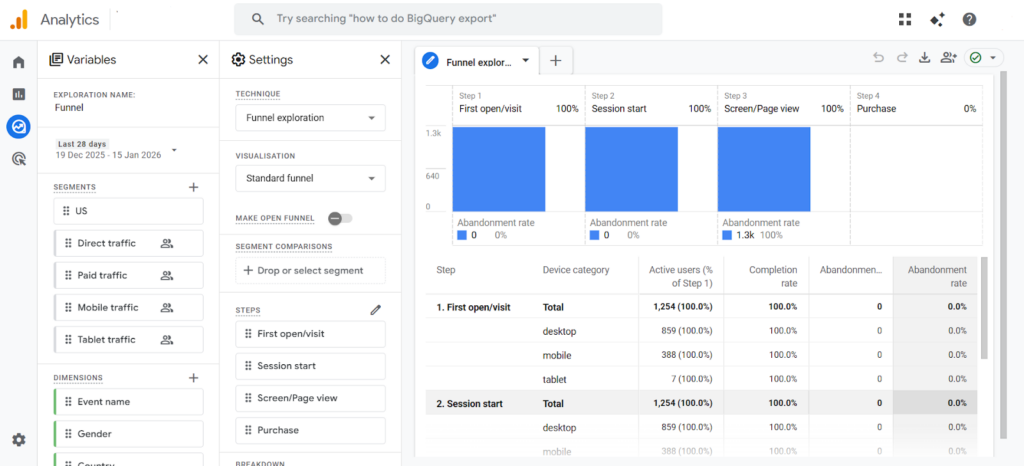
- Funnel Visualization: Use funnel exploration to see exact drop-off points in multi-step processes.
- Traffic Source Analysis: Paid traffic underperforming? That’s often a sign of a critical landing page problem.
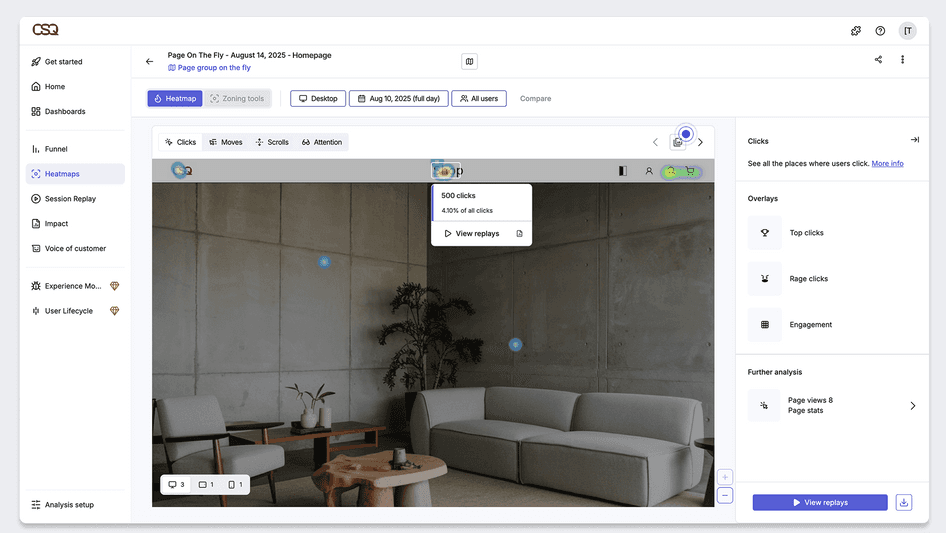
Beyond numbers, tools like heatmaps or session recordings (Hotjar, Crazy Egg) reveal how users behave, showing clicks, scrolls, and hesitations that numbers alone can’t.
Since forms are your main conversion point, micro-level analysis pays off. Using metrics like abandonment rate per step, the specific part of a field where users drop off, or skipped sections lets you pinpoint friction. Evidence shows:
- Password fields: often abandoned, with about 10.5% of users giving up.
- Phone numbers: roughly 6.4% of users hesitate or exit at this step.
- Email confirmations: 6.3%+ abandonment, adding extra friction.
- Complex addresses: around 4.8% of users struggle with multiple lines.
You shouldn’t mindlessly remove fields; fewer isn’t always better. Unbounce removed three fields from a lead gen form, expecting higher conversions, but saw a 14% drop
Growform is introducing built-in Form Analytics that will let you pinpoint field-level hesitation, skips, and abandonment. These insights are designed to make it easier to spot friction and craft targeted improvements that directly increase lead capture.
Step 3: Craft a Testable Hypothesis
Think of a hypothesis as a pre-flight checklist. It forces you to articulate why a change should work before investing traffic or resources. This moves you beyond guesswork. You’re no longer relying on opinions like “Bob from accounting says it’ll work”; instead, your tests are focused and deliberate.
A winning hypothesis follows a simple template:
“Changing [ONE VARIABLE] will result in [MEASURABLE OUTCOME] because [INSIGHT FROM ANALYSIS].”
For example, if your goal from Step 1 is to increase CTA clicks, and Step 2 showed visitors aren’t interacting with the button, a proper hypothesis might be:
“Changing the CTA button from ‘Submit’ to ‘Get My Free Quote’ will increase click-throughs by 12% because it clearly communicates the value and sets expectations for the user.”
For lead-generation landing pages, the form is often the make-or-break element. Hypotheses around form structure, length, and logic are some of the highest-impact tests you can run.
- Multi-Step Forms:
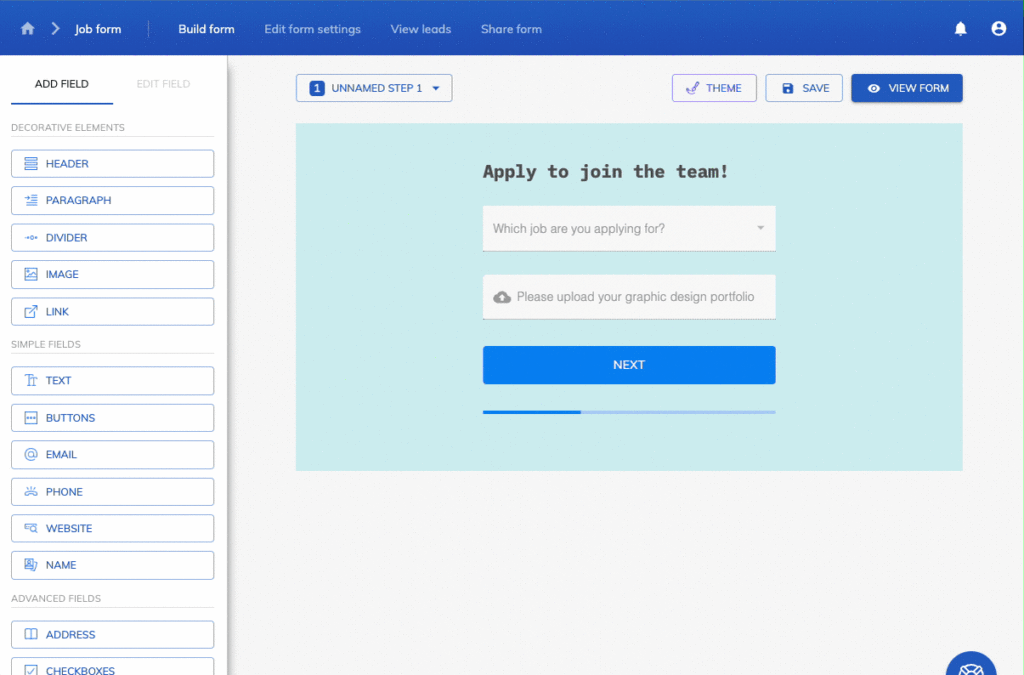
“Implementing a multi-step form will increase completion rates by 25% because breaking a long form into smaller, manageable steps reduces cognitive overload and leverages commitment psychology; users are more likely to finish something they’ve started.”
- Conditional Logic:
“Implementing conditional logic to show or hide questions based on user responses will increase form completion by 15% because it creates a personalized experience that only asks relevant questions, keeping the form focused and aligned with the user’s needs.”
- Field-Specific Adjustments:
“Simplifying complex address inputs will increase completion rates by 8% because it eliminates unnecessary friction points revealed in our form analytics.”
Growform makes these high-impact hypotheses actionable. Our intuitive multi-step forms and branching logic let you test and iterate quickly, without needing developer support.
Step 4: Design Your Variant(s)
The golden rule of A/B testing is simple: test one variable at a time. This ensures that any lift or drop in performance can be confidently attributed to that specific change.
Use your analysis in Step 2 to guide variant design. High-impact elements to test include:
Headline & Value Proposition
The headline is the first signal visitors use to decide if your page is worth their time. Testing benefit-driven language against feature-focused copy can quickly reveal what resonates most. Numbers can also strengthen headlines by adding clarity and credibility. In one Moz study, a headline that included a specific number outperformed a nearly identical version without one by 15%.
CTA Buttons
Small changes to CTA text or color can have an outsized impact on clicks. For example, travel company Going increased trial starts by 104% simply by changing its CTA from “Sign up for free” to “Trial for free.”

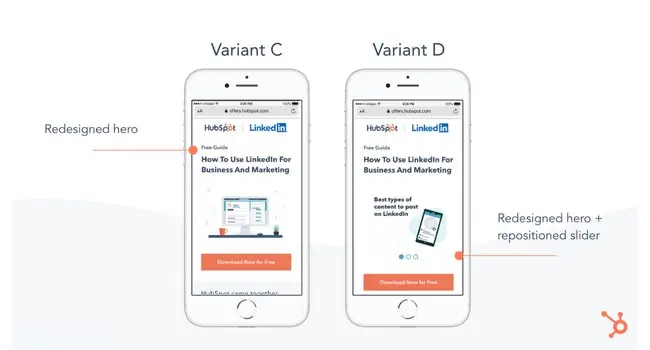
Placement matters too. In a HubSpot mobile test, reorganizing the hero section and repositioning the CTA led to a 10% lift in conversions.
Form Structure & Length
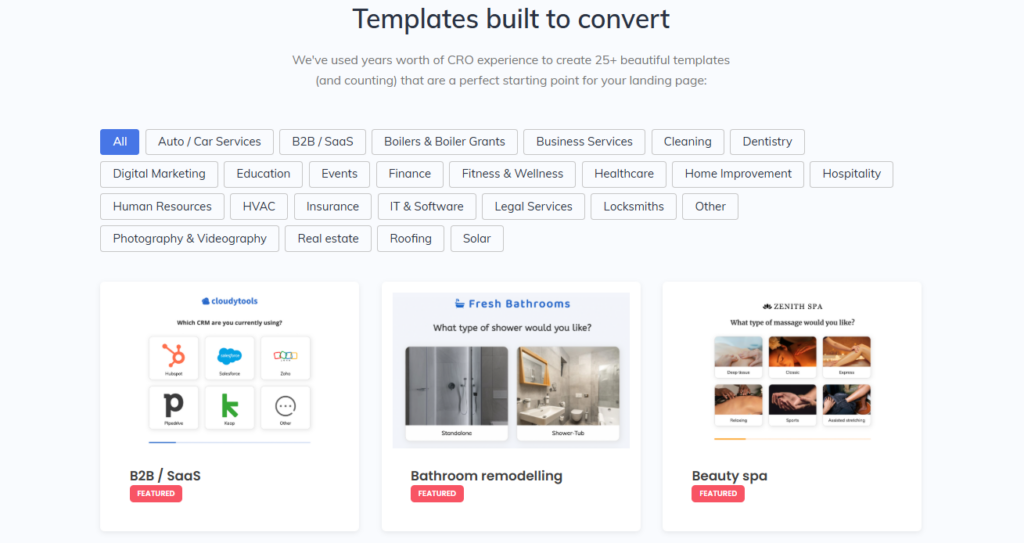
Form friction is a top conversion killer. Test single-step vs. multi-step forms or field order. To accelerate testing, Growform also offers CRO-optimized form templates for over 30 industries, including SaaS, digital marketing, finance, healthcare, real estate, solar, etc. These templates are built for conversion, letting you focus on testing and iterating rather than building forms from scratch.
Social Proof & Trust Signals
Adding client logos or testimonials near the form can reduce perceived risk and increase submissions. Research from the Spiegel Research Center found that displaying reviews can increase conversion rates by up to 270%, making social proof one of the most powerful elements to test.
Visual Content
Photos that are sharp, well-lit, and professional drive trust and credibility; studies show they achieve 94% higher conversion rates than low-quality images.
Step 5: Run the Test Correctly
Even the best hypotheses and variants won’t give meaningful insights if your test isn’t executed properly.
Before launching, set a clear framework:
- How long the experiment will run
- How much traffic each variant will receive
- The minimum detectable effect you care about.
These factors are crucial for statistical significance, which ensures your test results show real differences between variants and aren’t just due to random chance.
- Statistical Significance: Aim for at least 95% confidence (p ≤ 0.05) to reduce the risk of false positives.
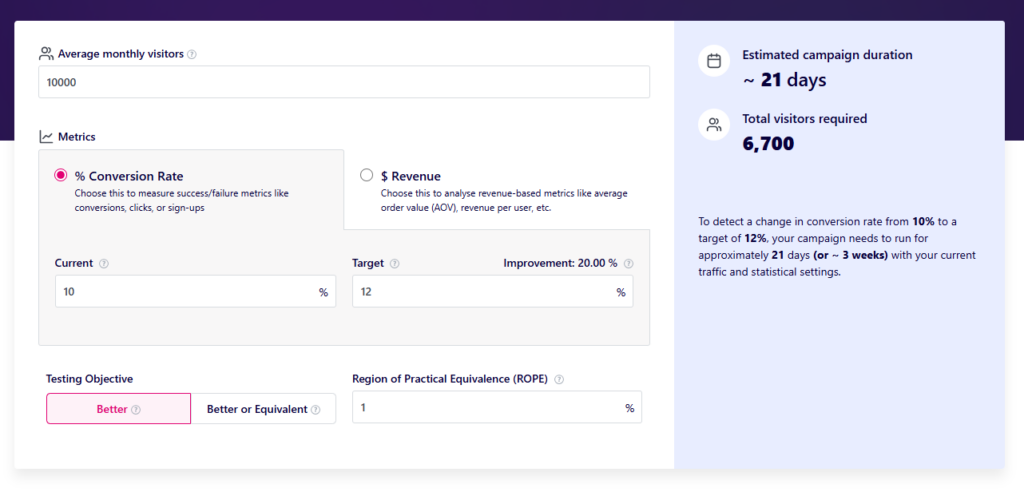
- Duration & Sample Size: Use a sample size calculator, like VWO’s to determine how long the test should run. A full business cycle (1–2 weeks) is recommended to capture weekday vs. weekend behavior.
- Traffic Split: For most tests, a 50/50 manual split works well. Short-term campaigns can also use multi-armed bandits to send more traffic to the better-performing variant during the experiment.
Next, you also need to prevent any interference with the test. Users seeing multiple variants or sudden traffic spikes from other campaigns can skew your data. Best practices include:
- Cookie-Based Assignment: Ensure each visitor always sees the same variant.
- Randomized Audience Allocation: Assign users randomly to test groups to keep characteristics balanced.
- Control or Document External Factors: Pause overlapping campaigns when possible, or note them so unusual traffic patterns can be accounted for during analysis.
Reliable conversion tracking is also essential for meaningful results. Test each variant in a staging environment to confirm:
- Conversions fire correctly in analytics platforms like Google Analytics.
- Ad conversions register in platforms like Google Ads.
Soon, Growform will allow native A/B testing for multi-step forms and individual fields, showing drop-off at each step. This gives actionable insights without relying on third-party tools and makes iterative improvements faster and more precise.
Step 6: Analyze, Implement, and Document
The real value of a test isn’t just declaring a winner; it’s the insights you gain.
Look beyond simple “win” or “loss” results. A statistically significant lift (95% confidence) points to a clear winner, while neutral outcomes aren’t failures; they show what changes don’t move the needle.
Surprising losers can reveal user behaviors or preferences you didn’t anticipate. Dig deeper into segments too, as a variant that underperforms overall may perform exceptionally well for mobile users or certain traffic sources.
Once a clear winner emerges, launch it fully and consider how the insights apply elsewhere. A winning CTA, headline, or trust signal can inform other pages or campaigns. If your test involved a form, Growform makes it easy to roll out the winning structure, field logic, or layout without developer help, keeping momentum high.
Finally, record everything: hypotheses, variants, results, and key learnings. Building a test library prevents you from repeating mistakes. It also provides a foundation for smarter, more effective future tests, turning each experiment into a stepping stone for continuous growth.
Streamline Your Landing Page Optimization with Growform
Every click, scroll, and form submission tells a story about your visitors. Landing page split testing turns those actions into actionable insights, helping you understand what drives leads and what holds them back. With a structured approach, you can stop guessing and start making decisions that truly boost conversions.
Growform makes this process effortless. Our multi-step forms, CRO-optimized templates, and upcoming native A/B testing allow you to experiment confidently, measure drop-offs, and refine every field and step, without relying on developers. Conditional logic, form analytics, and seamless integrations mean you capture more qualified leads while continuously improving the user experience.Start optimizing today. Sign up for Growform.