
LinkedIn Lead Gen Forms: A Practical 2026 Guide
LinkedIn Lead Gen Forms convert at 13%, while external landing pages sit at 2.35%, according to LinkedIn's own playbook.

Updated Published 12 min read
LinkedIn Lead Gen Forms convert at 13%, while external landing pages sit at 2.35%, according to LinkedIn's own playbook. That gap is why the format matters, but it's also why so many teams misread it. A form fill isn't the win, a sales-qualified lead is. If your CRM handoff is sloppy, your qualification weak, or your follow-up slow, the native form can produce a lot of expensive noise.
The right way to think about LinkedIn Lead Gen Forms is as one capture layer inside a wider B2B lead stack. They're excellent when you want low-friction, in-feed conversion from a targeted audience. They're much less impressive when your offer needs deeper qualification, consent evidence, or routing that sales ops can trust without manual cleanup.
What LinkedIn lead gen forms actually are
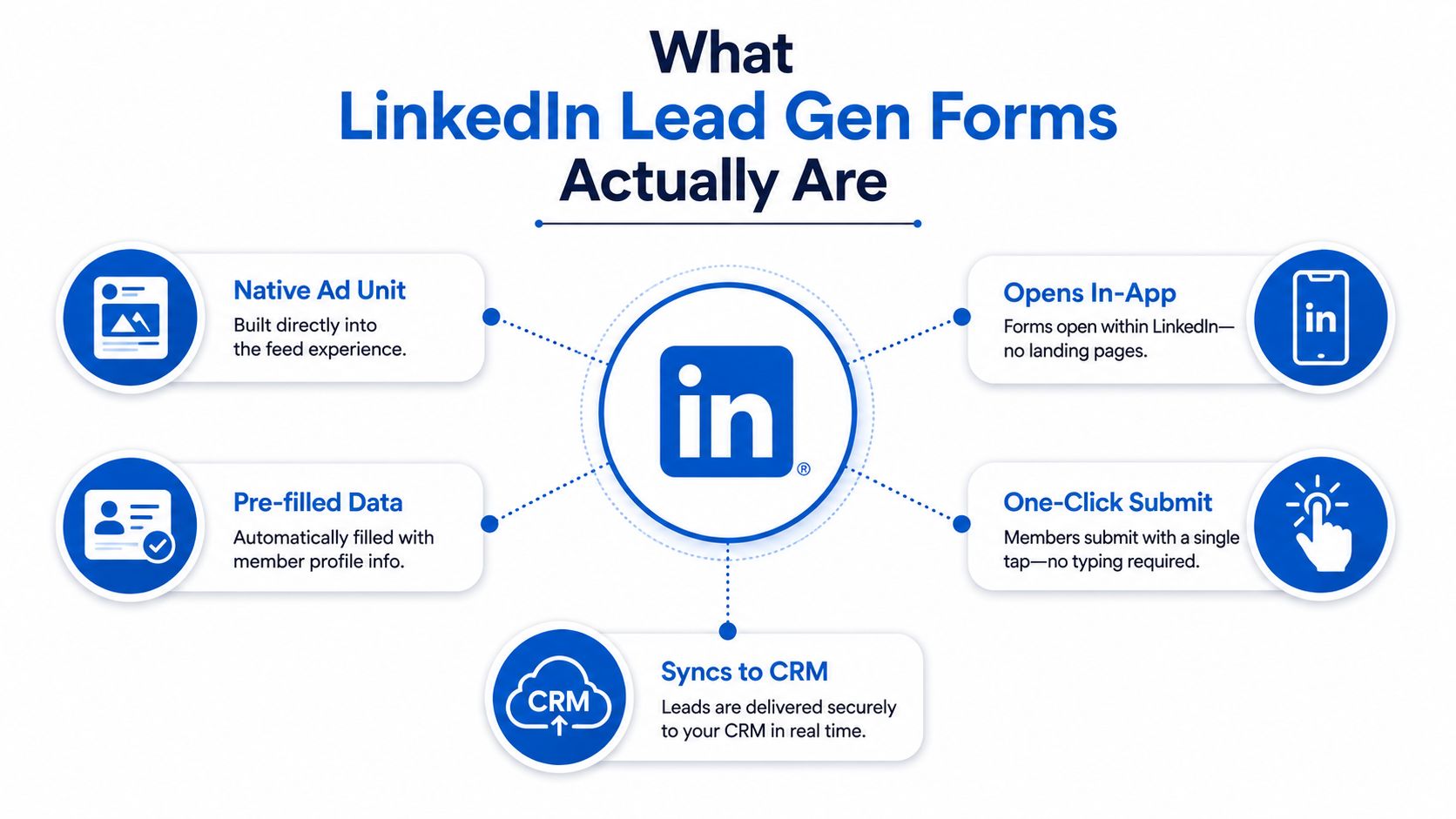
LinkedIn Lead Gen Forms are a native ad unit, not a separate web page. The user sees an ad in the LinkedIn feed or inbox, taps the CTA, and a form opens inside LinkedIn with profile data already filled in. LinkedIn introduced the format in April 2017 as an add-on to Sponsored Content, first on mobile, then later on desktop support, and framed it as an “easy way to collect quality leads” in its launch announcement (LinkedIn's launch announcement).
That distinction matters. You're not buying traffic to an external landing page and hoping the page loads fast enough or the user stays patient. You're buying a conversion path that stays in the LinkedIn experience, with the member's details pre-filled from their profile. LinkedIn positions that design as a friction-reducing alternative to off-platform capture, and its own materials say the form itself adds no extra cost beyond ad spend (LinkedIn Help on Lead Gen Forms).
The format appears on Sponsored Content and Sponsored Messaging, which makes it useful for both feed-based and inbox-based acquisition. In practice, that's why it's become a reference point for B2B demand gen, especially when the offer is simple enough to justify a short submission path. LinkedIn's playbook also recommends keeping the form short, usually 3 to 4 fields, because the native experience is built to reduce manual typing and avoid abandonment (LinkedIn lead gen form guidance).
How the form works under the hood
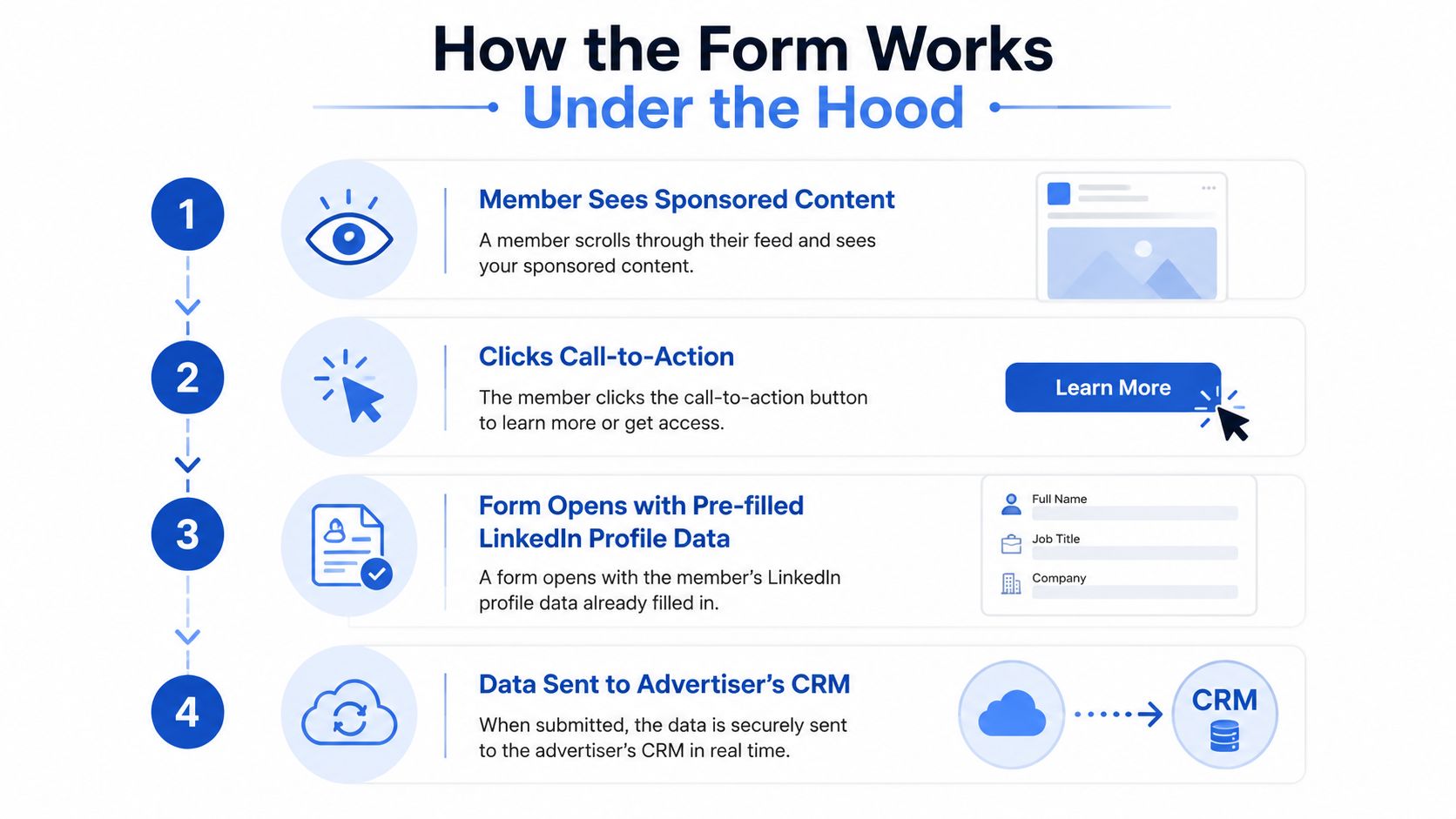
At the mechanical level, the form is simple. A member clicks a LinkedIn ad, the form opens, LinkedIn pre-fills fields such as name and contact details from the member profile, and the user submits without leaving the platform. LinkedIn's help docs make the mobile and desktop behavior explicit for Sponsored Content and Sponsored Messaging, and they emphasize that the auto-populated data is what reduces typing and friction (LinkedIn Help on Lead Gen Forms).
What the user sees
The user doesn't land on a blank web page. They see a branded form overlay with the fields you chose, the privacy notice, and the confirmation message after submission. That confirmation screen matters more than many marketers give it credit for, because it's the first place you can steer the lead toward a next step without making the user hunt for a separate page.
LinkedIn also lets you define custom questions and checkboxes, but the design bias is still toward brevity. The platform can support up to 12 fields, yet its own best-practice guidance says 3 to 4 fields is the practical range for strong completion behavior (LinkedIn lead gen form best practices).
What the advertiser receives
Once the lead submits, the data is delivered to the advertiser. If you don't route it into downstream systems, it sits in Campaign Manager for later export and review, which is why teams that delay routing end up with stale lead files and slow response times. The practical takeaway is simple, form submission is not lead management.
If you're mapping the flow on a whiteboard, it's four boxes, ad impression, click, pre-filled form, delivery to CRM or export. That's the underlying architecture, and it's why the format performs so well for high-intent capture.
Setting up your first form step by step
The setup path inside Campaign Manager is straightforward, but small choices affect lead quality later. Start in the Assets area, create a new lead gen form, and give it a name that your team can recognize in reporting. Choose the language first, because it affects the copy you'll write in the form details and confirmation screen.
Build the form in the right order
Next comes the offer headline and description. Keep both tightly aligned with the ad creative and the CTA, because mismatch here creates a jarring user experience and lower intent. LinkedIn's own guidance says the format works best when the CTA and the offer are coherent, so a user who clicks an ad for a demo shouldn't land on a form framed like a generic content download (LinkedIn lead gen form guidance).
Then add your fields. LinkedIn can support up to 12 fields, but the platform recommends 3 to 4 and warns against manual-input fields when pre-fill is available, because typing slows the user down and hurts conversion. In practice, I'd only add a custom question if you already know what action the answer will trigger downstream. A question that doesn't change routing, scoring, or qualification is just friction.
After that, write the confirmation message. Use it to set expectation, not to overpromise. If the lead is headed to sales, say so. If the lead gets a download, say that too. Then add your privacy policy link and any required disclosure text so the form is compliant before launch.
Finish by attaching the form to Sponsored Content or Sponsored Messaging. Don't skip the test submission. A form that looks right in the builder can still break the CRM mapping if the field names don't line up with your downstream system.
Keep the form short first, then qualify with routing logic after submission if you can.
That order preserves conversion while still letting sales ops filter bad-fit leads. If you try to make the form do everything up front, it usually does nothing well.
The real benefits and honest limitations
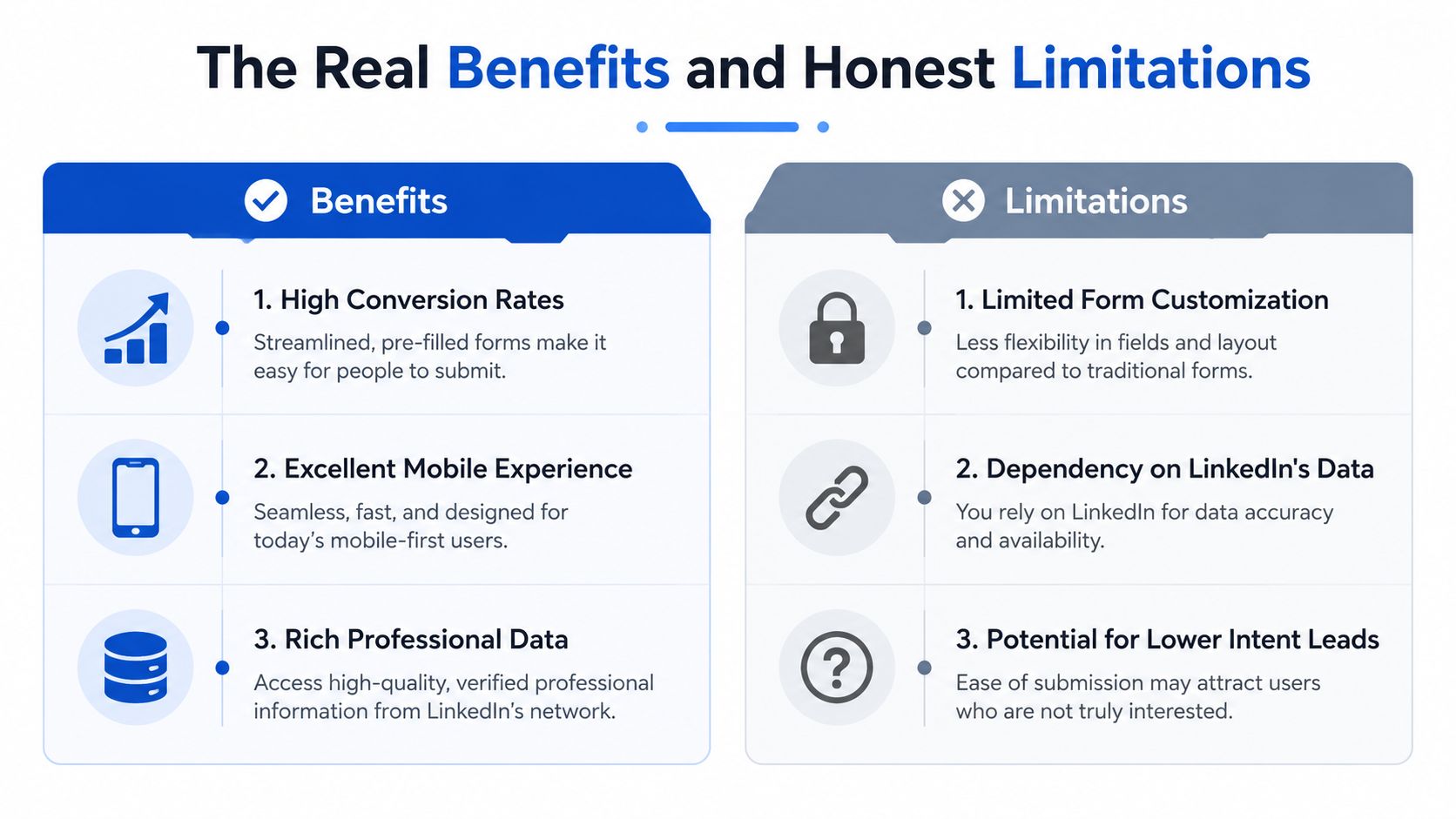
The biggest advantage is obvious, the user doesn't leave LinkedIn. That reduces friction, especially on mobile, and it's a major reason the format has stayed relevant in B2B acquisition. LinkedIn's playbook figure of 13% conversion versus 2.35% for external landing pages (the landing page number comes from a WordStream study) is the clearest statement of that advantage (LinkedIn playbook).
Benefits that actually matter
Another real benefit is cost structure. LinkedIn says there's no separate cost for the form itself beyond ad spend, so you're not paying for a second software layer just to use the native capture feature. That makes the format easy to activate, especially when the team already has a paid media budget and wants to ship fast.
The third benefit is the pre-filled profile data. It lowers typing burden and gives you cleaner baseline fields than a web form where a user has to manually enter everything. For straightforward B2B offers, that's enough to get a useful lead into sales or nurture quickly.
The tradeoffs that get ignored
The same design that increases completion can weaken qualification depth. Native forms are optimized for submission, not interrogation, so they don't replace richer capture layers when you need more context before handoff. If a buyer needs verified consent evidence, conditional logic, or disqualification rules, a native LinkedIn form won't replace a dedicated capture stack.
The audience inheritance is also a ceiling. You get the targeting strength of the LinkedIn ad, but you don't automatically improve the downstream data beyond what the form and CRM mapping capture. If the audience is broad, the form just delivers broad leads faster.
| Criterion | Benefits | Limitations |
|---|---|---|
| Conversion behavior | In-app submission reduces friction and supports strong completion | Completion can outrun qualification |
| User experience | Mobile-friendly, fast, and familiar | Limited room for deeper explanation |
| Cost structure | No separate fee beyond ad spend | No extra native tooling for richer logic |
| Data quality | Pre-filled profile details reduce typing | Data is only as good as LinkedIn's profile fields |
| Strategic fit | Strong for high-intent B2B capture | Weak for buyers who need proof or disqualification |
Integrations, webhooks and CRM delivery
Work starts after the click. A lead that sits in Campaign Manager for a day is already losing value, especially if sales expects speed-to-lead. Native connectors are the cleanest path when they fit, and LinkedIn supports integrations with major CRM ecosystems like Salesforce, HubSpot and Microsoft Dynamics through its delivery options and partner stack (LinkedIn Help on Lead Gen Forms).
Choose the delivery path by operational need
If your team lives inside a CRM, native sync is usually the least fragile option. It reduces manual export work and keeps lead ownership closer to sales workflows. If your routing rules are more complex, a webhook or automation layer gives you more control over where the submission goes and what happens next.
For lower-code teams, tools like Zapier or Make are practical middleware. They're not exciting, but they solve the common problem of sending one submission to multiple destinations without building custom infrastructure. For teams that want campaign outcomes tied back to the media platform, a server-side conversion event through the Conversions API is the more durable signal, because it lets you match a real business action instead of just a form open.
One detail people miss is attribution hygiene. If UTMs, click IDs or other hidden fields aren't preserved at submission time, your CRM will still get the lead, but the source path can go opaque. That's a reporting problem first and a media optimization problem second.
The internal routing layer matters just as much as the ad platform. How to integrate Growform with 000s of destinations via Zapier is a useful reference if you want to think about submissions as structured data moving through destinations, not just as names in a spreadsheet.
If the lead can't be traced cleanly from click to CRM record, your team will argue about quality instead of fixing the routing.
That's why I always test payloads before launch, not after a week of complaints. A broken webhook is quieter than a broken ad, but it can cost more.
Compliance, consent and lead quality tradeoffs
Serious operators care about two things here, consent evidence and lead quality. LinkedIn gives you the disclosure layer and an explicit consent mechanism in the form flow, which covers the platform's own submission path. But it doesn't bundle the kind of third-party certificate capture some lead-gen stacks rely on, so if you sell into heavily regulated verticals, you may still need a separate evidence layer in your overall funnel.
Why short forms can backfire
The qualification problem is more subtle. LinkedIn's own guidance pushes toward 3 to 4 fields and says the form sees the highest completion rates with 5 or fewer questions (LinkedIn lead gen form guidance). That's great for volume, but it also compresses qualification depth. If the offer is expensive, niche, or sales-assisted, a short form can flood the CRM with leads that look good at the form level and weak at the meeting level.
The right decision rule is operational, not ideological. Add one qualifying question only if it changes what happens next. If that extra question costs some leads but materially improves SQL quality, it's usually worth it. If it doesn't change routing, prioritization, or sales behavior, leave it out.
For operators in insurance, legal, home services and similar regulated spaces, consent evidence can't be treated as a nice-to-have. The TCPA guide for lead gen operators is a useful reminder that compliance isn't a checkbox, it's part of the monetization model.
A lead gen form that maximizes completion but produces weak downstream conversion is still a bad form. The best teams don't optimize for raw volume alone. They optimize for the shape of the pipeline after the submission lands.
LinkedIn lead gen forms vs external capture tools
Native forms and external capture tools solve different problems. LinkedIn wins when the priority is fast, in-platform submission from a professional audience that already matches your targeting. External tools win when the funnel needs more control over logic, branding, compliance evidence, or downstream routing.
| Criterion | LinkedIn Lead Gen Forms | External Capture Tools (e.g. Growform) |
|---|---|---|
| Conversion behavior | Strong native pre-fill and in-app flow | Can still convert well, but depends on the page and UX |
| Qualification depth | Limited, short form bias | Multi-step logic, conditional paths, disqualification |
| Design control | Template-driven and platform-bound | Full branding and layout control |
| Attribution | Works within LinkedIn's capture environment | Hidden fields, UTMs and click IDs can be handled with more control |
| Compliance evidence | Platform disclosure and consent flow | Can add TrustedForm or Jornaya-style evidence layers |
| CRM and buyer delivery | Native connectors and platform routing | Webhooks, Zapier, Boberdoo, Phonexa and other downstream systems |
The practical recommendation is straightforward. Use LinkedIn Lead Gen Forms when you want high-volume, low-friction top-of-funnel capture from a tightly targeted audience. Route to an external form when qualification, consent proof, or custom downstream delivery matters more than frictionless submission.
That split is especially useful for agencies and in-house teams running mixed offers. A webinar or content download can live happily in a native LinkedIn form. A sales-ready demo request, regulated lead, or buyer-specific offer often deserves a richer external form stack.
When to use each approach and what to measure
Start with the business goal, not the platform. If the goal is reach and raw capture from a qualified LinkedIn audience, stay native. If the goal is sales readiness, compliance evidence, or complex routing, use an external form layer and let LinkedIn act as the traffic source, not the capture endpoint.
The three metrics that matter
Raw lead count is too shallow to guide budget decisions. Track form-to-MQL rate, MQL-to-SQL rate, and cost per SQL. Those three numbers tell you whether the capture layer is helping the pipeline or just filling the CRM with names.
A simple Monday-morning checklist helps prevent most failures:
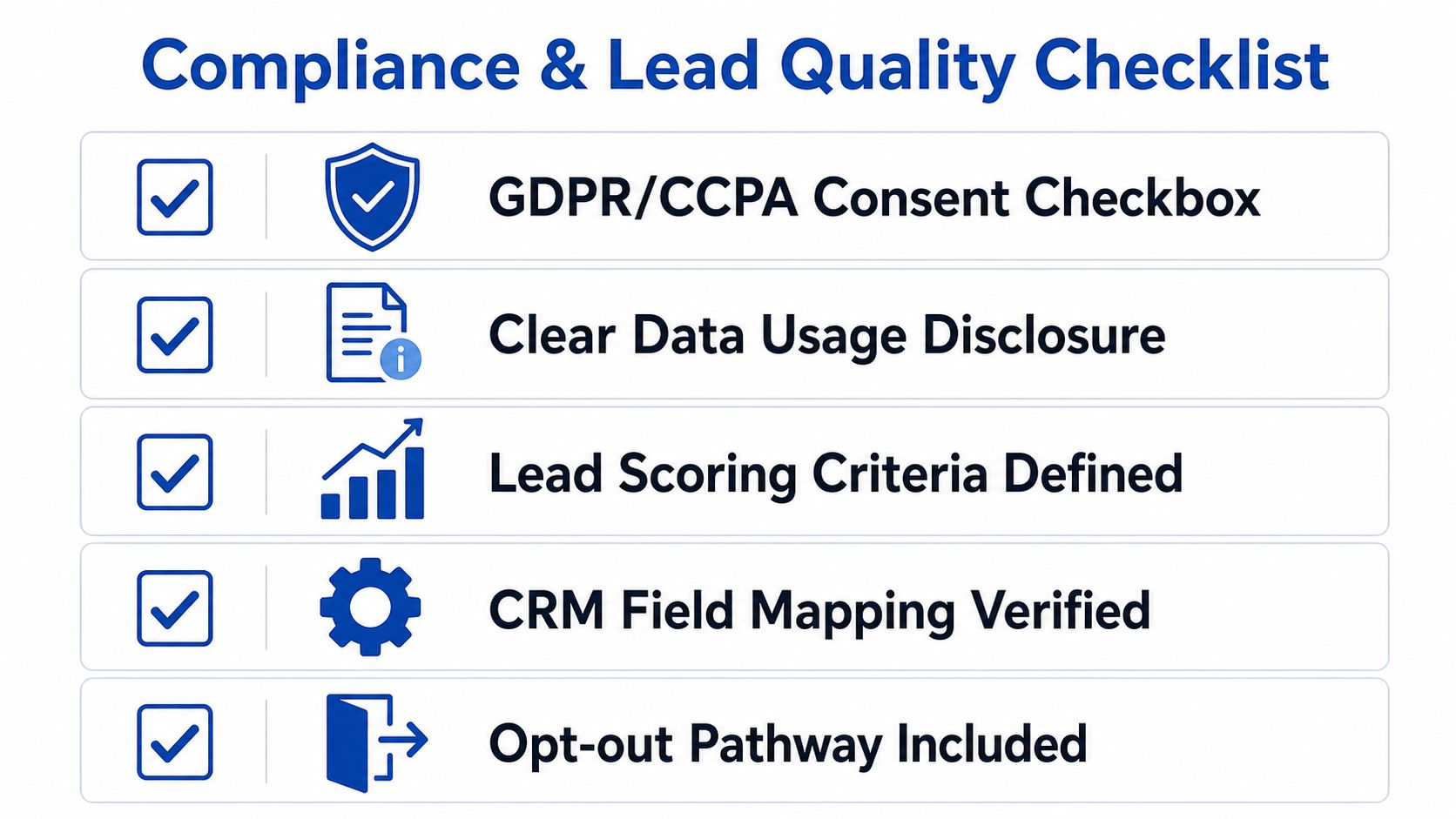
- Setup: confirm the form fields, CTA, confirmation message and privacy disclosure all match the offer.
- Integration: test the CRM sync, webhook payload or automation route before launch.
- Compliance: verify consent language, data handling and any evidence requirements for your vertical.
- Follow-up: make sure sales or SDR follow-up is fast enough to preserve intent.
- Reporting: review downstream conversion, not just form completions.
The best LinkedIn lead gen setup is the one that survives handoff, not the one that looks clean in Campaign Manager.
The hybrid approach is often the smartest one. Use LinkedIn Lead Gen Forms for top-of-funnel volume where friction is the enemy, and use external capture for sales-ready or compliance-sensitive offers where control matters more than convenience.
For real forms held against these rules, field by field, see our LinkedIn lead gen form examples. If you're deciding whether to keep your next campaign native or move it into a fuller capture stack, start with the funnel stage, the qualification burden and the CRM handoff requirements. If you want a form layer built for that kind of lead quality work, Growform is worth a look, and every plan starts with a 14-day free trial. Start free trial.
Related articles
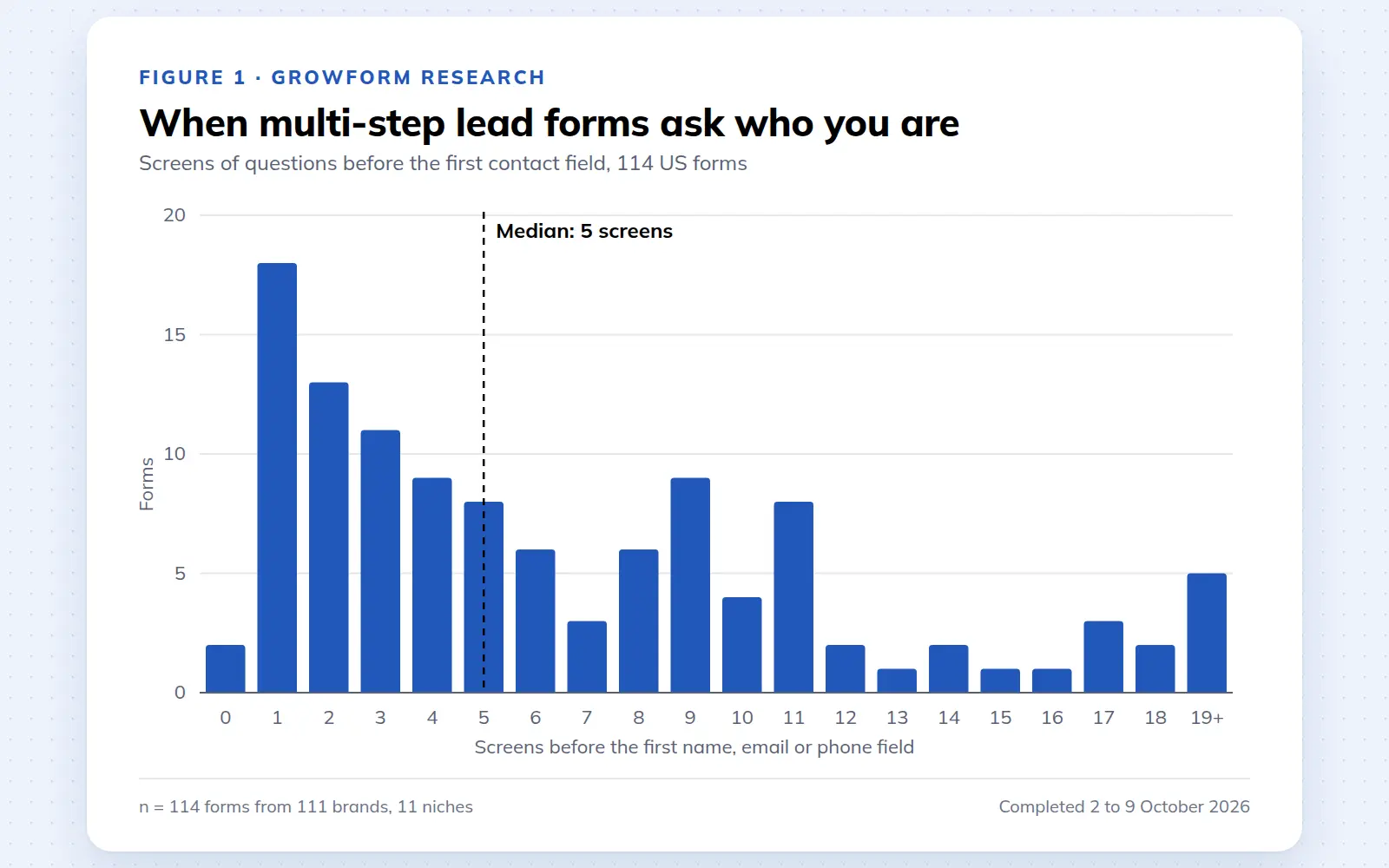
Multi-step lead forms: a 2026 study of 114 forms
We completed 114 US multi-step lead forms screen by screen in October 2026 and counted how long they are, what they ask first, how they show progress, when they ask for contact details and how they ask for consent.
October 9, 2026
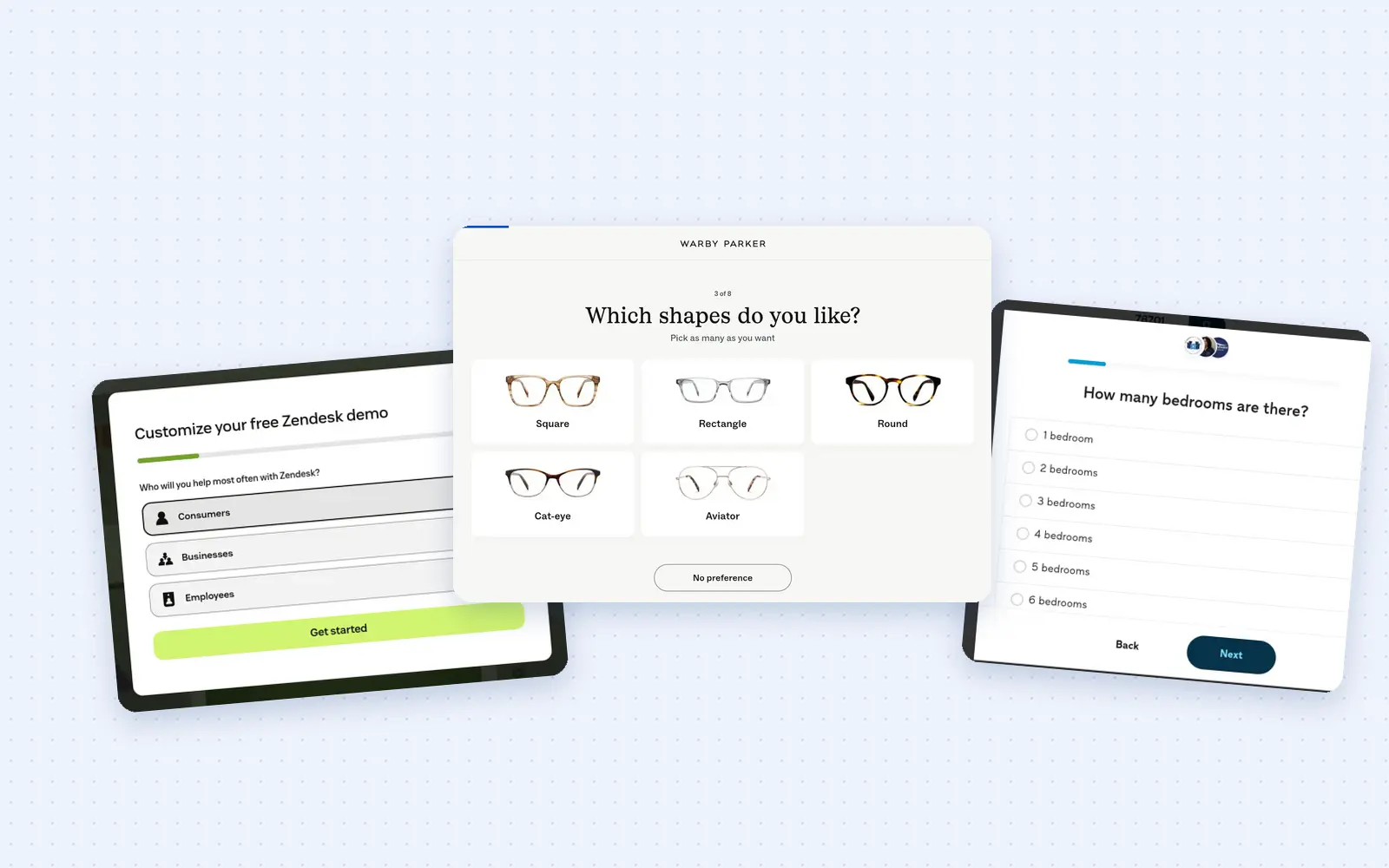
25 lead generation form examples to steal in 2026
From one-field newsletters to mortgage forms, we filled out 25 lead generation forms of every type. Here's what works in 2026, and what to learn from them.
October 9, 2026
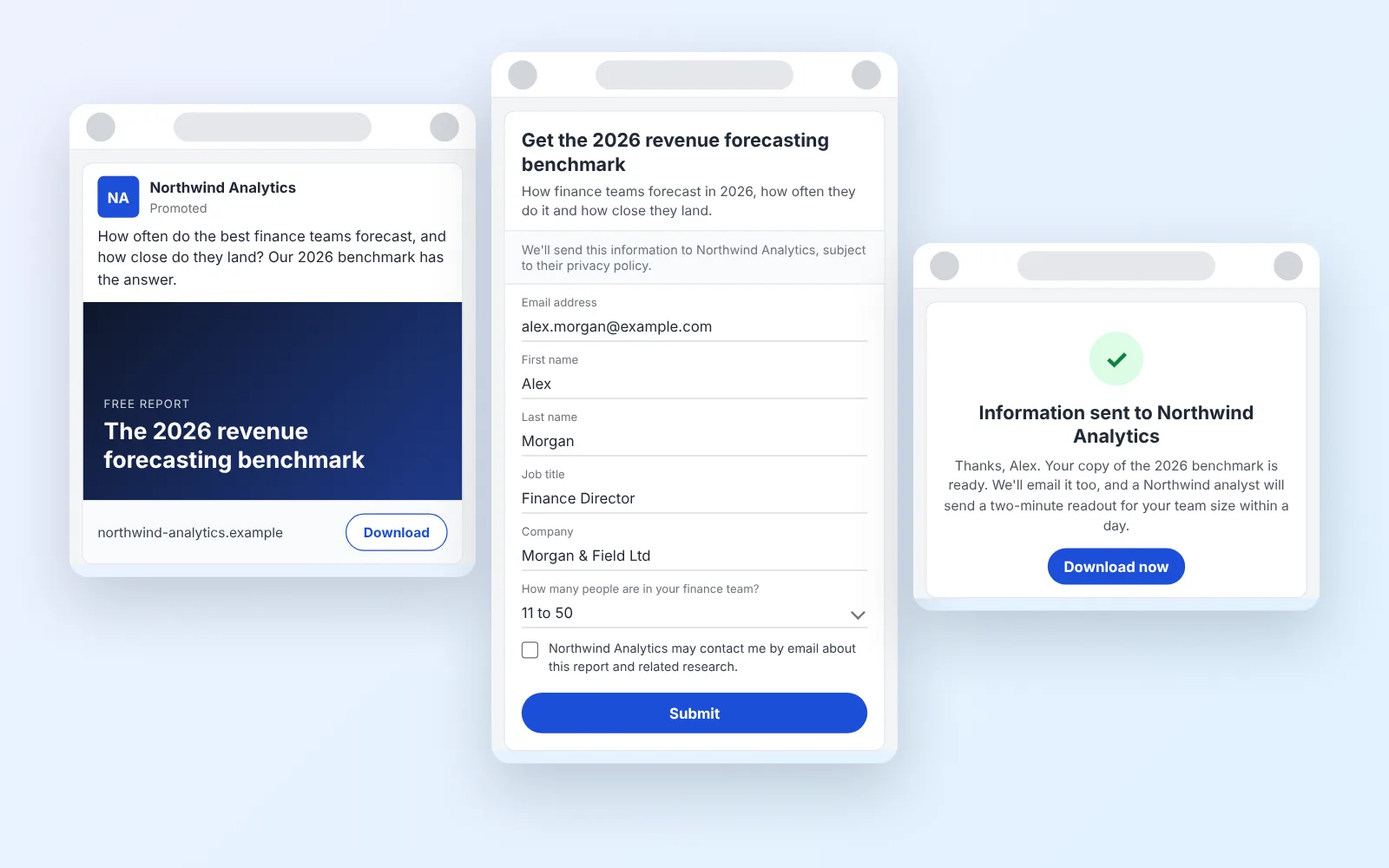
14 LinkedIn lead gen form examples worth stealing in 2026
We painstakingly searched across hundreds of LinkedIn lead gen forms, collated reams of data and worked out what's worth drawing inspiration from in 2026.
October 9, 2026