
14 LinkedIn lead gen form examples worth stealing in 2026
We painstakingly searched across hundreds of LinkedIn lead gen forms, collated reams of data and worked out what's worth drawing inspiration from in 2026.

Harvey Carpenter
Updated Published 10 min read
Having spent several hours scrolling on our LinkedIn feeds, we found a selection of forms worth drawing inspiration from.
Some of it was good. Landis asks for three fields and every one is already filled in from your profile.
Some of it was not.
The University of Law tells you that "by ticking this box" you agree to calls, texts and post, and there is no box.
LinkedIn lead gen forms are very short with very little room for error. The member taps once, glances at their own name and email, and either hits Submit or closes it. Every typed field, every vague headline and every consent line that makes no sense is a reason to close.
The 14 forms are below, grouped by type of offer, each with its fields in order and our take on what to keep and what to fix. If you want the website forms a LinkedIn lead should land in next, our lead generation form examples cover quote forms, quizzes and demo requests with every screen captured.
What 14 real LinkedIn lead forms showed us
Across the 14 LinkedIn lead gen forms we captured on October 9, 2026, the median form asked for 5.5 fields, six required a typed phone number and only three used a multiple-choice custom question.
- Five to six fields is the norm. The forms ask for between 3 and 9 fields, 79 in total, a median of 5.5. Seven stay at LinkedIn's recommended five or fewer and seven go over.
- Six of 14 require a phone number. It was an empty required box on all six. LinkedIn's one-sheeter is clear on this: phone is never pre-filled, so the member types it or leaves.
- Job title and company name are the most common extras. Eight forms ask for company name and seven for job title. Both were blank in our captures because the profile we used lists no current job. A filled-in profile would most likely see them pre-filled.
- Only three forms use a custom question the way LinkedIn recommends. HubSpot's nine-option company size dropdown and IAPP's consent dropdown are multiple choice. HubSpot's website URL and CyberPowerPC's company size and "What would you like to discuss about?" are typed: the free-response kind the playbook says costs 3 to 4% of submissions.
- Consent is handled four ways. Five forms rely on LinkedIn's standard "We'll send this information to…" line alone, five add a notice with no checkbox, three add a checkbox (Business Sweden's required, UKAI's and Stripe's optional), and IAPP asks as a required dropdown.
- One form didn't match its ad. NSK Europe's document ad is a patient handling guide. The form is headed "Explore NSK Solutions for Medical Imaging Equipment".
- Four ad cards show a submit count. HubSpot 4,225, Stripe 2,785, Harvard Chan 828, The University of Law 40. LinkedIn shows the number on some cards and not others, and it is the only volume signal you can see from the feed.
- Three offer types never appeared. No newsletter sign-up, no recruitment form and no free trial came up that day. This set is downloads, documents, demos, courses and events.
LinkedIn lead gen form examples, field by field
Every form here was seen in our feed on October 9, 2026, opened from the ad and captured without submitting. The verdicts lean on LinkedIn's own guidance, read the same day: five fields or fewer, multiple choice over typed answers, phone number only when you need it, and a thank-you button that delivers the offer.
Gated guides and reports
HubSpot · Stripe · Joe Stevens CWM · Throgmorton Associates
The ad shows a guide or report, the button says Download or Learn more, and the form only has to confirm where to send it. Four of the 14 work this way.
HubSpot: Instagram for Business kit
HubSpot's single image ad offers a free Instagram for Business kit under a Download button, and the card shows 4,225 submits. The form asks for email, a website URL, company size as a dropdown, then first name, last name and country.
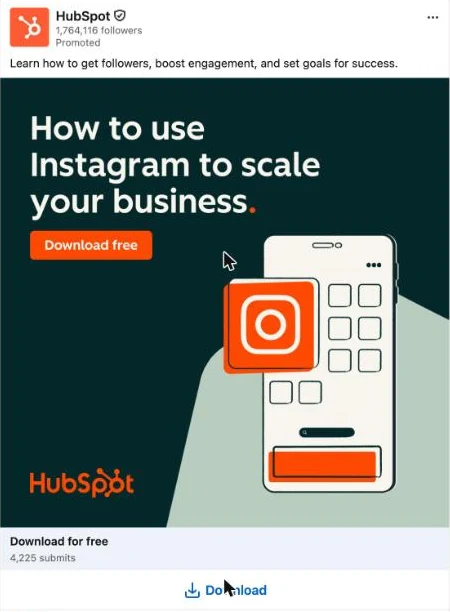
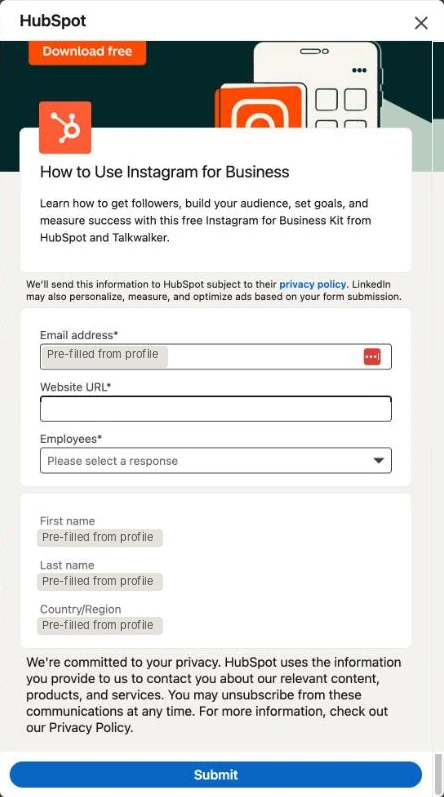
The company size dropdown is the textbook custom question. Nine ranges from 1 to 501 or more, one tap, and sales gets a clean segment. The notice under the fields says what HubSpot will do with the data and that you can unsubscribe, and it does not make you tick anything.
The website URL is the weak spot. It is the only field you type, it is required, and a URL on a phone keyboard is where people make mistakes. Company name from the profile would carry most of the same signal for nothing.
Stripe: pricing strategy guide
Stripe's ad promotes a guide on pricing strategy, with a Download button and 2,785 submits on the card. The form opens on job title and company name, then work email, first name, last name and country, with an optional checkbox to get the report by email.
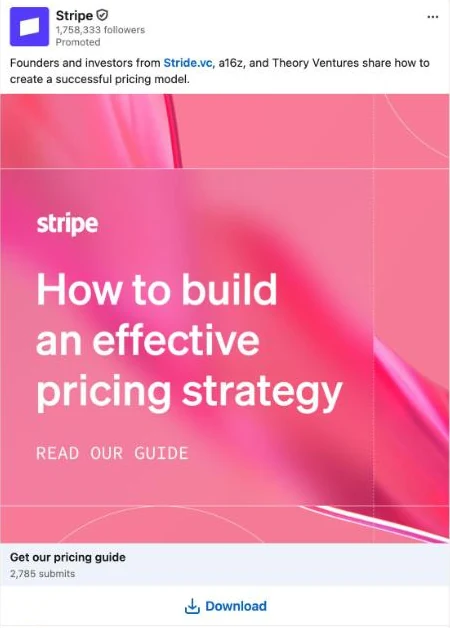
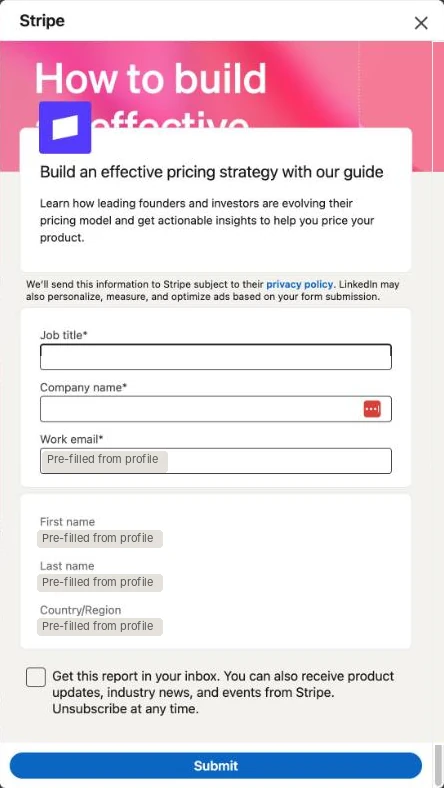
Two things we would copy. Work email instead of the personal address, which LinkedIn offers as its own field. And a checkbox that is optional and tells you what ticking it gets you, the report in your inbox plus product updates, so the consent reads like a benefit rather than a demand.
We would change the order. Job title and company name sit at the top, above the pre-filled fields, so the first thing you meet is a box to fill in. HubSpot puts the pre-filled email first, and that shows you how little the form wants before it asks for anything.
Joe Stevens CWM: retire early guide
A financial adviser's single image ad offers a retire-early guide under a Download button. The form asks for email and phone number, then first name, last name and LinkedIn profile URL. The details line says the guide arrives once the form is complete.
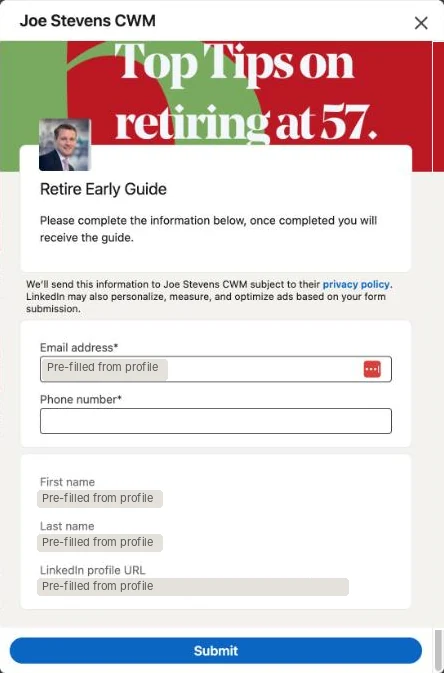
The details line does the one job a details line should do. It says what happens after you submit. Five fields keeps it inside LinkedIn's recommendation.
The phone number is the problem, because the stated reward is a PDF. If the real follow-up is a call from an adviser, say so in the details line, since a call is a different trade from a download. If it is not, the field is costing submissions for nothing.
Throgmorton Associates: retirement tax guide
Throgmorton's ad offers a guide on paying less tax in retirement under a Learn more button. The form asks for the same five fields as the Joe Stevens form, and its details line reads "Let us know where you'd like your guide sent. Your details won't be shared with anyone."
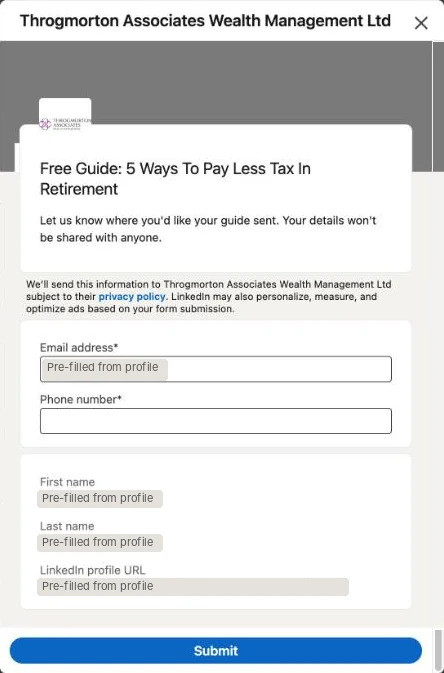
"Your details won't be shared with anyone" is the sentence a retirement lead wants to read before handing over a phone number, and it sits above the fields rather than in small print below them. That is the detail we would steal.
The ad button is the miss. Learn more opens a form that asks for a phone number, when Download would set the right expectation for a guide. On LinkedIn's own confirmation-button figures, Download Now is also the label members click most.
Document ads that unlock a PDF
Business Sweden · IAPP · Harness · NSK Europe
Four of the 14 were document ads. The feed shows the first pages of a PDF, the button reads "Unlock full document", and the reward is already on screen before the form opens. That changes what the form can get away with asking.
Business Sweden: investment report
Business Sweden's document ad previews a report on digital transformation. The form asks for job title and company name, then work email, first name and last name, with a required consent checkbox and a long consent paragraph under it.
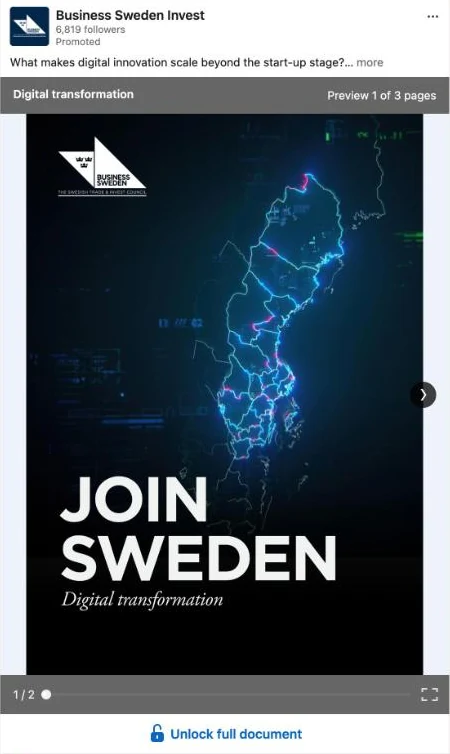
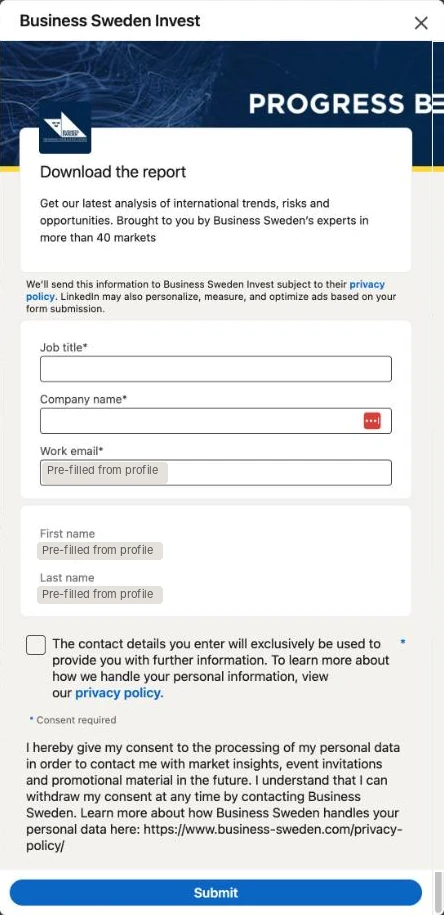
The consent is explicit, and for a public body marketing into the EU that is right. A required checkbox with "Consent required" under it, and a paragraph that names what the data is for (market insights, event invitations, promotional material) and how to withdraw. This is the disclosure checkbox LinkedIn's Help Center points advertisers to since the default consent box went away in 2020.
It says it twice, though. The checkbox label and the paragraph under it cover the same ground in different words. One sentence on the checkbox with the privacy policy link would get read. The paragraph will not.
IAPP: CIPP/E study guide
IAPP's document ad previews a study guide for a privacy certification exam. The form asks for email, job title and company name, then a required dropdown asking whether you consent to email updates, then first name, last name and country.
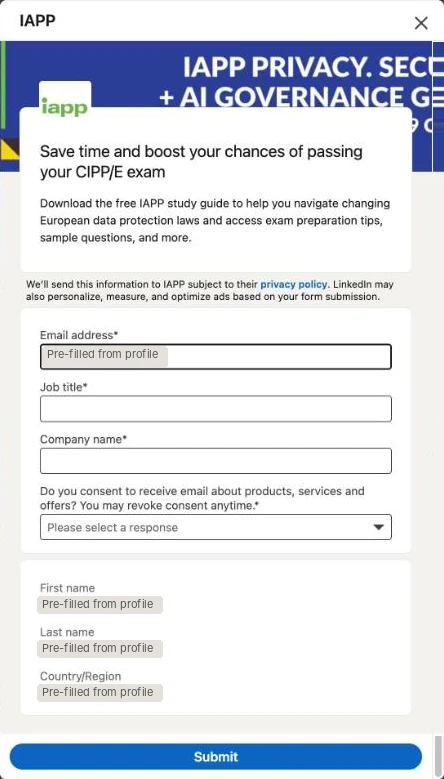
Consent as a multiple-choice question is a clever use of the mechanics. You cannot submit without answering, both answers are valid, and the answer lands in the CRM as a field rather than a checkbox state. For a privacy association it is also the form behaving the way its members expect.
It spends one of the three custom questions on something a disclosure checkbox would handle for free, and the dropdown opens on "Please select a response" rather than an answer, so it is an extra tap. We would move consent to a checkbox and use the question slot for the thing the exam prep team needs, such as when the exam is.
Harness: FinOps ebook
Harness's document ad previews a 35-page FinOps ebook. The form opens on a required phone number, then job title, company name, work email, first name, last name, LinkedIn profile URL, state and country. Nine fields.
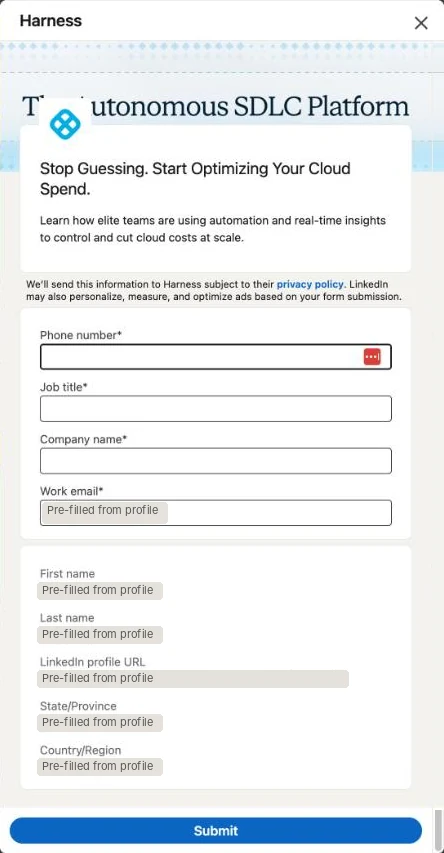
Most of the nine are pre-filled, and work email, LinkedIn URL, state and country cost the member nothing. The preview pages in the ad prove the ebook exists before the form asks for anything.
The phone number as the opening field is the choice we would reverse first. It is the field LinkedIn says to avoid, it is required, and it sits exactly where your eye lands when the form opens. Nine fields is also close to the 12 LinkedIn allows and well past the five it recommends. Email, name, company and job title would do the same job for an ebook.
NSK Europe: medical equipment guide
NSK's document ad previews a patient handling guide. The form that opens is headed "Explore NSK Solutions for Medical Imaging Equipment" and asks for email, phone number and company name, then first name, last name and country.
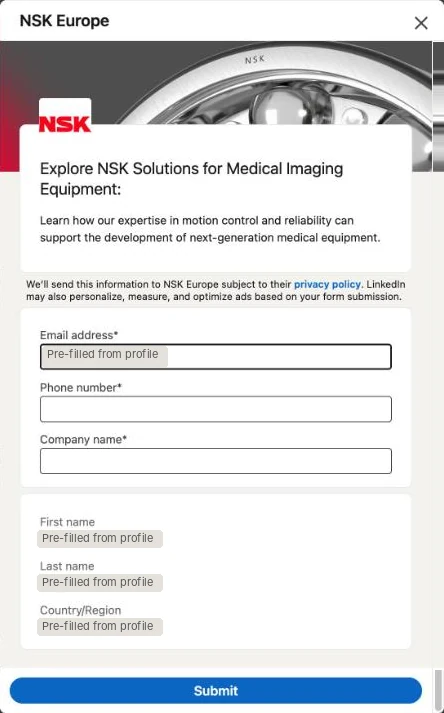
Six fields with two typed is a fair ask for an industrial lead that a sales engineer will follow up, and the country field routes it to the right office without a question.
The headline is the thing to fix. A form is an asset you attach to campaigns, and this one looks attached to the wrong ad. Someone who tapped to unlock a patient handling guide reads a medical imaging headline and has a reason to close the form. One form per offer, named for the offer, and the 60-character headline is where it shows.
Demos, quotes and callbacks
Landis · CyberPowerPC UK · Executive Performance Academy
When the follow-up is a conversation, the form has to collect the one thing the profile does not hold and leave the rest alone. Three of the 14 are built for a call or a demo.
Landis: Microsoft Teams demo
Landis's ad for a Teams contact center product ends in a Sign Up button. The form asks for work email, first name and last name, all pre-filled, and nothing else. It is the shortest form in the set.
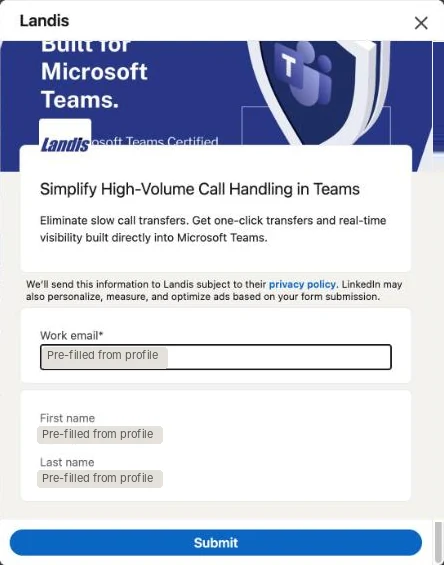
This is the form LinkedIn's marketing blog describes when it recommends three or four fields. You read the headline, see your own details and tap Submit.
What it does not do is check fit. The demo only makes sense for companies on Microsoft Teams, and nothing on the form asks. One multiple-choice question, "Which phone system do you use with Teams today?", would cost a tap and sort the demos worth running from the rest.
CyberPowerPC UK: business quote
CyberPowerPC's ad for AI workstations ends in a Learn more button and opens a business quote request. It asks for email, job title, company name, company size and "What would you like to discuss about?", all typed except the email, then first name and last name. Below the fields sits the opening of the company's privacy policy, 13 section links included.
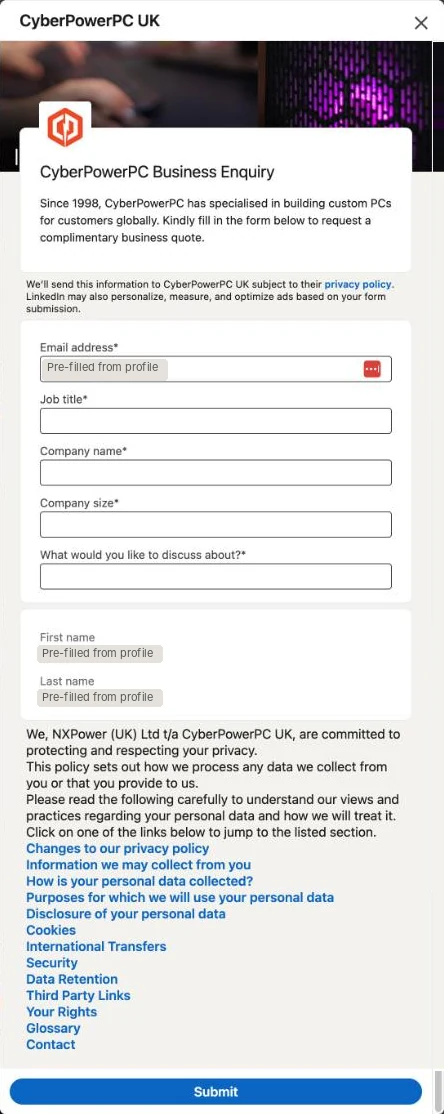
The details line says what the form is for, a complimentary business quote, and a quote can carry more questions than a download.
Four typed boxes is the issue. Company size is a text box here when LinkedIn offers it as a profile field and HubSpot shows it as a dropdown. "What would you like to discuss about?" is the free-response question the playbook warns costs 3 to 4% of submissions, and four options (workstations, servers, bulk PCs, something else) would route the quote better than a typed sentence. The pasted privacy text belongs behind the privacy policy link LinkedIn already requires.
Executive Performance Academy: coaching program
A coaching company's ad ends in a Learn more button and opens a form headed "See How The Executive Performance System Works". It asks for email and a required phone number, then first name, last name and LinkedIn profile URL. The notice says the company will send information and "reach out personally to see if we can help".
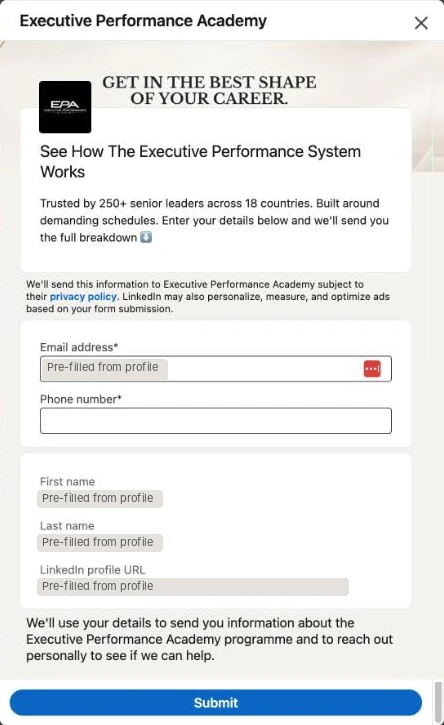
The notice is honest about the follow-up. "Reach out personally" tells you the phone number is for a call, which is the sentence most forms that ask for a number leave out.
The details line promises "the full breakdown" and the notice promises a call. Those are two different offers. Pick one, and make the thank-you button deliver it, before the phone number is asked for.
Courses and events
Harvard Chan Advanced Learning Academy · The University of Law · UKAI
A course or a seat has entry criteria, and the member's profile already holds most of what an admissions team needs. Three of the 14 are a course, a program or an event.
Harvard Chan Advanced Learning Academy: executive course
Harvard Chan's ad for a mental health leadership program (online, December 2026, $2,900 on the creative) ends in a Learn more button, with 828 submits on the card. The form asks for email, job title and company name, then first name and last name, with a notice that you will receive emails about the academy's programs.
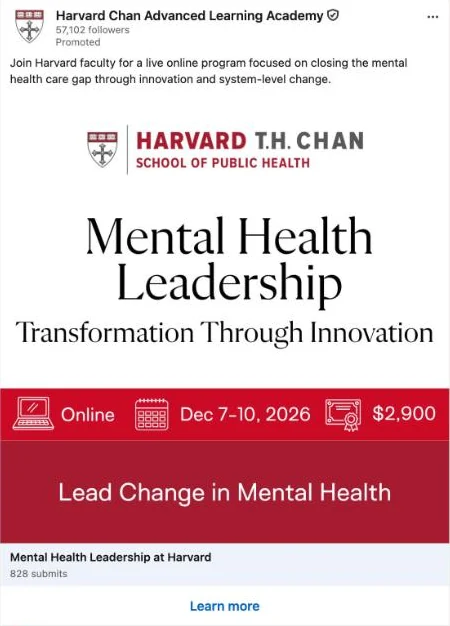
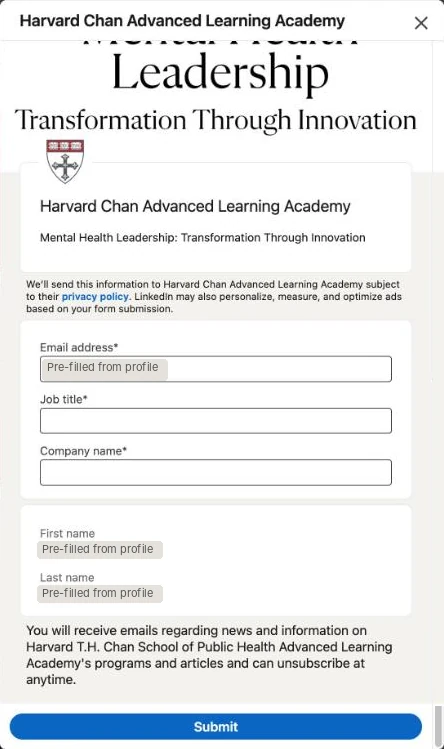
The price, dates and format are in the ad, so everyone who opens the form already knows the program costs $2,900. Five fields, with job title and company the two an executive education team needs, and a plain notice about what the emails will be.
The headline and the details line are the wrong way round. "Mental Health Leadership: Transformation Through Innovation" is the offer and belongs in the 60-character headline, with the school's name in the details line, because the headline is the first thing you read after tapping.
The University of Law: MA Law (Conversion)
The University of Law's ad for a law conversion master's ends in an Apply Now button, with 40 submits on the card. The form asks for email and a required phone number, then first name and last name. The notice begins "By ticking this box, you're agreeing that the University may contact you by email, phone, text or occasionally by post". There is no box.
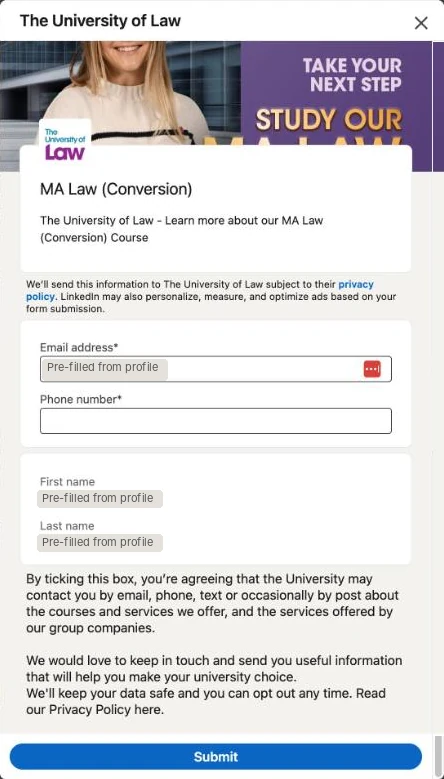
Four fields is the second-shortest form in the set, and for a course inquiry the phone number earns its place. An admissions call is the follow-up.
The notice reads like a checkbox label pasted into the privacy text field, so you are told you are agreeing by ticking a box you cannot see. LinkedIn's disclosure checkboxes exist for exactly this, and one of them, marked required, would make the consent real. Apply Now on a four-field form also promises more than the form does. Learn more would match it.
UKAI: Sovereign AI Summit registration
UKAI's event ad for a one-day summit in London ends in a Register button and opens LinkedIn's event registration form. It asks for email, company name and job title, then first name, last name and country, with an optional checkbox letting the organizer send communications about its offerings.
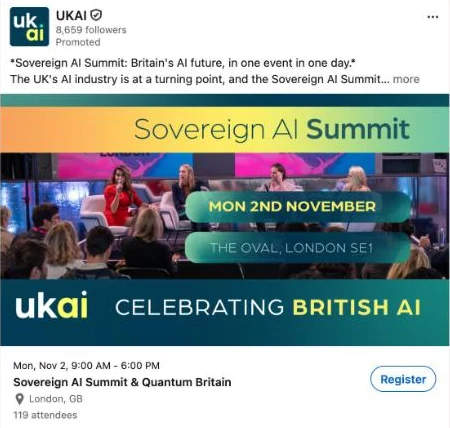
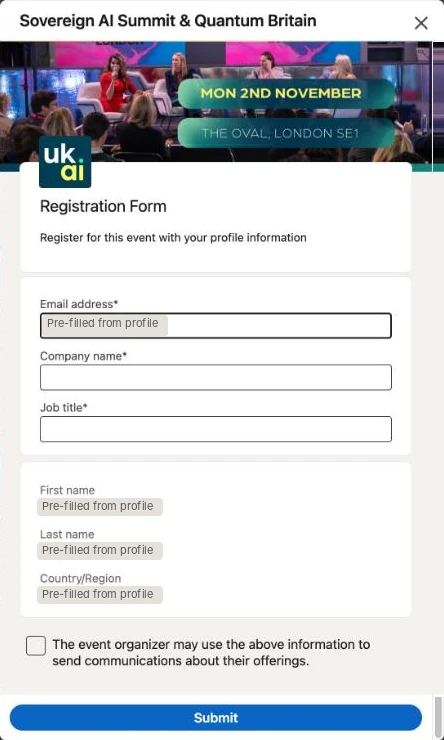
The event card does the selling, with the date, the venue and 119 attendees visible before the button. The marketing checkbox is optional and separate from the registration, which is how optional should look.
This is the one form of the 14 without LinkedIn's "We'll send this information to…" line, and the only privacy text is the optional checkbox. A member who wants to know where the data goes has nothing to read. "Registration Form" and "Register for this event with your profile information" are LinkedIn's defaults too. The event name belongs in the headline.
The rules, the set-up and Meta compared
The reference material behind the verdicts above, from LinkedIn's and Meta's own documentation. Open what you need.
What a LinkedIn lead form looks like to the member
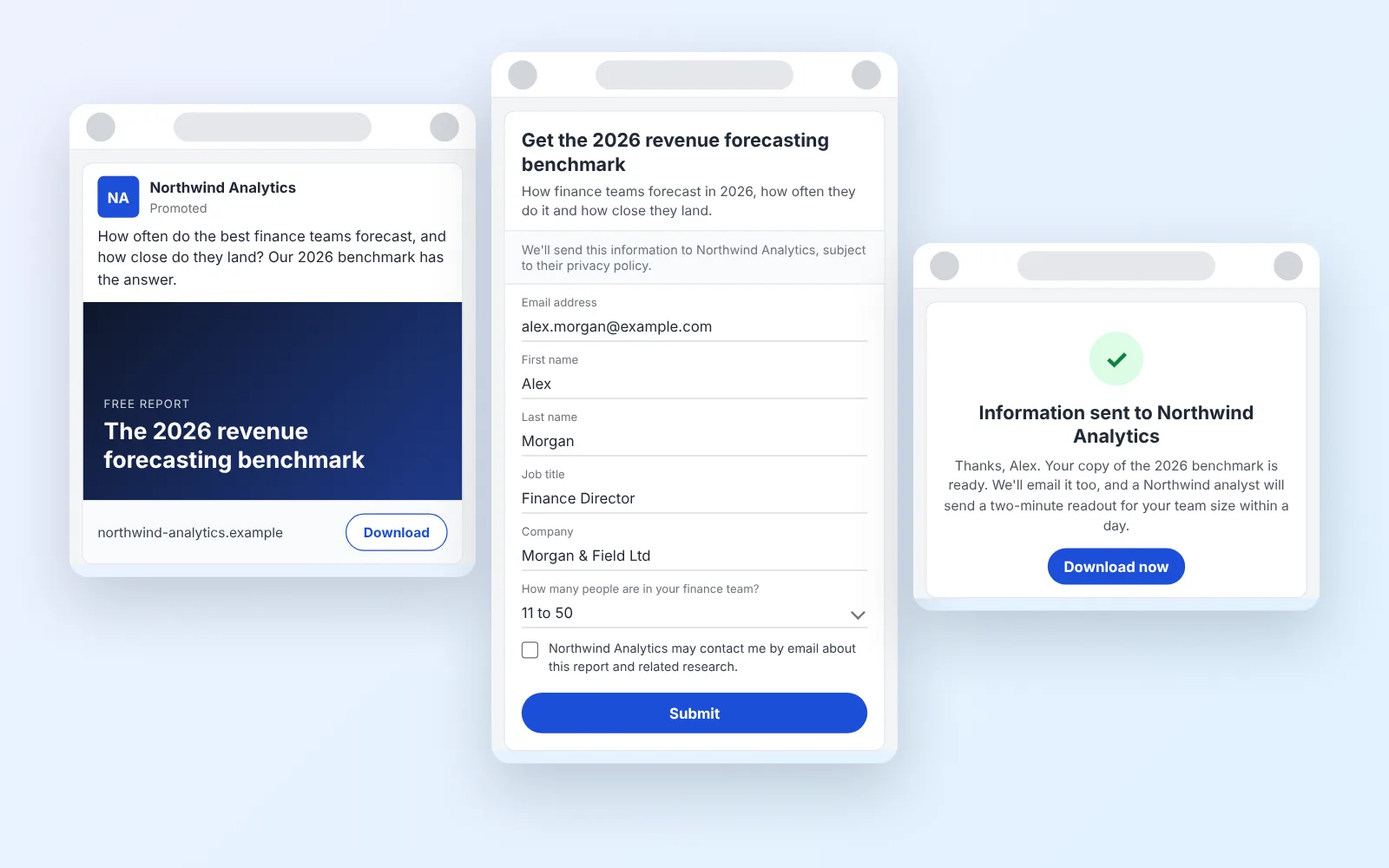
The screenshots above are the second of three screens. None of the 14 forms was submitted, so the thank-you screen is drawn here from LinkedIn's specifications, for an invented company, alongside the ad and the form.
Illustration of the member's three screens, drawn from LinkedIn's Lead Gen Form specifications. The company and the member are invented.
1The ad
2The pre-filled form
3The thank-you
The ad carries the button. Any single image, carousel, video, event, message, document or conversation ad can open a Lead Gen Form. The 14 above came from single image, document and event ads.
The form opens inside LinkedIn with a headline of up to 60 characters and a details line of up to 160. First name, last name and email are selected by default and pre-filled from the profile. You can choose up to 12 fields in total, with up to 3 of those as custom questions, each either multiple choice or a single line of text. Every field is required, the member can only edit contact fields and anything blank on their profile, and up to five disclosure checkboxes sit above the Submit button.
The thank-you is a message of up to 300 characters and one button that you point at a URL. If the ad promised a download, this button is the only way the member gets it. LinkedIn's own playbook says so in bold: content is not delivered automatically.
Behind the member's view, the lead lands in Campaign Manager with up to 20 hidden fields you set (campaign name, ad set, your own source IDs), and goes from there to a CSV download or a CRM sync. LinkedIn's Help Center says the collected profile data is stored for one year, so the sync is not optional. Our guide to LinkedIn Lead Gen Forms covers the CRM, webhook and CAPI delivery side in depth.
The rules the forms are held to
These are LinkedIn's figures, from its Lead Gen Forms playbook, its marketing blog and its Help Center, read on October 8, 2026.
- Five fields or fewer. The one-sheeter recommends five or fewer and allows 12. The marketing blog goes further and suggests three or four.
- Custom questions as multiple choice. The playbook says adding even one free-response question "can lead to a 3-4% drop in the lead submission rate".
- No fields the member has to type. Phone number and gender are never pre-filled, and the one-sheeter says to leave them out where you can.
- The thank-you button matters. LinkedIn's published click-through rates by button: Download Now 16.5%, View Now 14.0%, Learn More 10.3%, Visit Company Website 9.8%, Try Now 7.8%.
- Forms go stale. Sixty-six days after creation, only 10% of forms were still receiving leads, so the playbook says to refresh creative at least every two months.
- The form converts better than a landing page, by LinkedIn's count. The playbook puts the average Lead Gen Form conversion at 13% against a 2.35% landing page average it attributes to a WordStream study. Treat the 13% as LinkedIn's number for LinkedIn's product.
How to create a lead generation form in LinkedIn
LinkedIn's own steps, from its Help Center, in the order Campaign Manager asks for them. The delivery side, from CRM sync to webhooks, is in the guide.
- Open Campaign Manager, then Content & Assets, then Lead generation forms, then Create form. The form is an asset you attach to ads, not a setting inside one ad, so build it before the campaign.
- Form details. Name the form, pick its language (it cannot be changed after saving), write the headline (60 characters) and the details line (160 characters). Write the headline as the offer, not the brand.
- Lead details. Keep first name, last name and email, then add only the fields the follow-up needs. Add up to three custom questions and make them multiple choice. Every field will be required, so every field costs you.
- Data privacy. Paste a privacy policy URL (required for approval), add custom privacy text if your lawyers want it, and add disclosure checkboxes if you market to the EU, because LinkedIn stopped showing its default consent box there in 2020.
- Confirmation. Write the thank-you message (300 characters) as the next step, pick the button label, and point it at the asset you promised or the page you want the lead on next.
- Settings and hidden fields. Add up to 20 hidden fields for campaign, ad set and your own source IDs before the form is attached to a live ad set, because they cannot be added afterwards. Then connect the CRM sync, send a test lead, and attach the form to a campaign whose objective is Lead generation, the only objective that allows it.
Meta instant forms, compared
Meta's version of the same product is the instant form inside a lead ad, and it runs on Facebook and Instagram feeds, Stories, Reels and Marketplace. Four differences change how you build.
| LinkedIn Lead Gen Form | Meta instant form | |
|---|---|---|
| Form types | One | "More volume" (default), "Higher intent" with a review screen, "Rich creative" |
| Questions | Up to 12 fields, 3 of them custom | Up to 15 questions |
| Custom question types | Multiple choice, single-line text | Multiple choice, short answer, conditional answer, store locator, appointment request |
| What the member can edit | Contact fields and anything blank on the profile | Everything pre-filled except date of birth |
| How long the leads stay | One year for profile data | 90 days |
Meta's "Higher intent" form adds a review screen where the person confirms their details, puts a line under the contact fields saying you may follow up, and only runs in mobile feeds. Meta's own example for it is booking a test drive, and it is the type to pick for any lead a salesperson will call.
Meta also asks for a "reasonably prominent notice" inside the form telling people why you collect their contact details and who you share them with, and gives car makers sharing with dealers and real estate brands sharing with agents as its own examples. If you run both platforms, write that sentence once and use it as the disclosure checkbox on LinkedIn too.
What to do with the lead in the first five minutes
A native form gives you a contact and three answers. It does not give you a quote, a qualified case or a booked call, and it holds the data on someone else's clock.
Treat the thank-you button as the second step of the form. The member taps Download Now or View Now (LinkedIn's two best-performing labels), gets the asset, and lands on a page where a short Growform quiz or quote form asks the questions the native form could not: budget, timing, the specific product, the ZIP code. Those answers route the lead to the right rep, trigger the call, and sit in your CRM with no expiry.
Two things make it work. The sync, native or through Zapier, has to be on before the campaign starts, so the LinkedIn lead and the website answers join up on the same record. And the first call has to come fast. LinkedIn's playbook quotes a HubSpot study on this: wait five minutes and the odds of reaching the lead fall by a factor of ten.
LinkedIn lead form FAQs
What is a LinkedIn lead gen form?
A LinkedIn Lead Gen Form is a form attached to a LinkedIn ad that opens inside LinkedIn when a member taps the ad's button, pre-filled with contact and profile details from the member's account. The member reviews the fields, answers up to three custom questions, agrees to your privacy terms and submits in a couple of taps, then sees a thank-you message with one button. Leads land in Campaign Manager, where you download them as a CSV or sync them to a CRM.
What makes a good LinkedIn lead gen form?
A good LinkedIn lead gen form asks for five fields or fewer, lets the profile fill in most of them and saves its custom questions for multiple choice. In our 14 examples, Landis asked for three pre-filled fields and nothing else, while the weakest forms opened on a typed phone number or carried consent text about a box that was not there.
How much do LinkedIn lead gen forms cost?
Nothing beyond the ads. LinkedIn's Help Center says there is no additional cost for Lead Gen Forms outside the cost of the associated ad sets. You pay for the impressions or clicks on the ad as usual, and the form is free to attach.
How many fields should a LinkedIn lead gen form have?
Five or fewer, by LinkedIn's own recommendation, and three or four if you can. The form allows up to 12 fields including the custom questions. Every field is required, members cannot submit with a blank, and any field that is not on the member's profile has to be typed, so each one you add costs submissions. Phone number and gender are never pre-filled.
Which ad formats support lead gen forms?
LinkedIn's specifications list single image, carousel image, video, event, message, document and conversation ads. The form is only available under the Lead generation campaign objective.
How long does LinkedIn keep the leads?
LinkedIn's Help Center says collected member profile data can only be stored for one year because of its member privacy policy, while performance metrics stay in Campaign Manager beyond that. Several guides say 90 days, which is Meta's rule for instant forms, not LinkedIn's. Download or sync your leads as they arrive and the question never matters.
Do you need a consent checkbox on a LinkedIn lead gen form?
You need a privacy policy URL for the form to be approved, and since April 2020 LinkedIn no longer shows a default consent checkbox to EU members, so if your follow-up needs consent, add up to five disclosure checkboxes yourself, each up to 500 characters, and mark the ones that are required.
Related articles
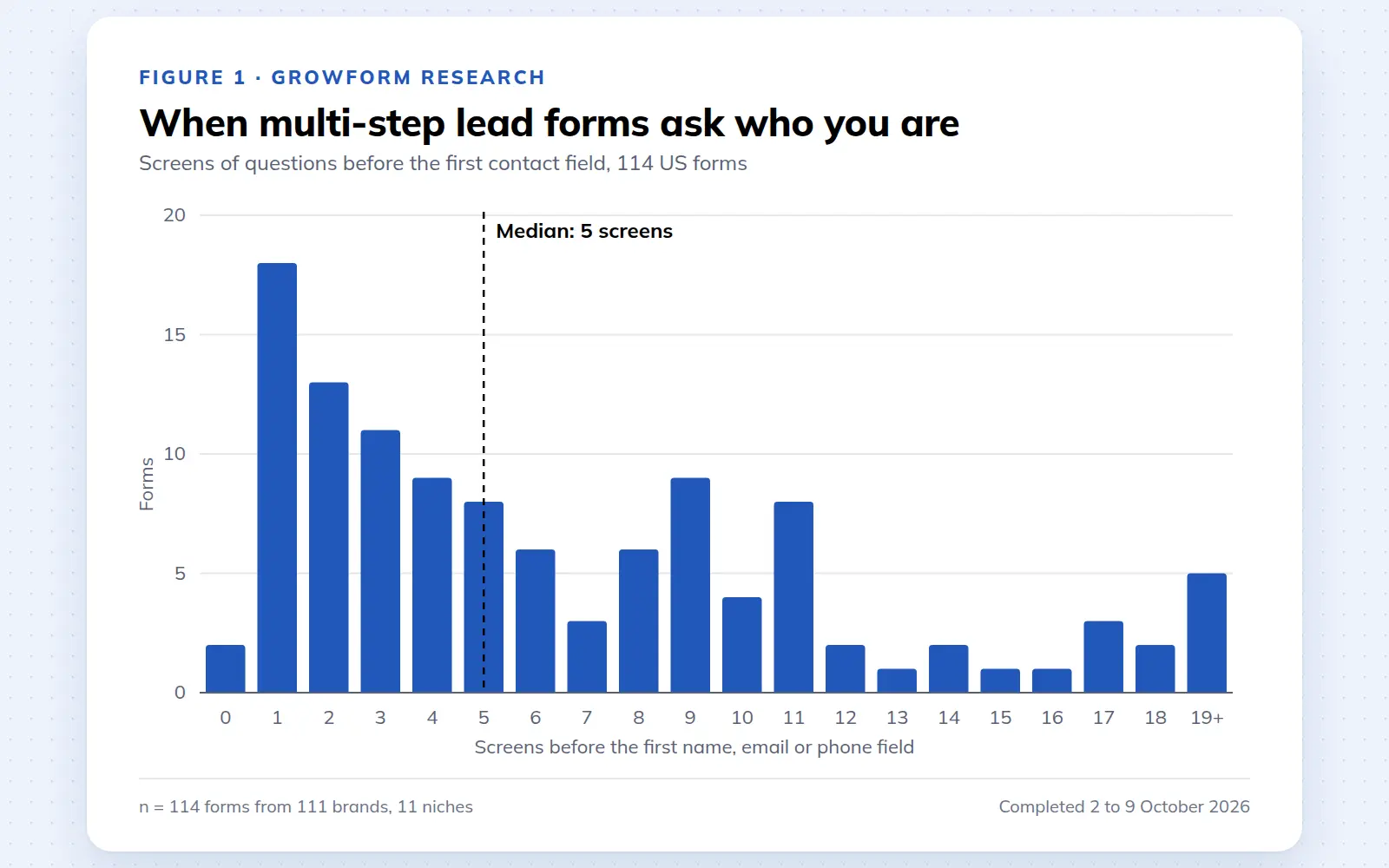
Multi-step lead forms: a 2026 study of 114 forms
We completed 114 US multi-step lead forms screen by screen in October 2026 and counted how long they are, what they ask first, how they show progress, when they ask for contact details and how they ask for consent.
October 9, 2026
25 lead generation form examples to steal in 2026
From one-field newsletters to mortgage forms, we filled out 25 lead generation forms of every type. Here's what works in 2026, and what to learn from them.
October 9, 2026
Form testing priorities for higher quality paid leads
October 8, 2026