
ZeroBounce Email Validation: A Complete Guide for 2026
 Harvey Carpenter Updated 11 min read
ZeroBounce's February 2025 list-decay report found that only 62% of verified email addresses were valid and safe for sending, while its real-time API detected more than 10 million typos in one year (ZeroBounce's list-decay report). That changes how performance marketers should think about email validation. It isn't a spreadsheet-cleaning task you run when the CRM looks untidy. It's a control point between paid acquisition, form conversion, lead routing, and sender reputation.
ZeroBounce can validate an address in approximately 3 seconds, according to its email validation service page. Those capabilities make it useful in both bulk hygiene and real-time capture, but the implementation decision isn't “accept valid, reject invalid.” Catch-all, role-based, disposable, abusive, and unknown addresses each require a different business rule.
Why email lists decay faster than you think
At least 22.71% of an email list decayed within one year in ZeroBounce's 2023 report. In its February 2025 reporting, the company said databases degrade annually by at least 28%, and its 2026 Email List Decay Report puts the figure for 2025 at 23%. The exact rate depends on the audience, acquisition channel, and industry. The operational point remains clear: an address can be usable at capture and unreachable when your team finally contacts it.
People change jobs, companies migrate domains, inboxes are abandoned, and addresses become disposable or unsafe. Forms introduce another source of decay immediately, including spelling errors, fake submissions, and addresses entered only to access a download or quote. Bulk cleaning can remove some of that risk later, but it cannot recover the ad spend, sales time, or routing opportunity tied to a bad lead.
Decay is an acquisition problem
For a paid lead-generation team, an invalid address creates more than an email bounce. The record may enter the CRM, trigger automation, consume enrichment activity, and reach a sales rep who cannot contact the prospect. If the funnel pays for every submission, the cost is already incurred before a bulk cleaner identifies the problem.
Timing determines the right control:
- Before capture: the form can stop obvious errors while the visitor is still present.
- Immediately after capture: the system can classify ambiguous addresses before routing.
- Before a campaign: a bulk check can identify decay in older records.
- After delivery: bounce and engagement data can refine future suppression rules.
The time-based rule should be specific to the address category. Reject clear syntax failures and disposable addresses at the form. Hold catch-all or unknown results for review, enrichment, or a lower-priority route instead of treating them as equivalent to a confirmed mailbox. Role-based addresses may suit a newsletter or resource delivery, but they can create weaker sales records when a named contact is required.
Real-time verification has greater value in continuously fed funnels than in static lists. It blocks avoidable errors before they enter the system, while periodic list checks address the risks that develop after capture.
How ZeroBounce email validation works
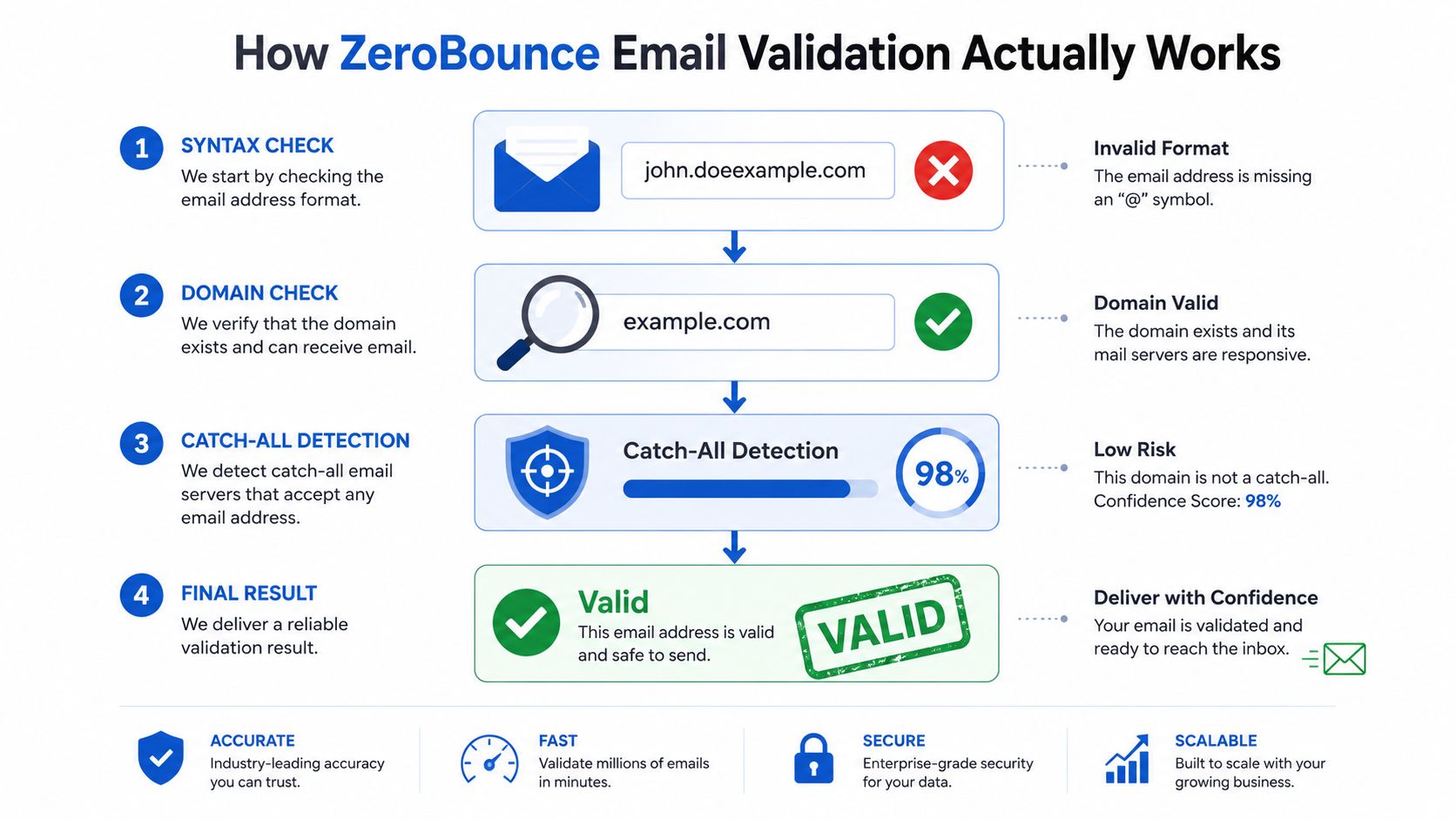
ZeroBounce checks an address through several signals instead of trusting formatting alone. The workflow moves from syntax and domain checks to mail-server behavior, then returns a status based on what the verifier can establish without sending a live message. Its service page describes validation at scale and a turnaround of approximately 3 seconds per address.
The verification layers
-
Syntax screening checks whether the address is structurally plausible. Missing symbols, malformed domains, invalid characters, and common formatting errors can be rejected before deeper checks use additional time or credits.
-
Domain verification checks whether the domain appears able to receive email. This separates a typo or nonexistent domain from an address connected to a functioning organization or consumer provider.
-
SMTP-level checking communicates with the receiving mail server without sending a message. The verifier asks whether the server will accept the mailbox, but the response may remain uncertain. Some servers conceal mailbox status, accept all addresses, or filter verification requests.
-
Risk classification adds the operating context introduced earlier. Results can identify whether an address is valid, invalid, or associated with a higher-risk category, including disposable, spamtrap, abusive, role-based, catch-all, or unknown conditions. That context supports different form decisions instead of one universal pass or fail rule.
Why the status matters more than the label
A valid result means the address passed the available checks. It does not show that the contact will open, respond, buy, or remember submitting the form. Catch-all results require caution because the domain accepts mail broadly, preventing confident confirmation of the specific inbox. Role-based addresses may receive messages reliably while belonging to a shared department rather than an individual buyer.
Apply those distinctions at capture. Reject clear syntax failures and disposable addresses immediately. Hold catch-all or unknown results for review, enrichment, or a lower-priority route. A role-based address can work for newsletters or resource delivery, while a named-contact workflow may send it to review.
Store the returned status, validation timestamp, and form decision in the CRM. If later performance shows that catch-all or role-based leads convert poorly, adjust routing without rebuilding the capture process.
Real-world accuracy and the catch-all problem
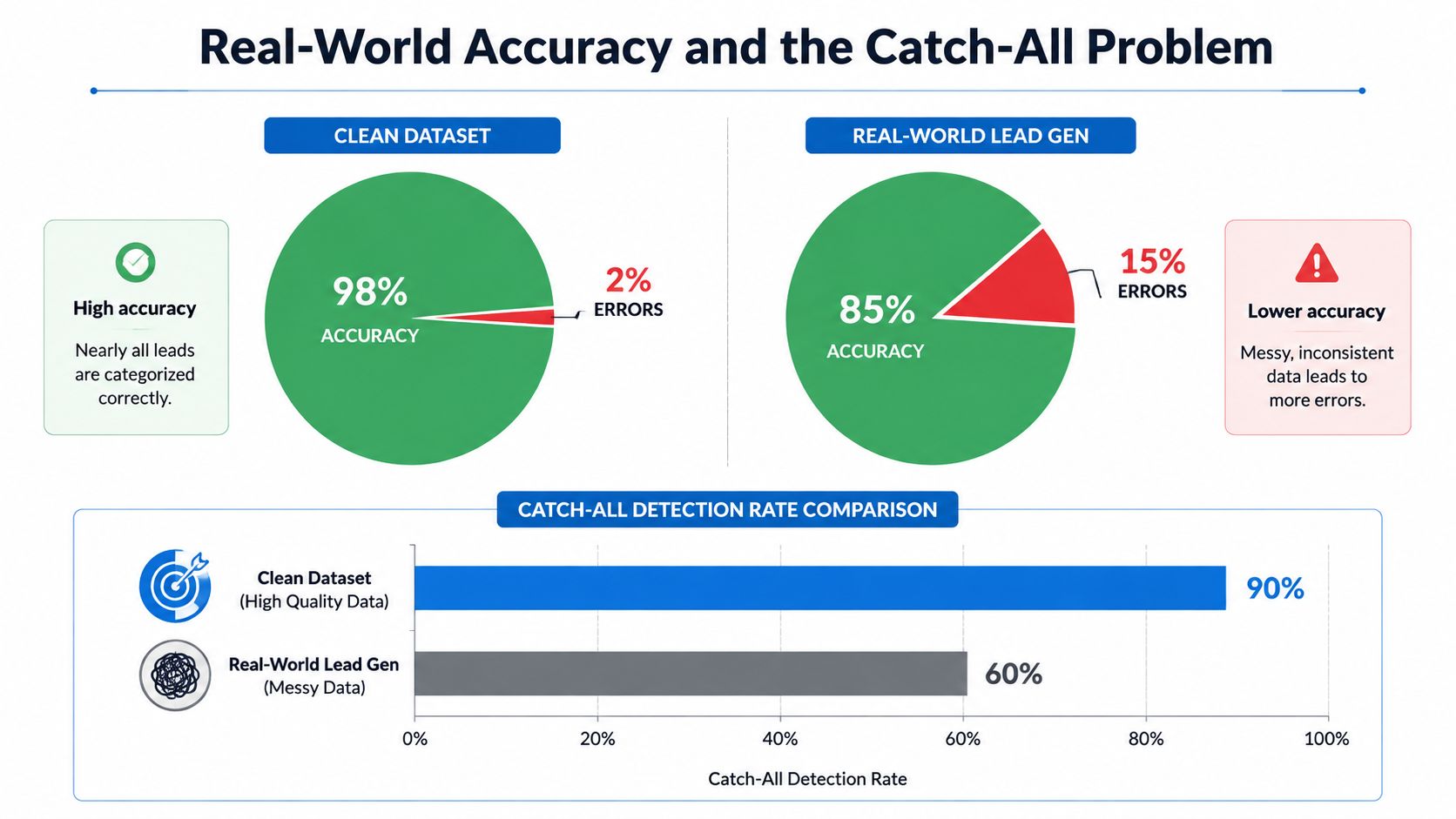
ZeroBounce markets accuracy at 99.6%, while independent reviews generally place real-world performance around 96% to 98% on standard domains. One review, published by the competing verifier Prospeo, reported 96.5% accuracy after processing 47,000 emails across 12 services over 90 days. The difference isn't necessarily a contradiction. It reflects the gap between a provider's stated benchmark and the uncertain mailbox conditions found in acquisition data.
Catch-all domains create the hardest limitation. Their mail servers may accept messages for many or all addresses, even when a particular mailbox doesn't exist. A verifier can complete the technical exchange, but the receiving server hasn't provided enough information to prove that the named person has a usable inbox.
What the tests reveal
ZeroBounce's documentation identifies catch-all validation as especially difficult because multiple filtering layers can reduce reliability. One reviewer's catch-all-focused test found that standard verification identified 467 of 500 real contacts, while a paid catch-all add-on didn't materially increase that count. That result supports a cautious operating model. Extra scoring can help prioritize leads, but it can't make an intentionally ambiguous server deterministic.
Use this guide to verifying email addresses as a companion when mapping statuses to your funnel logic.
A workable policy for ambiguous addresses
Don't automatically reject every catch-all lead. For a high-intent quote request, the opportunity cost of blocking a genuine prospect may exceed the deliverability risk. Accept the submission, mark it as lower confidence, and route it through a secondary confirmation or faster human follow-up.
Role-based addresses deserve a similar distinction. An info@ address may be unsuitable for an individual sales sequence, but it can be valuable for a company-level inquiry. Block it only when your buyer explicitly requires a named contact. Disposable, spamtrap, and abusive classifications should generally be suppressed because their downside is much clearer than the value of retaining them.
Business impact for high-volume lead generation
Validation earns its place in a lead stack when it changes what happens after the form is submitted. A clean address can move into the CRM, buyer router, and nurture sequence immediately. An invalid or toxic address can be stopped before it creates downstream work. A catch-all address can be accepted with a warning instead of being treated as equally reliable.
That separation affects buyer acceptance, cost per qualified lead, and sender reputation. It also protects sales capacity. A representative who spends time chasing an address that never existed isn't just losing one activity. They're working from a distorted pipeline and may delay follow-up on leads that could convert.
| Metric | Without Validation | With ZeroBounce Validation | Impact |
|---|---|---|---|
| Buyer acceptance | Ambiguous records reach the buyer | Status-based routing filters obvious risk | Fewer avoidable rejections |
| Cost per lead | Spend includes uncontactable submissions | Acquisition data is screened before handoff | Better visibility into usable lead cost |
| CRM quality | Typos and disposable addresses remain active | Risk categories are stored and suppressed | Cleaner automation and reporting |
| Sender health | Campaigns include more questionable records | Invalid and toxic addresses are removed early | Lower avoidable delivery risk |
Don't confuse validation with deliverability
Validation can confirm that an address appears usable. It can't repair weak authentication, poor engagement, spam complaints, bad content, or a damaged sending reputation. Validity's 2025 Benchmark Report frames inbox placement as a global measurement tracked with seed data, reinforcing the need to evaluate delivery beyond list hygiene.
That means a low bounce rate doesn't automatically mean your campaigns belong in the inbox. Keep authentication, suppression, segmentation, engagement management, and inbox-placement monitoring in the same operating plan.
Privacy and compliance considerations
Email verification is still data processing. Sending an address to a validation API doesn't create consent to market, and a valid result doesn't identify the person who controls the inbox. Those two facts should remain separate in your data model and your compliance documentation.
A compliant form should record the submission context, the consent language shown, the relevant timestamp, and the validation outcome. In regulated industries, that evidence matters because the business may need to show both that the address was usable and that the person agreed to the intended communication.
Build the audit trail deliberately
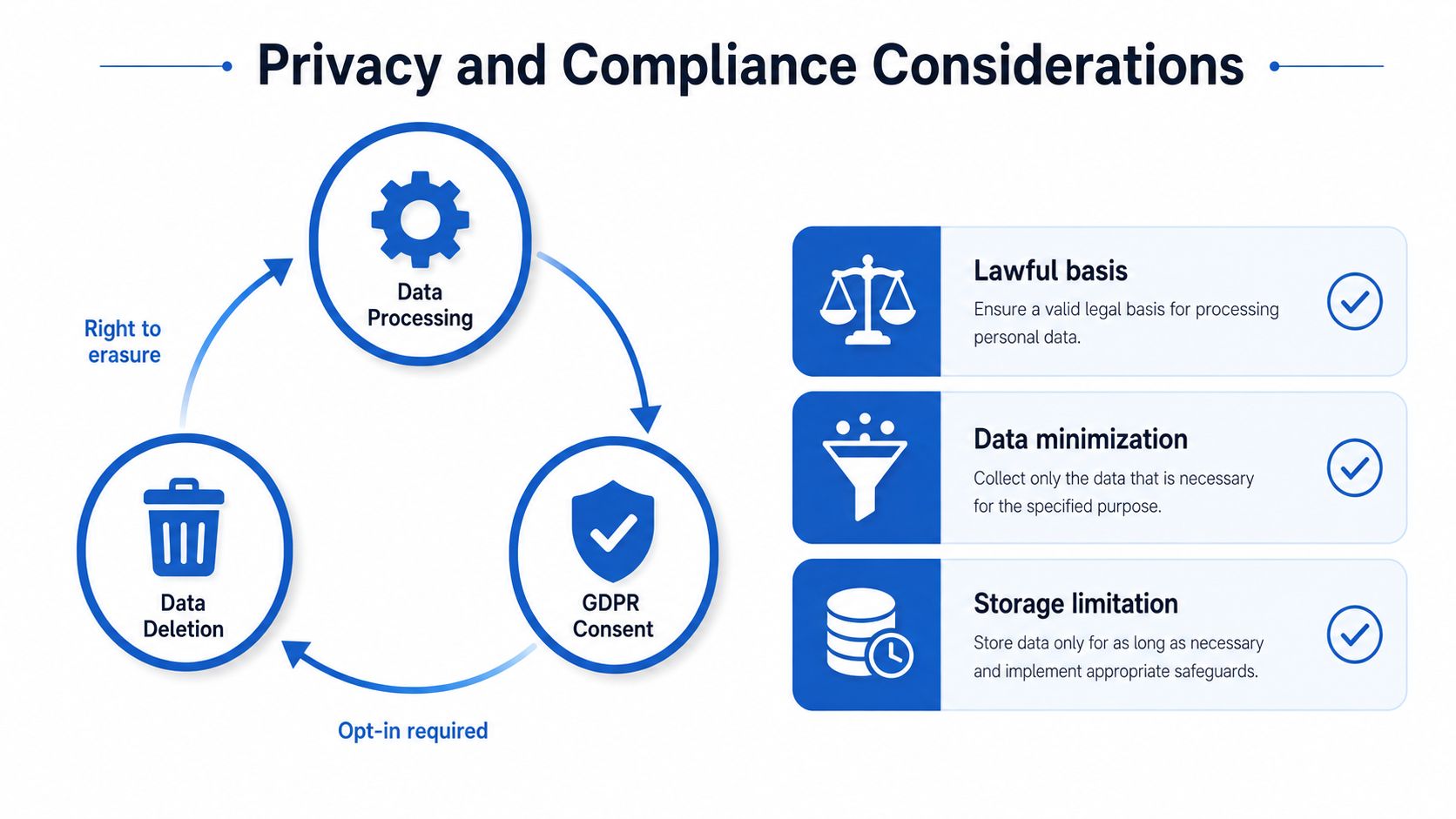
- Lawful basis: Document why the business processes the address for validation and how that purpose relates to the form submission.
- Data minimization: Send only the fields needed for validation. Don't include unrelated lead details in an email-verification request.
- Storage limitation: Define how long validation responses, logs, and failed submissions remain available.
- Deletion handling: Make sure an erasure request can remove the address and associated records from your form system, CRM, and integration logs.
- Consent separation: Store marketing permission independently from the technical result returned by the verifier.
For SMS-adjacent lead flows, email validation also shouldn't be treated as a substitute for the consent evidence required by the applicable messaging rules. A valid email doesn't prove permission to send texts or make calls. The form must preserve the actual opt-in record and any required disclosure.
Teams using a form builder should map these fields before launch. This guide to setting up contact state in Growform is useful when the workflow needs to distinguish a submitted contact from an opted-in, validated, or disqualified record.
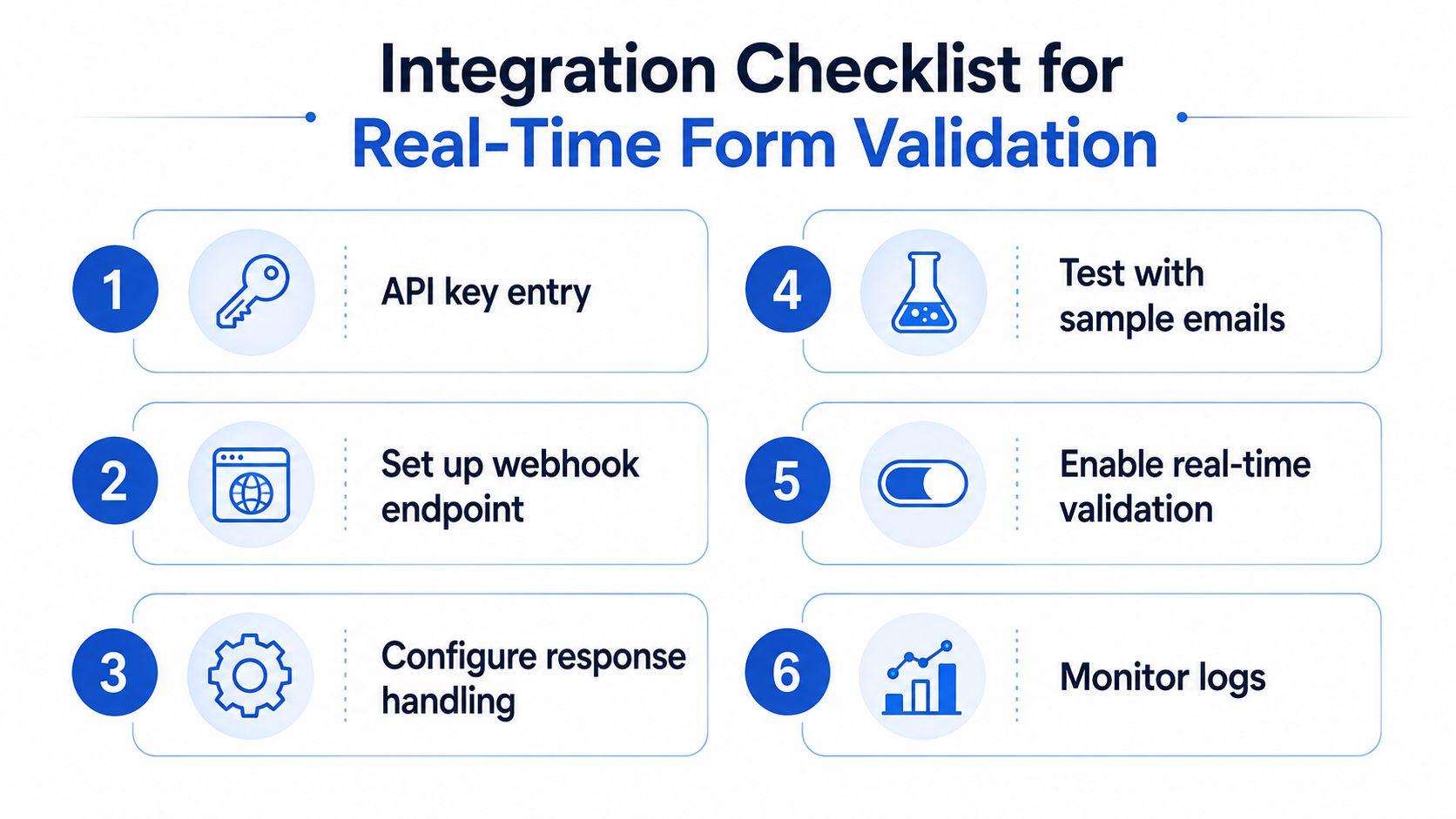
Integration checklist for real-time form validation
Real-time validation works when the form treats ZeroBounce as a decision service, not as a decorative badge beside the email field. The API response needs to affect what the user sees, what the CRM receives, and how the lead gets routed.
Configure the request and response
-
Protect the API credential. Keep the ZeroBounce key on the server-side integration or managed connector where possible. Don't expose a permanent credential in browser code.
-
Trigger validation at the right moment. Validate after the visitor finishes the email field, or when they attempt to continue from that step. Avoid firing requests on every keystroke because partial addresses generate noise and unnecessary calls.
-
Map every status. Pass the returned status into a hidden field or backend record. Keep the original email, normalized email, status, and validation time together so sales and operations can audit the decision.
-
Write explicit routing rules. Use a policy such as:
- Invalid, spamtrap, abusive, or disposable: block submission with a neutral correction message.
- Valid: allow immediate submission and normal routing.
- Catch-all: accept for high-intent funnels, but add a review flag or secondary confirmation task.
- Role-based: accept when the offer is company-level, flag when individual ownership is required.
- Unknown or timeout: avoid falsely claiming failure. Hold the lead for controlled fallback or request a different address.
Handle failure without damaging conversion
API latency and service interruptions need a fallback path. If the request times out, the form can preserve the submission, mark validation as pending, and delay buyer distribution until the result is available. For low-risk campaigns, you may choose to allow the lead through with a pending status, but that decision should be intentional and measurable.
Use a friendly message for rejected input. “Please check your email address and try again” helps a genuine visitor fix a typo without revealing internal classifications such as spamtrap or abuse detection. Never discard the original submission, because that makes debugging and compliance review harder.
Test before production
Run test cases for malformed addresses, known disposable addresses, role-based inboxes, catch-all domains, valid consumer addresses, and API failure conditions. Confirm that the form displays the right message, the webhook carries the right status, the CRM stores the result, and the buyer router follows the intended branch.
Teams evaluating the full workflow can use this real-time and bulk lead verification guide to compare point-of-capture checks with later list processing.
Metrics to track after implementation
A validation integration should earn its place through downstream evidence. Start with the rate of hard bounces from leads captured before and after deployment, but don't stop there. A validator can reduce bad addresses while an overly strict policy also removes genuine prospects, especially when catch-all domains are common in your audience.
Track the full path from form completion to buyer acceptance and first contact. If valid leads reach sales faster but buyer acceptance falls, your routing rules may be admitting too many ambiguous records. If bounce rates improve while form completion drops, the user experience or threshold is probably too restrictive.
| Metric | Target Benchmark | Measurement Frequency | Action Trigger |
|---|---|---|---|
| Hard bounce rate | Establish a lower baseline after implementation | Weekly | Bounces rise despite validation |
| Buyer acceptance | Maintain or improve the existing qualified-lead baseline | Weekly or monthly | Acceptance declines after stricter filtering |
| Form completion | Preserve the pre-validation conversion baseline | Daily during launch, then weekly | Completion drops after new checks |
| Cost per accepted lead | Track against paid acquisition economics | Weekly | Filtering raises qualified-lead cost |
| Time to first contact | Compare validated and pending lead paths | Weekly | Pending leads receive materially slower follow-up |
| Status mix | Monitor valid, catch-all, role-based, and risky classifications | Monthly | One source produces unusually high-risk data |
Don't create unsupported targets before you have a baseline. The right threshold depends on your audience, buyer rules, offer intent, and tolerance for false positives. Review the data by traffic source and campaign, because a branded B2B funnel may justify accepting a catch-all inquiry while a tightly controlled nurture sequence may not.
Sender reputation and inbox placement also belong in the review. Validation is one layer of deliverability, alongside authentication, engagement, complaint management, suppression, and content quality. When those measures disagree, investigate the entire sending system instead of blaming the email field alone.
Growform provides multi-step lead-generation forms with conditional logic, real-time webhooks, and a ZeroBounce integration that validates email addresses before submission, on your own ZeroBounce API key. Start free trial to test status-based routing in your own funnel, then connect accepted and flagged leads to the CRM or buyer workflow that handles them.
Related articles

Quiz Funnels vs Multi-Step Forms for Lead Generation
Paid traffic operators usually ask the wrong first question here.
September 30, 2026

8 Lead Qualification Questions That Convert
The best qualification question isn't always the first one.
September 30, 2026

What Is Lead Qualification: A 2026 Guide to BANT & CHAMP
Lead qualification is the process of deciding whether a prospect is worth a salesperson's time before anyone ever calls.
September 30, 2026