
Typeform pricing 2026: every plan, the real cost and the response cap
Typeform costs $39 to $379 a month on monthly billing, or about 30% less billed yearly. Every plan and limit, checked October 12, 2026, plus what a lead generation form really costs.

Updated Published 12 min read
Typeform's core plans cost between $39 and $129 per month, but the exact plan you need comes down to how many responses you expect, how many people need access and whether you're comfortable with a Typeform logo on your forms. The main number to watch is the response cap - once you reach it, your forms close until the next month unless you pay to move up a tier.
As of October 2026, Typeform's paid plans cost $39 to $379 a month on monthly billing, or about 30% less on yearly billing, and its free plan is limited to 10 responses a month.
Below you'll find every plan, what each one includes and what happens at the cap. If you run ads or collect sales leads, you can skip to what a lead form costs.
Update (October 2026): Typeform has raised its core prices since our last update in December 2025. Basic went from $29 to $39 a month, Plus from $59 to $79 and Business from $99 to $129. Growth Essentials and Growth Pro are now legacy plans, and Growth Flow replaced them in May 2026.
How much does Typeform cost?
Typeform's core plans cost $39 to $129 a month on monthly billing. There is also a free plan, and Enterprise is priced by sales.
| Plan | Price a month | Responses a month | Users |
|---|---|---|---|
| Free | $0 | 10 | 1 |
| Basic | $39 | 100 | 1 |
| Plus | $79 | 1,000 | 3 |
| Business | $129 | 10,000 | 5 |
| Enterprise | Contact sales | Custom | Custom |
Prices are for monthly billing. Paying yearly takes about 30% off each plan, so Basic comes to roughly $330 a year instead of $468.
Typeform also sells two specialist plans that most buyers can ignore. Growth Flow ($379 a month) is for marketing teams, and Talent ($169 a month) is for HR teams. We cover both further down.
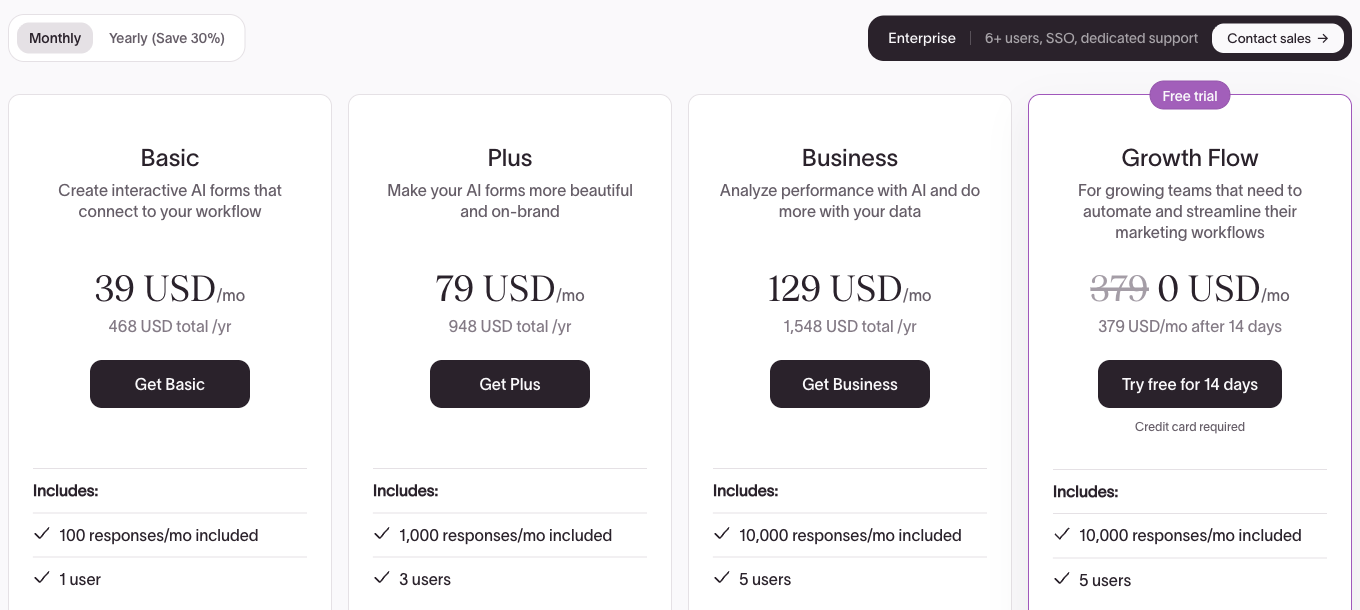
Typeform shows prices in your local currency, so visitors in the UK and Europe see pounds or euros. The plan limits are the same everywhere.
Typeform also sells one add-on on its pricing page. Contacts & Automations costs $25 a month on Plus and above, or $75 a month for the larger tier on Business and above, and it is included in Growth Flow.
What does each Typeform plan include?
Each step up the core plans adds responses and users, and a handful of features sit behind each tier. The features that move people up a plan are branding removal, tracking pixels and custom domains.
Basic: $39 a month
Basic gives one user 100 responses a month, with payments, file uploads (1 GB of storage) and webhooks. The Typeform logo stays on your forms. It suits one person collecting a few sign-ups or orders a week.
Plus: $79 a month
Plus is the cheapest plan that removes Typeform branding. It also adds a custom subdomain on typeform.com, three users and 1,000 responses a month. Most small businesses that put a Typeform on their website end up here.
Business: $129 a month
Business raises the allowance to 10,000 responses and five users, and adds drop-off analysis, which shows where people abandon a form. It is also the cheapest plan with the Google Analytics, Google Tag Manager, Meta Pixel and Salesforce integrations. For anyone running paid ads, that makes Business the real starting price.
Enterprise: contact sales
Custom domains (your own domain rather than a typeform.com subdomain), single sign-on and a signed HIPAA business associate agreement are only available on Enterprise. It is priced through sales, and anything above five users means a sales call too.
Typeform's specialist plans
Growth Flow ($379 a month) is Typeform's plan for marketing teams. It launched in May 2026 and replaced Growth Essentials and Growth Pro. On top of the Business features it adds 1,500 data enrichments a month (Typeform looks up company and contact details for each respondent), video questions, AI analysis of answers and the Contacts & Automations add-on. It is the only Typeform plan with a free trial, which runs for 14 days and needs a credit card.
Talent ($169 a month) is a bundle for HR teams, launched in July 2025. It gives three users 3,000 responses a month, with video questions and answers for candidate screening, AI follow-up questions and knowledge quizzes for onboarding.
Is Typeform free?
Yes. Typeform's free plan allows 10 responses a month across all your forms, and each form can have 10 questions. It includes logic, URL parameters (Typeform's hidden fields), embedding and integrations such as HubSpot and Google Sheets, so it is a fair way to try the editor.
Ten responses is enough to test a form and not much more. When the tenth response arrives, the form closes for the rest of the month, so anything public, such as a contact form, a waitlist or a quiz, will outgrow it quickly.
For lead generation the limit rules it out. You cannot run real lead generation on Typeform's free plan. You need enough leads to measure a conversion rate and to compare one ad or landing page against another, and ten a month is not enough to do either. For paid ads, the realistic starting point is Business at $129 a month. We go through the details in Typeform's free plan limits.
Does Typeform have a free trial?
Only on Growth Flow. Basic, Plus and Business have no trial. On the free plan you can add paid features in "trial mode", but a form that uses them cannot be published until you upgrade or remove those features. Growth Flow comes with a 14-day trial and asks for a credit card up front.
Growform takes the opposite approach. Every plan starts with a 14-day free trial, and you don't need a credit card to start it.
What happens when you hit Typeform's response limit?
When you reach your monthly response limit, Typeform switches your forms to private and they stop accepting responses until the next billing month or until you upgrade. Typeform emails you at 90% and again at 100% of the allowance. Deleted responses still count toward the limit, and unused responses do not roll over.
The alternative is auto-upgrade. With it switched on, your forms stay open and Typeform moves you to the next response tier with a prorated charge. On Basic the tiers run from 100 to 250, 500 and 750 responses, and the 751st response moves you to Plus. Three details are worth knowing before you pay:
- Auto-upgrade is switched on by default when you upgrade from the free plan.
- The higher tier stays on your bill in later months. You have to switch auto-upgrade off and downgrade yourself.
- Typeform's pricing page does not list the price of each response tier.
For a survey, a closed form is an inconvenience. For a paid campaign it is wasted money, because your ads keep running and keep charging you for clicks that land on a form nobody can submit. That is why lead generation teams on Typeform tend to leave auto-upgrade on, and why the plan price works as a minimum rather than a budget.
How Growform handles plan limits
Growform's plan limits are soft. If a campaign takes you past your monthly lead allowance, you'll know long before any form is switched off, and you have time to decide whether to upgrade. Growform is built for teams running serious lead generation, where a form that closes in the middle of a campaign costs money for every minute it stays closed.
What does Typeform cost for lead generation?
A lead generation team needs more from a form than the right number of responses. It needs the pixel to fire on every lead, UTMs to reach the CRM and, for anyone who sells leads, consent evidence attached to each one. Here is where those features sit on Typeform's price list:
| What a lead form needs | Cheapest Typeform plan | Price billed monthly |
|---|---|---|
| Hidden fields for UTMs and click IDs | Free (10 responses a month) | $0 |
| No Typeform branding | Plus | $79 |
| Meta Pixel, Google Analytics and Google Tag Manager | Business | $129 |
| Salesforce integration | Business | $129 |
| Form on your own domain | Enterprise | Contact sales |
| TrustedForm or Jornaya consent certificates | Not on Typeform's price list | - |
| Real-time phone and email validation | Not on Typeform's price list | - |
The headline price of $39 a month does not apply to paid traffic. The cheapest Typeform plan that can fire a Meta pixel costs $129 a month, which is more than three times the plan most people compare.
Here is what the same campaign costs on each tool, on monthly billing, with ad tracking switched on:
| Leads a month | Typeform plan | Typeform price | Growform plan | Growform price |
|---|---|---|---|---|
| Up to 300 | Business | $129 | Basic | $79 |
| Up to 1,000 | Business | $129 | Professional | $139 |
| Up to 3,000 | Business | $129 | Scale | $249 |
| More than 10,000 | Business with paid response tiers, or Enterprise | Not published | Custom | Contact us |
Below 300 leads a month, Growform costs less. Between 1,000 and 3,000 leads, Typeform's Business plan costs less per response, and that is a fair point in its favor. The difference is what each price includes. Growform's Professional plan adds TrustedForm and Jornaya certificates, real-time phone validation through Twilio and email validation through ZeroBounce, and forms hosted on your own domain. On Typeform, the domain needs an Enterprise contract and the rest are not on the price list. You can run these numbers for your own campaigns with our cost per lead calculator.
The bigger difference is the form itself. Typeform shows one question per screen, which works well for surveys. A lead form usually works better with steps that group related questions, a progress bar and a contact step at the end, and we explain why in why you shouldn't use Typeform on your landing page. Eugen Bechir, a performance marketer at BeMarketable, said that when his team moved to Growform, "we saw an immediate increase in conversion rates".
Where Typeform falls short for lead generation
Typeform is a well-made product, and for surveys, research and HR it is often the right choice. For forms that sit behind paid traffic, five things count against it:
- The price has risen fast. The core plans cost about a third more than they did in December 2025, and Typeform's own help center still quotes the old $59 Plus price.
- The cap closes your forms. Without auto-upgrade, a campaign that does well closes its own form. With auto-upgrade on, the bill rises and stays risen until you step in. Growform warns you well before a limit affects your forms.
- Tracking costs $129 a month. Meta Pixel, Google Analytics and Google Tag Manager are Business features, so the $39 and $79 plans are not real options for paid campaigns.
- Your own domain needs an Enterprise contract. Plus gives you a subdomain of typeform.com. A form at quote.yourcompany.com means a sales call.
- Payments are final. Typeform does not refund unused time when you cancel, and both monthly and yearly plans renew automatically. You cannot pause a subscription.
Typeform still wins when you need a conversational survey, a candidate screening flow or high response volumes at a low price per response. If that is your use, the Business plan is good value, and the best Typeform alternatives cover the cheaper general-purpose tools.
Typeform vs. other form builders on price
Here is how Typeform's entry pricing compares with the tools people most often consider instead, checked on each vendor's pricing page on October 1, 2026:
| Tool | Free plan | Entry paid plan (billed monthly) | Responses on the entry plan |
|---|---|---|---|
| Typeform | 10 responses a month | Basic, $39 | 100 |
| Jotform | 100 submissions a month, 5 forms | Bronze, $39 | 1,000 |
| Tally | Unlimited submissions (fair use) | Pro, $29 | Unlimited |
| Fillout | 1,000 responses a month | Starter, $19 | 2,000 |
| Heyflow | No free plan, 14-day trial | Starter, $89 | 50 |
| Growform | No free plan, 14-day trial | Basic, $79 | 300 leads |
Typeform Basic works out at 39 cents a response, and only Heyflow costs more per response on this list (our Heyflow alternative page works that out at any volume). Growform Basic comes to about 26 cents a lead, while Jotform, Tally and Fillout cost less again. General form builders compete on how many responses you get for your money. Growform competes on how many of those responses turn into leads you can sell or close. If you are weighing Typeform against Google's free option, see our Typeform vs Google Forms comparison, and for Jotform there is a Jotform alternative page.
Is Typeform worth the price?
Typeform is worth it if you run surveys, research or hiring forms and value the respondent experience over price. For lead generation, its value depends on volume. The plan most teams actually need is Business at $129 a month, and features that lead sellers rely on, such as consent certificates, phone validation and your own domain, are either missing from the price list or tied to an Enterprise contract.
If your forms exist to produce leads, try a builder made for that job. Here is one of our insurance templates, running live on this page. Click through it to see how a multi-step lead form feels to a visitor.
This is the auto insurance quote form template. You can clone it and edit every step during the free trial.
Frequently asked questions
How much does Typeform cost per month?
Typeform costs $39 a month for Basic, $79 for Plus and $129 for Business on monthly billing, and yearly billing takes about 30% off. The specialist plans cost $169 (Talent) and $379 (Growth Flow), and Enterprise is priced by Typeform's sales team.
Does Typeform charge per response?
Not directly. Each plan includes a set number of responses a month. When you go over, either your forms close until next month, or auto-upgrade moves you to a larger response tier and charges you the prorated difference.
Which Typeform plan removes Typeform branding?
Plus, at $79 a month or $56 a month billed yearly, is the cheapest plan that removes the Typeform logo. Basic and the free plan show it on every form.
Which Typeform plan includes Meta Pixel and Google Tag Manager?
Business, at $129 a month, is the cheapest plan with the Meta Pixel, Google Analytics and Google Tag Manager integrations. Growth Flow and Enterprise include them too.
Can you get a refund from Typeform?
Typeform does not refund early cancellations or unused time. When you cancel, the plan runs until the end of the period you have paid for, and forms that use paid features go back into trial mode.
Is Typeform cheaper than Jotform?
Not at the entry level. Both start at $39 a month on monthly billing, but Jotform's Bronze plan includes 1,000 submissions against 100 on Typeform Basic, and Jotform's free plan allows 100 submissions a month against Typeform's 10.
Is Typeform better than Google Forms?
Typeform makes far better-looking forms and has logic, integrations and branding control, while Google Forms is free and quick for internal use. Our Typeform vs Google Forms comparison goes through both in detail.
We checked Typeform's pricing on October 12, 2026. Typeform changes its pricing from time to time, so check its pricing page before you buy.
Related articles
Jotform pricing 2026: every plan, every limit and what a lead form costs
Jotform costs $39, $49 or $129 a month, or $408, $468 or $1,188 a year, and the free plan stops at 100 submissions. Every plan and limit, checked October 9, 2026, plus what a lead form really costs.
October 9, 2026

6 Best Form Builders for ClickFunnels Lead Funnels
September 30, 2026

7 Best Quiz Builders for Lead Qualification Funnels
Paid traffic lead funnels rarely fail because the quiz looked boring.
September 30, 2026