


ClickFunnels lead funnels are built around a simple job: capture contact information on an opt-in page, move the visitor to a thank-you page, and trigger the email list and follow-up funnel sequence that does the nurturing. In that setup, Growform is relevant because it is a lead-generation form builder rather than a general survey tool, while ClickFunnels’ own form element remains a solid baseline for simple opt-ins.
The mistake is treating ClickFunnels forms like isolated page widgets. What actually matters is whether the form fits the economics of paid traffic, captures the first conversion with minimal friction, and hands clean lead data into the rest of the stack without breaking attribution.
What makes a good form builder for ClickFunnels lead funnels?
A good ClickFunnels form builder keeps the first opt-in short, captures an email reliably, and adds qualification only when the traffic economics support it. Growform, ClickFunnels, and similar tools should be judged on field control, mobile UX, attribution pass-through, and handoff speed.
ClickFunnels’ own support documentation is clear about the funnel structure: a lead funnel is typically made up of an opt-in page, thank-you page, email lists, and a follow-up funnel sequence. Its input form documentation for ClickFunnels Classic is just as direct: the form needs an email address input field, and the page needs a button configured as Submit Order/Form. ClickFunnels 2.0 accepts a submission without either, but it creates no contact record without an email or phone number. That tells you the core job of the form is not complexity. It is reliable capture.
The second layer is conversion efficiency. HubSpot’s 2019 survey of marketers reported a mean lead-capture conversion rate of 21.5% and found that 74% of marketers use web forms for lead generation. Its analysis of more than 40,000 landing pages showed conversion tends to fall as form fields increase. Unbounce reports a similar practical pattern: shorter forms usually do better, and multi-step forms often outperform longer single-page forms.
Growform includes 25+ field types, which matters when a ClickFunnels page needs progress bars, inline validation, or address lookup without custom development.
Do not pick the builder with the most field types. For ClickFunnels lead funnels, the better filter is this one:
- Capture speed: can you launch a clean opt-in fast?
- Qualification control: can you ask more only after the first micro-commitment?
- Data plumbing: do UTMs, gclid, fbclid, and source IDs survive the handoff?
- Lead quality: can you verify phone or email before the record hits sales or a buyer?
Should you use native ClickFunnels forms or an external form builder?
Use native ClickFunnels forms when you want the simplest email-first opt-in. Use an external builder when you need multi-step qualification, better mobile UX, or stronger routing into HubSpot, Salesforce, or lead distribution software.
Native ClickFunnels forms are enough for many classic opt-in funnel use cases. If the page only needs name, email, maybe phone, and a direct transition into the follow-up sequence, staying native reduces moving parts. That is often the right decision when speed matters more than advanced logic.
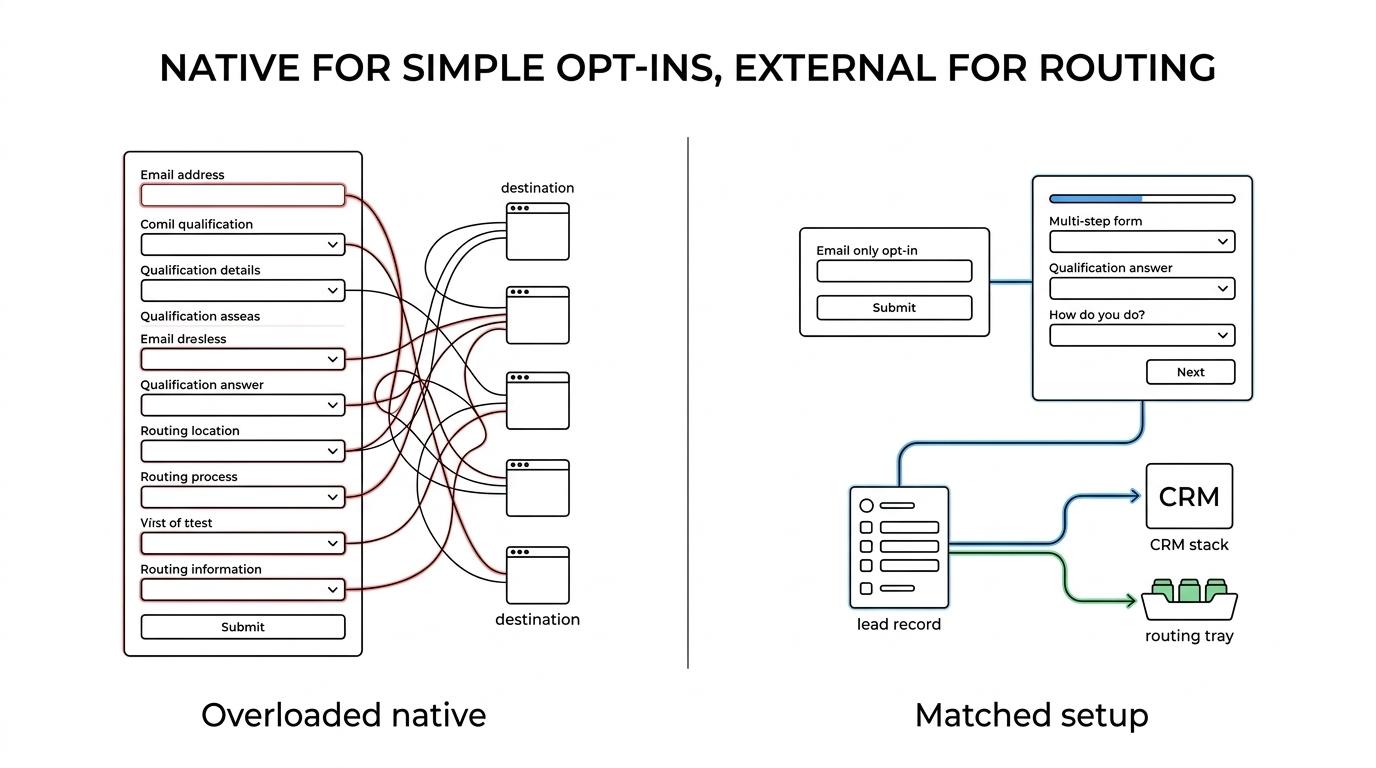
External builders make sense when the form is carrying more business risk. If your media costs are high, if sales is complaining about junk leads, or if you must pass structured data into a CRM and routing stack in real time, the extra control becomes worth it. That is especially true in verticals like solar, roofing, legal, or insurance, where qualification quality can matter as much as raw CPL.
An external builder does not automatically convert better. If your current ClickFunnels form is already short and your main problem is offer quality or traffic quality, swapping builders will not fix the funnel.
What are the 6 best form builders for ClickFunnels lead funnels?
The best ClickFunnels form builders are the ones that respect opt-in funnel economics: fast loading, short forms, clean embedding, and reliable delivery of lead data. For most operators, the shortlist should start with lead-focused tools, then expand to general-purpose builders only if the use case requires it.
- Growform: Best fit for paid-traffic lead funnels that need multi-step qualification, hidden fields, and real-time delivery into CRMs or lead distribution platforms. It works as a capture layer alongside ClickFunnels rather than replacing the funnel.
- ClickFunnels native input forms: Best when you want the shortest path to an email-first opt-in. The official setup is straightforward: required email field, required Submit Order/Form button, and direct compatibility with the rest of the funnel.
- Typeform: Best for conversational form experiences and lighter qualification flows. The trade-off is that survey-style presentation can feel slower in hard-nosed paid acquisition funnels.
- Jotform: Best when you need a wide range of field types and internal workflow flexibility. The risk is overbuilding the form and adding fields that lower conversion.
- Fillout: Best for teams that want modern conditional logic and a clean builder without a heavy setup. It is a strong middle ground when branching matters.
- Paperform: Best when the form needs more editorial control and richer content blocks around the questions. It often suits considered offers better than pure high-volume opt-ins.
How should you choose a ClickFunnels form builder for paid traffic?
Choose based on traffic cost, downstream workflow, and how much qualification your buyers or sales team require. If CPCs are high or lead rejection is expensive, the right form builder is the one that protects data quality without slowing the first conversion.
Start with the funnel’s first commitment. If the only goal is to get an email and move the lead into nurture, keep the form minimal. If the goal is to route by state, product type, homeownership, or case eligibility, then the builder needs logic, hidden fields, and structured outputs.
Next, map the operational handoff. If leads only land in ClickFunnels and an email autoresponder, native may be fine. If they also need to hit HubSpot, Salesforce, GoHighLevel, Boberdoo, LeadsPedia, or a webhook endpoint, check delivery options before you care about aesthetics.
Then test the traffic context. Paid social often rewards lower friction and mobile-friendly steps. Search traffic can tolerate a bit more intent-driven qualification. If you cannot explain why a field changes routing, follow-up, or lead value, remove it.
Should ClickFunnels opt-in forms be single-step or multi-step?
Single-step opt-ins win when the offer is simple and the next action is email nurture. Multi-step forms win when you need to ask more without showing all the friction at once.
This is where ClickFunnels operators often leave money on the table. They either keep everything on one page because it feels simpler, or they split too early and create unnecessary clicks. The better rule is to match the structure to the amount of information you truly need before the thank-you step.
Unbounce’s guidance is useful here: multi-step forms are often associated with better conversion rates, especially when the alternative is a long block of visible fields. That does not mean every form should be multi-step. It means multi-step is often a cleaner way to collect five to ten data points than presenting five to ten fields all at once.
“Multi-step” is not permission to ask anything. If step two is full of low-value questions, the added structure will not save the completion rate.
How many fields should a ClickFunnels form have?
In most ClickFunnels lead funnels, fewer fields convert better. HubSpot’s 40,000-page analysis found conversion falls as field count rises, and ClickFunnels itself only requires an email address input field plus a submit button to make the form work.
That should guide the default build. Start with the minimum viable opt-in, then add only the fields that materially improve routing, compliance, sales readiness, or buyer acceptance. If you can defer a question to step two, to a thank-you-page survey, or to the first sales contact, do it.
HubSpot’s field-type findings matter too. Multiple textareas and multiple drop-down select fields are commonly associated with lower conversion. Textareas feel like work. Repeated dropdowns feel slow, especially on mobile. If the same answer can be captured with buttons, a short select, or progressive steps, that is usually better.
Growform offers 250+ templates, which is useful when a ClickFunnels operator needs to test shorter lead forms across new campaigns quickly.
Ask for phone only if you have a clear follow-up plan for speed-to-lead, SMS, or call center contact. Asking for it “just in case” adds friction without guaranteed value.
How do you add qualification without tanking conversion rate?
Add qualification after the first micro-commitment, not before. If a field affects routing, compliance, or buyer acceptance, keep it. If it only satisfies curiosity, remove it or defer it.
Step one is to separate essential fields from diagnostic fields. Essential fields determine whether the lead can be worked or sold. Diagnostic fields are nice for reporting but do not change the next action.
Step two is to order questions by perceived ease. Email, ZIP, and simple multiple-choice questions feel lighter than income ranges, injury details, roof age, or free-text descriptions. Lead with the easy win, then earn the harder ask.
Step three is to apply if-then logic. If the answer disqualifies the lead, stop early. If the answer determines routing, branch the form. If the answer changes nothing, it does not belong.
“Better quality” does not always mean “more fields.” It often comes from smarter sequencing, not more data collection.
How do you pass ClickFunnels form data into CRMs and follow-up sequences?
Pass form data in real time, or your ClickFunnels lead funnel loses value fast. Growform and webhook-based builders are strongest when submissions must reach HubSpot, Salesforce, GoHighLevel, or a lead distribution platform immediately after the opt-in.
The first handoff is usually simple: capture the lead, add it to the email list, trigger the follow-up funnel sequence. The second handoff is where advanced operators care more. That is where UTMs, source tags, click IDs, qualification answers, and routing fields need to land intact in the CRM or buyer payload.
If you run paid traffic, hidden field capture matters more than most teams expect. A form that looks good but drops gclid, fbclid, or campaign sub-IDs can quietly ruin attribution. If you cannot trust the source data, your optimization loop breaks.
Growform can push submissions in real time through webhooks and 7,000+ Zapier apps, which is useful when a ClickFunnels lead must hit a CRM, alert stack, or routing platform immediately.
Test delivery with real records, not just preview mode. The common failure is not visual. It is a broken payload, missing field mapping, or delayed handoff that sales notices before marketing does.
What compliance and verification checks matter for ClickFunnels leads?
For consumer lead funnels in 2026, consent evidence and contact verification are operational requirements, not nice-to-haves. TCPA-sensitive verticals, paid social traffic, and lead resale models all need clearer proof of consent and better filtering of bad phone or email data.
Start with the consent layer. If you generate or sell consumer leads in insurance, legal, finance, or home services, review the opt-in language against current TCPA expectations and any applicable state mini-TCPA rules. If buyers or internal compliance teams require proof, capture consent evidence at the point of submission.
Then look at verification. Phone verification, SMS verification, OTP steps, and email validation are all trade-offs between friction and quality. If spam, bots, or unreachable leads are eating margin, a small amount of added friction can pay for itself. If your traffic is already high intent and clean, heavy verification may be too much.
Focus on these checks first:
- Consent evidence: TrustedForm or Jornaya where your buyers or legal team require it
- Contact validity: phone verification, email validation, or OTP for high-risk campaigns
- Routing readiness: state, ZIP, product, or case-type fields that determine the next destination
- Auditability: stored timestamps, source data, and form version history when possible
If the lead is valuable enough to follow up on, it is valuable enough to capture correctly. That is the standard a ClickFunnels form builder should meet.
Growform embeds on a ClickFunnels page as the capture layer and hands each lead on to the rest of the funnel. Start free trial and test it against your native opt-in for 14 days.
Related articles

7 best form builders with server-side tracking for lead gen
October 29, 2026

7 best form builders with TrustedForm integrations
October 21, 2026

6 best form builders for Meta CAPI lead tracking stacks
October 20, 2026