Skip to content
Growform Multi Step Form Builder

Event management inquiry form template

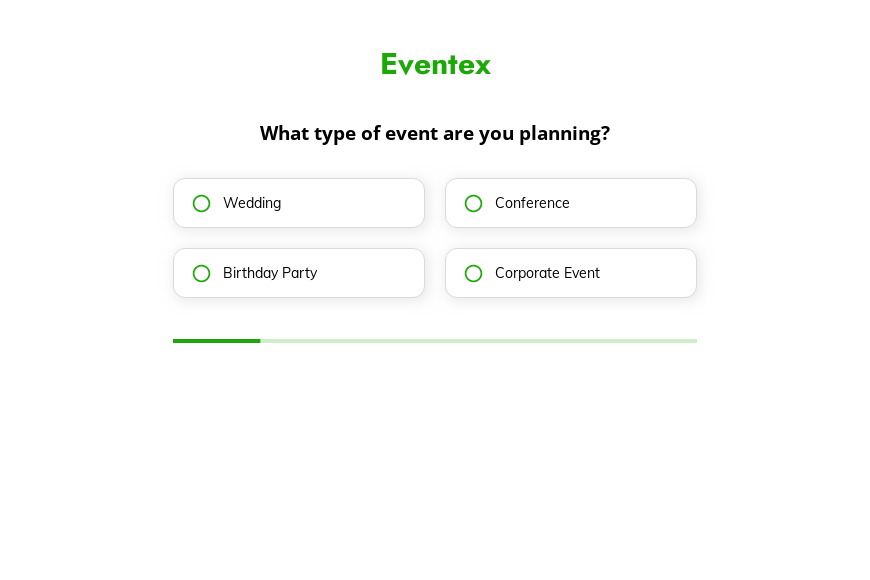
This five-step event management inquiry form asks the type of event, the number of guests, the services needed and the preferred timing, followed by the contact details. Clone it into your Growform account and add guest budget bands.

What the form asks, step by step

Event companies that offer venues, catering and entertainment need to know which services a client wants. The form asks that alongside the event type, size and timing.

  1. Step 1: “What type of event are you planning?”

    Weddings, conferences, birthdays and corporate events follow very different plans.

  2. Step 2: “How many guests are you expecting?”

    Guest bands from under 50 to over 200 set the venue and catering scale.

  3. Step 3: “What services are you interested in?”

    Venue, catering, planning or entertainment shows which part of your business is needed.

  4. Step 4: “What is your preferred event date?”

    Timing bands replace an exact date, which many clients do not have yet.

  5. Step 5: “How shall we contact you?”

    Name, email and phone come last.

  6. After submitting

    Rewrite the confirmation to say when a planner will follow up with ideas and availability.

Who it’s for

Full-service event management companies, venues with in-house teams and event agencies use this template for new inquiries. Unlike an event booking form that assumes a date, it asks for a timing band, which suits clients who are still planning. The services step shows whether the client needs a venue, food, entertainment or everything, so the right coordinator replies. Planners focused on private parties may prefer the party planning template.

Why this structure converts

  • Guest numbers are banded, so clients answer without a final list.
  • The services step turns a general inquiry into a specific brief for your team.
  • A timing range lets clients who have not chosen a date still complete the form.
Use this template

14-day free trial, no credit card

Make it yours

  • Make services multi-select

    Most clients need more than one service. Change the services step to multi-select so catering and a venue can be requested together.

  • Add a budget question

    A budget step after the guest count helps you shape a proposal that fits what the client can spend.

  • Ask for the date if known

    Add an optional date field for clients who already have a fixed day, alongside the timing bands.

Frequently asked questions

What should an event management questionnaire ask?

At first contact it should ask the event type, the number of guests, the services needed and the timing. Budget and venue preferences follow in the planning call.

Can I use it as an event booking form?

Yes. Add a required date field and a confirmation message, and it works as a booking request for a fixed date.

Which tools can receive inquiries?

Growform connects to HoneyBook, Dubsado, EventHub and HubSpot, and sends every inquiry by email.

What happens next?

  1. Step 1: Clone this form template

    Clone this template into your Growform account (create one first if you don’t already have one).
  2. Step 2: Edit your form

    Get creative and adjust your form's theme options, questions or layout in the Growform form builder.
  3. Step 3: Share or embed your form

    Share a link to your form, or embed it in your existing website. Receive new submissions by email or send them to 7,000+ apps via Zapier.

Start your free trial

Build multi-step forms just like this one. 14-day free trial, no credit card required.