Skip to content
Growform Multi Step Form Builder

Parts return request form template

This five-step parts return request form asks the reason for the return, the part’s condition, the urgency and refund or replacement, followed by the contact details. Clone it into your Growform account and add an order number.

What the form asks, step by step

This is a customer-service form rather than a sales form. It gives your returns desk the facts needed to approve or refuse a return before anyone replies.

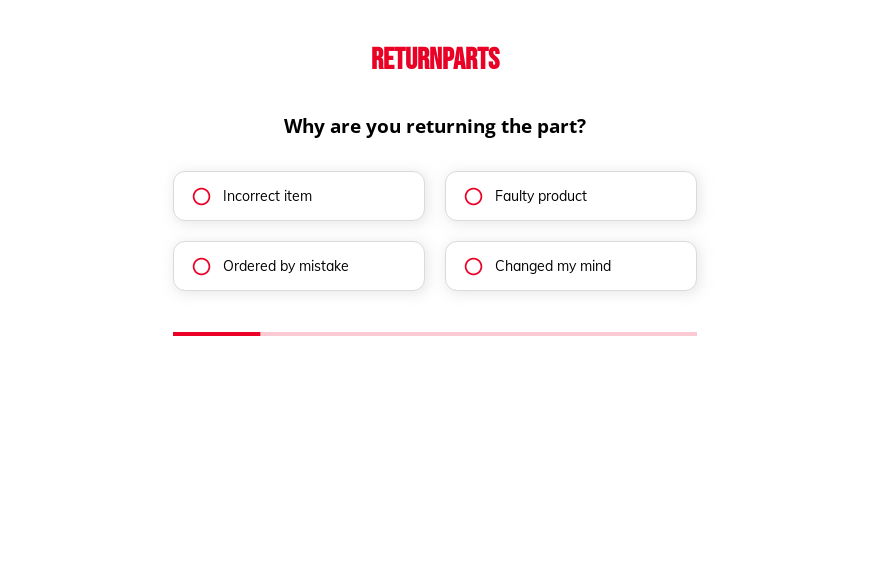
  1. Step 1: “Why are you returning the part?”

    Incorrect item and faulty product are your errors, while the other two are not.

  2. Step 2: “What is the condition of the part?”

    New, used or damaged decides whether the part can go back on the shelf.

  3. Step 3: “How soon do you need the replacement part?”

    An immediate need may justify shipping the replacement before the return arrives.

  4. Step 4: “Would you prefer a refund or a replacement?”

    Refund or replacement tells finance and the warehouse what to prepare.

  5. Step 5: “How shall we contact you?”

    Name, email and phone come last.

  6. After submitting

    The customer sees a standard thank-you, which you can rewrite with your returns address and the next steps.

Who it’s for

Parts distributors, online auto parts shops and equipment suppliers use this template as a return request form. It is not a lead form. It replaces return requests by email, where the reason and the condition are often missing, with four answers your returns team can act on. Most businesses then issue a return authorization number by email. Suppliers who also take orders online can use the auto parts order form.

Why this structure converts

  • The reason for the return is a set of choices, which makes return data easy to report on.
  • Asking about condition before refund preference lets you set expectations about restocking.
  • Customers finish in four taps, which reduces the emails asking how to return a part.
Use this template

14-day free trial, no credit card

Make it yours

  • Ask for the order number

    Add a required text field for the order or invoice number so every request can be matched to a sale.

  • Request photos of faults

    A file upload for photos of faulty or damaged parts helps you approve claims without waiting for the part.

  • Explain your return policy

    State your return window and any restocking fee on the first step so customers read it before they start.

Frequently asked questions

Is this a return authorization form?

It is the request that comes before one. Once you approve the return, you can send the customer a return authorization number and instructions.

Can returns go to my help desk?

Yes. Growform can send each request to Zendesk, Freshdesk or a Google Sheet, so returns are tracked with other support tickets.

Why does a return form need contact details?

You need them to send the authorization and a shipping label. This template asks for them on the last step.

What happens next?

  1. Step 1: Clone this form template

    Clone this template into your Growform account (create one first if you don’t already have one).
  2. Step 2: Edit your form

    Get creative and adjust your form's theme options, questions or layout in the Growform form builder.
  3. Step 3: Share or embed your form

    Share a link to your form, or embed it in your existing website. Receive new submissions by email or send them to 7,000+ apps via Zapier.

Start your free trial

Build multi-step forms just like this one. 14-day free trial, no credit card required.