
7 best form builders with server-side tracking for lead gen

Updated Published 8 min read

Browser-only pixels are no longer enough for paid lead generation. Growform sits in the form-builder category where this matters most: if your funnel loses UTMs, GCLIDs, or event IDs between the click and the submit, Meta and Google learn from incomplete data.
The right choice depends on whether you want native server-side tracking inside the builder or a builder that cleanly supports GTM, webhooks, and backend relays. For most operators, the strongest setup uses browser and server events together, then ties them back to one lead record with first-party identifiers and a shared event ID.
Why does server-side tracking matter for lead-gen forms?
Server-side tracking matters because Meta Conversions API and Google conversion reporting are less exposed to browser blocking than a pixel alone, and Gartner’s 2026 survey data shows many consumers actively avoid or block ads.
Google Ads Help says the Google tag should be installed on every page and that it improves measurement accuracy by setting cookies on the advertiser’s domain with a unique identifier. That matters more in lead gen than in many ecommerce flows because the conversion often happens after several form steps, hidden-field pass-through, and a CRM handoff.
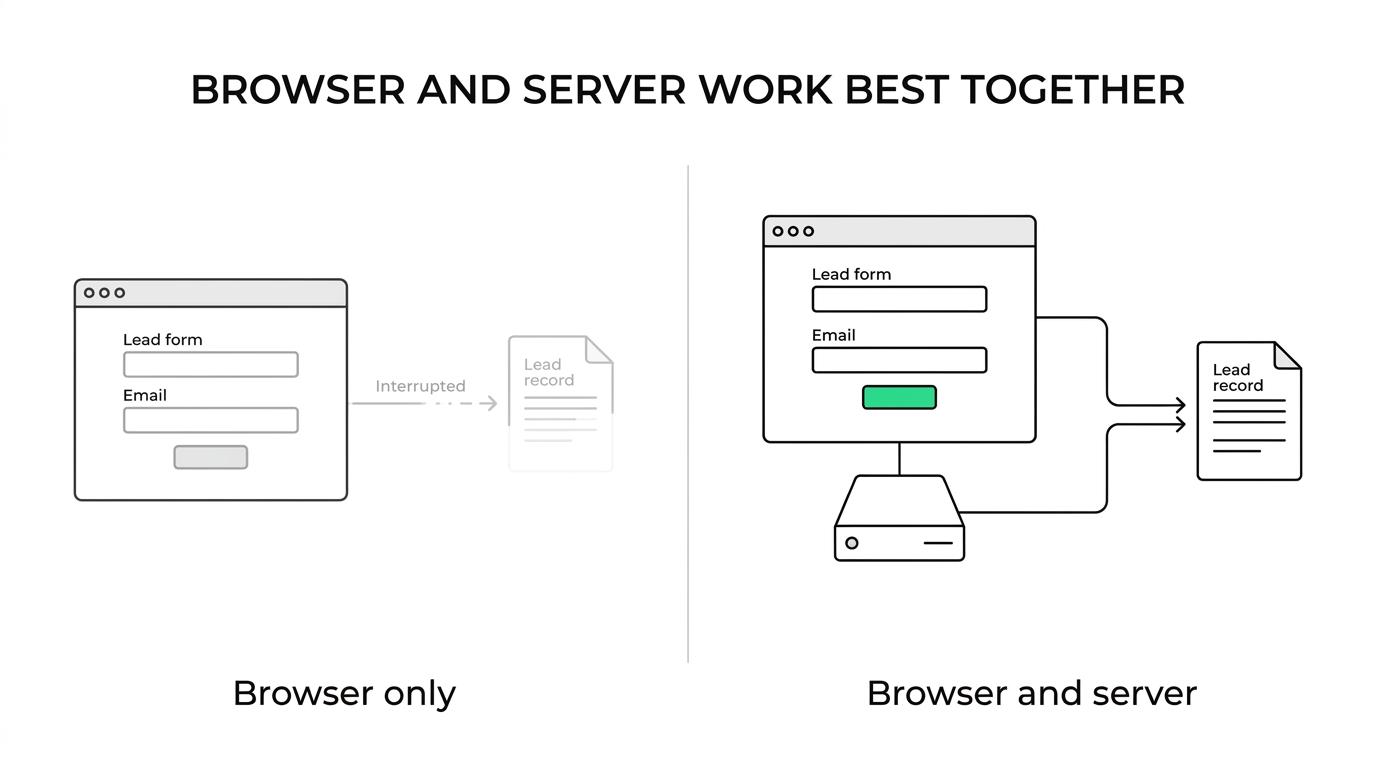
Server-side tracking is not a replacement for browser events. In practice, the browser event helps ad platforms react quickly to on-page behavior, while the server event gives you a second, more durable reporting path when browsers, cookies, or page timing get in the way.
If your media buying depends on Meta or Google optimization, then missing even a modest share of valid leads can skew bidding. If your sales team or buyers reject poor-quality leads, then the measurement problem gets worse because the form is no longer just a conversion point. It is the start of your attribution chain.
Browser pixel vs server-side tracking: which is better?
Server-side tracking is usually better for reliability, but browser events are still better for immediate on-page signals. Meta and Google work best when both fire and deduplicate through a shared event ID.
A browser pixel is easy to install and easy to debug in the page. The downside is obvious: it lives in the browser, where ad blockers, cookie limits, consent states, and page-load issues can interrupt it. A server-side event is sent from your backend or form infrastructure after the submit, so it is less dependent on the user’s browser environment.
The trade-off is control versus speed. Browser events are quick to ship. Server-side events take more planning because you need event naming, payload mapping, and deduplication logic. If you run only browser events, measurement is fragile. If you run only server events, you may lose some live browser context and make debugging harder. The best practice is both.
What are the 7 best form builders with server-side tracking for lead gen?
Growform and Unbounce are the strongest options for performance-focused lead gen, but the right pick depends on whether you need native server-side events, mobile conversion lift, or CRM-first workflows.
This list prioritizes what paid lead operators actually need: hidden-field capture, stable click-ID pass-through, event-ID support, real-time handoff, and the ability to run browser plus server measurement without breaking attribution.
-
Growform: Best native fit for paid lead generation. It supports hidden-field capture for UTMs and GCLIDs and fires Meta Pixel and Google Ads conversions on submit. Server-side conversion events to the Meta Conversions API and Google are coming soon.
-
Unbounce: Best when landing page testing is as important as the form itself. It works well if your team is comfortable handling server-side events through GTM or a backend relay and checking that hidden fields persist across variants.
-
HubSpot Forms: Best when CRM ownership, lifecycle stages, and sales reporting matter more than front-end form experimentation. A strong fit for in-house teams that can connect first-party lead data to Google’s enhanced conversions for leads.
-
Jotform: Best for teams that value broad workflow flexibility and many downstream integrations. Paid-traffic teams should validate mobile completion rate and field pass-through before making it the default.
-
Typeform: Best for conversational UX and moderate lead volume. Teams that choose it for aesthetics often underestimate the need for hidden fields, click IDs, and faster lead delivery.
-
GoHighLevel Forms: Best for agencies already running funnels inside GHL. Convenient, but many operators add a specialized form layer when they need deeper qualification logic or tighter tracking control.
-
Formstack: Best for process-heavy teams that want structured forms and operational governance. It can work in a server-side stack, but the reporting quality still depends on how your IDs and first-party data move downstream.
If your stack includes lead routing tools, call tracking, or offline sales reconciliation, then the form builder is not just a UX choice. It is part of your measurement infrastructure.
How should you implement server-side tracking on a lead form?
Implement server-side tracking in three parts: capture identifiers in the form, send the lead to your backend or tracking endpoint, then post a deduplicated conversion to Meta and Google.
Most tracking failures happen before the server event is ever sent. The form does not hold the right click IDs, the event ID changes mid-flow, or the CRM receives a lead record that no longer matches the ad-platform event.
-
Capture the right identifiers at form level: store UTM parameters, GCLID, fbclid, landing page URL, referrer, timestamp, and one stable event ID in hidden fields.
-
Send the submit payload to a trusted endpoint: that can be your application backend, a webhook receiver, a server-side GTM setup, or an automation layer that preserves raw field values.
-
Post conversion events with deduplication logic: use the same event ID for browser and server events, then validate in Meta Events Manager and Google Ads that only one conversion is counted per lead.
If you run both Meta and Google, then build the event ID once and keep it unchanged from click through submit. If you generate separate IDs for browser and server paths, deduplication gets messy fast.
Which tracking fields must a form builder capture?
The minimum field set is UTM source, medium, campaign, click IDs like GCLID and fbclid, a unique event ID, landing page URL, and core lead identifiers like email and phone.
These fields do different jobs. UTMs explain source and campaign context. Click IDs tie the lead back to the ad platform. First-party identifiers support matching and offline measurement. The event ID keeps browser and server events from inflating results. UTMs alone are not enough.
You also want field persistence across every step of the funnel. Multi-step forms often perform better, but they introduce more chances for hidden data to drop. If the builder cannot preserve hidden fields from the landing page to the final submit, your server-side setup will still underperform.
- Attribution fields: UTM source, medium, campaign, term, content, landing page URL, referrer
- Ad-platform IDs: GCLID, GBRAID, WBRAID, fbclid, and any network-specific click ID you rely on
- Deduplication keys: event ID, lead ID, and submit timestamp
- First-party identifiers: email, phone, ZIP or postal code, and consent status where relevant
Native server-side tracking vs GTM or webhook relays: what is the better setup?
Native server-side tracking is faster to launch, while GTM server-side or webhook relays give you more control. Meta CAPI and Google enhanced conversions can work in either model if IDs and payloads are consistent.
Native tracking inside the builder is attractive because it reduces setup time and removes one failure point. If your team needs a form live this week, that matters. It is often the cleanest path for agencies and lean media teams.
A relay model gives you more flexibility. You can enrich payloads, map custom fields, apply lead validation rules, or forward the same record into a CRM, a distribution platform, and ad-platform measurement. The trade-off is maintenance. More moving parts mean more chances for drift after a landing page edit or CRM field change.
How do enhanced conversions for leads fit into form tracking?
Enhanced conversions for leads help Google Ads recover attribution by matching hashed first-party form data to signed-in Google users who engaged with ads.
Google’s 2026 guidance says enhanced conversions for leads use hashed first-party user-provided data from website lead forms. That makes them especially relevant when the form submit is just the first step and the sale or qualification happens later in a CRM or call center.
Step 1 is capturing clean first-party data in the form, especially email and phone. Step 2 is making sure the data is normalized before hashing and transmission. Step 3 is connecting the form submit or downstream qualified-lead event back to Google Ads with the right identifiers.
Enhanced conversions do not replace click IDs. Click IDs, the Google tag, and enhanced conversions work best together. One improves click-level linkage, another improves site-side measurement, and the third improves lead matching.
How should you test deduplication and attribution before launch?
Test with real clicks, real form submits, and a fixed event ID across Meta Events Manager, Google Ads, and your CRM. If one system shows a lead and another does not, stop and trace the payload.
Do not rely on one platform’s green checkmark. A form can show as “tracked” while still dropping GCLIDs, overwriting the event ID, or pushing incomplete data to the CRM. The only meaningful test is end-to-end.
-
Build a tagged test URL with UTMs and platform click IDs where possible.
-
Submit the form on desktop and mobile, then confirm the browser event, the server event, and the CRM record all share the same key identifiers.
-
Check deduplication in the ad platform. If browser and server versions of the same lead count separately, the shared event ID is broken.
-
Verify lead quality fields and delivery timing. A lead that arrives late or stripped of attribution is still a tracking failure.
What should you check before choosing a form builder?
Choose the builder that protects measurement, lead quality, and handoff at the same time. A pretty form that drops GCLIDs or cannot pass a stable event ID will cost more than it converts.
Most teams overweight design and underweight data durability. For paid lead gen, the safer buying question is not “Can this form look good?” It is “Can this form survive real traffic, multi-step logic, hidden fields, and downstream reporting without losing attribution?”
- Native server-side events: Best when launch speed matters and your use case is standard
- Hidden-field persistence: Required for UTMs, click IDs, and source data across multi-step flows
- Deduplication support: Shared event ID or an equivalent method you can inspect and test
- First-party data path: Clean email and phone capture for enhanced conversions and offline matching
- Real-time delivery: Webhooks or direct integrations that move leads instantly into CRM or routing tools
- Front-end conversion UX: Mobile load speed, inline validation, progress states, and qualification logic
If two builders look similar, pick the one that exposes more of the tracking layer, not the one with the prettier demo. In lead generation, the form is part of your media buying system.
Related articles

7 best form builders with TrustedForm integrations
October 21, 2026

6 best form builders for Meta CAPI lead tracking stacks
October 20, 2026

7 best ping post form builders for lead routing teams
October 19, 2026