


Teams running paid traffic into insurance, solar, legal, or home services funnels should treat a TrustedForm integration as an operations decision, not just a form feature. Growform, a multi-step form builder built for lead generation, is relevant here because its documentation gives unusually clear detail on how the TrustedForm certificate URL is captured and passed downstream.
The main question is not just “does this form builder support TrustedForm?” It is whether the certificate URL survives the full handoff from form submit to CRM, lead distribution software, or buyer payload.
What is a TrustedForm integration and why does it matter?
A TrustedForm integration means a form captures a TrustedForm Certificate of Authenticity and passes its certificate URL with the lead. ActiveProspect and FCC guidance make that important when consumer consent must be evidenced for TCPA-sensitive calling workflows.
ActiveProspect describes the TrustedForm Certificate of Authenticity as a unique, tamper-proof digital record created when a consumer visits a webpage hosting the TrustedForm script. The certificate URL is the immutable reference to that record. In practical terms, that URL is what your CRM, compliance team, lead buyer, or dialer-side workflow may need when someone asks, “Show me the consent evidence for this lead.”
The TCPA side is what raises the stakes. FCC consumer guidance says certain autodialed or prerecorded calls generally require prior express consent, and FCC rules have long required written consent for certain telemarketing calls to wireless numbers. A form builder cannot give legal advice, but it can either preserve consent evidence well or lose it badly.
Adding the script alone does not solve the problem. If the certificate URL is never stored as a lead field, your sales or routing stack may receive a lead with no usable proof attached.
Which form builder is the safest choice if you need a confirmed TrustedForm integration?
Growform is the safest documented pick here because its 2026 feature page explicitly says TrustedForm can be enabled with one toggle and the TrustedForm_certUrl can be passed through webhooks, Zapier, and email alerts.
That level of specificity matters more than marketing language. In high-volume lead generation, the real failure point is often not front-end capture. It is the silent break between the form, the webhook payload, and the destination where leads are sold, routed, or called.
If you only need a generic internal form, specialized consent evidence handling may be more than you need. If you buy traffic and monetize or work leads fast, field-level delivery of the certificate URL is not extra polish. It is part of lead viability.
What are the 7 best form builders to evaluate for TrustedForm-heavy lead generation funnels?
The strongest shortlist combines one confirmed option with six common lead capture tools that operators often vet for script support, custom fields, and downstream delivery. Treat everything after Growform as an evaluation candidate to test, not a confirmed match.
When you compare platforms, separate two questions. First, can the page host the TrustedForm workflow? Second, can the submission pass the certificate URL all the way into the systems that actually use it?
- Growform: Confirmed documentation for one-toggle enablement, stored certificate URLs, and delivery via webhooks, Zapier mapping, and email alerts.
- Unbounce: Common in paid traffic programs. Verify whether your exact form setup preserves the certificate URL into your CRM or buyer payload.
- Leadpages: Often used for fast campaign launches. Confirm field persistence across redirects and post-submit handoff.
- Instapage: Popular with performance teams. Check how custom code, thank-you pages, and delivery methods affect consent evidence.
- Typeform: Frequently considered for guided UX. Validate whether the experience fits high-intent lead funnels and preserves required fields.
- Jotform: Common starting point for forms. Test field naming, routing, and whether compliance evidence is exposed cleanly downstream.
- GoHighLevel native forms: Common in agency stacks. Verify that the certificate URL survives into the CRM and any external routing or dialer flow.
A useful way to read this list is by risk. The more your revenue depends on buyer acceptance, the more you should favor builders with explicit documentation around certificate capture and field delivery.
How does a TrustedForm certificate get created and attached to a lead?
The workflow is simple: the TrustedForm script loads on the page, a certificate URL is generated for that session, and the URL must be stored with the final lead submission. If any one of those steps breaks, your integration is incomplete.
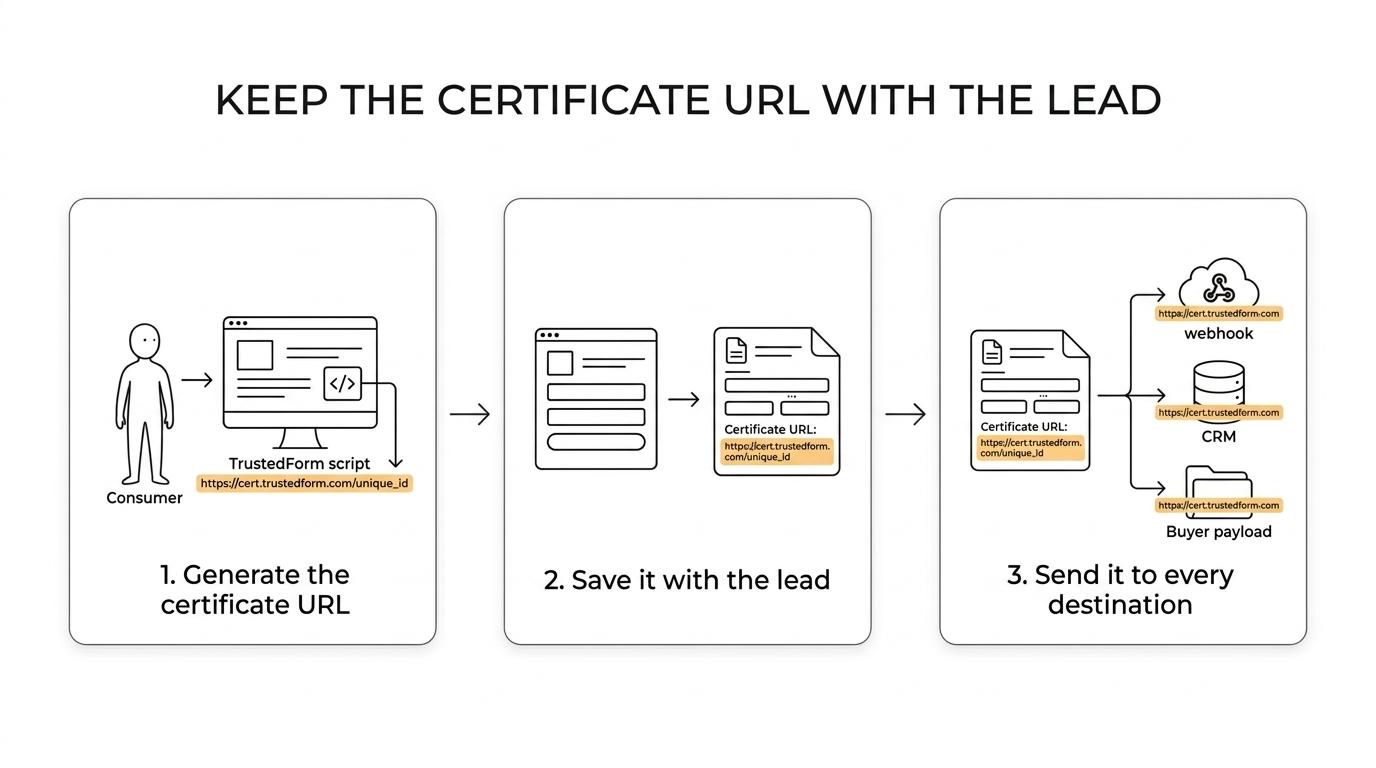
Step 1 is page-level creation. ActiveProspect says the TrustedForm Certificate of Authenticity is automatically created when a consumer visits a webpage hosting the TrustedForm script. That means the certificate begins as a session event, not as a CRM event.
Step 2 is form-level capture. The page or form workflow needs to associate the certificate URL with the user’s submission. In single-step flows that is usually direct. In multi-step funnels, the key issue is persistence from step to step and through the submit action.
Step 3 is delivery. The certificate URL must travel as a normal lead field into webhooks, Zapier, your CRM, or your lead distribution platform. Do not treat the thank-you page as proof of anything. The payload received by the destination system is what counts.
How should you test TrustedForm before sending live traffic?
You should test capture, storage, and delivery, not just the script. A valid test ends with the certificate URL visible in the submission record, the outbound payload, and the destination system.
Many teams stop after seeing the form submit successfully. That is not enough. You want to confirm that a real lead record contains the expected certificate field and that the same field arrives intact wherever the lead is routed next.
Use a simple launch checklist:
- Submit: Use a fresh browser session and complete the form exactly as a real consumer would.
- Inspect: Confirm the form stores the certificate URL as a lead field, not only as hidden page logic.
- Deliver: Check the webhook payload, Zapier task, or CRM record for the same field value.
- Retrieve: Open the certificate URL and confirm it points to the expected consent record.
- Compare: Match timestamps, campaign data, and any click IDs to catch persistence errors early.
If you use redirects, embedded forms, or multiple landing page variants, test each path separately.
Is a native TrustedForm integration better than a custom-script workaround?
Yes for most operators. A native integration usually lowers implementation risk, while a custom-script workaround can work but is easier to break during page edits, GTM changes, or a redesign.
The reason is operational, not cosmetic. Native handling usually means the builder already knows where to store the field and how to expose it to downstream systems. A workaround may still depend on custom code, hidden inputs, tag timing, or a brittle submit sequence.
If your lead buyers reject records without consent evidence, then reliability beats flexibility. If your stack is locked into a specific landing page system, a workaround may still be acceptable, but only if you fully document field capture, mapping, and QA ownership.
“Custom” does not mean “more powerful.” In compliance-sensitive lead generation, custom often just means there are more ways for a small change to break a critical field.
Can multi-step forms hurt TrustedForm capture or TCPA evidence?
No, not inherently. Multi-step forms can improve mobile completion, but only if the certificate URL and consent context persist through the full session and final submit event.
This is an important distinction. Step count is a UX issue. Consent evidence is a data and disclosure issue. You can run a long qualification funnel and still preserve proper evidence if the session, disclosure language, and submit event stay connected.
The real trade-off is implementation complexity. A single-step form is simpler to reason about. A multi-step form can screen out junk and raise lead quality, but it introduces more opportunities for field loss if the certificate URL is not carried forward cleanly.
How do you pass the certificate URL into webhooks, Zapier, or lead routing platforms?
Growform documents this clearly: the certificate URL can be delivered as TrustedForm_certUrl through webhooks, Zapier mapping, and email alerts. In any builder, the same rule applies: treat the certificate as a required lead field, not a nice-to-have extra.
Step 1 is to define the field name you expect downstream. Consistency matters. If your form stores one field name and your CRM or buyer mapping expects another, the value may disappear without throwing an obvious error.
Step 2 is to map that field at every handoff point. That usually means the form submission record, the webhook body, any Zapier action, and the final CRM or routing destination. Operators using Boberdoo, Phonexa, LeadsPedia, LeadByte, or direct buyer posts should think of this exactly like any other required payload field.
Step 3 is to validate the live payload, not just the UI. Open a test submission, inspect the outgoing data, and confirm the destination system stores the same certificate URL value. If the values differ, fix that before traffic scales.
What mistakes usually break TrustedForm integration on paid traffic funnels?
The usual failures are basic: missing field mapping, broken redirects, altered consent text, and QA that stops at the form UI. Meta, Google, and your lead buyer will not repair a missing certificate URL after the fact.
Most breakages show up during normal campaign work. Someone swaps a template, changes the embed, rewires a webhook, or edits the submit logic. The form still “works,” but the consent evidence no longer reaches the system that needs it.
Watch for these failure patterns:
- Field renamed mid-funnel
- Redirect path that drops hidden values
- Certificate created on one page but not persisted to submit
- Testing only cached sessions
- Email alert contains the field but CRM does not
- Buyer post mapping missing the certificate URL
- Consent disclosure changed without re-testing the capture path
If one failed submission could trigger buyer rejection, compliance escalation, or sales-team distrust, then TrustedForm should be launch-blocking criteria in your form QA process.
Related articles

6 best form builders for Meta CAPI lead tracking stacks
October 20, 2026

7 best ping post form builders for lead routing teams
October 19, 2026
Jotform pricing 2026: every plan, every limit and what a lead form costs
Jotform costs $39, $49 or $129 a month, or $408, $468 or $1,188 a year, and the free plan stops at 100 submissions. Every plan and limit, checked October 9, 2026, plus what a lead form really costs.
October 9, 2026