


If you run paid lead generation on Meta, the form builder is part of the measurement stack, and tools like Growform matter because the form is where browser events, server-side events, and lead-level attribution either stay connected or quietly break.
That is the real dividing line in this category. The best tools for Meta CAPI lead tracking are the ones that can record the conversion at the moment the form is completed, preserve click identifiers, and hand the lead to the CRM or routing platform without losing the fields ad platforms and buyers depend on.
Why does Meta CAPI change what you need from a form builder?
Meta CAPI turns the form layer into part of your measurement stack. Growform, Meta Pixel, and the Conversions API work best when the form can emit both browser and server events tied to the same lead.
A standard form builder can collect data and still be weak for attribution. That gap shows up when a lead submits successfully, but Meta only sees a browser-side event, or sees no event at all because a thank-you page never loads, a redirect varies by path, or a client-side script fails.
For high-volume operators, that is not a small reporting issue. It changes optimization, CPA, and how aggressively Meta can bid. Teams often treat Meta CAPI as a bolt-on integration when the underlying form does not expose the identifiers or event logic the CAPI setup needs.
The practical requirement is simple: your form builder should know when the lead is actually complete, tie that moment to a single event ID, and carry the matching fields needed for Meta to connect the conversion back to the ad click.
Is thank-you-page tracking enough for lead generation forms?
Sometimes, but only for simple flows. Google Ads and Meta can count a conversion from a thank-you page, yet that model breaks when one form has inline success states, dynamic endings, or several redirect paths.
Google Ads Help is clear that URL-based conversion tracking fits cases where a specific page view can count as the conversion. Its own example is a thank-you page. Google also lets you configure exact match, starts with, or contains rules for that URL. That works well when every successful lead lands on one stable page and you do not need custom transaction values or other custom parameters.
The problem is that many paid lead funnels do not behave that neatly. Some show an inline success message, some redirect different lead types to different pages, and some use multi-step flows embedded on a landing page with no dedicated thank-you URL at all. In those cases, event-based tracking from the form itself is usually cleaner than relying on page load rules or an event snippet tied to a separate page.
If your funnel can change endings by lead type, traffic source, or qualification logic, then a URL rule is usually too brittle for serious optimization.
What are the best form builders for Meta CAPI lead tracking stacks?
The best options combine strong lead-form UX with event-level tracking, identifier pass-through, and dependable delivery into CRMs or routing tools. Dedicated lead form builders usually outperform generic survey tools for Meta CAPI stacks.
The six tools below are the ones most operators should evaluate first when the goal is clean Meta lead tracking, not just attractive form design.
-
Growform
Best fit for lead-gen teams that need conversion events fired from the form itself, Meta Pixel events for every step and completed lead, and lead-level attribution fields like UTM parameters and click IDs (gclid, fbclid) passed through to the CRM or buyer. Server-side events for the Meta Conversions API are coming soon. -
Unbounce
Strong choice when landing page testing is the center of the workflow. It fits best when the page builder matters as much as the form, though teams should validate how conversion events and click IDs are passed in their exact setup. -
Jotform
Useful when broad workflow integrations matter. It can be a workable option for simpler lead capture, but performance teams should check hidden-field pass-through and ad-platform event options before assuming it fits a Meta CAPI stack. -
Typeform
Often chosen for conversational UX. That can help response quality, but operators should test whether the tracking model, field capture, and downstream delivery are strong enough for paid traffic at volume. -
Instapage
Best when the landing page workflow is already centered there. The trade-off is that some teams still need tighter form-level tracking logic than page-first tools provide out of the box. -
GoHighLevel
Convenient for agencies already deep in the GHL ecosystem. It can work well for simpler builds, but more demanding multi-step qualification and attribution setups usually need close QA.
Ranking matters less than fit. If your bottleneck is signal loss into Meta, event handling and ID pass-through matter most. If your bottleneck is launch speed across many client funnels, template speed and embed flexibility matter more.
How do you choose the right builder for your tracking stack?
Choose from the data path backward. Meta, Salesforce, and LeadsPedia each need specific fields and event behavior, so the right builder is the one that preserves the identifiers your downstream stack actually reads.
Start with the outcome you need to measure. If Meta optimization is your priority, ask how the tool sends browser and server events. If CRM reporting is the priority, ask which attribution fields are saved with the lead record. If lead resale or routing is involved, ask whether the webhook payload keeps those same fields intact.
Use this checklist during demos or technical reviews:
- Conversion trigger: Can the builder record completion from the form itself, not only from a thank-you page?
- Event transport: Does it support browser events, server-side events, or both?
- Deduplication: Can one shared event ID tie the browser event and server event to the same lead?
- Field capture: Are UTM parameters, click IDs, and matching fields stored with the submission?
- Delivery: Do those fields survive the trip into the CRM, webhook, or routing platform?
A long integrations list does not guarantee good tracking. A builder can connect to hundreds of apps and still fail the test that matters most: whether the exact lead data needed for attribution arrives intact.
Meta Pixel only or Pixel plus Conversions API?
Pixel plus Conversions API is usually the stronger setup. Browser events give speed, while server events recover signal that Safari, ad blockers, or client-side script failures can miss.
Pixel-only setups are easier to launch, and for smaller accounts they may be good enough at the start. The issue is resilience. Browser-side tracking depends on code executing in the user’s session. That makes it more vulnerable to blocked scripts, consent interruptions, and page-flow oddities.
A combined setup gives Meta two chances to see the conversion. The browser event fires at completion, and the server event confirms the same action from the back end. The trade-off is complexity: if you do not deduplicate them with the same event ID, you can inflate results. That is one of the most common implementation errors in lead-gen accounts.
If you spend enough on Meta that signal quality changes bidding behavior, server-side CAPI is usually worth the extra setup work.
How do you set up deduplicated browser and server events?
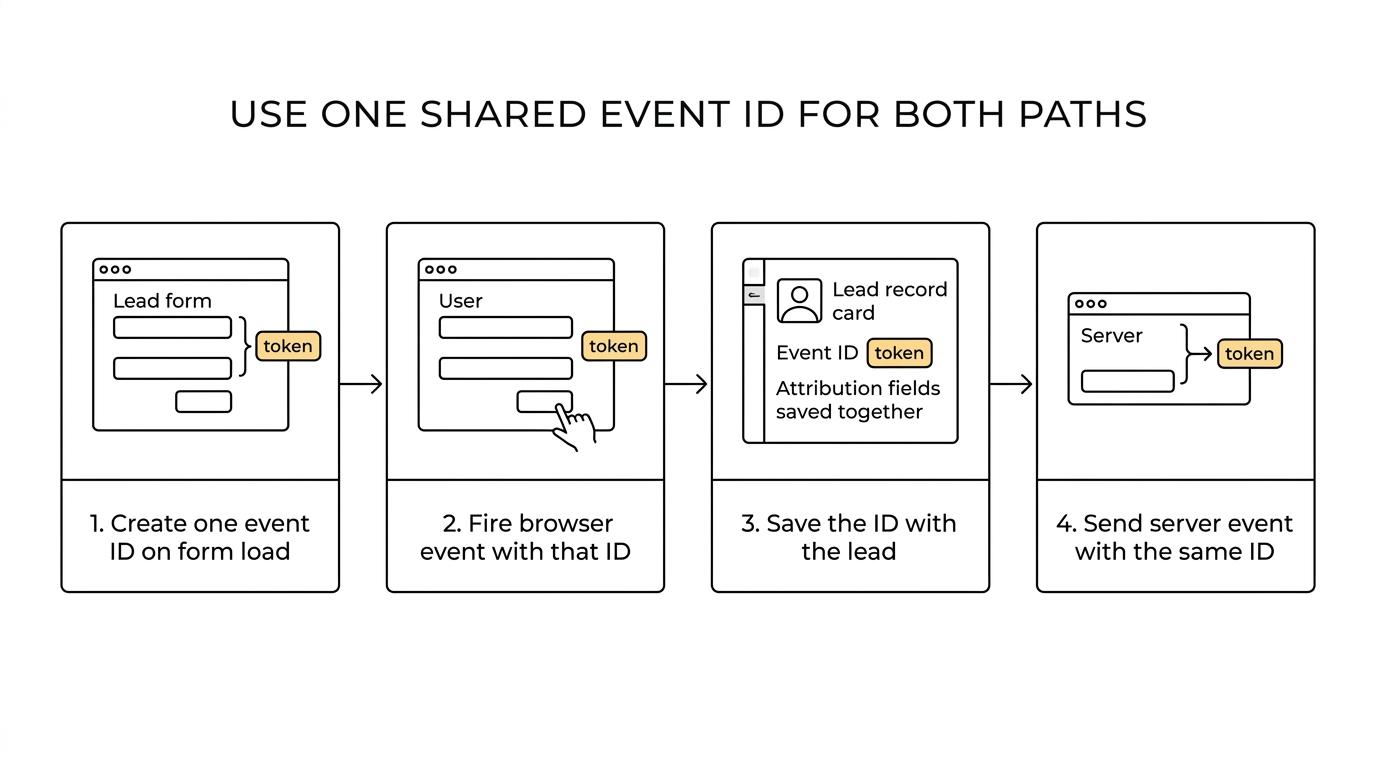
Use one event ID across both paths. With Meta Pixel and server-side CAPI, the clean pattern is a unique ID created on form load, reused at browser submit, and sent again from the server.
The logic is straightforward, but the order matters. If the IDs differ, Meta may count two conversions or ignore one path during matching. If the form cannot store the ID with the lead, deduplication becomes guesswork.
A clean implementation usually looks like this:
- Generate a unique event ID when the form session starts.
- Fire the browser completion event with that ID when the lead submits.
- Save the same ID with the lead record and attribution fields.
- Send the server-side event with the identical ID after submission is confirmed.
That shared-ID pattern is one of the clearest signs that a form builder was designed with real lead tracking in mind, not just front-end styling.
Which attribution fields should every lead form capture?
Every paid lead form should capture more than name and phone. UTM parameters, GCLID, FBC, FBP, IP address, and user agent connect the click, the lead record, and later optimization or offline imports.
These fields do different jobs, and teams often miss one that later turns out to be critical.
- UTM parameters: Source, medium, campaign, content, and term make campaign reporting readable across ad platforms and CRMs.
- GCLID: Needed when Google Ads offline conversion tracking or lead import workflows are part of the stack.
- FBC and FBP: Useful Meta identifiers that improve click-to-conversion matching.
- IP address: Supports matching and QA when server-side events are involved.
- User agent: Helps preserve device and browser context for matching and debugging.
Capturing the fields is only half the job. Make sure they are available in the webhook payload, CRM field mapping, and any distribution post. Many teams store UTMs locally, then lose them during handoff and assume the ad platform is at fault.
How do multi-step forms affect conversion tracking accuracy?
A multi-step form can improve both completion and measurement when step progression is tracked. Nielsen Norman Group has shown that users judge effort by visible form length, so progress cues and step events matter.
That matters more than it sounds. If users scan the form before they read instructions, the visible structure of the flow shapes whether they start at all. A multi-step form can reduce perceived friction, but only if the steps are logical and the number of steps feels reasonable.
From a tracking perspective, step-level events help isolate where intent collapses. If users reach step two but not step three, you have a cleaner diagnosis than a single pageview and a missing submission. That makes it easier to separate traffic quality issues from question-order problems.
Not every multi-step form will lift results. If you split a weak 14-field intake into four screens, you still have a weak intake. Good step design, strong question order, and visible progress matter as much as the tracking itself.
How do you push tracked leads into CRMs and routing platforms without breaking attribution?
Map the lead once, then test the payload end to end. HubSpot, Salesforce, Boberdoo, and LeadsPedia all depend on field consistency, so front-end tracking still fails if the webhook drops or renames IDs.
Start by defining one canonical field map. Decide exactly what each system should receive for source, campaign, click ID, event ID, phone, email, and qualification data. Then use those same names or explicit translations everywhere. If your CRM calls a field campaign_id but your routing layer expects utm_campaign, document the mapping before launch.
Next, run a live test lead from ad click to final destination. Confirm four things: the browser event fired, the server event fired, the lead was saved, and the destination system received the same attribution fields. If any one of those breaks, optimization and reporting can drift apart.
Test failures on alternate endings. If qualified leads redirect to one path and unqualified leads get an inline message, both outcomes should still preserve the data you need for QA and platform learning.
Related articles

7 best ping post form builders for lead routing teams
October 19, 2026
Jotform pricing 2026: every plan, every limit and what a lead form costs
Jotform costs $39, $49 or $129 a month, or $408, $468 or $1,188 a year, and the free plan stops at 100 submissions. Every plan and limit, checked October 9, 2026, plus what a lead form really costs.
October 9, 2026

6 Best Form Builders for ClickFunnels Lead Funnels
September 30, 2026