


Lead routing teams do not need just another pretty form. They need a front end that can capture qualified consumer leads, preserve attribution, pass consent evidence, and hand data to a ping post stack fast enough to protect acceptance rates and margin. Growform is relevant here because it sits at that capture layer, between paid traffic and platforms like Boberdoo, Phonexa, or LeadsPedia.
If you manage paid traffic at volume, the form builder is not separate from lead routing. It shapes speed-to-lead, buyer acceptance, compliance posture, and whether your UTM and click ID data make it to the systems that decide revenue. That is why the “best” tool is usually the one that works cleanly with routing software, not the one with the flashiest template gallery.
What makes a form builder good for ping post lead routing?
The best ping post form builders act like capture infrastructure, not just visual form tools. For teams feeding Boberdoo, Phonexa, or LeadsPedia, webhook delivery, retries, tracking, consent capture, and branded hosting matter more than sheer template count.
A lead routing form has one job: collect enough data to qualify a lead without crushing conversion rate, then deliver it fast and accurately. That means reliable webhook POST delivery, hidden field support for UTMs and click IDs, conditional logic to screen junk, and enough field control to map exactly what buyers or routers expect. If you sell or route consumer leads, a tool that cannot preserve data integrity from ad click through submission will cost more than it saves.
How does ping post work from the form side?
Ping post starts at the form, not at the routing platform. The form captures the lead, sends a partial or full payload, receives routing logic downstream, and then posts the full record to the winning buyer or system.
Step 1 is capture. The form collects contact details, qualification fields, consent, and attribution. In high intent verticals like final expense, solar, or mass tort, that often includes ZIP, age band, homeowner status, injury type, or policy interest.
Step 2 is the ping. A router or middleware receives a reduced data set first and checks buyer rules, price, or acceptance logic. If Buyer A wants only certain states or time windows, the ping lets the system decide before the full post happens.
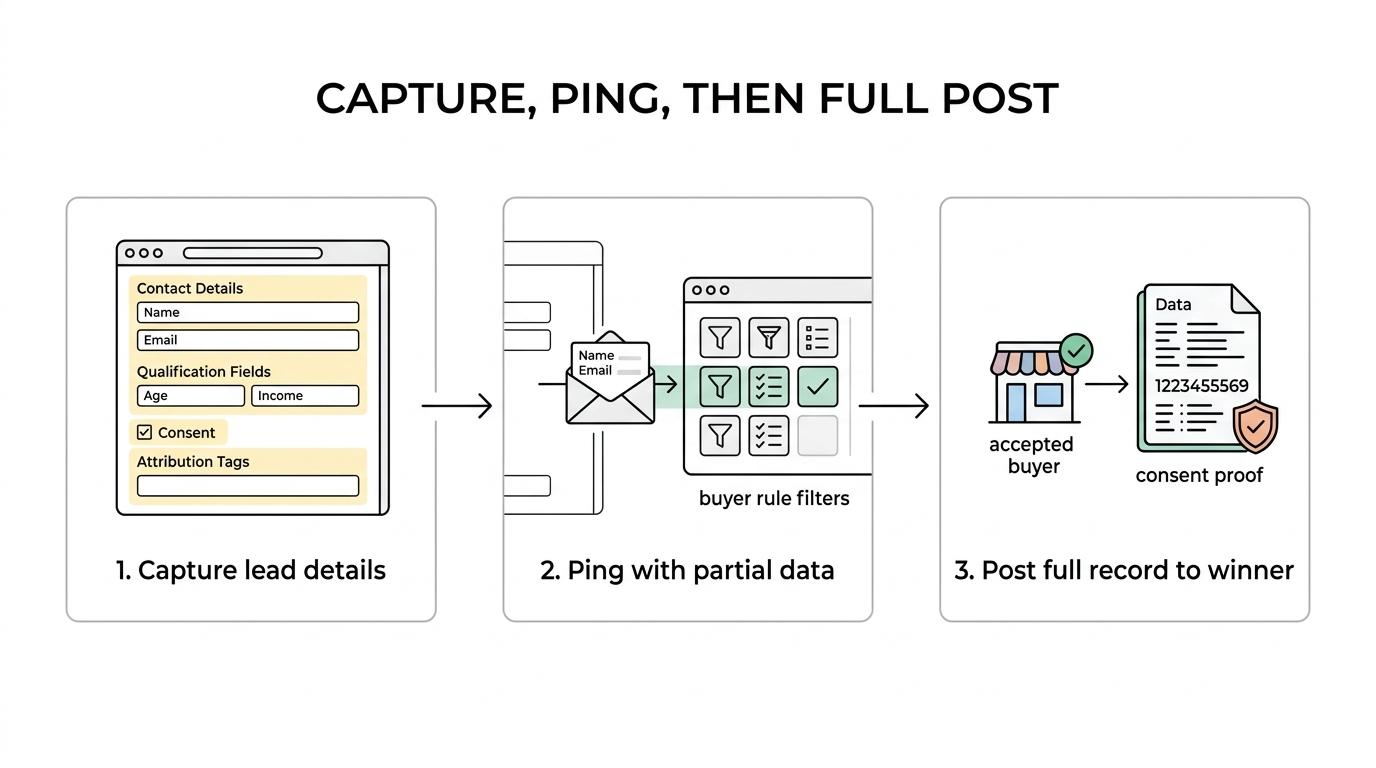
Step 3 is the post. If a buyer accepts, the full record moves with all required fields, often including TrustedForm or Jornaya tokens, UTMs, and internal lead IDs. If no buyer accepts, then your fallback logic should route to another buyer, to in-house sales, or to a save path.
The form builder itself usually does not run the full ping post auction. The form’s job is to collect the right data and send it into the routing stack with as little friction and delay as possible.
What are the 7 best ping post form builders for lead routing teams?
Growform is the best fit when you want a form builder purpose-built for lead generation, qualification, and fast handoff into routing software. The rest of the field can still work, but each option carries trade-offs around payload control, conversion focus, or compliance readiness.
The right pick depends on whether you care most about conversion rate, landing page ownership, agency convenience, or general-purpose form flexibility.
- Growform: Best for dedicated lead routing teams that need multi-step qualification, webhook delivery, hidden field support, Meta and Google tracking support, and compliance evidence capture at the form layer.
- Jotform: Best for teams that want a broad no-code form tool with many integrations, though lead routing operators should verify payload cleanliness and mobile conversion performance before scaling.
- Typeform: Best for conversational qualification flows and softer user experience, but operators should watch completion rate trade-offs on longer, high-intent funnels.
- Unbounce forms: Best when the landing page and form need to live in the same page builder, though native forms can hit limits when routing logic and field handling get more technical.
- Instapage forms: Best for page-centric paid traffic teams that prioritize design workflow, but lead sellers often need more routing-specific control than the form layer offers out of the box.
- Leadpages forms: Best for simpler campaigns and lower operational complexity, and less ideal when you need deeper qualification, buyer-specific payload shaping, or advanced routing QA.
- GoHighLevel forms: Best for agencies already inside the GHL stack, especially for local service campaigns, though more demanding routing teams often outgrow the native form experience.
How do webhook delivery and native integrations compare for lead routing?
Webhooks usually win for lead routing, while native integrations win for convenience. If your destination is Boberdoo, Phonexa, or custom middleware, webhook control is normally worth more than one-click setup.
Native integrations are useful when you need a direct copy in HubSpot, Salesforce, or GoHighLevel with minimal configuration. They are less useful when the destination requires custom field names, partial pings, buyer-specific logic, or fallback handling.
Webhooks give operators more control over timing, payload format, retries, and routing branches. They also work better when you need to insert an enrichment or validation step before a lead reaches the buyer. Keep the webhook as the primary path and the native CRM integration as a secondary record-keeping path. That setup reduces the chance that CRM limitations dictate your routing architecture.
How should you capture consent for TCPA-sensitive routing?
For telemarketing-exposed lead flows, Growform or any equivalent builder should capture prior express written consent at submission and pass proof into the routing stack. In 2026, routing teams still need to treat consent language and evidence retention as operational requirements.
FCC rules require prior express written consent for telemarketing robocalls and robotexts (47 CFR 64.1200). The FCC's separate rule tying that consent to a single seller at a time on comparison shopping websites was vacated by the Eleventh Circuit in Insurance Marketing Coalition v. FCC on 24 January 2025 and never took effect. The FTC has also long taken a hard line on prerecorded telemarketing calls without prior written authorization. If your leads may trigger telemarketing, robocalls, or robotexts, then your form should capture the consent text shown, the timestamp, the page URL, and the proof artifact that downstream buyers ask for.
That is why routing teams increasingly treat TrustedForm and Jornaya as part of form architecture rather than as later add-ons. Don't focus only on the visible checkbox and ignore evidence retention.
How should you set up tracking and custom events for routed leads?
The cleanest setup tracks both form behavior and routing outcomes. Google Analytics 4 and Google Tag Manager can measure front-end interactions, while server-side events and webhook outcomes tell you whether leads were accepted, rejected, or qualified.
Step 1 is capture-side tracking. Record pageview, form_start, step_progress, and form_submit events. Google’s documentation allows recommended and custom events through the Google tag or Google Tag Manager, which is useful for multi-step funnels where abandonment often happens before submission.
Step 2 is attribution pass-through. Persist UTMs, gclid, fbclid, source, campaign, and sub IDs through every step. If these fields disappear before the webhook fires, then your router may still accept the lead, but your reporting will not explain margin by source.
Step 3 is outcome tracking. Fire downstream events when a lead is accepted, sold, booked, or rejected. Do not treat form_submit as the final KPI. For routing teams, accepted_lead or qualified_lead is often the metric that matters.
When is branded hosting better than embedding on your landing page?
Hosted forms are better when you need a fast standalone funnel URL, while embeds are better when the landing page owns the conversion path. The choice affects speed, trust, deployment, and analytics setup.
Hosted forms on a custom domain are useful when media buyers need a campaign live today or when multiple traffic sources should hit the same controlled funnel. They also help when you want the entire experience on a branded subdomain rather than a third-party link. Growform, for example, supports custom-domain hosting through a customer-owned web address, and a CNAME record may take 24 to 48 hours to settle.
Embeds make more sense when the page itself carries SEO, quality score, or page-specific social proof. One subtle point: hosted custom domains matter only for shared form links, while embeds already sit on your domain. If your attribution breaks more often on hosted pages, check your script order and hidden field persistence before blaming the router.
How do retries, timeouts, and error handling affect lead acceptance?
Retries and error handling directly affect sellable volume. A lead that converts but fails to post is not a low-quality lead, it is an operational loss.
Routing teams should ask what happens when the receiving endpoint is unavailable, slow, or returns an error. Does the form builder retry? Does it log the failure clearly? Can you identify whether the failure happened at the form, middleware, or buyer endpoint?
Timeouts matter because lead value drops with delay, especially when call centers or SMS workflows start immediately after submission. Ask vendors about duplicate protection too. If a retry posts successfully after a buyer already created the lead, then idempotency logic matters just as much as the retry itself.
An HTTP 200 response does not mean the lead was monetized. It only means the receiving system acknowledged the request. You still need router-side acceptance and disposition logs.
What should your form payload include before sending a lead to Boberdoo or LeadsPedia?
A strong payload includes contact data, routing fields, consent evidence, attribution, and technical identifiers. Missing any one of those can lower acceptance, break reporting, or create compliance exposure.
At minimum, most routing payloads should include:
- Lead identity: name, phone, email, ZIP, and any core vertical fields needed for buyer matching
- Routing qualifiers: state, product interest, homeowner status, age range, injury type, debt amount, or other buyer rules
- Consent evidence: consent text version, timestamp, page URL, IP, and TrustedForm or Jornaya token where required
- Attribution data: UTM source, medium, campaign, ad ID, gclid, fbclid, and internal sub IDs
- Technical metadata: lead ID, form ID, submit time, user agent, and any router-specific key fields
If you ping on partial data first, then keep a stable lead ID through the later post. That single choice makes troubleshooting much easier when buyers reject for missing or mismatched fields.
How should you test a ping post form builder before moving paid traffic?
Test the builder like revenue infrastructure, not like a design tool. The goal is to prove conversion handling, payload integrity, and compliance evidence before real spend hits the funnel.
Step 1 is submit-path testing. Run valid, invalid, and edge-case submissions. Test required fields, phone and email validation, disqualification logic, and fallback routing. Make sure the same data appears in the form platform, router, CRM, and any buyer-facing endpoint.
Step 2 is tracking QA. Confirm that hidden fields persist across every step, every device, and every embed or hosted variant. Check that GA4 events fire correctly, that GTM sees each interaction, and that server-side conversion signals map to the right campaigns.
Step 3 is failure testing. Force webhook failures, slow responses, and malformed payloads. Then confirm what retries, alerts, and logs look like. If a vendor cannot show you exactly how failed deliveries are retried and surfaced, it is not ready for serious lead routing volume.
Related articles
Jotform pricing 2026: every plan, every limit and what a lead form costs
Jotform costs $39, $49 or $129 a month, or $408, $468 or $1,188 a year, and the free plan stops at 100 submissions. Every plan and limit, checked October 9, 2026, plus what a lead form really costs.
October 9, 2026

6 Best Form Builders for ClickFunnels Lead Funnels
September 30, 2026

7 Best Quiz Builders for Lead Qualification Funnels
Paid traffic lead funnels rarely fail because the quiz looked boring.
September 30, 2026