
Growform HubSpot Forms for Better Lead Qualification

If you already use HubSpot to manage inbound leads, you probably do not need to replace your CRM. You need a stronger capture layer in front of it. Growform gives HubSpot teams multi-step, wizard-style, quiz-style, and one-page lead capture forms built for paid traffic conversion, deeper qualification, and cleaner handoff into HubSpot through Zapier.
Growform is built specifically for lead generation, not generic surveys or internal data collection. That matters when your form has to do more than collect a name and email. It has to qualify, disqualify, preserve attribution, verify contact data, and get the right record into HubSpot fast enough for follow-up, workflows, and lead scoring to actually matter.
Table of Contents
Growform improves HubSpot forms where conversion and lead qualification are won
HubSpot forms already do important CRM work. They can collect visitor information, create or update records, trigger follow-up actions like emails or segmentation, and support multi-step navigation, required fields, and conditional logic.
What Growform adds is a form experience built around CPL, mobile completion rate, and lead quality. If you are buying traffic from Meta, Google, LinkedIn, Taboola, or other paid channels, that front-end experience often decides whether HubSpot receives a qualified lead or a half-finished form fill.
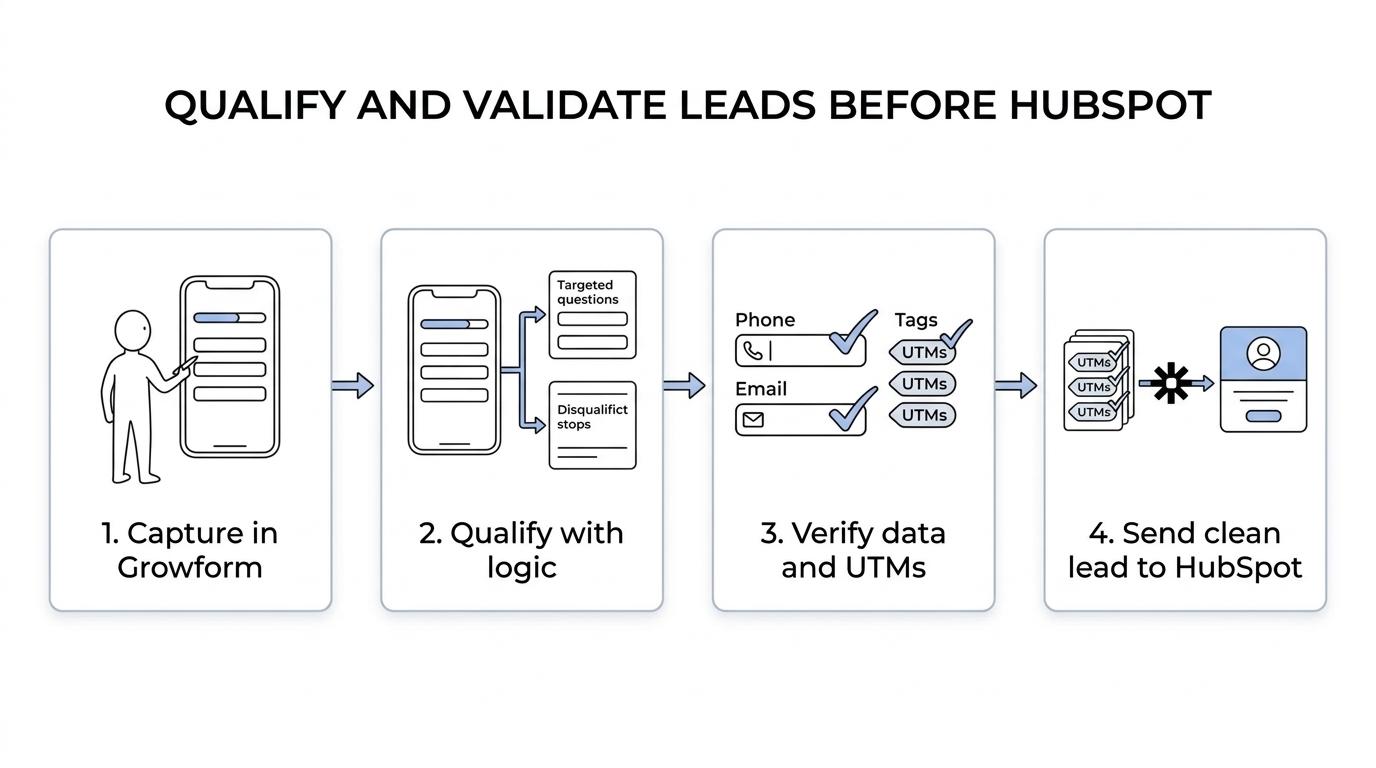
Growform helps you ask more useful questions without dropping completion rates in the process. Instead of forcing prospects through a long static form, we break qualification into steps, use progress indicators, inline validation, and conditional logic, and make the flow feel easier on mobile.
“Growform customers have reported forms with 2x as many fields still converting better when the flow is built for lead generation.”
Multi-step HubSpot lead qualification with conditional logic, hidden fields, and cleaner data
HubSpot supports conditional logic and even complex rules, but the buying decision is not just about whether logic exists. It is about whether your team can build a better qualification flow quickly, ship it without a developer, and pass richer lead data into HubSpot so scoring and routing become more useful.
Growform gives HubSpot users the front-end flexibility to collect better data before the CRM takes over. That includes conditional questions, disqualification logic, hidden fields, and prefilled fields, so each submission can carry both the answers your sales team needs and the attribution data your media buyers care about.
Here is the kind of data Growform can help you pass into a HubSpot-connected workflow:
- Qualification answers: service need, property type, budget, timeline, ownership status, injury type, coverage type, or other vertical-specific filters
- Attribution fields: UTMs, gclid, fbclid, source, campaign, and sub IDs carried through the full multi-step flow
- Data quality signals: phone verification via Twilio, email validation via Zerobounce, and consent evidence through TrustedForm or Jornaya where regulated lead flows demand it
That matters because HubSpot lead scoring works best when the contact record contains strong properties and actions to score against. Growform improves what reaches HubSpot, so your segments, workflows, reports, and lead scoring logic start from better input.
“Growform can add conditional logic, hidden fields, and prefilled fields before the lead ever reaches HubSpot.”
Send qualified Growform submissions into HubSpot and the rest of your lead stack
Growform’s HubSpot setup sends leads into HubSpot through Zapier. For many teams, that is exactly the right balance: keep HubSpot as the system of record, while using Growform as the form layer that captures and qualifies the lead more effectively.
That setup also helps when HubSpot is only one part of your stack. Growform can push submissions in real time to HubSpot, alert your sales team by email, SMS, or WhatsApp, send data to Google Sheets, and connect into broader routing or distribution workflows when your business needs more than a single CRM destination.
If your operation spans agencies, regional teams, or multiple downstream systems, Growform keeps the capture side clean while HubSpot handles lifecycle, nurturing, and reporting. You do not have to force HubSpot forms to do every job in the funnel.
“Growform sends submissions to HubSpot through Zapier and can connect to 300+ destinations when your workflow extends beyond one CRM.”
Better HubSpot form UX for mobile paid traffic and faster campaign launches
Growform is designed for teams that need a better HubSpot form live this week, not after a queue of design and engineering tickets. You can build and launch multi-step forms, quote forms, contact forms, and qualification funnels without pulling in a developer for every change.
Growform includes 100+ templates informed by UX research and 25+ lead-capture components such as progress bars, address lookup, inline validation, and subtle animations that reduce perceived friction on longer forms. That gives you more control over how a HubSpot-connected form actually feels to complete, especially on mobile.
Growform also gives you stronger design control than most native CRM forms. You can match brand colors and typography, use Google Fonts, add custom CSS, remove Growform branding on paid plans, and embed the form with a simple HTML snippet into WordPress, Webflow, Unbounce, Instapage, Leadpages, or a client site. If you prefer a standalone flow, custom domain support is available too.
For traffic-heavy campaigns, Growform is hosted on Cloudflare’s global network with 275+ locations, with uptime monitoring and optional enterprise SLAs. That helps keep load times from becoming the silent reason your HubSpot lead volume slips.
When Growform is the right HubSpot forms choice
Growform is a strong fit for HubSpot users when the CRM is already working, but the form layer is not. That usually looks like one or more of these situations:
- You run paid traffic at volume and need better mobile completion and lower abandonment on longer forms
- You need harder qualification without showing every field at once and scaring prospects away
- Your sales team is questioning lead quality and you need disqualification, verification, or better routing inputs
- You care about attribution integrity and need hidden fields, UTMs, and click IDs to land intact in HubSpot
- You work in regulated lead verticals and need TrustedForm or Jornaya evidence captured at the point of submission
- Your current landing page or HubSpot form setup is slow to change and every update turns into a dev request
If you only need a very basic contact form, HubSpot’s native form builder may be enough. Growform makes more sense when form conversion, qualification depth, routing accuracy, and speed of launch have direct impact on pipeline, acceptance rate, or cost per lead.
Growform helps HubSpot users keep the CRM they trust and upgrade the capture layer in front of it
That is the core value of Growform for HubSpot forms. You keep HubSpot for records, follow-up, segments, workflows, and lead scoring. We improve the part that prospects actually touch first.
For in-house marketers, that means faster testing and better lead quality without waiting on engineering. For lead generation operators, it means richer qualification before the lead enters your CRM or downstream routing logic. For agencies, it means a cleaner way to deliver branded, higher-converting HubSpot-connected forms for clients without settling for rigid native form builders.
If you want HubSpot forms that qualify harder without hurting conversion, build your next funnel in Growform and send the lead data into HubSpot once it is actually worth scoring.