
Form testing priorities for higher quality paid leads
 Harvey Carpenter Published 10 min read
Paid traffic form testing gets misread all the time.
A team sees a submit rate jump, calls the test a win, and scales spend. Two weeks later, contact rates fall, sales complains about junk, buyer rejection rates climb, and the ad platforms have already trained toward the wrong lead profile. The problem was never the form submit rate by itself. The problem was what the form encouraged people to submit.
For consumer lead generation at volume, the best form tests are the ones that improve both completion rate and lead usefulness. That means testing the parts of the form that change who submits, how accurately they submit, and whether the downstream stack can tell a good lead from a bad one.
Why paid lead form testing needs a different scorecard
A paid lead form is not a newsletter signup box. It sits at the front of a revenue chain that includes traffic cost, qualification, compliance, routing, contact rate, buyer acceptance, and sales outcome. If your testing plan only looks at raw conversion rate, you can make the form “better” while making the business worse.
That is why the first job in form testing is choosing the right outcome metric. A shorter form might lift submit rate by 20%, yet cut contactable leads if it attracts low-intent users or captures weaker data. A stricter form might lower top-line volume while raising margin per visitor.
The most useful test scorecards usually include a mix of front-end and back-end numbers.
- Raw form completion rate
- Qualified lead rate
- Contactable lead rate
- Buyer acceptance or rejection rate
- Cost per qualified lead
- Revenue per click or per session
If you sell leads into a ping post or distribution setup, this matters even more. Higher raw volume is not the goal if more leads fail validation, get rejected by buyers, or route into lower-paying buckets.
Test form length and field count before cosmetic changes
If a paid funnel has never been tested properly, field count is still one of the best places to start. A large HubSpot analysis across more than 40,000 landing pages found a familiar pattern: conversion rates tend to fall as field count rises. That is not new, but many teams still spend weeks changing button colors before testing whether two or three fields should exist at all.
The catch is that “fewer fields” is not a complete rule for paid lead gen. Some fields earn their place because they affect qualification, compliance, routing, or contactability. The real question is whether each field pays rent.
A practical way to test length is to remove fields in tiers, not all at once. Start with anything that does not change routing, risk, or lead value. Keep the fields that your sales team, buyer, or distribution logic actually needs. Then measure not just submit rate, but the quality delta after the submit.
Which fields usually deserve protection in paid lead forms
| Field category | Usually keep early | Usually test carefully | Often remove or delay |
|---|---|---|---|
| Contact data | Phone, email | Full address | Secondary phone |
| Core qualification | ZIP, service type, property type, age band | Ownership status, timeline, claim status | Nice-to-have profiling |
| Attribution | Hidden fields, gclid, fbclid, source IDs | Keyword text exposure to user | Any user-facing attribution fields |
| Freeform input | None by default | Brief issue summary when sales needs it | Long textarea descriptions |
Open text fields are a common quality trap. They feel useful because they promise richer context, yet they create friction and low-standardized data. In most paid lead funnels, a long textarea belongs late in the flow, or after the main conversion, not near the top.
The same logic applies to fields that look harmless but cost more than expected. “How did you hear about us?” may be interesting. It usually should not be in a paid form if you already capture source data in hidden fields.
Test field type and input format before rewriting copy
Two forms can ask for the same information and perform very differently because of how the input is designed.
That matters more than many operators expect. HubSpot’s field-level findings suggest that extra single-line text fields often hurt less than heavier field types like textareas and select boxes.
Academic research on web forms found that date field design changes response quality. Separate inputs for dates improved response quality over a single input, and drop-down style controls reduced ill-formed answers even more. The lesson for lead gen is straightforward: when accuracy matters, input structure can outperform copy tweaks.
The safest pattern is to test the field type before changing the actual question. If a field underperforms, ask whether the friction comes from the wording or from the way users must answer it.
A few field-type priorities usually pay off fast:
- Use early: radio buttons, button choices, short single-line text
- Use with care: select boxes, especially long dropdowns on mobile
- Delay or avoid: long textareas near the top of the funnel
- Format tightly: date, phone, ZIP, and email fields with clear constraints
Field order matters too. Easy, low-threat questions should come first. Harder qualification questions can appear later, once a user has already invested effort and seen progress. This is where multi-step forms often outperform long static layouts. A one-field-at-a-time or small-batch step pattern reduces perceived friction, and public-sector usability guidance has recommended vertical layouts and instructions above fields for exactly this reason.
One more detail: if a field needs explanation, place the explanation above the field, not buried in placeholder text. Placeholder copy disappears as soon as someone starts typing, which is a bad trade when the field already has risk of bad input.
Test qualification logic at the form layer, not only in the CRM
Many paid lead teams still let almost everyone submit and try to sort it out after the fact. That works poorly when traffic is expensive and speed matters.
Qualification logic at the form layer lets you separate stronger leads from weaker ones before the handoff. That can mean branching users down different question paths, skipping irrelevant fields, or ending the flow early when the lead does not fit the campaign. If you already know a buyer only wants homeowners in certain ZIP codes, or a final expense funnel only wants a defined age range, test that logic inside the form.
This is one of the biggest differences between generic forms and lead-gen-oriented forms. The form should help decide whether the data is worth passing downstream.
That changes several things at once:
- Lead quality: low-fit submissions are blocked or separated before they hit sales or buyers
- Routing accuracy: the payload matches the right buyer or CRM workflow
- Bidding signals: ad platforms can optimize toward qualified leads, not every submit
- Ops efficiency: fewer junk leads get posted, reviewed, or disputed
A useful first test is not “short form vs long form.” It is “same front-end conversion rate, but with better qualification logic.” You may find that a slightly stricter path lowers gross lead count while raising accepted leads enough to improve margin.
For Meta and Google lead funnels, this point is huge. If every completion fires a conversion event, even bad leads teach the algorithm what to find more of. If only qualified leads count, the model has a better target. That is often a stronger improvement than any copy test on the landing page.
Growform builds this into the form. Conditional logic shows or skips steps based on earlier answers, lead disqualification ends the form early for leads that do not fit, and conversion events for Google Ads and Meta can count qualified leads only. Hidden fields keep UTMs and click IDs on every lead through each step, so the results of each variant can be traced to the CRM or buyer payload.
Test tracking and qualified lead reporting before scaling spend
Bad tracking hides bad form decisions.
If the form does not persist UTMs, click IDs, keywords, source IDs, and qualification status, you cannot tell which variant drove the better lead. You can only tell which variant got more people to click submit. That is a weak testing loop.
Before scaling any winning form variant, validate the full tracking chain from ad click to CRM or lead buyer payload. Check hidden field capture. Check whether gclid and fbclid survive multi-step flows. Check whether step-level events and the final conversion fire correctly. Check whether Meta CAPI or server-side lead events match what the platform claims.
This is also the point where “qualified leads” should become a reporting object, not a spreadsheet cleanup job. A form test is much more useful when it can answer questions like these:
- Did the variant increase raw submissions or qualified submissions?
- Did phone-valid leads rise at the same rate as total leads?
- Did the buyer acceptance rate hold by traffic source and ad set?
- Did revenue per lead or EPC improve after routing and rejection filters?
Teams often find that ad platform conversions run below actual lead counts because some events are missed or deduplicated incorrectly. That gap matters when comparing tests. A variant with cleaner tracking can look like a media win when it is really a measurement fix. It is better to know that before spend ramps.
Test usability controls that lift data quality, not just conversion rate
The best usability changes reduce bad entries, accidental errors, and abandonment from avoidable friction.
Official health-form guidance makes a point that applies cleanly to paid lead generation too: complex or confusing forms cause entry errors and put users off. Paid traffic users are even less patient. They clicked an ad, landed cold, and are often on mobile. Small usability problems get punished fast.
This is why the best lead operators test controls that improve both ease and precision:
- Validation: catch malformed emails, incomplete phone numbers, and impossible dates before submit
- Verification: use live phone or email checks, or SMS OTP when the lead value supports the extra step
- Layout: keep fields in a single vertical flow with clear next-step actions
- Mobile input mode: trigger the right keyboard for phone, ZIP, and numeric answers
Phone verification deserves special attention in high-CPC funnels. If a vertical has expensive traffic and sales depends on immediate outbound calling, it can be worth testing real-time phone validation or OTP. That adds friction, so it should not be rolled out blindly. Still, on the right campaigns, a lower submit rate with a much higher contact rate is a very good trade.
Address lookup is another strong candidate when routing depends on location. It speeds entry, standardizes the output, and reduces the garbage that breaks matching or buyer acceptance later.
Progress indicators can help too, though they are not magic. A progress bar is most helpful when the steps feel honest and the next action is obvious. It works best paired with short steps and visible momentum.
A form testing roadmap for higher quality paid leads
If a form has not been tested in a disciplined way, there is a sensible order to follow. Start with the variables that change economics the most. Save minor aesthetic tests for later.
| Priority | What to test | Main upside | Primary metric | Guardrail metric |
|---|---|---|---|---|
| 1 | Field count | Higher completion rate | Submit rate | Qualified lead rate |
| 2 | Field type and order | Lower friction, cleaner inputs | Step completion rate | Error rate by field |
| 3 | Qualification logic | Better lead quality | Qualified lead rate | Total volume |
| 4 | Validation and verification | Fewer bad records | Contactable lead rate | Abandonment at validation step |
| 5 | Tracking and conversion rules | Better optimization and attribution | Qualified conversions in ad platform | CRM match rate |
| 6 | Cosmetic changes | Marginal lift | CTR to form start or submit rate | No quality loss |
A strong test plan also separates front-end wins from business wins. If a variant gets more starts but fewer qualified leads, it is not a win. If a variant trims volume but raises contact rate, buyer acceptance, and revenue per visitor, it probably is.
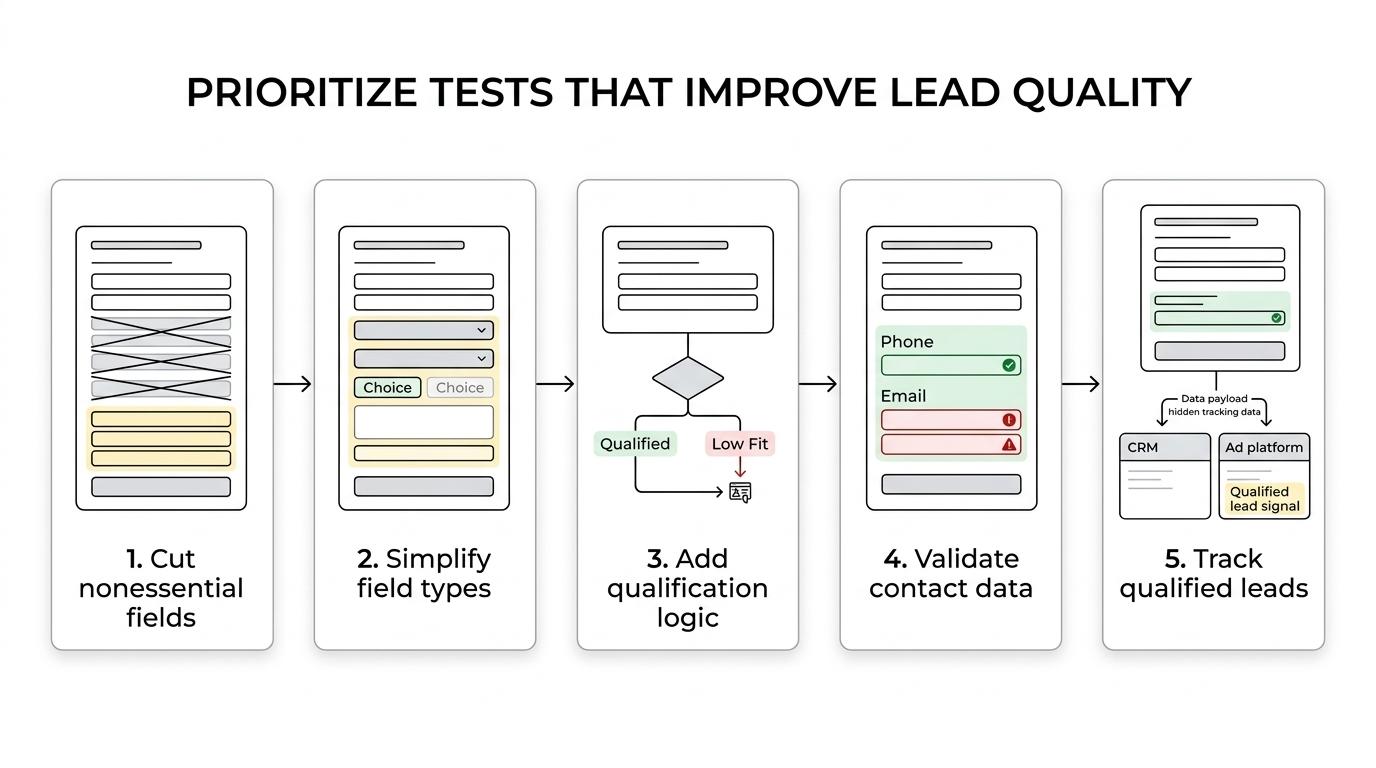
For many paid lead operators, the fastest gains come from a simple sequence: strip weak fields, replace heavy inputs with lighter ones, move hard qualification later in the flow, validate contact data before submit, and make sure only qualified leads become optimization signals. That is how form testing starts doing more than lifting conversion rate. It starts improving the actual lead business behind it.
Related articles
We checked 66 multi-step lead forms. Here's what we learned
We filled out 66 multi-step lead forms from US insurance, mortgage, legal, solar, real estate and home services sites and counted what they do before they ask who you are. Nine lessons for your own lead form, with the numbers behind each one.
October 8, 2026

8 best mobile form builders for lead generation teams
October 1, 2026
A/B Testing for Landing Pages How to Lift Conversions
September 30, 2026