
Cupcake order form template
Take cupcake order submissions online with a multi-step form that is quick to complete on any device. Clone it, brand it and embed it in minutes.

How our cupcake order form template works
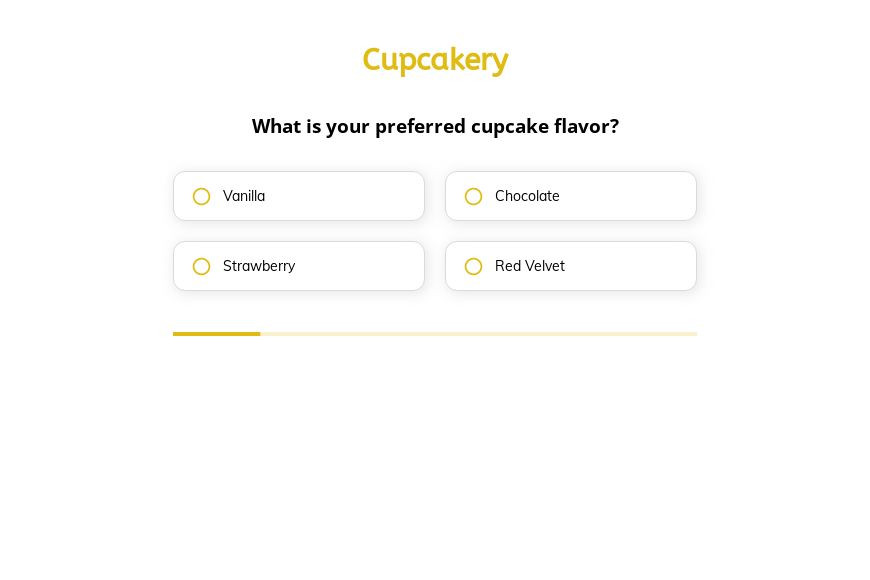
Our Cupcake order form template collects everything you need in one short, guided form. It starts with the choices people find easiest to make, such as “What is your preferred cupcake flavor?” and “How many cupcakes would you like to order?” and leaves names, addresses and contact details until the end, so you get fewer half-finished submissions, fewer clarification calls and a complete record of what was requested.
Conditional logic skips what doesn’t apply. Answers on one step decide which questions appear next, so a customer only ever sees the steps that are relevant to them. A collection is not asked for a delivery address; a delivery is. Shorter, more relevant forms get finished.
Easy questions first, personal details last. The form opens with the questions a customer already knows the answers to and asks for a name, email and phone number only at the end. By then they have told you what they need and invested a minute of effort, so far fewer people abandon the form at the contact step.
A progress bar that shows the finish line. Visitors can see how many steps are left, so a cupcake order submission feels like a quick task rather than an open-ended form. Visible progress is progress people are more likely to complete.
Every part of the template is editable in the Growform builder: questions, order, colors and fonts. Clone it, make it yours and start collecting better cupcake order submissions today. The 14-day free trial needs no credit card.
What happens next?
-

Step 1: Clone this form template
Clone this template into your Growform account (create one first if you don’t already have one). -

Step 2: Edit your form
Get creative and adjust your form's theme options, questions or layout in the Growform form builder. -

Step 3: Share or embed your form
Share a link to your form, or embed it in your existing website. Receive new submissions by email or send them to 7,000+ apps via Zapier.
Start your free trial
Build multi-step forms just like this one. 14-day free trial, no credit card required.