Skip to content
Growform Multi Step Form Builder

Wedding planning questionnaire template

This six-step wedding planning questionnaire asks the couple’s theme, guest count, budget range, wedding date and any notes, followed by the contact details. Clone it into your Growform account and add your planning packages.

What the form asks, step by step

A planner decides whether to take a wedding from its date, size and budget, and the form collects all three. The theme opens the form because couples enjoy answering it.

  1. Step 1: “What’s your dream wedding theme?”

    Rustic, vintage, beach, modern or glam shows the couple’s style immediately.

  2. Step 2: “What’s your estimated guest count?”

    Guest numbers from under 50 to over 200 set the scale of the day.

  3. Step 3: “What’s your budget range?”

    Budget bands tell you which of your packages the couple can afford.

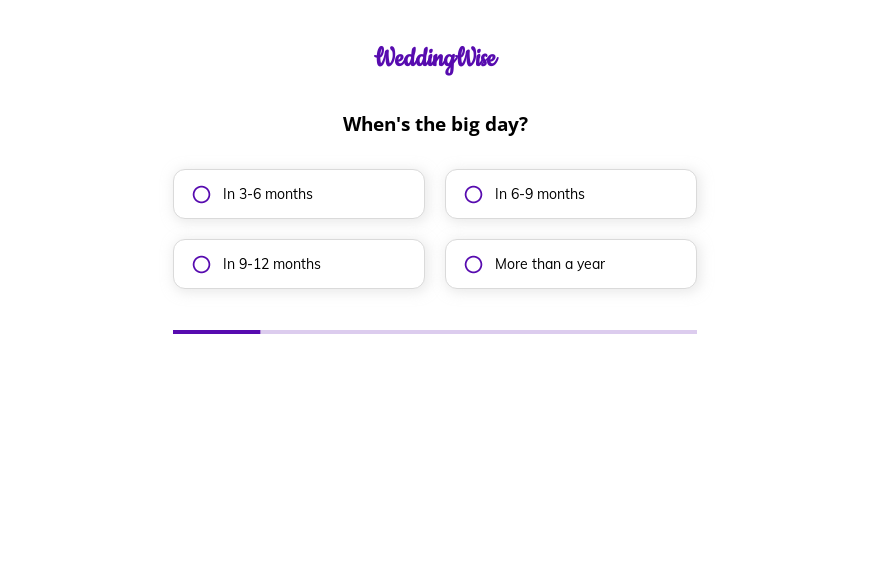
  4. Step 4: “When’s the big day?”

    The date picker lets you check your calendar before replying.

  5. Step 5: More information

    Couples can mention the venue, traditions or anything already booked.

  6. Step 6: “How shall we contact you?”

    Name, email and phone come last.

  7. After submitting

    Planners typically personalize the thank-you screen with a note about the free consultation and a link to recent weddings.

Who it’s for

Wedding planners, coordinators and venues with an in-house planning team can use this template as the inquiry form on their website. As a wedding planner intake form it gives you the theme, scale, budget and date together, so you can tell within a minute whether the wedding fits your calendar and your packages. A detailed wedding planner questionnaire covering suppliers and timings can follow the booking.

Why this structure converts

  • Starting with the theme makes the form feel like planning rather than qualification.
  • Budget is offered in bands, which couples find easier than naming a figure.
  • The wedding date is collected before contact details, so unavailable dates can be answered quickly.
Use this template

14-day free trial, no credit card

Make it yours

  • Ask about the venue

    Add a question asking whether the couple has booked a venue. Couples without one may need your venue search service.

  • Show your packages

    Link to your full, partial and day-of coordination packages on the thank-you screen.

  • Adjust the budget bands

    Set the bands to match the weddings you plan, such as starting at $20,000 if that is your minimum.

Frequently asked questions

What questions does a wedding planner questionnaire ask?

At the inquiry stage it asks the theme, guest count, budget and date. Supplier lists, schedules and family details come after the couple signs.

Can couples give an approximate date?

The template uses a date picker. Add an “We have not set a date yet” option if you work with couples early in their planning.

Can inquiries go into HoneyBook or Dubsado?

Yes. Growform connects to HoneyBook, Dubsado and 17hats, as well as Google Sheets.

What happens next?

  1. Step 1: Clone this form template

    Clone this template into your Growform account (create one first if you don’t already have one).
  2. Step 2: Edit your form

    Get creative and adjust your form's theme options, questions or layout in the Growform form builder.
  3. Step 3: Share or embed your form

    Share a link to your form, or embed it in your existing website. Receive new submissions by email or send them to 7,000+ apps via Zapier.

Start your free trial

Build multi-step forms just like this one. 14-day free trial, no credit card required.