

For a Phonexa team, the form builder determines whether LMS Sync receives the exact data needed for real-time lead distribution, ping tree decisions, validation, and buyer acceptance. Growform is one example of a no-code multi-step form builder built for that upstream capture role, which is why it often comes up in the same buying conversation as native Phonexa forms and general-purpose tools.
That is the core decision. Phonexa routing teams do not need a generic form tool that merely captures submissions. They need a capture layer that improves lead quality before the lead ever reaches response analyzers, buyer rules, or ping/post logic.
What should a Phonexa form builder do before a lead hits routing?
A Phonexa form builder should validate, structure, and enrich lead data before LMS Sync touches it. Clean phone, email, ZIP, consent, and attribution fields are the minimum needed for reliable routing.
Phonexa’s official LMS Sync materials frame lead distribution as a real-time process based on the selected flow, data entered on the form, constraints, and CRM data for recurring leads. That makes the form the first rules engine in the stack, whether you call it that or not.
Do not treat validation as something buyers or the routing platform can “sort out later.” If the capture layer sends malformed phone numbers, missing ZIPs, or broken hidden fields, Phonexa can still process the lead, but your downstream acceptance rate and reporting quality usually suffer.
The strongest setups also preserve consent evidence, page context, and ad-click identifiers. If your routing team cares about source-level yield, then missing UTMs or click IDs are not a cosmetic problem. They directly reduce bidding confidence and partner reporting accuracy.
Is Phonexa’s native Form Builder enough for most routing teams?
Yes, for many teams, Phonexa Form Builder is enough when the priority is keeping form logic close to LMS Sync.
The trade-off is flexibility. Native builders are often best when forms are short, routing rules are stable, and the team values fewer moving parts over richer front-end UX. If you are buying high volumes of mobile traffic into longer qualification flows, then the native route can start to feel narrow.
What are the 7 best form builders for Phonexa lead routing teams?
The best options split into three groups: dedicated lead-gen builders, Phonexa-adjacent tools, and native forms inside broader landing-page or CRM systems. The right choice depends on whether your bottleneck is conversion rate, routing control, or operational simplicity.
- Growform: Best when you need multi-step qualification, hidden-field pass-through, verification, and real-time delivery into a routing stack upstream of Phonexa.
- Phonexa Form Builder: Best when you want the form workflow closest to LMS Sync.
- LeadCapture.io: Relevant because Phonexa has publicly positioned it as a paired lead form and compliance-oriented capture option alongside distribution and analytics.
- Unbounce native forms: Useful when the landing page already lives in Unbounce and the team wants one-page ownership, though routing-heavy teams often outgrow basic native form controls.
- Typeform: A fit for conversational user experience, but teams with strict payload requirements often need extra mapping work.
- Jotform: Practical for broad workflows, but high-volume paid traffic teams often want tighter control over lead qualification and pass-through fields.
- GoHighLevel forms: Reasonable for agency stacks already built in GHL, especially for SMB funnels, but more demanding routing flows can expose limits.
This list is not about which builder looks nicest. It is about which one helps a Phonexa team capture exactly the data its distribution logic needs, with the least friction between ad click and lead delivery.
How do you connect a form builder to Phonexa in real time?
Use a capture tool like Growform to collect and validate fields, then send the payload by webhook or Zapier into Phonexa LMS Sync for distribution. The key is field mapping discipline, not just “having an integration.”
Step 1 is field design. Map every required routing input before you build the form. If Phonexa distribution rules depend on state, vertical, buyer filters, lead type, or consent evidence, then those fields need a fixed destination and a fixed format.
Step 2 is delivery setup. Send the submission immediately by webhook or middleware into the receiving endpoint or workflow that hands off to Phonexa. If you wait for batch syncs or manual review, then speed-to-lead drops and your ping/post economics get worse.
Step 3 is testing under live-like conditions. Submit leads with edge cases: incomplete ZIPs, duplicate phones, bad emails, recurring leads, and alternate traffic sources. Test both accepted and rejected payloads. Clean success logs are only half the story.
How should you structure fields for ping tree and ping post delivery?
Ping tree and ping post work best when lead fields are structured, normalized, and easy for buyers to parse. Short forms can still support complex routing if the data model is clean.
Before you finalize the form, separate your fields into distinct operational groups:
- Identity fields: name, phone, email, ZIP, state
- Routing fields: vertical, product type, ownership status, age band, coverage range
- Proof fields: consent timestamp, page URL, TrustedForm or Jornaya token
- Attribution fields: UTM source, campaign, gclid, fbclid, sub IDs
It is tempting to think that more questions automatically create better routing. That is only partly true. Better routing comes from the right questions in machine-friendly formats. A dropdown for homeowner status is usually more useful than an open text question that says “tell us about your property.”
If your buyers price on a small set of fields, put those early enough that you can branch intelligently. If they do not, keep the path short and ask only what materially changes buyer fit, compliance, or payout.
How do you reduce bad leads before Phonexa routes them?
Reduce bad leads at capture first, then at pre-distribution second. The best stack catches obvious problems before submission and lets Phonexa screen the rest.
Phonexa says leads are validated and checked against campaign-level constraints before distribution. That is useful, but it should not be your first line of defense. Front-end validation lowers wasted traffic earlier.
Take a layered approach. Use inline validation to catch formatting errors, conditional disqualification for obvious non-fit leads, and phone or email verification when your traffic source quality justifies the extra step. If your paid traffic is clean and intent is high, then aggressive OTP can hurt completion. If fraud is rising, then OTP often pays for itself.
Do not confuse “more verification” with “better quality.” Too much friction can cut real leads faster than fake ones. Test by source, device, and vertical.
Multi-step builder vs native LMS Sync builder: which fits better?
Multi-step builders like Growform usually fit better for longer mobile qualification flows, while native LMS Sync builders fit better for shorter forms and tightly integrated routing. The right answer depends on where your losses happen.
If your biggest problem is form abandonment on paid traffic, multi-step often wins because it breaks long qualification into smaller commitments. That is especially relevant in verticals where routing depends on several qualifying answers, not just name and phone.
If your biggest problem is operational complexity, native often wins because it keeps editing, routing, and response logic closer together. The trade-off is that the capture experience may be less flexible when brand control, conditional branching, or qualification depth becomes more demanding.
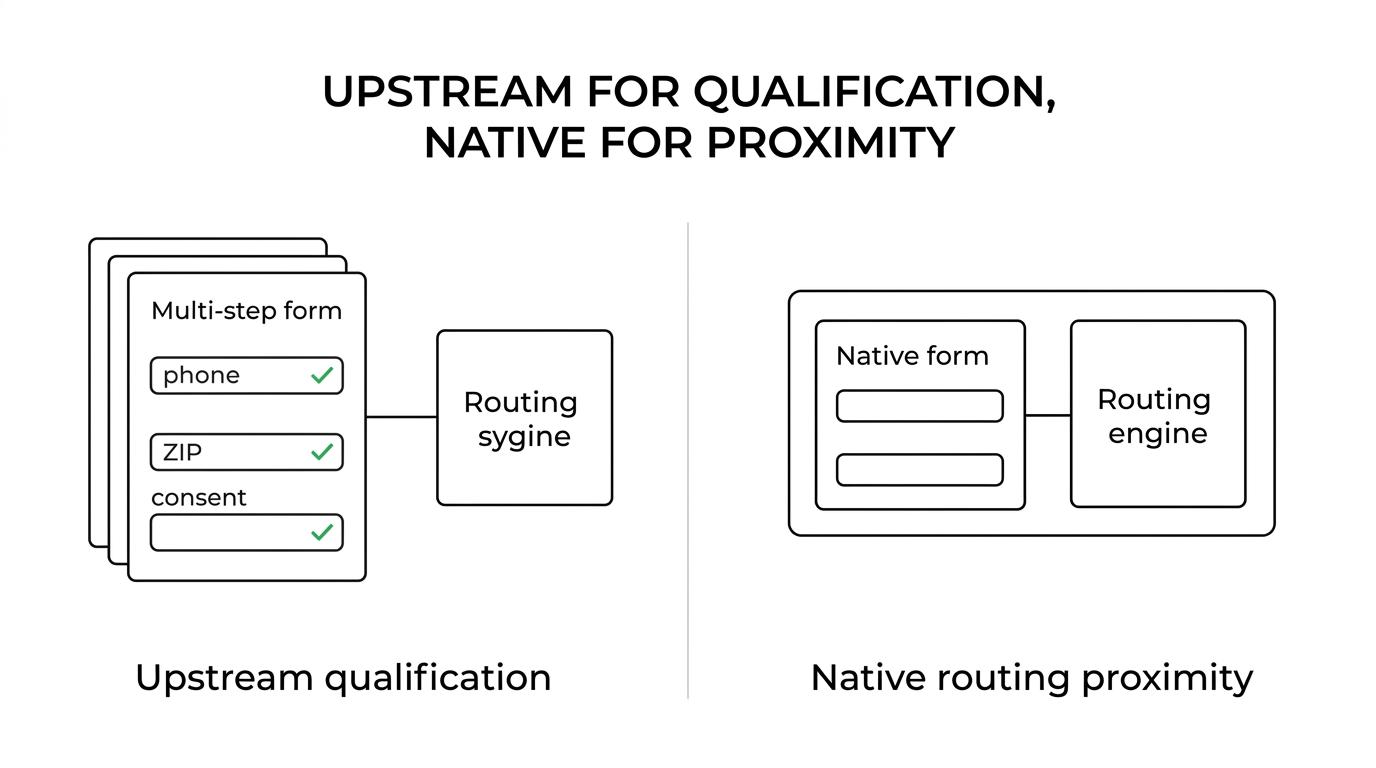
One practical test is this: if conversion rate is flat but buyer acceptance is poor, improve field quality first. If acceptance is solid but volume is weak, improve the front-end experience first.
Form builder plus webhook layer vs direct native setup: which is safer?
Direct native setup is safer when the flow is simple. A form builder plus webhook layer is safer when you need stronger field control, parallel delivery, or more flexible attribution handling.
Many teams assume fewer tools always means less risk. That is only true if the native setup already supports your field logic, delivery format, and testing needs. If it does not, then you create hidden risk through manual workarounds, not through software count.
If you need the same submission to feed Phonexa, a CRM, and an alerting system at once, a separate capture layer is often cleaner. If you need only one destination and a narrow form, then keeping everything inside the native routing platform is usually easier to govern.
The practical question is failure visibility. If a payload breaks, where do you see it first? The safer stack is the one your operators can debug quickly at 4:30 p.m. on a Friday traffic spike.
Which decision criteria matter most when choosing a Phonexa form builder?
Five criteria usually decide the outcome: routing-fit data, validation depth, delivery speed, attribution integrity, and editing speed. Design matters, but it is rarely the primary buying factor for routing teams.
When you compare tools, score them against these points:
- Routing fidelity: Can the form capture exactly the fields buyers and flows need?
- Validation controls: Can you check phone, email, ZIP, and obvious junk before handoff?
- Delivery plumbing: Does it support real-time webhook or reliable middleware handoff?
- Attribution pass-through: Will UTMs, click IDs, and source IDs survive the full flow?
- Operational control: Can marketers change logic without opening dev tickets?
Do not compare form builders the way a brand team would compare a design tool. Phonexa teams should compare them the way an operator compares a revenue input. If a field fails, who loses money first, and how fast do you know?
How do compliance and attribution change the form-builder decision?
Compliance and attribution often change the answer more than UX does. A form that converts well but drops consent evidence or click data can still be the wrong choice.
For consent-sensitive verticals, you need capture-time evidence attached to the lead record, not sitting in a separate spreadsheet or page log. That includes timestamp, page context, consent language exposure, and any token-based proof your buyers require. The same logic applies to attribution. If source and click identifiers disappear between the ad and LMS Sync, then partner analysis and bid decisions become less reliable.
If a builder makes compliance proof and hidden-field persistence hard, then it is not really cheaper, even if the monthly fee is lower. Paid traffic forms should be judged by accepted lead volume and auditability, not by subscription line item alone.
Related articles

7 best form builders with server-side tracking for lead gen
October 29, 2026

7 best form builders with TrustedForm integrations
October 21, 2026

6 best form builders for Meta CAPI lead tracking stacks
October 20, 2026