


Lead routing is the control layer that decides whether an expensive inbound lead gets to the right buyer, rep, or queue while intent is still fresh. Growform matters in this discussion because the front end of the stack only works when form data, consent proof, and attribution move into routing logic in real time.
The right choice depends on what happens after the form submit. Some teams route owned leads into HubSpot or Salesforce, others send leads into Boberdoo, LeadsPedia, or Phonexa, and some need call-center queue logic after the lead is created. The common requirement is simple: capture clean data fast, then hand it off without delay or loss.
Why does response speed matter in lead routing?
Fast lead routing directly improves qualification odds. The Lead Response Management study by James Oldroyd and InsideSales.com analyzed 15,000 unique leads and 100,000 call attempts and found the odds of qualifying a lead fall fourfold when response time moves from 5 minutes to 10 minutes.
That matters even more in consumer lead gen where traffic comes from Meta, Google, Taboola, or other paid channels. A slow handoff reduces close rate. It also lowers the value of the click you already paid for, hurts buyer confidence, and increases the gap between gross CPL and realized margin.
Teams often treat routing as a downstream problem. In practice, the delay often starts at the form, with missing webhooks, broken hidden fields, or validation running after the submit instead of before it. If response time is a revenue lever, routing has to start at capture.
What features make a lead routing tool good for real-time lead handoffs?
A good lead routing tool combines decision logic, fallback rules, and delivery visibility. Amazon Connect's routing model is a useful benchmark here because it formalizes routing criteria, preferred agents, queue fallbacks, and expiration durations instead of relying on one brittle rule.
When you compare tools, focus on the mechanics that protect handoff speed and lead usability:
- Decision logic: route by state, vertical, source, schedule, buyer caps, validation result, or consent status.
- Fallback behavior: send to preferred agents or buyers first, then broaden to queues or backup destinations when the first path times out.
- Payload control: preserve UTMs, click IDs, consent evidence, and field mappings required by the CRM or buyer endpoint.
- Real-time visibility: show delivery success, queue state, abandoned handoffs, and retry behavior quickly enough to act on them.
What are the best lead routing tools for real-time lead handoffs?
The best tools depend on whether you need form-side handoff, lead distribution, or call-queue routing. Growform belongs in the stack when your bottleneck starts before the router, while LeadsPedia, Phonexa, and Boberdoo are stronger when the core job is selling or distributing leads.
For high-volume operators, these seven tools stand out:
-
Growform: Best as the capture and qualification layer before routing. It is not a replacement for a lead distribution platform, but it is strong at multi-step capture, real-time phone and email validation, hidden-field pass-through, and immediate webhook or Zapier delivery into CRMs and routing systems.
-
LeadsPedia: Best for lead distribution and buyer management. It is widely used by aggregators who need routing by buyer rules, caps, vertical, geography, and delivery endpoint.
-
Phonexa: Best for teams that want routing plus a broader lead-management stack. It fits operators who want distribution, tracking, and monetization tools in one platform.
-
Boberdoo: Best for mature ping/post workflows. It remains a known choice when a business sells leads into multiple buyers with strict caps, bidding rules, and compliance requirements.
-
LeadByte: Best for teams that need lead management and routing with less marketplace complexity.
-
Databowl: Best for insurance and financial services operators who need detailed delivery logic and buyer integrations. It is often evaluated where lead compliance and downstream acceptance rates are tightly managed.
-
Amazon Connect: Best when the handoff continues into an agent queue or contact center. It is not lead routing software in the classic aggregator sense, but its routing criteria, preferred-agent logic, and real-time queue metrics are valuable when speed-to-call is part of lead monetization.
A useful way to think about the category is this: capture-layer tools create clean, routable records. Lead distribution platforms decide where the lead goes commercially. Queueing platforms decide who handles the contact operationally.
How do you connect a lead capture form to routing software?
The cleanest setup starts at the form. Growform is relevant here because the handoff fails long before the router if the form does not validate contact data, preserve hidden fields, or deliver payloads reliably into the next system.
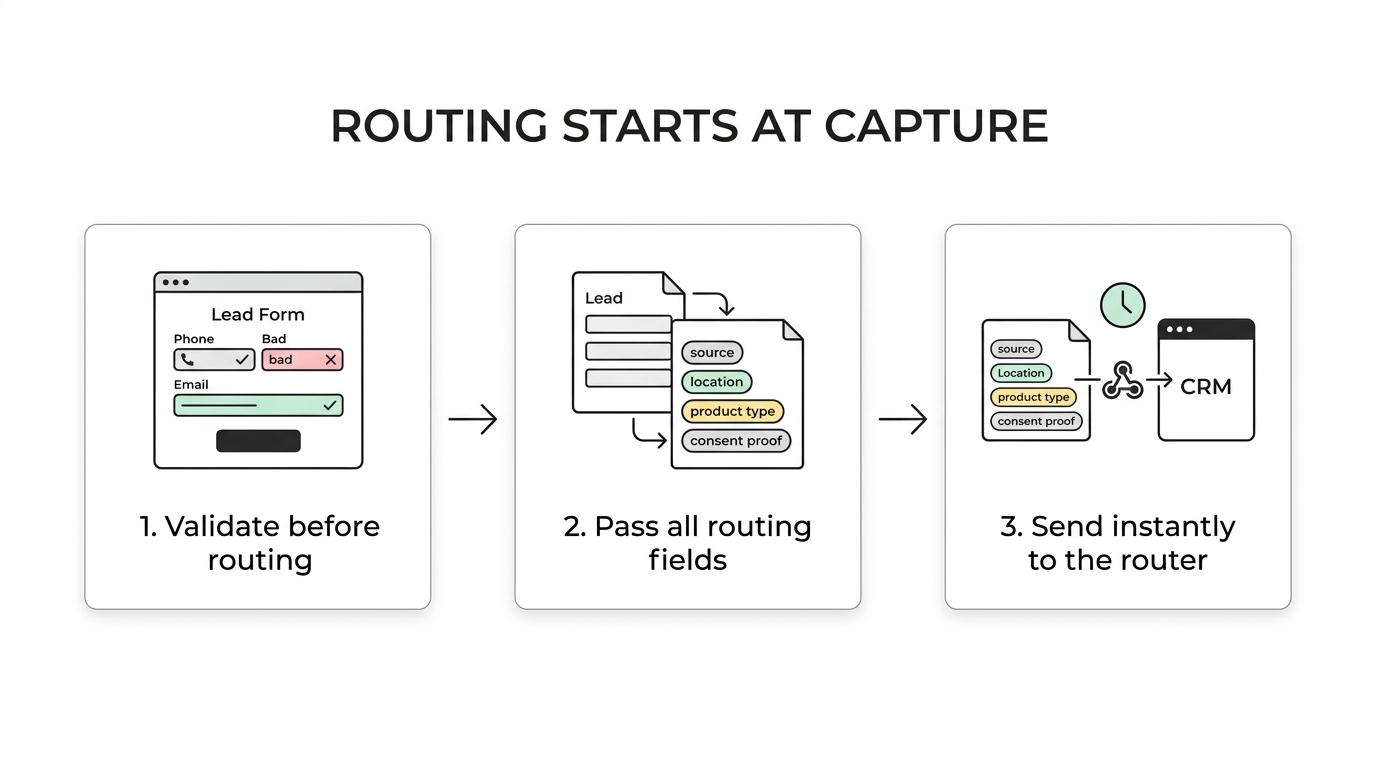
Step 1: validate before routing. Phone verification, email validation, and basic junk filtering should happen before the lead hits your CRM or buyer endpoint. If a phone number is invalid, the router should never waste queue space or buyer bids on it.
Step 2: pass every field the router needs. That includes UTMs, gclid, fbclid, source IDs, state, product type, compliance evidence, and any custom routing flags. Some teams assume multi-step forms break attribution. They do only when hidden-field pass-through is weak.
Step 3: choose the transport based on latency and control. Webhooks usually beat email parsing by a wide margin. Native integrations reduce mapping errors. Zapier is acceptable when the workflow is simple and monitored. If your buyer or platform supports direct post, use it.
How do routing criteria, queues, and fallback rules work in practice?
Effective routing uses layered logic, not one static rule. Amazon Connect documents a model where contacts can be routed to preferred agents first, then fall back to a broader pool, and if all routing steps expire, the contact is offered to the longest-available agent with that queue in their routing profile.
That same logic maps well to consumer lead operations. A high-value roofing lead in Florida might go first to a preferred buyer with open capacity, then to a secondary buyer at a lower payout, then into an owned sales queue if both reject. The key settings are routing criteria, expiration duration, and the final fallback state.
Is lead routing software better than CRM assignment rules?
Dedicated lead routing software is better when you sell leads, manage caps, or need buyer-specific logic. HubSpot and Salesforce assignment rules work well for owned leads going to one sales team, but they are rarely enough for ping/post, retries, or commercial distribution.
CRM assignment rules are usually person-centric. They answer, "Which rep gets this lead?" Lead routing tools are market-centric. They answer, "Which buyer, queue, endpoint, or agent should receive this lead based on value, eligibility, capacity, and timing?"
If you only need state-based round-robin into a small in-house team, a CRM may be enough. If you need acceptance tracking, rejection handling, payout logic, or multiple delivery formats, move upstream into dedicated routing software. Do not try to force a CRM to behave like a lead exchange.
Should you use ping/post or direct posting for lead distribution?
Ping/post is better when multiple buyers compete for the same lead. Direct posting is better when one destination always owns the lead and the goal is minimum latency with fewer moving parts.
In ping/post, the router first sends a lightweight data set, or ping, to potential buyers. Buyers respond with bids, acceptance rules, or availability. The router then posts the full lead to the selected buyer. This structure is useful for maximizing revenue per lead, but it adds complexity and another point of failure.
Direct post sends the full record to one destination immediately. That is faster and easier to audit. It also avoids the edge cases where a ping looks valid but the post fails because a required field or consent token is missing. If your economics are stable and buyer choice is predictable, direct post can outperform a complicated auction setup on operational reliability alone.
How do you track lead routing performance in real time?
Real-time tracking should cover both delivery and queue health. Amazon Connect notes that some real-time metrics refresh every 15 seconds, which is a good benchmark for operational visibility when leads are expected to be worked immediately.
Step 1: track submit-to-handoff latency. Measure the time from form submit to webhook success, CRM creation, buyer acceptance, and first agent touch. If you cannot see those timestamps, you cannot defend your CPL or diagnose rejection spikes.
Step 2: monitor queue and failure metrics. Look at handled, abandoned, and delayed contacts, plus endpoint errors, retries, and timeout rates. Near-real-time visibility matters because a broken field map at 10:00 a.m. can burn an entire day of paid traffic before someone notices.
Step 3: review routing outcomes by source and rule path. If Facebook mobile traffic is producing more expired handoffs than Google search traffic, the issue may be intent profile, time-of-day staffing, or form validation quality, not just routing logic.
What mistakes cause slow or broken lead handoffs?
Most handoff failures come from bad field discipline, weak fallback logic, or poor monitoring. The router often gets blamed, but the root cause is usually upstream data quality or a downstream endpoint that was never tested under live conditions.
Step 1: remove avoidable payload ambiguity. Normalize state, phone, and campaign fields before routing. If one buyer expects CA and another expects California, map it deliberately. If required fields differ by destination, the rule set needs to account for that before delivery.
Step 2: design clear fallback paths. If a preferred buyer is capped, offline, or rejecting on compliance, define the next destination explicitly. Do not assume "first-come first-served" behavior will protect revenue. Without a fallback, the lead just stalls.
Step 3: test the full path, not just the submit button. Submit live test leads, inspect the CRM record, confirm consent artifacts, verify buyer acceptance, and watch the queue. Many teams read a green webhook response as proof the handoff worked. It only means one endpoint accepted a request, not that the lead became usable or billable.
Related articles

Quiz Funnels vs Multi-Step Forms for Lead Generation
Paid traffic operators usually ask the wrong first question here.
September 30, 2026

8 Lead Qualification Questions That Convert
The best qualification question isn't always the first one.
September 30, 2026