
Home Services Lead Generation: A Practical Playbook
You’ve paid for the click, the homeowner has completed the form, and the notification arrives after dinner. By the time someone on the team sees it the next morning, the prospect has already called another contractor. Worse, some submissions were never serviceable, never urgent, or never a fit for the crew in the first place….
 Harvey Carpenter Updated 13 min read
You've paid for the click, the homeowner has completed the form, and the notification arrives after dinner. By the time someone on the team sees it the next morning, the prospect has already called another contractor. Worse, some submissions were never serviceable, never urgent, or never a fit for the crew in the first place.
That's the reality behind home services lead generation. The ad matters, but margin is usually won or lost after the click, through the form experience, qualification rules, attribution, routing, and speed of response. A campaign that generates inexpensive inquiries can still be unprofitable if sales receives incomplete data or calls too late.
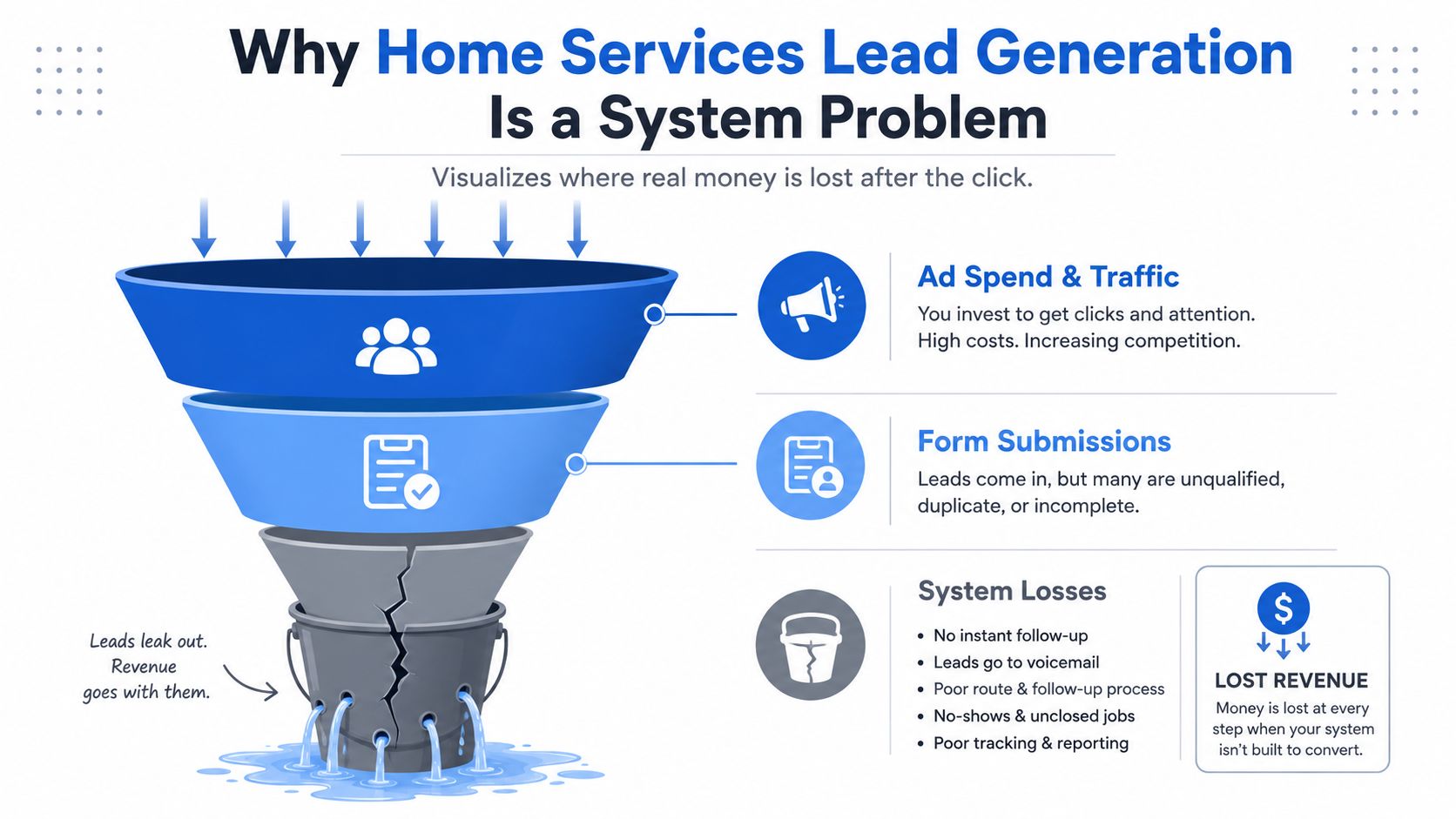
Why home services lead generation is a system problem
A roofing operator can run well-managed search campaigns and send traffic to a credible landing page, yet still lose profitable jobs. Forms arrive after hours, the CRM leaves them unassigned, and the next morning the team finds that several addresses fall outside the service area. The ad generated a submission, but the operating system failed to turn it into a workable conversation.
For multi-location operators, lead generation for franchises requires shared standards with local execution. Each branch may have different service boundaries, staffing hours, routing priorities, and qualification rules. A single-location HVAC or plumbing company faces the same design problem on a smaller scale. The funnel must match how the business answers calls, schedules technicians, and declines work that will not fit.
The form submit is only a handoff point
A submission moves through several operational gates:
- Capture: Collect a usable phone number, email address, location, and service request.
- Qualification: Identify urgency, project type, geographic fit, and trade-specific requirements.
- Verification: Check that the contact details work and retain evidence of consent.
- Routing: Send the lead to the correct salesperson, branch, buyer, or after-hours queue.
- Response: Call, text, or follow up while the customer is still seeking help.
A failure at one gate lowers the value of the original click. That makes the idea that lead intelligence should start at the form layer a useful operating principle: preserve campaign data and collect intent before information becomes scattered across forms, CRMs, call systems, and spreadsheets.
Response speed also belongs in the system design. A widely repeated figure, usually credited to a Lead Connect survey, says 78% of customers buy from the first company that responds, and one 2026 home-services benchmark reports that 62% of inquiries arrive outside business hours. Velocify's analysis of roughly 3.5 million leads found a 391% higher conversion rate when the lead was called within one minute. Another often-cited benchmark says 50% of sales go to the vendor that responds first.
The useful question is whether the business can identify intent, verify the contact, route it correctly, and measure whether it became a booked job. Channel choice matters, but the margin is decided by the handoffs that follow.
Choosing channels that fit your trade
Channel selection follows intent, trade, geography, and competition. A homeowner searching for “emergency plumber near me” has a different reason to act than someone browsing roofing ideas on social media. The channel must match the buying situation, then feed a capture and follow-up process that can qualify the request and route it to the right operation.
Paid search usually fits urgent, high-intent services. Plumbing and HVAC searchers often describe an active problem and expect a phone conversation or appointment. Roofing can also perform in search, but acquisition costs are harder to absorb. A benchmark reports an average home-services search CPL of $90.92, with a 6.37% CTR, $7.85 CPC, and 7.33% conversion rate. Roofing and gutters reach $228.15 per lead with a 3.70% conversion rate, according to LocaliQ's 2025 home services search benchmarks, drawn from 3,211 US campaigns.
| Trade | Best-fit channels |
|---|---|
| Plumbing | Paid search, Local Services Ads, Google Business Profile, referrals |
| HVAC | Paid search, Local Services Ads, Google Business Profile, maintenance follow-up |
| Roofing and gutters | Paid search for tightly defined intent, SEO, Google Business Profile, referrals |
| Landscaping and recurring outdoor services | Local SEO, Google Business Profile, referrals, Meta |
| Multi-location home services | Paid search, Local Services Ads, SEO, central reporting with local routing |
Local Services Ads and Google Business Profile help when customers need reviews, hours, directions, calls, or messages before committing. Keep service areas and hours accurate, monitor calls, and tie review requests to completed jobs. Without call tracking, booked work from Google Business Profile may appear as “organic” or “direct,” weakening channel and branch attribution.
Meta suits work that needs explanation or visual proof, including remodeling, roofing inspections, landscaping, and planned HVAC replacement. It can create demand, but a cold visitor still needs a short form that captures service, location, and urgency without feeling like an interrogation. SEO and local content build more slowly, while reducing dependence on auction-based traffic and supporting branded demand.
Referral programs and post-job outreach also need an owner. After completion, request a review, ask for a referral, and obtain permission before using project details or images. Plumbing content that explains plumber red flags for homeowners can reach people already comparing providers.
Roofing operators should examine how lead generators can improve CPL and lead quality at the form layer. Start with a narrow channel shortlist. Fund sources that produce the right service requests, preserve source data through routing, and expand only after the business can verify, attribute, and respond to those leads reliably.
Designing the campaign to form funnel
The ad and the form should feel like one uninterrupted conversation. If the ad promises emergency furnace repair, the landing page should lead with emergency availability, service-area confirmation, and a clear way to request help. Sending that visitor to a generic “all services” page introduces uncertainty at the moment intent is highest.
Build around the mobile decision
Start with the first screen, not the desktop layout. A mobile visitor should see the service promise, location relevance, trust signal, and next action without hunting through navigation or a long paragraph. Use a single primary CTA, large tap targets, visible labels, and input types that trigger the right mobile keyboard.
A multi-step form often works better than one intimidating block, but only when each step feels easy. Begin with a low-friction question such as service type, then ask for location, urgency, and contact details. Show a progress indicator so the visitor understands the remaining effort. Don't hide a long qualification sequence behind a button that says “Get quote” if the user expects a quick request.
A practical sequence might look like this:
- Service selection: Repair, replacement, inspection, maintenance, or another clear category.
- Location: Address or ZIP code, with service-area checking built into the flow.
- Situation: Urgent issue, planned project, damage, age of equipment, or property type.
- Contact details: Name, phone, email, and preferred contact method.
- Scheduling preference: A realistic window that helps the team respond appropriately.
The order matters. Asking for a phone number before establishing relevance can feel abrupt. Asking for an entire project description before confirming that the company serves the address creates unnecessary work for someone who may be in the wrong area.
Remove friction without removing useful data
Use address lookup where it reduces typing, inline validation instead of an error page, and autofill-friendly fields. Don't require duplicate entry for information the browser can supply. If a visitor abandons after providing valuable details, a soft save can support follow-up, but it must be handled with clear consent and responsible data practices.
Paid-search benchmarks place a strong home-services Google Ads conversion target around 7.33% to 7.97%, with average CPC around $6.55 and implied CPL in the roughly $82 to $116 range. Those figures make the mobile completion flow commercially important. A small improvement in completion can matter more than chasing cheaper clicks, especially when broad-match traffic sends visitors to a page that doesn't match their query.
A useful test: Change one point of friction at a time. Test the first question, the CTA wording, the address field, or the progress display separately so you know what changed the result.
Qualifying and disqualifying without killing conversion
Qualification shouldn't feel like a sales interrogation. It should help the business determine who needs help, what kind, where they are, and how quickly someone should respond.
Ask the easiest, highest-value questions first. A homeowner will usually answer a simple service question before they'll provide a detailed budget. Conditional logic then reveals the next relevant question instead of presenting every possible field to everyone.
Use trade-specific decision paths
For roofing, ask whether the request concerns a leak, storm damage, inspection, repair, or replacement. If replacement is selected, ask about roof age and property details. If storm damage is selected, ask about the event and visible damage. A lead outside the service area can be redirected before the sales team spends time on it.
For HVAC, the path can change based on repair versus replacement. System age, equipment type, property size, and whether the customer has no heating or cooling can determine urgency. A no-cooling call in extreme weather should enter a different queue from a homeowner gathering replacement options.
For plumbing, distinguish emergencies from planned work. A burst pipe, sewer backup, or water-heater failure needs rapid escalation, while fixture replacement or a future remodel can enter a scheduled nurture path. Fuel type and water-heater configuration can help assign the right technician, but don't ask technical questions the homeowner can't reasonably answer.
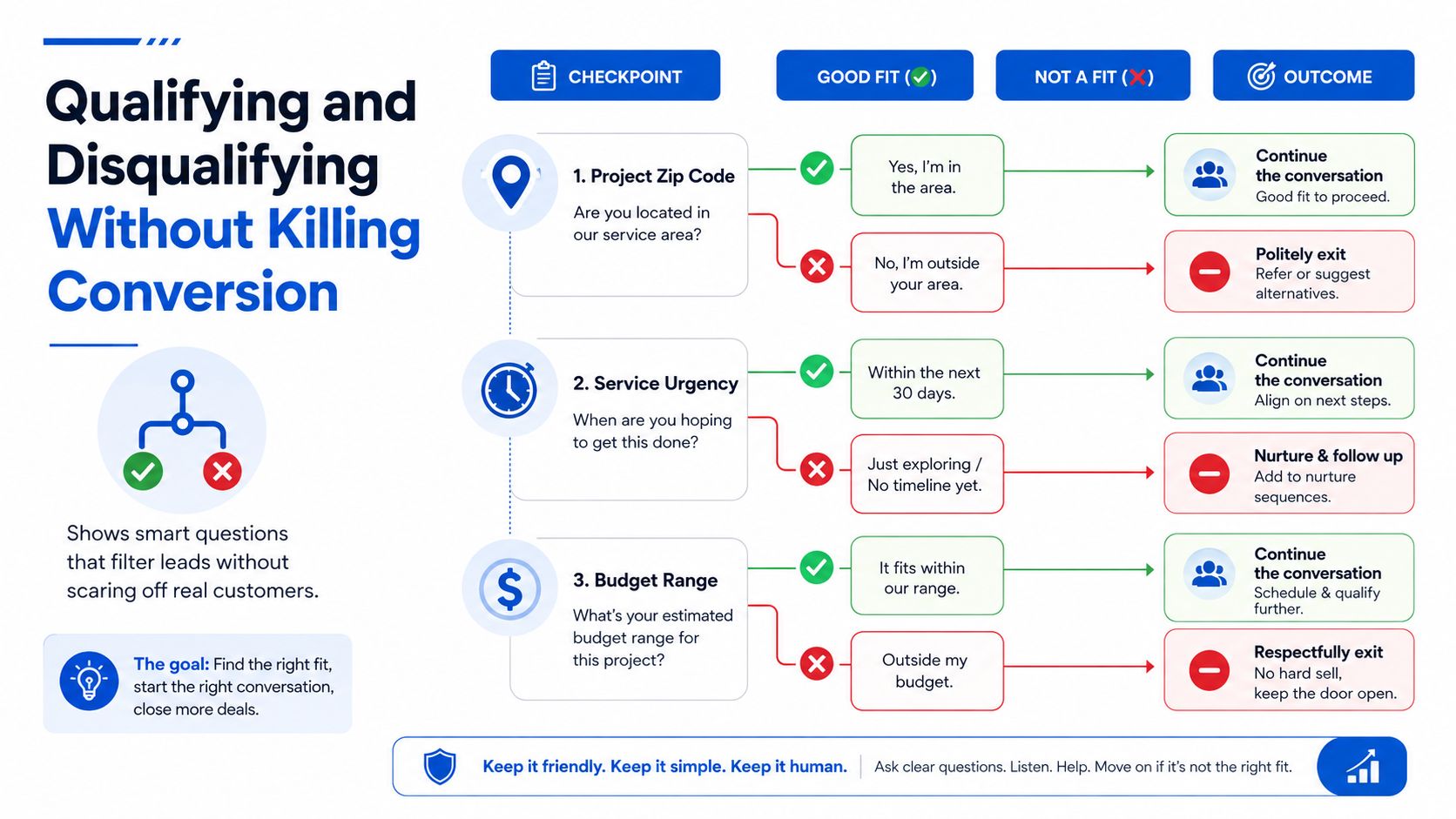
The first filter should usually be geography and service fit. Then ask urgency, project type, and only the details needed for routing or an informed first conversation.
Disqualify softly when possible
A hard rejection is appropriate for an impossible service area, an unsupported job type, or a request that violates company policy. Many other low-fit submissions shouldn't disappear. Route them to email nurture, a slower callback queue, a partner, or a self-service resource.
Use plain language. “We don't currently serve this area, but you can check these nearby providers” is better than a silent form failure. A budget question can also be framed as project planning rather than a demand for financial disclosure. Give ranges or choices that help the business understand fit without forcing a visitor to justify their finances.
The operational payoff is clear. Sales gets fewer irrelevant calls, while genuine prospects aren't rejected because they need a different response path. The form captures intent, and the routing system decides how much human attention that intent deserves.
Attribution, consent evidence, and verification
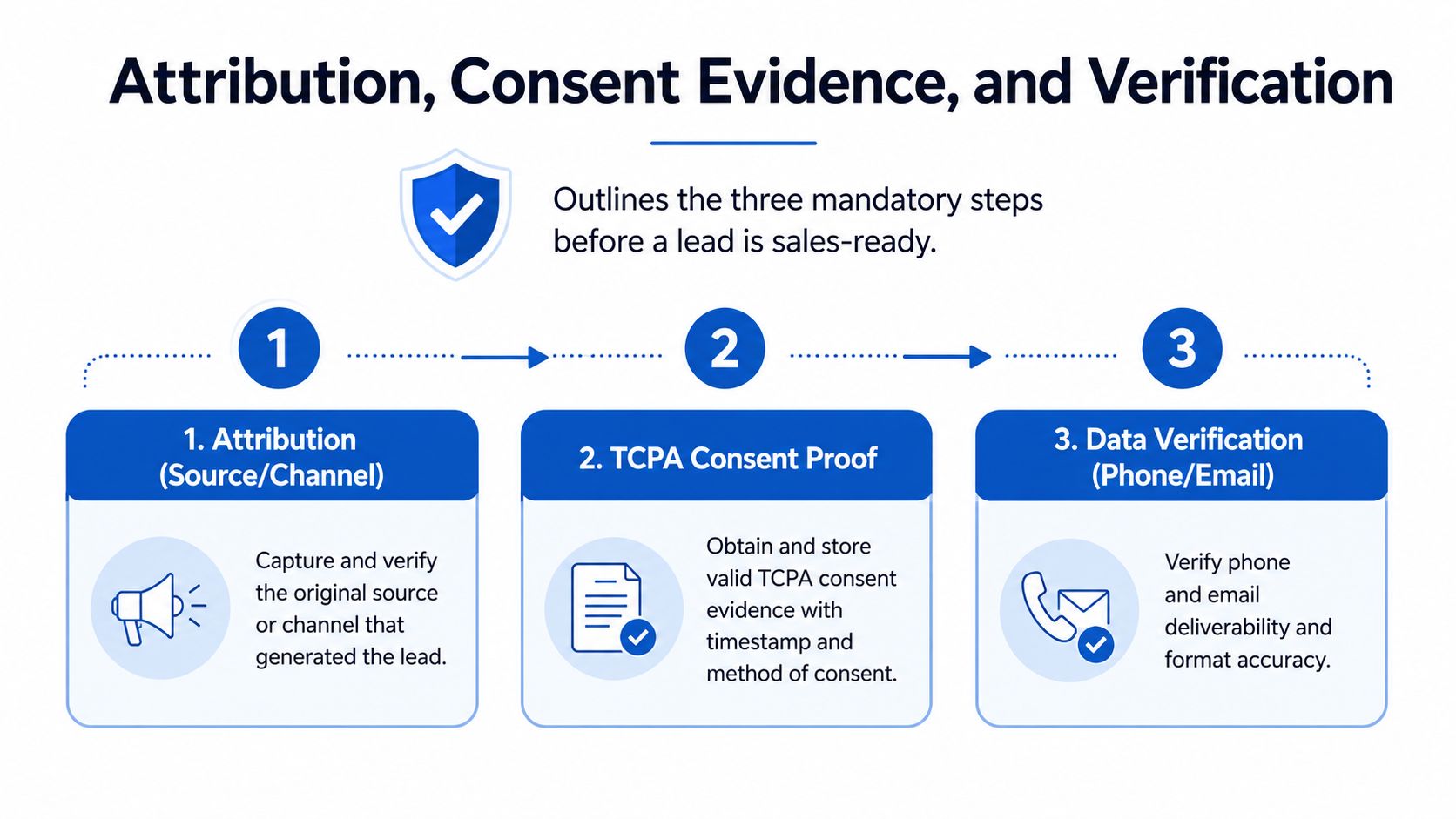
A lead isn't sales-ready just because a phone number exists. Before delivery, attach three things: where the lead came from, what consent was given, and whether the contact data is usable.
Preserve the original source
Capture UTMs, click IDs such as gclid and fbclid, campaign names, ad groups, creative identifiers, landing-page variants, and any publisher or sub-ID. Hidden fields should persist those values through every form step and pass them into the CRM, call-tracking platform, or buyer payload.
This prevents a common reporting failure. Marketing sees conversions in Google Ads, sales sees contacts in the CRM, and finance sees booked jobs in a scheduling system, but no one can connect the three records confidently. The form layer should pass a stable lead ID and source metadata forward so the business can compare CPL with appointments and booked revenue.
Meta and Google server-side conversion signals can help close gaps created by browser restrictions and incomplete client-side tracking. They don't replace clear event definitions. Decide whether the important event is a completed form, an accepted lead, an appointment, or a booked job, then send the right signal at the right stage.
Store proof with the submission
Consent evidence should travel with the lead, not sit in a separate spreadsheet. Record the consent language, timestamp, page or form version, source context, and any required evidence from the capture process. TrustedForm and Jornaya are commonly used for consent documentation in lead-generation workflows, especially where leads are routed to buyers or multiple sales teams.
Compliance evidence is part of lead quality. If a buyer can't confirm how the contact agreed to be reached, the lead may be rejected even when the customer is genuine.
Verify before delivery
Phone and email verification can identify malformed, unreachable, recycled, or suspicious submissions before they consume sales capacity. Verification shouldn't become an excuse to block every unusual lead. Use risk signals alongside service fit, and send uncertain records into review rather than deleting them automatically.
The right handoff contains the customer's answers, source data, consent record, verification status, and routing decision. That package gives sales context and gives marketing a defensible path from click to revenue.
Delivery, routing, and speed to lead
A verified lead that sits in an inbox is still a lost opportunity. Route it automatically into the CRM, lead distribution platform, or GoHighLevel, then trigger the first alert without waiting for a coordinator to check a dashboard.
Build a response chain
A practical workflow has a primary recipient and backups:
- Immediate delivery: Send the complete record to the correct branch, trade queue, or salesperson.
- Instant alert: Trigger SMS, call, email, or WhatsApp notifications based on urgency and local process.
- Acknowledgment: Require the assigned person to accept the lead or mark an attempt.
- Escalation: If no acknowledgment occurs, notify a manager or secondary responder.
- After-hours handling: Send urgent work to an on-call team and planned work to a scheduled follow-up queue.
- Failure logging: Record webhook errors, failed notifications, and reassignment events.
For a multi-buyer model, a ping tree can offer the lead to the first eligible buyer, then continue according to agreed rules if the offer expires or is rejected. For an owned sales team, round-robin routing can work, but only when availability, territory, trade, and licensing are part of the logic. A simple rotation sends leads to the wrong person whenever the schedule changes.
Speed benchmarks show why these controls matter. One benchmark set reports 73% booking for under-60-second texting versus 4% at 30 or more minutes, while median response times around 42 minutes correspond to sharply lower booking rates.
Make response speed observable
Track the timestamp of submission, delivery, acknowledgment, first call, first text, and appointment creation. A manager should be able to see whether a lead was delivered quickly but ignored, or whether the integration itself failed.
The first message should identify the company, reflect the service request, and offer a clear next action. Don't send a generic automated text that forces the homeowner to repeat everything they already entered. More detail on the economics and operational consequences of response time is available in these time-to-lead benchmarks.
KPIs, testing roadmap, and the next 90 days
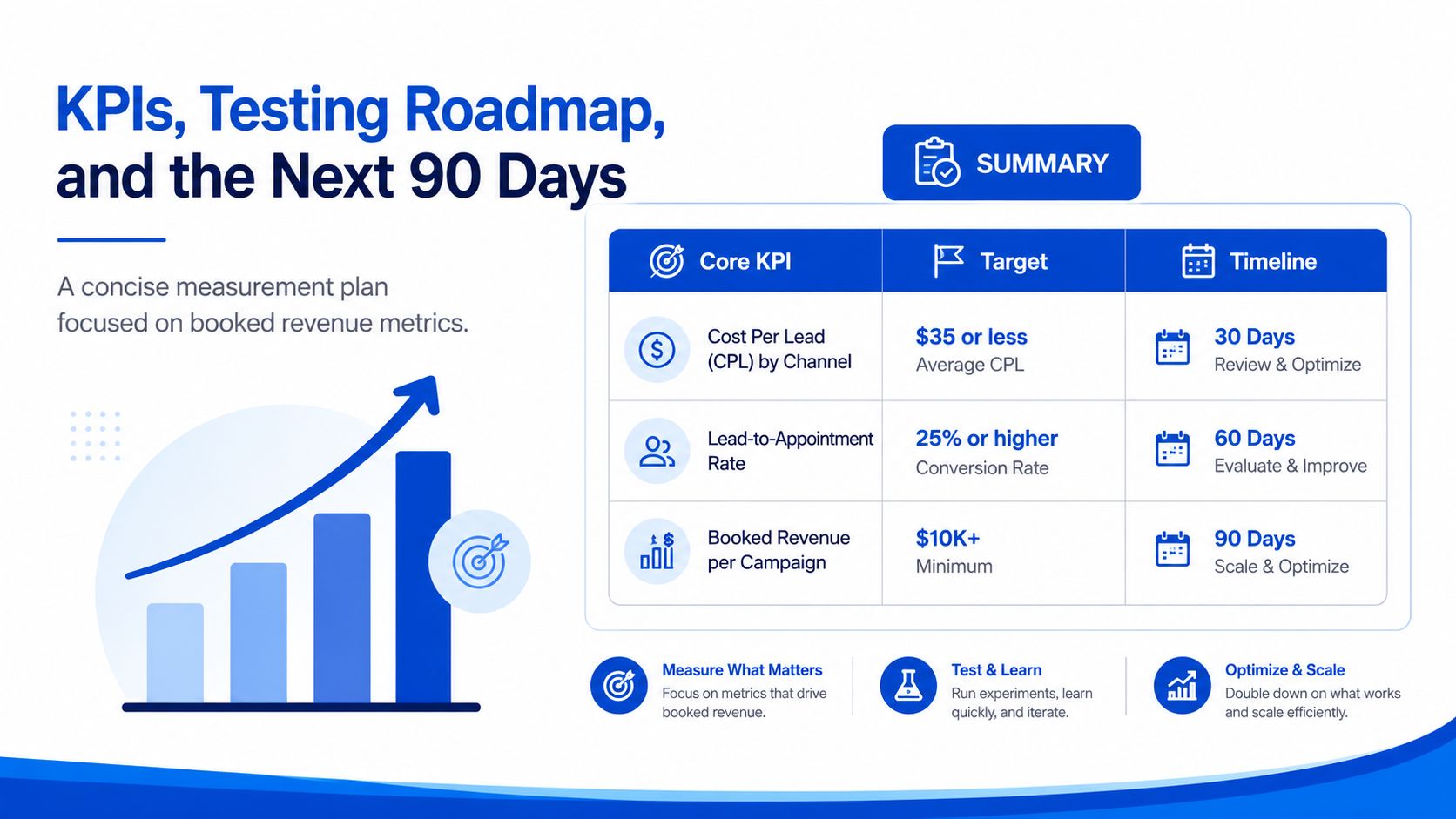
A full schedule can hide an unprofitable campaign. Impressions, clicks, and raw form volume help diagnose acquisition, but the dashboard must connect each inquiry to acceptance, appointment, booked work, and revenue.
Track these measures by trade, channel, geography, campaign, and responder:
- CPL by source: Separate paid search, Local Services Ads, Meta, organic, referrals, and branded demand.
- Lead-to-appointment rate: Measure whether accepted leads become scheduled conversations or visits.
- Speed to lead: Report median and slowest response patterns, including after-hours performance.
- Acceptance and rejection rate: Record why a lead was rejected, such as service area, job type, duplicate, invalid contact, or capacity.
- Booked-job cost: Connect acquisition spend to booked work, not just submitted inquiries.
- Revenue by campaign: Use consistent lead IDs so closed jobs can be attributed to the original source.
Industry benchmarks can help set an initial planning range, but they should not set the budget by themselves. Conversion varies by trade, service area, qualification rules, response speed, and close rate. Your acceptance, appointment, and booked-job data should determine which campaigns earn more spend.
A disciplined testing sequence
Days 1 through 30 should fix visibility. Confirm that every submission carries source data, consent evidence, service-area answers, verification status, delivery timestamps, and a final disposition. Repair broken integrations before increasing spend. If the team cannot explain where a lead went, additional traffic only makes diagnosis harder.
Days 31 through 60 should improve fit and response. Test one qualification rule at a time. Compare hard disqualification with soft routing for a specific job type. Add after-hours escalation, then check whether urgent inquiries reach a human quickly. Keep the ad, landing page, form, CRM workflow, and sales script stable within each test, or the result will be difficult to interpret.
Days 61 through 90 should refine economics. Compare booked-job cost by channel and trade. Tighten keywords that produce low-fit inquiries, adjust landing-page message match, and shift budget toward campaigns that generate accepted appointments rather than cheap form fills. If roofing CPL is high, better qualification and close tracking may matter more than cheaper clicks.
Review the dashboard weekly, then make strategic budget changes only after enough completed jobs support a useful comparison. Keep a test log with the hypothesis, change, launch date, audience, and business outcome. This prevents several variables from changing at once and being mistaken for improvement.
The operating system determines the margin. Capture only what the customer can answer, qualify with conditional logic, verify the record, route it immediately, and judge every source by booked revenue. Lead generation becomes manageable when the handoff after submission is measured as carefully as the click.
If mobile forms lose prospects or unqualified inquiries reach sales, Growform can build multi-step lead funnels with conditional qualification and real-time delivery to downstream systems. Use it to test a cleaner capture and routing flow before adding traffic to a campaign with unresolved leakage. The roofing, HVAC and plumbing templates are ready to clone, and you can start a free trial today.
Related articles
Insurance Lead Gen: The Complete Playbook for 2026
“Get more insurance leads” is still the typical advice many receive. It's also the fastest way to hide a broken funnel.
September 30, 2026

High-Converting Insurance Quote Forms: A Practical Guide
Insurance quote forms have to ask for far more fields than a typical lead form, so every field, branch and webhook has to earn its place.
September 30, 2026

Mass Tort Leads: Buy, Sell, & Qualify Guide 2026
Mass tort lead economics get ugly fast.
September 30, 2026