
High-Converting Insurance Quote Forms: A Practical Guide
 Harvey Carpenter Updated 16 min read
Insurance quote forms have to ask for far more fields than a typical lead form, and in Zuko's industry benchmarks they are the longest forms of any sector, at 54.3 fields on average. That length isn't a copywriting problem alone. It reflects a harder operational reality: the form must collect enough underwriting data to produce a sellable lead, move the submission into the right buyer's system, preserve consent evidence, and trigger follow-up before intent disappears.
A high-performing insurance funnel treats every field, branch, hidden parameter, verification check, and webhook as part of the acquisition economics. The best design isn't necessarily the shortest form. It's the form that asks the right question at the right moment, rejects poor-fit traffic politely, and delivers accepted leads with complete attribution and compliance records.
Why Insurance Quote Forms Are a Profit Lever, Not Just a Contact Form
Insurance quote forms influence both acquisition cost and revenue quality. They determine whether paid traffic becomes an anonymous visit, an incomplete contact, or a lead with enough information for pricing, routing, consent verification, and prompt follow-up. That makes the form a profit-control surface tied directly to CPL, acceptance rate, and speed-to-lead.
Length does not have to mean abandonment. Zuko's data puts insurance form conversion at 55.8%, against 51.7% across all industries. Insurance buyers still need location, risk, coverage, household, and eligibility information. The operational question is where to request each answer, how to verify it, and whether the resulting lead can be sold.
Auto, home, and life teams should pull CPL, completion, and acceptance from their own buyer and CRM reports. Those reports should connect the front-end form to post-submit outcomes, including verification status, ping/post results, contact rate, and bind quality.
Intent affects the economics. Reported channel benchmarks show inbound insurance leads converting at 18.5% in 2025, compared with 1.9% for outbound leads. Another benchmark reports inbound closing at 25% to 30%, versus 2% to 5% for outbound. The data supports a practical distinction: a visitor who starts a quote has stronger declared intent than a broad prospecting contact.
That intent can disappear before the lead reaches an agent. About 84% of insurance prospects abandon their quotes, and the sharpest abandonment period occurs within the first 24 to 48 hours, according to ProPair's analysis of inbound insurance leads. The form therefore needs an operational path: capture consent, preserve TrustedForm or Jornaya evidence where required, send server-side conversion data, run verification, and deliver the accepted submission to the correct CRM or buyer quickly.
Designing Multi-Step Insurance Quote Forms for Mobile
A multi-step form works when it reduces perceived effort without hiding the seriousness of the qualification process. Insurance quote forms often need several inputs, so placing every question on one screen creates a wall of fields before the visitor has experienced any progress.
Start with the first decision: use three to five focused steps when the intake requires several categories of information, and use a single screen only when the request is brief and the buyer can qualify the result later. A typical auto or home flow can separate:
- Location, usually ZIP code and state.
- Risk basics, such as vehicles, property type, or number of occupants.
- History, including prior coverage and claims-related questions.
- Contact, name, phone, and email.
- Consent and routing, including disclosures and final confirmation.
The order matters. Ask for ZIP first because it enables state and market logic. Ask vehicle or property details next because those answers establish relevance. Leave driver history and contact information until the visitor has already invested a small amount of effort. A guide to multi-step form UI patterns provides useful interface patterns for keeping each screen narrow and readable.
Make every mobile interaction deliberate
Use 44px tap targets, a single-column layout, and sticky primary actions. ZIP, age, mileage, and similar values should trigger numeric keyboards. Date of birth belongs in a native date picker where the device supports it, rather than a tiny free-text field with unclear formatting.
Under 360px wide, remove secondary navigation and keep labels short enough that they don't wrap into distracting blocks. Preserve the user's last completed step if validation fails or the browser reloads. A visitor shouldn't lose vehicle details because one phone field was entered incorrectly.
Progress indicators should show both the current step and the steps remaining. A bar that says “Step 2 of 4” gives a more concrete expectation than an unexplained percentage. Don't use progress animation to create false urgency. Use it to answer the visitor's practical question, “How much more do I have to do?”
Prefill without taking control away
Capture URL parameters into hidden fields, but also use visible prefill carefully. A campaign landing page can pass a known ZIP, state, or product type into the form. Geolocation may suggest a ZIP, but the visitor must be able to correct it because location signals can be imprecise.
Optional disclosures should appear near the final step, not as an early interruption. The form still needs clear consent language before submission, but an early modal or long legal block can make the first screen feel heavier than it needs to be. Keep the initial experience focused on the quote task, then give the visitor a readable final review.
Qualification and Disqualification Logic That Protects Lead Quality
The strongest insurance quote forms don't wait until the buyer rejects a lead. They identify obvious mismatches during intake, before verification costs, routing fees, and sales time accumulate.
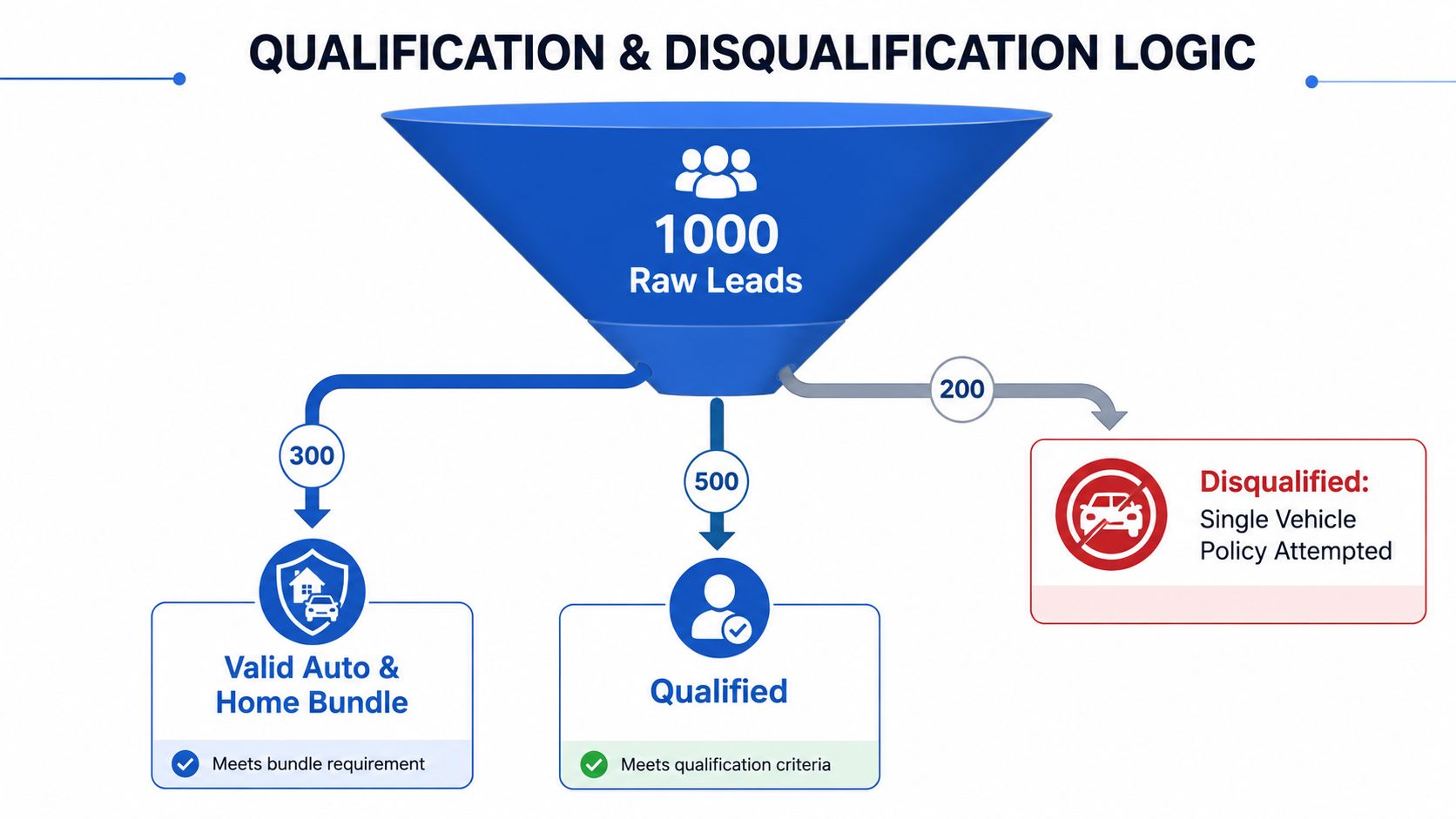
Begin with rules that are easy for the visitor to answer and easy for the system to explain. A ZIP code that doesn't match the selected state should trigger inline correction. A request for an auto and life bundle should branch differently when the visitor has only one vehicle and no stated life-insurance need. A driver without a license can be routed away from a standard auto quote path without collecting a full contact record first.
Other examples require careful carrier-specific configuration:
- Coverage lapse: A self-reported auto lapse longer than the buyer allows can trigger a hard eligibility gate when the buyer's appetite requires continuous coverage.
- Age range: Route ages outside a carrier's appetite to another offer rather than letting the lead enter a queue that can't serve it.
- Property fit: A renter, homeowner, landlord, and vacation-property owner shouldn't receive identical follow-up.
- Household structure: A multi-car household can receive a different buyer tier from a single-vehicle request.
- Geographic eligibility: State and ZIP rules should run before a submission reaches ping/post.
Don't expose every underwriting rule as a blunt rejection. Some conditions should create a soft segment rather than a disqualification. A homeowner with several vehicles may be an A-tier bundle opportunity. A renter with one vehicle may be a valid B-tier auto lead. A visitor who doesn't meet the immediate buyer criteria may still qualify for educational content, a callback request, or a different product path.
Good disqualification preserves intent. A friendly exit page should explain that the selected option isn't available through that route and offer the next relevant action.
Run lightweight rules on field blur when the answer is definitive, such as an invalid state combination. Reserve harder gates for the final step when context matters. Before launch, test edge cases manually, including blank values, pasted text, changed ZIP codes, back-button behavior, and users who switch from one product type to another.
A practical tiering model can pass a buyer a concise reason code, not just a mysterious score. Store values such as bundle_opportunity, standard_auto, state_mismatch, or outside_appetite alongside the lead. That gives the buyer enough context to accept, reject, or reroute the record without asking the sales team to reconstruct the form session.
Attribution Plumbing From Click to Closed Lead
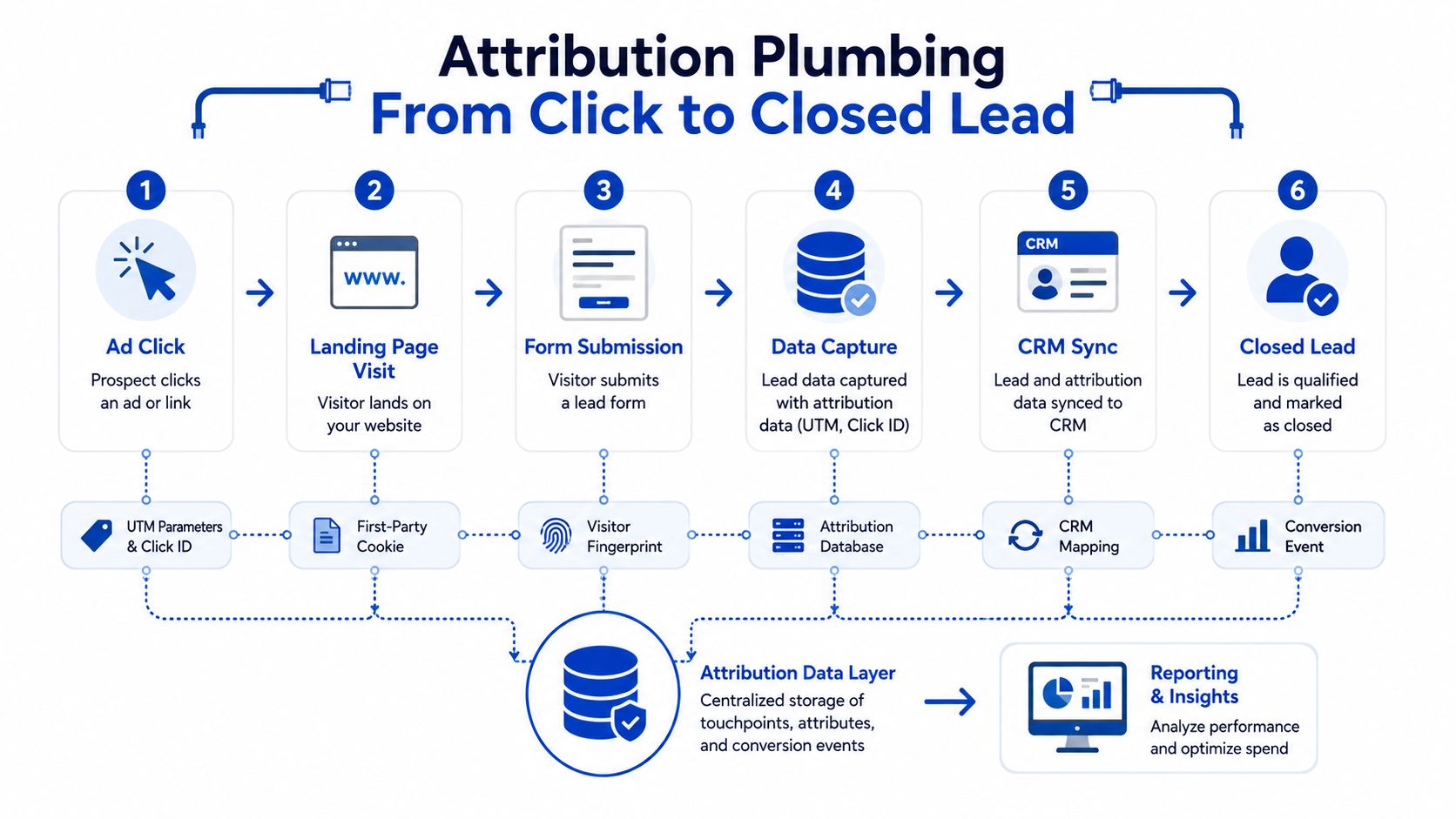
Most attribution failures happen between funnel steps. A visitor arrives with a click ID, completes a multi-step experience, submits successfully, and then reaches the CRM without the data needed to connect that record to its campaign.
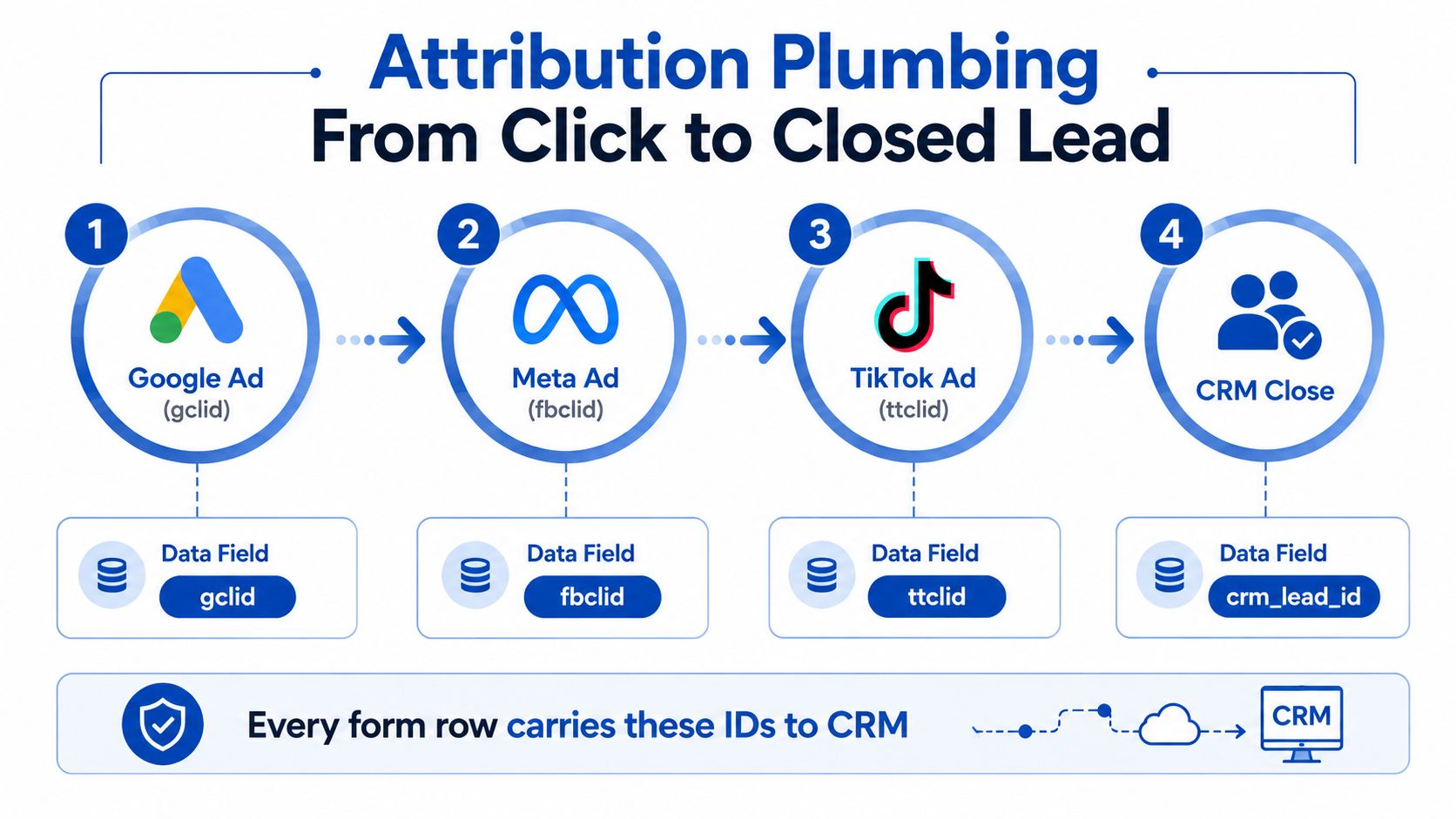
Capture identifiers as soon as the landing page loads. Paid-media fields usually include Google gclid, Meta fbclid, TikTok ttclid, and Microsoft msclkid. Referral, email, native, and partner traffic should retain utm_source, utm_medium, utm_campaign, utm_content, plus the buyer's sub-ID convention.
Store these values in first-party browser storage and copy them into hidden fields. Every step must carry the values forward, because the browser URL can change as the visitor moves through the form. At submission, stamp the complete payload on the server and in the client request. Server-side capture helps preserve attribution when browser restrictions, ad blockers, or later navigation disrupt front-end tracking.
A hidden-field payload can use a structure like this:
| Field group | Example values |
|---|---|
| Campaign identity | utm_source, utm_medium, utm_campaign |
| Click IDs | gclid, fbclid, ttclid, msclkid |
| Lead identity | lead_id, session_id, source_id |
| Funnel state | product, state, qualification_tier |
| Evidence | trustedform_url, jornaya_leadiD, consent_version |
Match field names to the receiving CRM or distribution platform exactly. A value sent as google_click_id is functionally missing if the buyer's system only reads gclid. The same mapping discipline applies to ping/post payloads, buyer responses, and server-side CAPI events.
Reconcile marketing and sales data
Meta Conversions API and Google Enhanced Conversions can mirror qualified-submit events, provided the implementation follows consent and data-handling requirements. Define the conversion around a valid submission that passed qualification and entered the delivery pipeline. A form view should not become a lead event.
For longer sales cycles, keep the original click IDs attached to the CRM record through quote, contact, opportunity, and close. A daily reconciliation should check:
- Identity continuity: The same lead ID links form, CRM, buyer, and policy records.
- Source persistence: Original click IDs and UTMs remain available after reassignment.
- Status mapping: Accepted, rejected, contacted, quoted, and closed use explicit values.
- Delayed conversion: Closed revenue can be matched to the originating campaign.
- Server parity: Browser and server events do not create duplicate conversions.
When these checks fail, CPL reporting may look healthy while accepted-lead and policy revenue data drift away from the campaigns that generated them. Attribution should therefore be tested through the buyer response and eventual close, not stopped at form submission.
Consent, Compliance and TrustedForm Evidence on Every Submission
This section was reviewed on 30 September 2026. It describes operating practice and is not legal advice.
Consent belongs inside the form's data model. It isn't a footer sentence that disappears after submission. A buyer needs to know what the visitor agreed to, which seller or sellers were identified, when consent was captured, and whether the evidence can be retrieved later.
TrustedForm and Jornaya should load when the form loads, not only when the visitor clicks submit. Their certificate or LeadID values should enter hidden fields and travel with the final payload. If the script fires too late, a fast completion can produce a lead without usable evidence. The TrustedForm implementation guide offers a practical reference for integrating that capture into the form flow.
The FCC's one-to-one consent rule would have required consent to identify a single seller and was due to take effect on January 27, 2025. The Eleventh Circuit vacated it three days earlier, on January 24, 2025, in Insurance Marketing Coalition v. FCC, and it never took effect. Buyer contracts can still ask for named-seller consent, so your compliance team should validate the exact language for each product, seller, state, and transfer model. The TCPA overview covers the ruling.
A consent record should preserve:
- The displayed consent text and version.
- Seller identity and product category.
- IP address and timestamp.
- TrustedForm certificate URL and Jornaya LeadID where applicable.
- State-specific language and privacy links.
- The visitor's opt-out or preference signal.
- Transfer or recorded-consent evidence when a lead changes hands.
| Element | Paid Search | Facebook Ads | Cold Call Transfer | Partner Email |
|---|---|---|---|---|
| Consent text version | Store with submission | Store with submission | Store call disclosure | Store email and landing-page version |
| Seller identity | Name the seller | Name the seller | Identify the transfer recipient | Identify the seller on the form |
| Evidence record | TrustedForm or equivalent | TrustedForm or equivalent | Call recording and transfer log | Click, form, and consent records |
| Click attribution | gclid and UTMs | fbclid and UTMs | Call source and transfer ID | Email campaign and UTMs |
| Privacy controls | Privacy notice and opt-out | Privacy notice and opt-out | Call disclosures and opt-out handling | Privacy notice and preference handling |
Marketing and analytics tags should stay off quote or application flows until consent is obtained, while quote-engine, authentication, and fraud-prevention scripts may be necessary for the service.
Real-Time Delivery to CRMs and Lead Distribution Platforms
A submitted form isn't a billable lead until the downstream system receives, validates, accepts, and records it. Email notifications are useful for alerts, but they shouldn't be the primary transport for a high-intent insurance submission. Email parsing introduces ambiguity around field names, timing, duplicates, and consent evidence.
Use a webhook with a structured JSON payload. Include the full field set, qualification results, consent identifiers, click IDs, verification outcomes, and TrustedForm URL. The receiving endpoint should return a clear response that tells your system whether the lead was accepted, rejected, or needs retry handling.
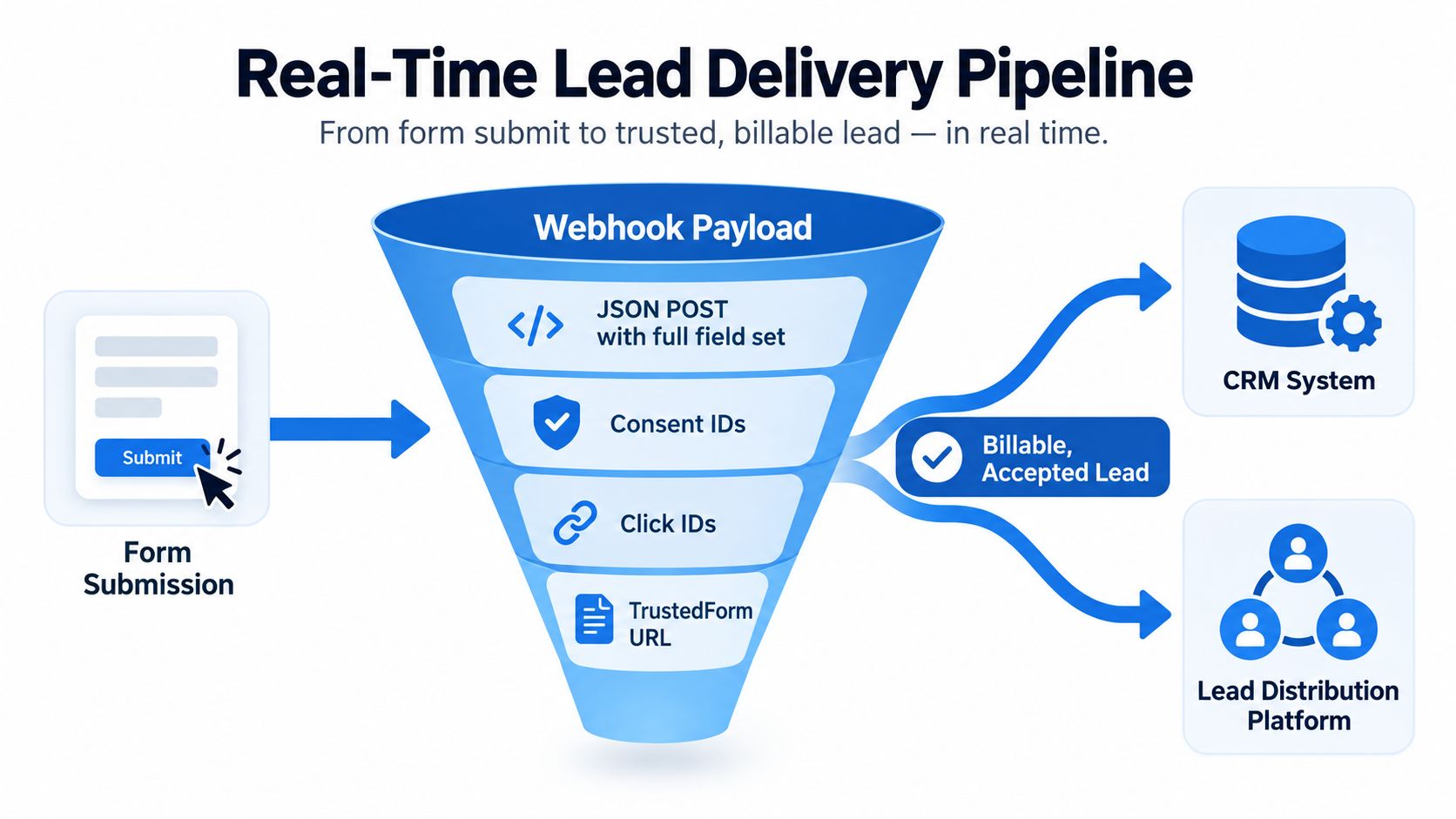
Ping/post flows separate buyer eligibility from full lead delivery. A ping sends enough information for the buyer or marketplace to decide whether it wants the lead. A post sends the complete record after acceptance. This approach can reduce unnecessary transfers and gives the seller a cleaner audit trail.
Common destinations include CRM connections to HubSpot and GoHighLevel, Salesforce through Zapier, insurance marketplaces such as EverQuote and SmartFinancial, and distribution platforms such as LeadByte and LeadsPedia. The right route depends on whether one carrier owns the follow-up, several buyers compete for the lead, or an aggregator manages routing and billing. The guide to lead distribution software covers the integration layer in more detail.
Build delivery around failure, not just success
Measure the time from valid submit to CRM receipt, buyer response, and first sales action. Don't promise an arbitrary service-level target without testing the receiving system and buyer contract. Instead, set an internal alert when latency exceeds the buyer's acceptance window, then inspect whether the failure came from DNS, authentication, a timeout, a malformed payload, or a downstream queue.
Twilio can validate phone numbers at capture, while ZeroBounce can help identify problematic email addresses. Treat both as signals, not automatic proof of fraud. A valid number can still belong to the wrong person, and an apparently deliverable email can still be unresponsive.
Buyers commonly reject records for missing consent evidence, invalid contact data, wrong state, duplicate submissions, unsupported product type, incomplete underwriting answers, and fields that don't match the declared coverage request. Return the rejection reason to the CRM and feed it back into the form's qualification logic. Otherwise, the team keeps paying to discover the same problem downstream.
A/B Testing and Optimization Playbook for Quote Funnels
Testing insurance quote forms requires discipline because a higher completion rate can hide lower lead quality. Start with one visible change, define the primary metric before launch, and wait for the predetermined sample size from a calculator rather than stopping when an early result looks attractive.
Use qualified submit rate as the primary metric. Track CPL, post-filter acceptance, verification failure, speed-to-lead, buyer return rate, and eventual sales status as secondary measures. The form wins only when it produces more usable opportunities, not when it collects more incomplete or unrouteable contacts.
Begin with low-risk tests
Test headline clarity, ZIP-field copy, and CTA wording before changing the entire structure. These tests are easier to interpret because they don't simultaneously alter field order, branching, page load, and consent presentation.
Move to structural experiments only after the baseline is stable:
- Step count: Compare a shorter sequence with a more segmented flow.
- Progress indicator: Test a percentage bar against explicit step numbering.
- Question timing: Move hard qualification later while keeping routing logic intact.
- Input type: Compare a controlled range selector with free text where the answer is naturally bounded.
- Consent presentation: Test clear inline disclosure against a modal, subject to legal approval.
Industry benchmark roundups report that comparison-style forms can average 36 fields and take 8.5 minutes, while each additional required field may reduce completion by roughly 10% to 15% and about 27% of users abandon forms because they feel too long. Treat those figures as directional evidence for reducing perceived effort, not as a promise for a specific variant.
| Hypothesis | Variant | Primary Metric | Expected Lift | Min Sample |
|---|---|---|---|---|
| ZIP-first flow improves mobile progress | ZIP and location before risk details | Qualified submit rate | Measure against baseline | Set with calculator |
| A useful disqualification page protects trust | Alternative offer instead of dead end | Qualified submit rate and exit behavior | Keep trust within the approved tolerance | Set with calculator |
| A controlled quote-range input reduces effort | Slider or choices instead of free text | Qualified submit rate | Compare with baseline | Set with calculator |
| Inline TCPA disclosure reduces interruption | Visible disclosure beside consent | Qualified submit rate and compliance review | Compare with modal baseline | Set with calculator |
The “expected lift” column should contain your pre-registered target, not a fabricated industry promise. Don't turn a hypothesis into a guaranteed result.
Run a 30-day sprint
Days one through five, instrument the baseline. Confirm event names, qualification outcomes, buyer responses, consent evidence, click-ID persistence, duplicate handling, and CRM status mapping. Review recordings or session behavior where permitted, focusing on the first screen, validation errors, and the point where visitors stop.
Days six through twelve, test copy and field behavior. Change one element at a time. Watch qualified submit rate and acceptance together. If completion rises while acceptance falls, the variant probably removed a useful qualification signal or made the form too permissive.
Days thirteen through twenty-one, test structure. Compare step grouping, progress treatment, prefill, and the timing of optional questions. Keep traffic allocation stable and don't peek at partial data to declare a winner.
Days twenty-two through thirty, validate downstream outcomes. Send the winning experience through the actual CRM, buyer, verification, and follow-up path. A front-end winner that loses consent certificates or creates duplicate records isn't ready for rollout.
Kill a test when it causes material compliance failure, corrupts attribution, increases buyer rejection, or creates a clear decline in qualified submissions. Iterate when the primary metric improves but one operational metric weakens. Ship only when the full funnel remains healthy.
Copy-paste launch checklist
Functional
- Mobile rendering: Test common phone widths, orientation changes, slow connections, and keyboard behavior.
- Autofill: Confirm browser autofill maps to the correct fields without overwriting hidden attribution values.
- Errors: Show inline messages, preserve completed answers, and make correction paths obvious.
- Persistence: Verify back-button, refresh, and interrupted-session behavior.
Qualification
- Branching: Test valid, invalid, borderline, and incomplete answers against real carrier rules.
- Disqualification: Provide a relevant alternative path instead of a blank failure page.
- Reason codes: Pass the qualification result and routing explanation to the CRM or buyer.
Attribution
- Parameters: Preserve UTMs,
gclid,fbclid,ttclid,msclkid, and source sub-IDs. - Persistence: Carry identifiers through every step and stamp them on final submission.
- Server events: Fire Meta Conversions API and Google Enhanced Conversions only for the approved qualified-submit event.
Compliance
- Evidence: Confirm TrustedForm and Jornaya values exist before delivery.
- Consent: Place the TCPA disclosure above the consent action and identify the seller or sellers clearly.
- State language: Review California, Florida, Washington, and other applicable state requirements with counsel.
- Privacy: Include the relevant rights, opt-out, and “Do Not Sell” controls.
Delivery
- Ping/post: Test buyer responses, timeouts, retries, and duplicate prevention.
- Verification: Run Twilio phone and ZeroBounce email checks according to buyer rules.
- Payload: Include full fields, consent IDs, click IDs, qualification tier, and certificate URLs.
- Monitoring: Alert on delivery failures, missing evidence, unexpected rejection reasons, and CRM mismatch.
Use a soft-launch gate before scaling, with thresholds for acceptance rate, CPL, and complaints agreed in advance with your buyers and compliance team.
Growform provides a no-code multi-step form builder for insurance lead capture, conditional qualification, hidden-field attribution, real-time delivery, and TrustedForm and Jornaya evidence collection. If you're rebuilding an insurance quote funnel, start from the auto insurance template and ship and test the capture layer without waiting for a custom development cycle. Start free trial.
Related articles
Insurance Lead Gen: The Complete Playbook for 2026
“Get more insurance leads” is still the typical advice many receive. It's also the fastest way to hide a broken funnel.
September 30, 2026

Home Services Lead Generation: A Practical Playbook
You’ve paid for the click, the homeowner has completed the form, and the notification arrives after dinner. By the time someone on the team sees it the next morning, the prospect has already called another contractor. Worse, some submissions were never serviceable, never urgent, or never a fit for the crew in the first place….
September 30, 2026
Mass Tort Leads: Buy, Sell, & Qualify Guide 2026
Mass tort lead economics get ugly fast.
September 30, 2026