
8 best mobile form builders for lead generation teams
 Harvey Carpenter Published 9 min read
Mobile forms are no longer a design detail. For paid traffic lead generation teams, they sit right at the point where CPL, lead quality, and downstream routing either hold together or break, which is why tools like Growform, a no-code multi-step form builder for lead generation, get compared against broader form and landing page platforms.
The hard part is not finding a form builder. It is picking one that stays usable on a phone, keeps labels predictable, reduces bad input, and hands the lead off cleanly into HubSpot, Salesforce, GoHighLevel, or a lead distribution layer without turning every change into a dev task.
Why do mobile forms matter so much for lead generation teams?
Mobile forms matter because mobile phones now drive most web sessions. DataReportal says 51.6% of web traffic comes from phones, and 96.2% of internet users go online via mobile at least some of the time.
For lead generation teams buying Meta, Google, native, or social traffic, that changes the whole operating model. A form that feels acceptable on desktop can still lose a meaningful share of paid clicks on mobile because the keyboard covers the screen, the fields are too dense, or the labels disappear when the user starts typing.
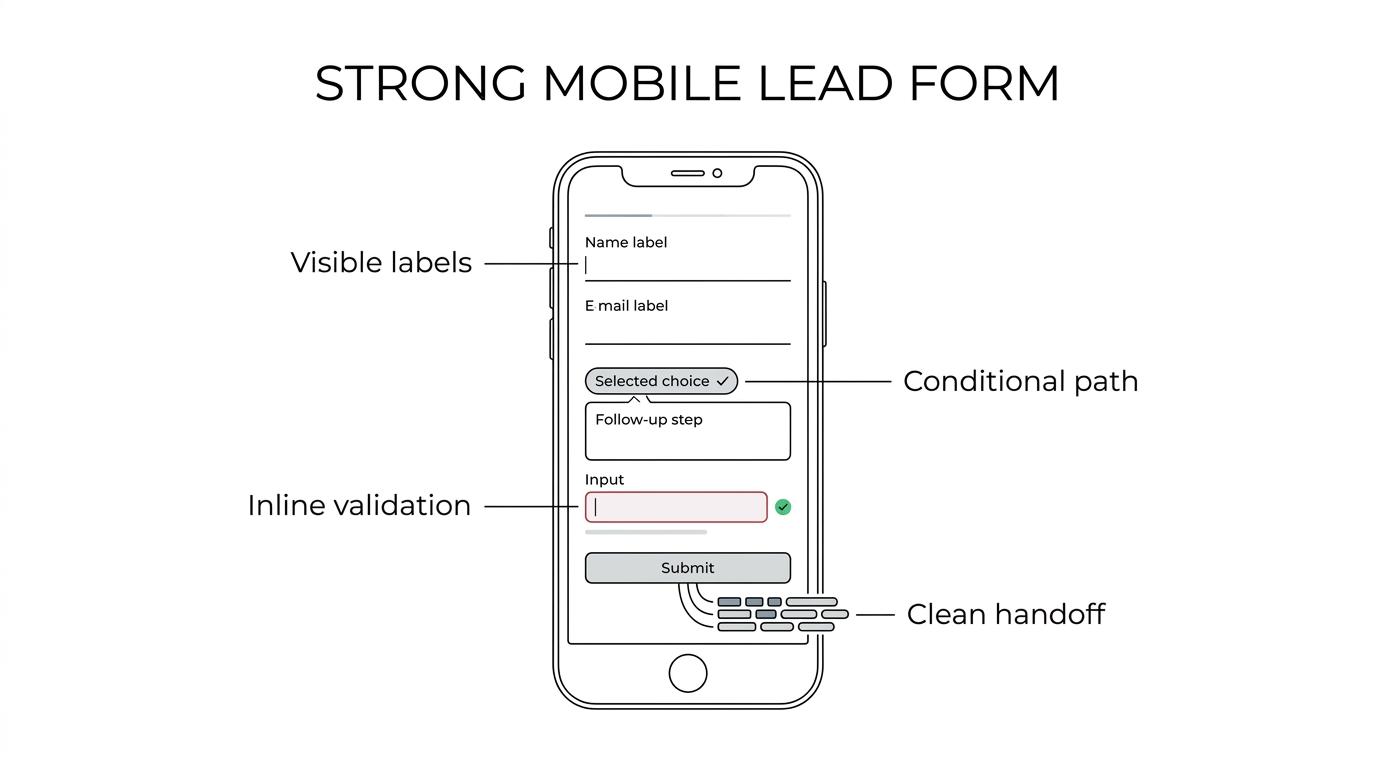
Baymard’s research helps explain why this matters. It reported that 17% of users had abandoned due to checkout complexity, and it found that field count affects UX more than the number of steps. A lead form is not a checkout, but the friction pattern is similar on small screens: too many inputs, poor error handling, and unclear requirements hurt completion.
What makes a mobile form builder good for paid traffic and lead qualification?
The best mobile form builders combine phone-first UX with lead qualification and delivery. Growform is built for that stack, while tools like Typeform focus more on general form creation.
Start with usability. W3C guidance says labels for most form fields should appear immediately before the field, which usually means stacked labels above the input on mobile. That matters because placeholder-only forms often look clean in mocks but become error-prone in live traffic once users forget what each field was asking for.
Then look at operator features. A strong lead generation form builder should support conditional logic, disqualification, hidden field capture, click IDs like gclid and fbclid, and real-time posting into CRM or routing systems. If it cannot carry attribution and compliance evidence through the capture layer, the problem reaches past UX into reporting, buyer acceptance, and margin.
A pretty conversational interface does not automatically mean higher conversion. On mobile, clarity usually beats novelty.
What are the 8 best mobile form builders for lead generation teams?
There are clear leaders for mobile lead capture, but they serve different teams, from aggregators using ping post workflows to in-house marketers who mainly need cleaner CRM intake.
This shortlist focuses on mobile usability, qualification depth, data pass-through, and fit for paid traffic lead generation rather than general surveys or internal forms.
-
Growform: Best fit for lead generation teams that need mobile-first multi-step flows, conditional qualification, and real-time handoff into CRM or lead routing systems. It is a specialized capture layer, so it makes most sense when conversion rate, lead quality, and downstream delivery matter more than generic data collection.
-
Typeform: Best for teams that want a polished conversational experience and simple mobile interaction. The trade-off is that high-volume operators often need more explicit qualification, compliance, and routing control than conversational builders are known for.
-
Jotform: Best for broad use cases and fast deployment across many form types. The trade-off is that it is a general-purpose tool first, so operators may need to work harder to tune it for high-intent paid traffic funnels.
-
Unbounce: Best if your paid landing pages already live in Unbounce and the team wants fewer moving parts. The trade-off is that native forms inside landing page builders are often less flexible for deep qualification and advanced mobile flow design.
-
Instapage: Best for enterprise teams that value page design control, collaboration, and experimentation. The trade-off is similar to Unbounce: strong landing pages, less specialization on the form as a lead qualification engine.
-
Leadpages: Best for teams that want straightforward landing page deployment with built-in forms. The trade-off is lighter logic and fewer operator-oriented features once campaigns need disqualification, hidden field mapping, or more complex flows.
-
GoHighLevel: Best for agencies that want forms inside the same CRM and funnel stack they already manage for clients. The trade-off is that more demanding mobile UX, styling, and logic requirements can push agencies to a dedicated form layer.
-
HubSpot Forms: Best for in-house marketers who prioritize CRM-native capture and operational simplicity. The trade-off is front-end rigidity, especially when paid traffic campaigns need mobile-first design control rather than standard embedded forms.
How should you evaluate a mobile form builder in 15 minutes?
A fast evaluation works if you test the same mobile scenario across two or three tools and score friction, data pass-through, and handoff speed.
Do not start in the editor. Start on your phone as if you were a paid click from a real campaign, then check what happens after submit.
- Load and tap test: Open the live form on an iPhone or Android device, move through it with one thumb, and check whether fields, labels, and buttons stay visible.
- Qualification test: Add one logic jump and one disqualifier, then confirm the flow still feels natural on mobile.
- Attribution test: Pass UTMs, gclid, fbclid, and source fields through the form to the destination system.
- Delivery test: Submit a lead and verify how fast it reaches the CRM, Slack, email alert, or buyer endpoint.
Do not judge the builder by how easy it is to design. Operators should judge it by how well it survives live traffic, bad inputs, and downstream handoff.
Are multi-step mobile forms better than single-step forms?
Multi-step mobile forms usually win when qualification is non-trivial, while single-step forms can still win for quote requests with five fields or fewer.
The key point is not that more steps are magically better. Baymard’s benchmark suggests the number of fields is often the bigger issue. If you have eight to fifteen inputs, grouping them into short steps can reduce perceived effort and make the screen less cramped. Progress bars also help users understand where they are.
If the flow is short and high intent, a single-step layout may still convert well because it minimizes transitions. If the flow needs qualification, multi-step usually gives you cleaner sequencing: contact info later, easy questions first, and difficult inputs only after commitment is earned.
Do not assume a multi-step form should ask the same questions as the old long form, just spread out. The better move is usually to cut or postpone low-value fields.
How many fields should a mobile lead form include before conversion drops?
Field count matters more than step count. Baymard’s 2024 benchmark found average checkout flows at 11.3 fields across 5.1 steps.
Lead generation teams should treat that as directional, not literal. A solar quote form, final expense funnel, or roofing lead form has different economics than ecommerce checkout. Still, the principle holds: every extra field must earn its place.
If a field does not improve close rate, routing logic, compliance evidence, or buyer acceptance, it is a candidate for removal. If a buyer requires data you do not need for the initial decision, collect it later through SMS, call center intake, or a post-submit step.
How do you build a mobile form that keeps labels, validation, and input usable?
Mobile usability improves when labels stay visible above the field, errors appear inline, and keyboards match the expected input type.
Step 1: Keep labels persistent. W3C guidance favors labels immediately before the field, which usually means stacked labels on mobile. Placeholder text alone fails because it disappears once typing begins.
Step 2: Reduce input effort. Use the correct field type for phone, email, ZIP, and numeric inputs so the right keyboard appears. Auto-complete, address lookup, and prefilled hidden fields reduce taps and correction time.
Step 3: Validate in context. Inline validation is better than showing a stack of errors after submit. If a phone number is too short or an email is malformed, tell the user right there, not after they finish the entire form.
Do not confuse motion with clarity. Small animations can help, but only if the next action is obvious and fast.
Should you use a landing page builder’s native forms or a dedicated mobile form builder?
Dedicated mobile form builders beat native landing page or CRM forms when you need conditional qualification, branded design control, or cleaner click-ID pass-through.
Native forms are often enough when the flow is simple, the CRM is fixed, and the campaign volume is modest. An in-house team running branded search into a short HubSpot form may not need another layer.
A dedicated builder becomes more useful when form performance itself is the bottleneck. That tends to happen when paid social traffic is cold, mobile share is high, or downstream systems require richer data. Hidden fields, conditional paths, webhook delivery, server-side tracking, and compliance evidence are where the gap usually appears.
If your current landing page tool handles the page well but not the form well, separating those layers is often the cleaner fix.
How do you connect mobile forms to routing, attribution, and compliance systems?
Mobile forms only pay back when handoff is immediate. Growform fits upstream of LeadsPedia, Phonexa, or Boberdoo as the capture layer, not the routing engine.
The cleanest setup treats the form as the front end of a lead stack. It captures intent, qualification, attribution, and consent, then passes a normalized payload to the systems that score, route, or sell the lead.
- Attribution: Capture UTMs, gclid, fbclid, source, campaign, and sub-ID fields at the form layer.
- Routing: Send lead data in real time via webhook or connector to CRM, call center, or distribution software.
- Compliance evidence: Attach TrustedForm or Jornaya proof at submission if the vertical requires it.
- Response speed: Trigger SMS, email, or internal alerts immediately to protect speed-to-lead.
If your buyers use ping post, collect the fields required for the ping decision first. If the lead passes, post the full payload and any consent evidence. That sequence reduces wasted friction and keeps the form focused on what the market actually needs.
When should you add phone verification, email validation, or consent tools to mobile forms?
Add phone verification, email validation, or consent evidence when bad leads cost more than the extra friction, especially in insurance, solar, home services, and legal.
Phone verification helps when fake numbers, duplicates, or unreachable leads are hurting acceptance or sales productivity. Email validation helps when the address is needed for nurture, policy flow, or appointment confirmation. Consent tools like TrustedForm and Jornaya matter when buyers, carriers, or legal workflows require proof tied to the exact moment of capture.
More verification raises data quality, but it can reduce raw completion if used too aggressively. If fraud is high or buyer rejection is expensive, stronger verification is usually worth it. If intent is already high and speed matters more than perfect data, soft validation may be the better starting point.
Do not apply the same verification standard to every campaign. Mobile form rules should follow the economics of the vertical, the traffic source, and the acceptance criteria on the back end.
Related articles
A/B Testing for Landing Pages How to Lift Conversions
September 30, 2026
WordPress Multi Step Forms That Convert in 2026
Multi-step forms can convert at several times the rate of single-page forms.
September 30, 2026

How to Add Webflow Form Conditional Logic Without Code
September 30, 2026