


A low CPL can hide a very expensive problem.
Many lead sellers look at the front-end number, see traffic converting, and assume the funnel is healthy. Then the buyer return file lands, acceptance drops, and margin disappears. The lead looked real. The form completed. The phone number may even have connected. Still, the buyer rejected it.
That disconnect is where a lot of paid traffic programs lose money. In high-volume consumer lead generation, the number that matters is not the form submit cost by itself. It is the cost per accepted lead, and often the cost per usable lead after buyer rules, consent checks, and routing filters have done their work.
Lead buyer rejection rate starts after the form submit
Lead buyer rejection rate is the share of leads a buyer refuses, returns, discounts, or blocks from billing. That can happen in real time through ping/post filters, or later during compliance review and reconciliation.
This is why “good CPL” often turns out to be misleading. A lead can look fine on the surface and still fail where money changes hands. The buyer is not only judging whether a person filled in a form. They are judging whether the lead fits their rules, carries the right proof, and can survive their own downstream compliance checks.
In operator terms, a cheap lead with a 30 percent rejection rate is often worse than a more expensive lead with clean straight-through acceptance.
Here is the gap in plain terms:
| Front-end signal | What it tells you | What it misses | Buyer impact |
|---|---|---|---|
| Low CPL | The form converts traffic efficiently | Fit, proof, and routing completeness | Can still produce poor accepted CPL |
| Valid email and phone | Contact data looks usable | Consent evidence and buyer-specific filters | Can still be auto-rejected |
| High lead volume | Media and form are generating submissions | Whether those submissions can be billed | Can inflate performance reporting |
| Good intent answers | Consumer appears interested | Missing required payload fields | Can fail ping/post or CRM ingestion |
| Fast delivery | Lead reaches buyer quickly | Whether the buyer can legally and operationally work it | Can be returned after review |
A lot of rejection is created upstream, inside the form layer. If the form captures weak disclosures, incomplete fields, or poor-fit users, the lead is already compromised before it ever hits Boberdoo, Phonexa, LeadsPedia, or a direct buyer endpoint.
Consent proof and one-to-one consent affect lead acceptance
Reviewed November 2026.
Compliance is not a side issue anymore. It is part of lead economics. Buyers now use consent requirements as acceptance criteria because they do not want to buy something they cannot safely call, text, or defend later.
The FTC has long said that express informed consent matters in telemarketing contexts and that clear and conspicuous disclosures must be difficult to miss and readily understandable. The FCC’s December 2023 order found that lead-generated calls and texts make up a large share of unwanted outreach and often rely on flimsy claims of consent, and it adopted a one-to-one consent rule for lead-generation websites. The Eleventh Circuit vacated that rule on 24 January 2025, before it took effect.
For lead sellers, that turns a legal standard into a commercial filter. A buyer may reject a lead not because the consumer was fake, but because the buyer cannot verify how consent was captured, on which page, against which disclosure, and for which seller.
The practical failure modes become obvious:
- Missing certificate: No TrustedForm or Jornaya record attached to the lead
- Weak disclosure capture: Checkbox text, page language, or consent presentation is unclear
- No seller association: The buyer cannot tie the consent to the actual advertiser or named seller
- Bad recordkeeping: No timestamp, page URL, IP, or session evidence
- One-to-one mismatch: Consent language is too broad for the outreach model being used
This is why a lead can be “real” and still get rejected. The buyer is buying a contactable, defensible record.
Form-layer qualification lowers lead buyer rejection rate
The fastest way to cut buyer returns is to stop sending leads that should never have been delivered.
Form-layer qualification and disqualification change the economics because they move filtering to the point of capture. Instead of paying for traffic, generating a form submit, sending it to the buyer, and waiting for a rejection, you screen for buyer fit before the lead enters billing and routing.
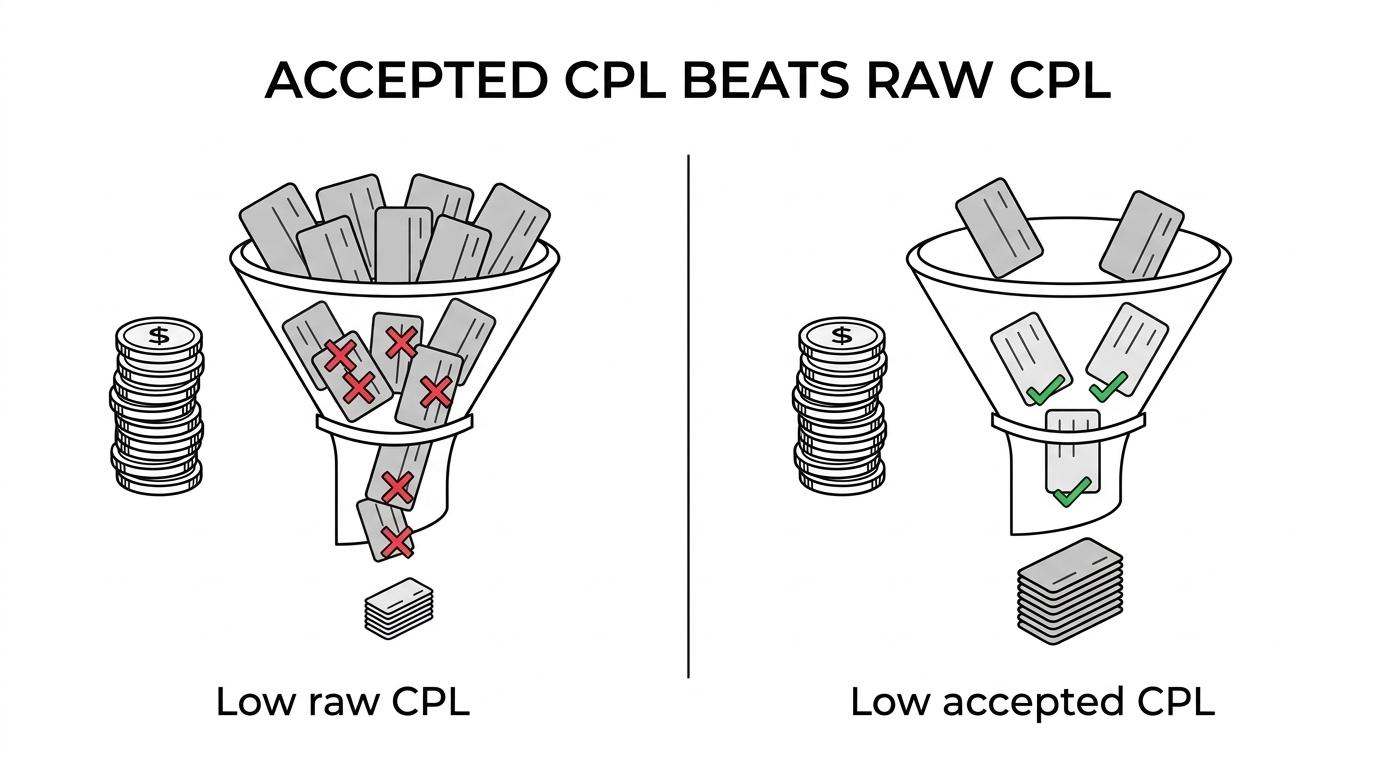
That sounds simple, but it changes the scorecard. Raw CPL matters less when the form protects accepted volume.
Think about the math:
- 1,000 clicks at $8 CPC = $8,000 spend
- 200 leads at $40 CPL
- 65 percent buyer acceptance = 130 accepted leads
- Accepted CPL = $61.54
If a stricter form drops conversion and raises front-end CPL to $48, but acceptance rises to 88 percent, the result is different:
- 167 leads at $47.90 CPL
- 88 percent acceptance = 147 accepted leads
- Accepted CPL = $54.42
The second funnel “looks worse” if you only stare at form conversion rate. It is better if you care about gross margin.
The qualification criteria vary by vertical and buyer. Common examples include:
- geo and state restrictions
- age bands
- homeowner status
- property type
- insurance coverage status
- injury date windows
- debt amount thresholds
- duplicate suppression
- phone and email validation
In roofing, solar, final expense, and mass tort, these early screens are often the difference between a profitable campaign and a media bill that never clears.
Missing payload fields break lead distribution and buyer acceptance
A surprising amount of lead buyer rejection comes from plumbing, not traffic quality.
Ping/post buyers and distribution platforms usually score or route leads based on required fields. If the form does not capture them, or the webhook does not send them cleanly, the lead may fail the ping, post into a dead-end bucket, or get accepted operationally but rejected during reconciliation.
This is common when a pretty front-end form is bolted onto a technical back-end stack without enough thought about payload requirements.
Typical failure points look like this:
- Missing campaign IDs or source IDs
- No TCPA or disclosure text snapshot
- Absent TrustedForm certificate URL or Jornaya token
- Bad field normalization for state, DOB, homeownership, or ownership type
- No hidden fields for UTM, gclid, fbclid, click ID, or affiliate sub IDs
- Invalid phone formatting for buyer endpoint rules
- Conditional questions shown in the UI but not mapped into the payload
If you run ping/post from the form side, the form is the first stage of lead distribution. That means the capture layer should be built around downstream acceptance rules, not only around visual design.
This is where operators often outgrow generic form tools. A lead form for paid traffic needs field logic, hidden field pass-through, verification, and reliable webhook delivery into Boberdoo, Phonexa, LeadsPedia, or a custom buyer API. Without that, rejection rate becomes a systems problem dressed up as a traffic problem.
Growform is built for this layer of the stack. Native TrustedForm and Jornaya integrations attach a certificate URL or LeadiD to every lead. Hidden fields carry UTMs, click IDs and sub-IDs through every step, and phone verification through Twilio and email verification through ZeroBounce run while the lead is still on the form. Webhooks then post each lead to Boberdoo, Phonexa, LeadsPedia or your own endpoint the moment it is submitted, and failed sends retry automatically.
A high-acceptance lead form setup for paid traffic
The form setup that improves acceptance is rarely dramatic. It is a stack of small controls that reduce ambiguity.
A practical build for buyer-friendly paid lead generation usually includes the following:
- Consent proof capture: Attach TrustedForm and Jornaya evidence at the moment of submission.
- Qualification logic: Ask only the questions that affect routing, acceptance, or pricing.
- Disqualification rules: Stop out-of-policy leads before webhook delivery.
- Verification: Validate phone and email before the lead leaves the form.
- Payload hygiene: Normalize fields and pass attribution values into the downstream system.
- Fast delivery: Send leads instantly to CRM via retry-safe webhooks.
A multi-step form is often better for this than a single long form because it lets you stage friction. You can collect easy intent signals first, then ask higher-friction qualifying questions later, once the user is invested. That usually protects completion rate while still giving the buyer the fields they need.
There is also a quality signal effect. A form that asks the right questions in the right order tends to filter out casual or mismatched users without needing a harsh submit-wall at the end.
Lead verification and disqualification should happen before delivery
If buyer rejection is hurting margin, verification needs to move left.
Phone verification, SMS OTP, and email validation are not only anti-fraud tools. They improve contactability and cut the class of leads buyers hate most: records that look complete but cannot be worked. That matters when buyers score vendors on contact rate, acceptance, and return percentage.
The same goes for disqualification. If a lead fails buyer criteria, the best outcome is often that the lead never posts.
That is why advanced lead forms increasingly include two different layers:
- Verification layer: phone, email, duplicate checks
- Fit layer: buyer rule screens, geography, product eligibility, compliance gating
When those controls sit in the form, you avoid paying the operational tax of bad submissions traveling through your whole stack.
Track accepted CPL, not just front-end CPL
If you want to lower lead buyer rejection rate, your reporting has to change first.
A lot of teams still optimize campaigns using only CPC, CVR, and raw CPL. Those are useful, but incomplete. The real dashboard should connect media cost to accepted outcomes and reasons for return.
A better weekly view includes:
- Acceptance rate: accepted leads divided by submitted leads
- Return reason mix: compliance, duplicate, bad contact data, geo mismatch, missing fields
- Accepted CPL: spend divided by accepted leads
- Usable CPL: spend divided by leads that are both accepted and contactable
- Source-level rejection rate: buyer returns by campaign, ad set, page, and form version
Once you track rejection reason by form version, you start seeing patterns fast. One disclosure block causes more manual review. One landing page variant misses a required field. One source produces more invalid numbers. One buyer needs a field your current form never asked.
That is why the form should be treated as a profit control surface, not a design asset.
For teams running volume through Meta, Google, native, or affiliate traffic, the biggest gains often do not come from cheaper clicks. They come from building forms that capture proof, filter fit, and deliver a complete payload the buyer can accept on the first pass.
When that happens, lead buyer rejection rate drops, straight-through acceptance rises, and the CPL that matters starts moving in the right direction.
Related articles

7 Best Lead Routing Tools for Real-Time Lead Handoffs
October 13, 2026

Quiz Funnels vs Multi-Step Forms for Lead Generation
Paid traffic operators usually ask the wrong first question here.
September 30, 2026