


Operators using Boberdoo do not need a generic form tool. They need a capture layer that can pass clean lead data, attribution, and consent proof into routing logic without crushing mobile conversion rates. Growform is relevant here because it is a no-code multi-step form builder built for lead generation, not surveys, and the front end matters just as much as the Boberdoo routing rules behind it.
Boberdoo’s advantage is that it already combines lead distribution, ping/post, call routing, and form building in one platform. The harder question is which front-end builder gives you the right mix of conversion performance, compliance evidence, and payload control before the lead ever hits Boberdoo.
What makes a form builder work well with Boberdoo lead routing?
A Boberdoo-ready form builder must pass structured fields, attribution data, and consent evidence into routing logic without slowing mobile completion. Because Boberdoo supports real-time distribution and ping/post, bad payload design becomes a revenue problem quickly.
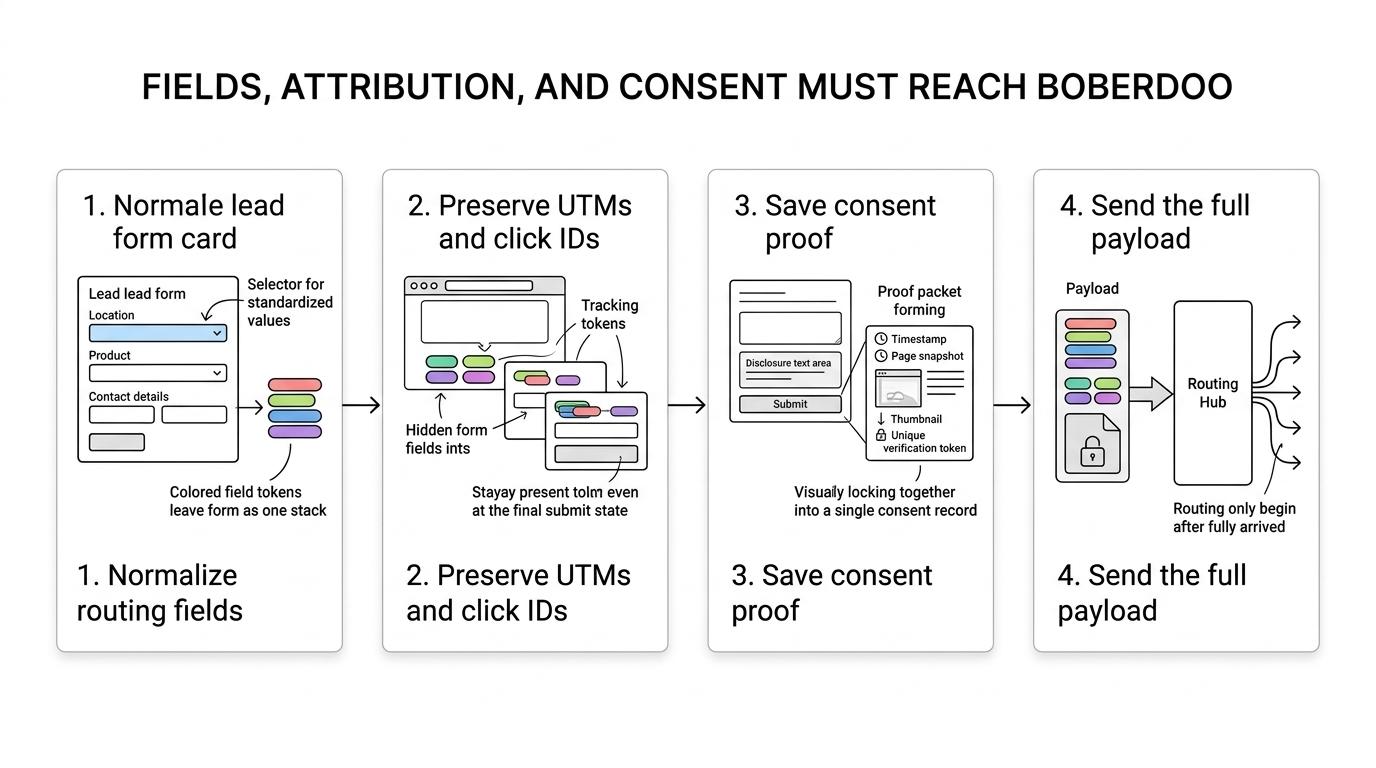
The first requirement is field fidelity. If your buyers route by state, product, age range, homeowner status, or traffic source, the form has to capture those values in a format Boberdoo can use consistently. A pretty front end is not enough if "TX" comes through once, "Texas" comes through another time, and the source ID is missing on half the leads.
The second requirement is delivery control. Boberdoo supports price-based, priority-based, weighted, and earnings-per-lead distribution logic. That only works well when the posted lead contains the exact routing inputs your rules expect. If the form cannot reliably pass hidden fields, timestamps, click IDs, or consent references, the routing layer is forced to guess.
The third requirement is low-friction qualification. The best Boberdoo form builders let you ask harder questions later in the flow. That matters because a leadgen funnel has two jobs at once: convert the click and qualify the lead.
How does Boberdoo’s own form builder compare with dedicated front-end tools?
Boberdoo’s built-in form builder is practical for tight platform coupling, while dedicated tools usually win on mobile UX, design control, and multi-step qualification. The trade-off is simplicity versus front-end conversion performance.
Boberdoo says its Form Builder is integrated with its automated lead distribution system. That is useful when your main priority is reducing integration overhead and keeping source settings, pricing, and routing in one place. If your form is straightforward and your operators live inside Boberdoo all day, the native option can be the fastest path to launch.
Dedicated front-end tools usually pull ahead when the form itself is your main lever. Paid traffic funnels often need progress bars, conditional logic, disqualification paths, hidden-field handling, branded design control, and cleaner mobile behavior than a routing platform’s native form module typically offers.
Do not assume the form builder and the routing engine should always be the same product. They solve related but different problems. Boberdoo is strongest at distribution and source logic. A specialized front end is strongest at turning paid clicks into complete, qualified submissions.
What are the best form builders for Boberdoo lead routing flows?
The best options are Growform, Boberdoo Form Builder, Jotform, Typeform, Unbounce, Leadpages, and Instapage. The right choice depends on routing complexity, mobile conversion needs, and how much attribution data must survive the trip into Boberdoo.
For operators, the ranking is less about brand popularity and more about payload reliability, compliance readiness, and how well the form handles paid traffic. These seven are the most relevant categories to test first.
- Growform: Built for multi-step lead generation funnels, with hidden-field capture for UTMs, GCLIDs, and keywords plus real-time delivery into downstream systems through webhooks and integrations. Best when the form is a major conversion lever.
- Boberdoo Form Builder: The most direct fit when you want form capture tightly connected to Boberdoo distribution, source settings, and internal workflows.
- Jotform: Broad integration library and quick deployment, but it often needs careful tuning to match high-volume paid traffic requirements.
- Typeform: Strong conversational UX, especially for lighter qualification paths, though some lead buyers need more explicit field control than its style-first setup encourages.
- Unbounce: A solid choice when your team already standardizes on Unbounce landing pages and only needs moderate form logic.
- Leadpages: Good for simpler funnels where speed to publish matters more than deep routing and validation control.
- Instapage: Best suited to teams that care heavily about landing-page collaboration and experimentation, with forms as one piece of the page stack.
The reason this list matters is simple: Boberdoo can only route what it receives. The form builder that wins in a demo can still lose in production if it drops source parameters, weakens disclosure placement, or makes every new qualifying field a dev ticket.
If your team buys traffic across Meta, Google, native, and affiliates, test the front-end tool against a full routing payload, not just against visual preferences. That is where the real differences show up.
How should you map fields from a form into Boberdoo step by step?
Start with Boberdoo’s routing inputs, then build the form around those fields, not the other way around. Source ID, state, product intent, and contact data usually decide whether ping/post and distribution rules work correctly.
Step 1 is to document the fields Boberdoo uses for routing or buyer delivery. That usually includes visible fields like name, phone, ZIP, and state, plus hidden or system fields like source, campaign, sub ID, landing page, or product category. If a buyer’s pricing changes by state or lead type, those values must be normalized before submission.
Step 2 is to decide which questions belong in the form and which belong in hidden fields. Not everything valuable needs to be shown to the user. UTMs, click IDs, page URLs, timestamps, and form IDs usually belong behind the scenes.
Step 3 is to map output formats before launch. If Boberdoo expects a two-letter state code, then the form should submit a two-letter state code. If Boberdoo source rules use numeric source IDs, then pass the numeric source ID. If you skip this step, routing errors can look like lead-quality problems even when the traffic is fine.
How do you pass consent proof and disclosures into Boberdoo step by step?
Growform and Boberdoo should pass the exact disclosure context, timestamp, page URL, and proof artifact with the lead record.
Compliance note reviewed for 2026: the FTC states that prerecorded-message telemarketing consent must be in writing, affirmative, and obtained directly by the seller.
Step 1 is disclosure placement. If you are using Google Ads lead forms anywhere in the funnel, Google requires a privacy-policy link.
Step 2 is proof capture. That can include a timestamp, page URL, IP-related logging handled by your stack, and a TrustedForm or Jornaya token where required by buyers or internal compliance teams. A checkbox alone is not the full record.
Step 3 is payload delivery. Send the consent artifact, timestamp, disclosure version, and source details into Boberdoo so the same proof can travel downstream to buyers, carriers, or internal systems. If the proof stays only in the page builder, the lead record is incomplete the moment it enters routing.
How do you preserve UTMs, GCLIDs, and click IDs through a multi-step form?
Persist attribution in hidden fields from the landing-page load to the final submit, then pass the same values into Boberdoo and the CRM. If UTMs or GCLIDs reset between steps, reporting breaks before routing problems become visible.
Step 1 is capture at entry. Read the URL parameters on first page load and store them immediately. This matters for gclid, fbclid, campaign, ad set, keyword, source, and any affiliate or network sub IDs.
Step 2 is persistence through the whole flow. Multi-step forms can lose data if the tracking values are only attached to the first step. Keep them attached across every step and on the final submit event. If the page reloads mid-flow, you still want the same values present.
Step 3 is delivery into both Boberdoo and your downstream system of record. If Boberdoo gets the source but the CRM gets blank UTMs, optimization decisions become inconsistent. Keeping only source and medium loses the click-level identifiers that explain why one source performs better than another.
Are multi-step forms or single-step forms better for Boberdoo campaigns?
Multi-step forms usually win when you buy paid traffic into higher-friction verticals like solar, insurance, or mass tort. Single-step forms still work for short, high-intent offers where every extra click risks drop-off.
The reason multi-step often performs better is not magic. It breaks long qualification into smaller decisions, reduces perceived effort, and lets you place harder questions later. That is useful in Boberdoo flows because better qualification up front can improve routing outcomes without forcing every visitor to face a wall of fields at once.
That does not mean multi-step is always better. If your campaign is branded search, your offer is simple, and the sales team only needs five fields, a short single-step form may outperform. The right test is not form style by itself. It is revenue per visitor after routing, filtering, and buyer acceptance.
Are native ad lead forms or landing-page forms better for Boberdoo routing?
Landing-page forms route cleaner into Boberdoo because you control hidden fields, disclosures, and conditional logic. Native lead forms from Google or Meta reduce friction but usually limit payload depth and proof collection.
Native ad lead forms can work for simple direct-response use cases, especially when speed matters more than field richness. The problem for Boberdoo operators is that routing decisions often depend on more than name, phone, and email. They depend on state, qualification answers, consent context, source variables, and buyer-specific requirements.
Google Ads Help states that lead forms require a privacy-policy link. That is useful, but it is not the same as capturing the consent and payload depth that a serious ping/post flow may need. If your buyers demand TrustedForm or Jornaya evidence, seller-specific disclosure context, or source-specific hidden fields, a landing-page form is usually the safer choice.
If your traffic is broad social prospecting, then native forms can still play a role at the top of funnel. If your routing economics depend on granular acceptance rules, use a landing page and control the payload yourself.
When should you use Boberdoo’s built-in form builder?
Use Boberdoo’s form builder when speed, simple routing, and low integration overhead matter more than advanced UX. It makes the most sense for operators who want capture and distribution managed inside one system.
This option is strongest when you have a stable offer, modest design demands, and routing logic that depends more on back-end source settings than front-end experimentation. Teams running straightforward home services or finance flows sometimes prefer the lower operational complexity.
It is less attractive when the form itself is under active CRO testing, when mobile completion is a major problem, or when brand teams require tighter visual control. In those cases, the form builder becomes a conversion system, not just an input screen.
What mistakes break Boberdoo routing, attribution, or compliance?
Most failures come from missing required fields, inconsistent source mapping, weak disclosure records, or attribution that disappears before post time. None of these are hard to prevent, but each can lower acceptance rates fast.
The dangerous part is that these issues often look like traffic-quality problems first. In reality, many "bad lead" complaints start with payload damage. If a ping relies on state, age band, or homeowner status and the form sends blanks or inconsistent values, routing quality falls even if the user was legitimate.
- Field drift: one buyer gets
CA, another getsCalifornia, and a third gets nothing. - Consent mismatch: the stored record does not match the disclosure language the visitor actually saw.
- Attribution loss: UTMs or click IDs disappear between the first step and final submit.
- Over-qualifying too early: the first screen asks for too much before trust is established.
- Weak source hygiene: Boberdoo source rules exist, but the form never passes a stable source ID.
A good operating habit is to test your form with real source parameters and then inspect the final Boberdoo record, not just the thank-you page. That catches most issues before they hit buyers.
Which selection criteria matter most when choosing a Boberdoo form builder?
Pick on four axes: payload fidelity, compliance evidence, conversion performance, and delivery speed into Boberdoo. Fancy UI matters less than whether the lead arrives with the fields and proof your buyers actually require.
Boberdoo says its platform often processes over 50M API requests in a single day. At that scale, small front-end weaknesses compound quickly. The goal is not to pick the most famous form builder. It is to pick the one least likely to damage a high-value lead before routing starts.
- Payload fidelity: hidden fields, normalized outputs, webhook or API reliability
- Compliance evidence: seller-specific disclosure support, privacy-policy handling, TrustedForm or Jornaya readiness
- Conversion performance: mobile UX, multi-step logic, validation, and disqualification paths
- Operational speed: how fast marketers can launch, edit, test, and inspect live payloads
If your routing stack is sophisticated, choose the builder that behaves like part of the lead infrastructure. That is the standard that matters in Boberdoo environments.
Related articles
7 best form builders for Phonexa lead routing teams
November 3, 2026

7 best form builders with server-side tracking for lead gen
October 29, 2026

7 best form builders with TrustedForm integrations
October 21, 2026