
Jotform review 2026: pricing, limits and who it suits
This article explores Jotform’s core features, pricing, and integrations, while highlighting its limitations in lead generation.

Updated Published 11 min read
Jotform is one of the most used form builders on the web, and most Jotform reviews stop at "it does a lot". This one asks a narrower question: what does it do well, what does each plan really cost, and where do its limits start to matter once the form is collecting leads?
Jotform is a general-purpose online form builder, founded in 2006, that sells forms, PDF forms, e-signatures, approval workflows and AI agents on a free plan and three paid tiers, with submissions, form views and storage metered per account.
Update (October 2026): the prices and limits below were read from jotform.com/pricing and Jotform's help center on 6 October 2026. Jotform added AI Agents in February 2025 and its plans are still Starter, Bronze, Silver, Gold and Enterprise. Review scores were read on 1 October 2026.
The review covers the product, the pricing, the limits that matter for lead generation and who should pick what. If you are weighing it against the free option, read Jotform vs Google Forms first.
What Jotform is
Jotform describes itself as the easiest online form builder, made for data collection, payments and workflows. Its template menu runs through application, registration, contact, feedback, order, evaluation, reservation, booking and request forms, and its product line reaches well past forms into Jotform Sign, smart PDF forms, a PDF editor, Jotform Workflows and Jotform AI Agents.
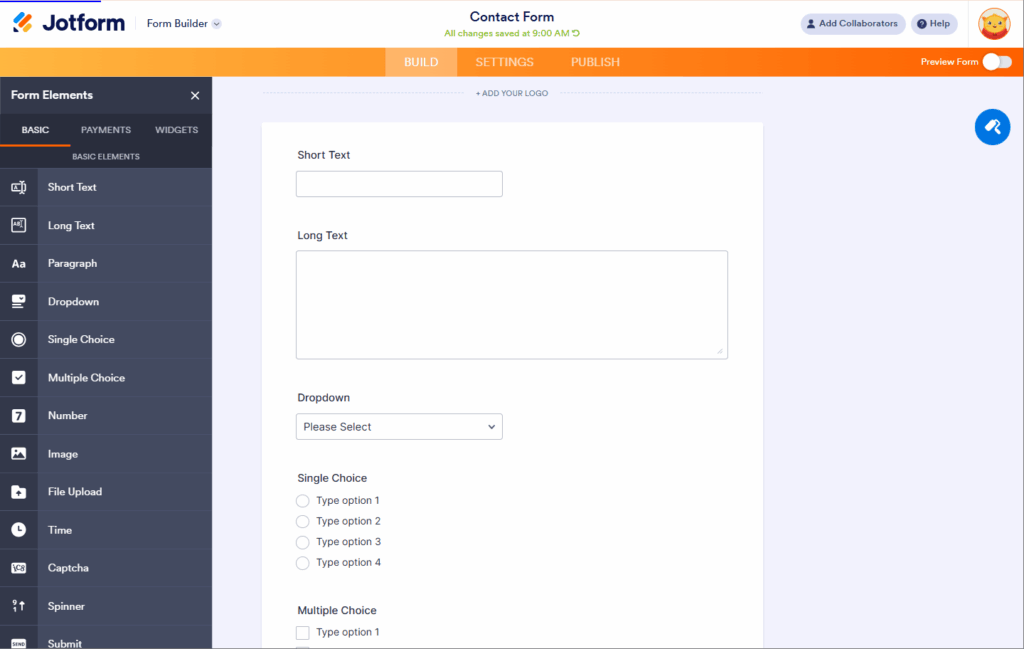
Jotform's homepage says the product is trusted by more than 40 million users, and its about page says it passed 35 million users in 2025. It is a private, bootstrapped company headquartered in San Francisco.
What Jotform does well
The form builder
The drag-and-drop builder is the reason people stay. It has a very deep field library, from text and choice fields through file uploads, signatures and payment fields to widgets, and the conditional logic can show, hide, skip pages and calculate. Several questions can sit on one page in a Classic form by adding a Page Break element, which is how multi-page forms are built.
Branding is handled in the builder as well: your logo, colors and fonts on any plan, and the "Powered by Jotform" badge switched off once you are on Bronze, Silver or Gold. Custom CSS can be injected into Classic forms with no plan restriction.
Payments, documents and signatures
Jotform takes payments through a form with no platform fee. Its support team's answer is plain: it does not collect any percentage of the payment from your users or from you. Pair that with Jotform Sign for e-signatures and the PDF tools for turning a submission into a document, and it covers order forms, applications and agreements without another tool.
Integrations and workflows
Jotform lists 150+ integrations, including CRMs, Stripe, PayPal, email platforms and Slack, with webhooks available on every form and no plan named in its webhook documentation. Jotform Workflows adds approvals, so a submission can be routed to a manager before anything happens to it.
AI tools
Jotform launched AI Agents in February 2025. An agent can sit on a form and answer a respondent's questions in chat or by voice, and the pricing page meters agent conversations, sessions, voice minutes and SMS messages alongside the older limits.
Compliance options
HIPAA features are available on the Gold plan and on Enterprise, which matters for anyone collecting health information and rules out the lower plans for that work.
Jotform pricing in 2026
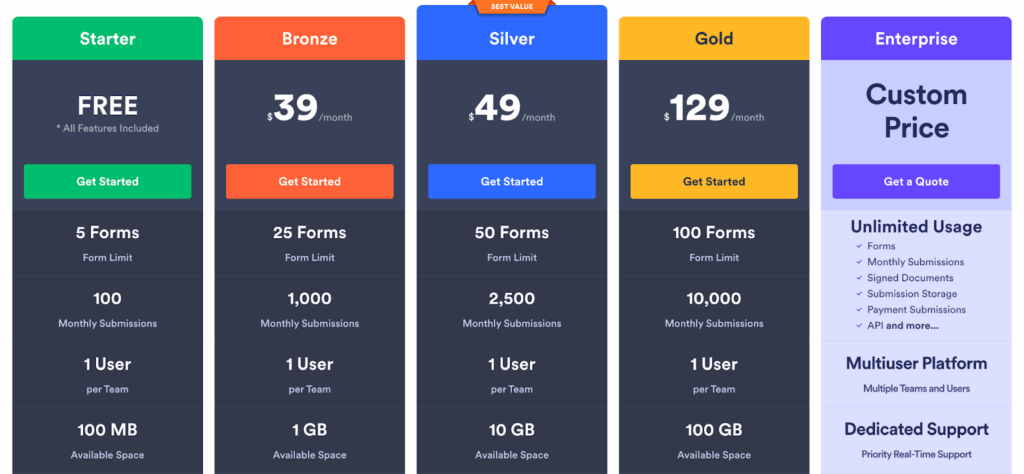
Read from jotform.com/pricing on 6 October 2026. The plan names and monthly prices are unchanged from the screenshot above, which was taken in July 2025.
- Starter (free): 5 forms, 100 submissions a month, 10,000 form views a month, 10 payment submissions, 100 MB upload space, Jotform branding.
- Bronze ($39 a month, or $408 a year): 25 forms, 1,000 submissions, 100,000 form views, 100 payment submissions, 1 GB upload space, 10,000 stored submissions, branding removed.
- Silver ($49 a month, or $468 a year): 50 forms, 2,500 submissions, 1,000,000 form views, 250 payment submissions, 10 GB upload space, 25,000 stored submissions.
- Gold ($129 a month, or $1,188 a year): 100 forms, 10,000 submissions, 1,000 payment submissions, 100 GB upload space, HIPAA features.
- Enterprise (custom): priced on request, with enhanced security, custom domains and single sign-on listed in the pricing FAQ.
Three things about the billing are worth knowing before you buy. There is no trial of the paid plans, and Jotform's answer is that the free plan carries the standard features. Jotform runs discounts on yearly plans at different times of the year, available only when upgrading to a higher yearly tier, and its pricing page says plans auto-renew at the full price in the next payment period. And outside Europe, Jotform charges in US dollars. Our Jotform pricing guide works through every limit and what a lead form costs on each plan.
The limits that matter for lead generation
Jotform is cheap per submission. Silver gives 2,500 submissions for $49, which no lead generation form builder matches on that measure. The catch is what else is metered, and what happens when a meter trips.
Form views are counted, and a cap switches the form off
Jotform counts form views account-wide every month: 10,000 on the free plan, 100,000 on Bronze and 1,000,000 on Silver. A form under a paid campaign spends views far faster than it spends submissions, because most visitors do not submit. Jotform's help center says that reaching any monthly limit, views included, disables your forms on a scheduled date and shows a "Form over quota" message until the month resets or you upgrade. Deleting submissions does not free the count.
There is also a lifetime storage ceiling on stored submissions, 10,000 on Bronze and 25,000 on Silver. Jotform's pricing page says that above it, the system deletes the oldest form response to make room for new submissions.
The tracking a paid campaign needs is not on the hosted form
Hidden fields are there, so a UTM parameter can be stored with a submission. The rest has to be done elsewhere. Jotform's support team has said it has no direct Google Tag Manager integration, and that custom JavaScript cannot be added to Jotform-hosted forms for security reasons. In both cases the route offered is the same: download the form's source code and host it on your own server, which is a developer job every time the form changes.
Your domain, Jotform's name
Paid plans remove the badge, but Jotform's help center says the Jotform name will still appear in the form URLs, and its pricing FAQ lists custom domains among what Enterprise provides.
Reviewers notice the same things
On review sites Jotform scores well. Capterra showed 4.7 out of 5 from 2,927 reviews and Trustpilot 4.3 from 1,838 reviews when we read them on 1 October 2026, with 11% of Trustpilot reviews at one star. The recurring complaints are about the plans rather than the builder. A 5-star Capterra reviewer, Cheyenne M., wrote in February 2026: "It is a little expensive considering I don't use all the features offered so I do wish there was a way to chose it for only what I use." Amanda P., an HR director, wrote in May 2026 that "Some of the more advanced features and customisation options can feel limited unless you move onto higher priced plans."
Who should pick what
Pick Jotform if your forms take payments or signatures, generate documents or need an approval step, if you need HIPAA features at a published price, or if you want a free plan that never expires for a low-volume form. For a client-facing application or booking form with modest traffic, it is a sensible choice.
Pick a lead generation form builder if the form sits on a landing page with an ad budget behind it. You need the form to convert on a phone, to keep the UTM and click ID attached to each lead, to fire a conversion event the ad platform can optimize on, and to stay live at the end of a good month.
A lead generation alternative: Growform
Growform is a multi-step form builder made for lead generation. Jotform collects data for any purpose. Growform exists to turn paid traffic into qualified, trackable leads and hand them to the systems that follow.
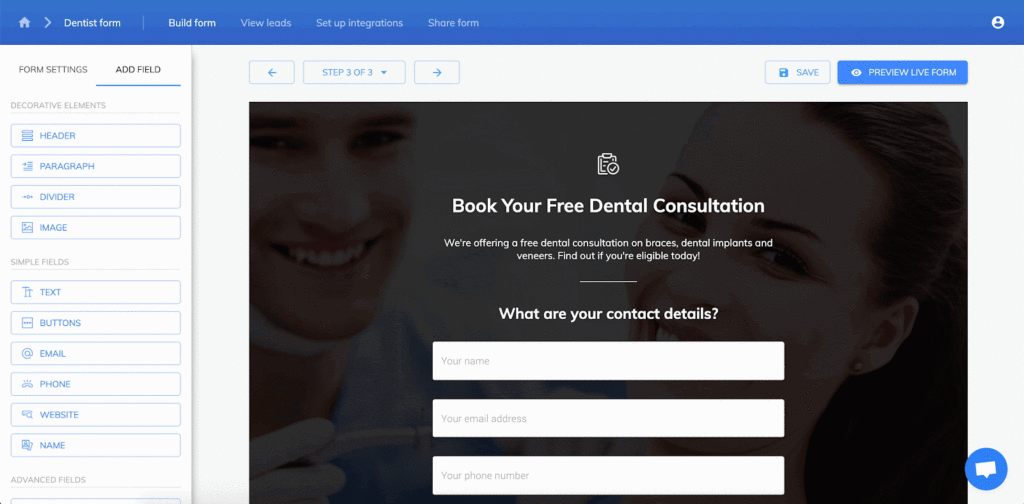
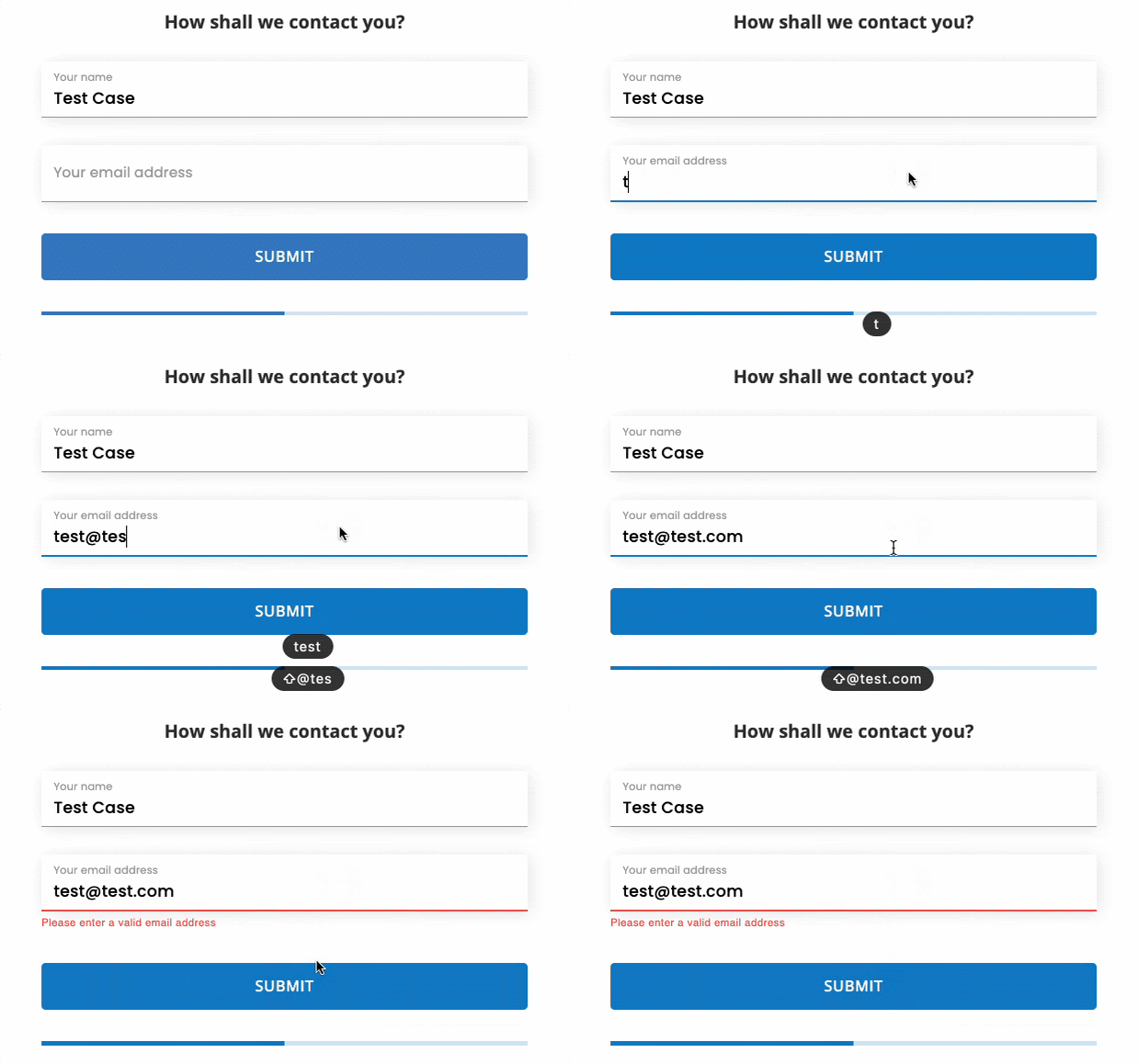
Every form is multi-step and mobile-first, with 25+ field types including picture buttons, address lookup and progress bars, and conditional logic that can show or hide steps, send different answers to different thank-you pages and disqualify leads that do not fit. One of our customers, Eugen Bechir, a performance marketer at BeMarketable, described the switch this way: "When we started using Growform we saw an immediate increase in conversion rates - we’re talking conversion rates doubling or even tripling in some cases."
Tracking is on every plan. Hidden fields capture UTMs, gclid and fbclid and keep them through every step, and conversion events fire to Google Ads, Meta and X on submission, with the option to report qualified leads only. On Professional and above, Google Tag Manager containers fire tags as the lead moves through the form, your form runs on your own domain through a CNAME, and real-time phone and email validation through Twilio and ZeroBounce stop fake details before they reach your CRM. TrustedForm and Jornaya record consent evidence on every submission for anyone who sells leads.
Delivery is immediate: webhooks, instant email alerts and 7,000+ apps through Zapier, with HubSpot, Salesforce, GoHighLevel and the lead distribution platforms among the common destinations.
Growform pricing
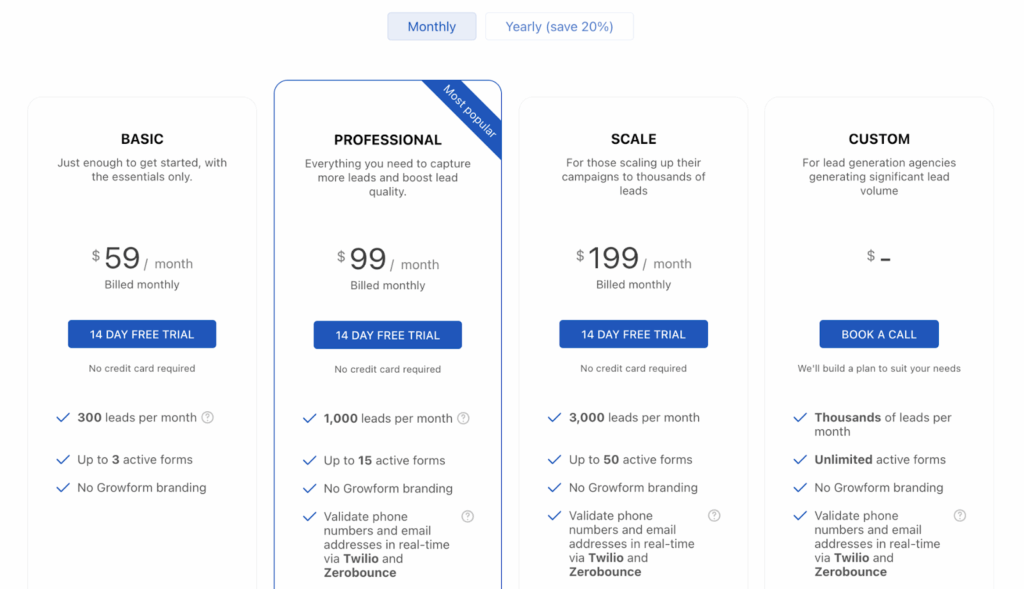
From Growform's pricing page, as of October 2026, with yearly billing 20% less:
- Basic ($79 a month): 300 leads a month, up to 3 active forms, no Growform branding, hidden fields, ad network tracking, Zapier, webhooks and email alerts.
- Professional ($139 a month): 1,000 leads a month, up to 15 active forms, Twilio and ZeroBounce validation, TrustedForm and Jornaya, a custom domain, Google Tag Manager and priority support.
- Scale ($249 a month): 3,000 leads a month and up to 50 active forms.
- Custom: thousands of leads a month, unlimited active forms and a 99.9% uptime SLA.
Plans count leads, not form views, so traffic never switches a form off. Every plan includes 250+ templates, conditional logic and custom CSS, and starts with a 14-day free trial with no credit card.
Jotform vs Growform for lead generation
| Jotform | Growform | |
|---|---|---|
| Built for | Data collection, payments and workflows | Multi-step lead forms under paid traffic |
| What is metered | Submissions, form views, payment submissions and storage, account-wide | Leads per month |
| At the cap | Forms disabled, "Form over quota" | Leads keep arriving, you get an alert to move up a plan |
| Several questions per step | Yes, with the Page Break element in Classic forms | Yes, by default |
| Google Tag Manager | No direct integration, only in self-hosted source code | Professional and above |
| Custom JavaScript | Not on Jotform-hosted forms | Every plan |
| Your own domain | Listed under Enterprise | Professional and above |
| TrustedForm and Jornaya | Not listed on the pricing page | Professional and above |
| Payments in the form | Yes, no platform fee | Through Zapier |
| Free plan | Yes, 100 submissions a month | 14-day free trial |
Jotform wins the last two rows, and for a form that takes money or runs for free at low volume, those rows decide it. For the form under an ad budget, the rest of the table does.
Verdict
Jotform is a capable, mature form platform at a fair price for general business forms, and its free plan is one of the more generous ones around. It is not built for lead generation, and the account-wide view meter, the missing Tag Manager integration and the Enterprise-only custom domain are the places that shows. If your form's job is to turn clicks into leads you can track and sell, use a tool built for that job.
Frequently asked questions
Is Jotform free?
Jotform has a free Starter plan with no time limit. As of 6 October 2026 it allows 5 forms, 100 submissions a month, 10,000 form views a month and 100 MB of upload space, and the form carries Jotform branding. There is no free trial of the paid plans, so the free plan is the way to try the product.
How much does Jotform cost?
As of 6 October 2026, Jotform's paid plans are Bronze at $39 a month or $408 a year, Silver at $49 a month or $468 a year, and Gold at $129 a month or $1,188 a year. Enterprise is priced on request. Jotform runs discounts on yearly plans at different times of the year, and its pricing page says plans auto-renew at the full price in the next payment period.
What happens when you hit a Jotform limit?
Jotform's help center says that reaching the upload space limit or any monthly limit, including submissions and form views, disables your forms on a scheduled date and shows a "Form over quota" message until the month resets or you upgrade. Deleting submissions does not free up the monthly count.
Is Jotform good for lead generation?
Jotform can collect leads, and hidden fields let it store UTM parameters. It is weaker where a paid campaign needs more: form views are metered on every plan, there is no direct Google Tag Manager integration, custom JavaScript cannot run on Jotform-hosted forms and a custom domain is listed under Enterprise. A form builder made for lead generation, such as Growform, counts leads rather than views and includes that tracking.
Does Jotform charge a fee on payments?
No. Jotform's support team states that it does not collect a percentage of payments made through a form. The payment processor's own fees still apply, and each plan has a monthly limit on payment submissions: 10 on the free plan, 100 on Bronze, 250 on Silver and 1,000 on Gold.
Related articles

6 best form builders with phone verification built in
November 16, 2026

7 best form builders for LeadsPedia lead routing teams
November 6, 2026

7 best form builders for Boberdoo lead routing flows
November 4, 2026