


LeadsPedia teams do not usually need another routing engine. They need a form builder that feeds the routing engine cleanly, with source data, consent evidence, and qualification logic intact. That is why tools like Growform matter in this category: they sit at the capture layer, while LeadsPedia sits at the distribution and routing layer.
A good LeadsPedia form builder is an operational control point for acceptance rate, compliance coverage, attribution accuracy, and speed-to-lead. If those pieces break, your router may still fire, but your margin usually drops first.
What should LeadsPedia teams look for in a form builder?
The best LeadsPedia form builders preserve source data, qualify leads before submit, and post cleanly into routing fields like TrustedForm and Jornaya IDs. If a tool looks good but breaks UTMs or server posting, it is the wrong tool for paid traffic.
LeadsPedia’s official documentation makes the routing side clear. It supports direct web-form posting, server posting, webhooks, API access, duplicate-check settings, and vertical fields tied to Jornaya Lead ID and Trusted Form Cert ID. That means the form builder should do three jobs well before LeadsPedia ever touches the record: capture the right data, shape the payload correctly, and filter low-value submissions early.
The practical checklist is simple. You want hidden field support for UTM parameters and click IDs, reliable webhook or post capability, flexible field naming, conditional logic, and a clean way to store consent evidence. Do not treat compliance as a downstream problem. It is usually a capture-layer problem first.
Should you use LeadsPedia’s native posting options or an external form builder?
Use LeadsPedia for routing and Growform or a similar builder for capture when paid traffic volume, mobile UX, and qualification matter. LeadsPedia handles distribution well. A dedicated front end usually handles step logic, validation, and attribution capture better.
This is not an either-or decision for most operators. LeadsPedia is a SaaS platform for affiliate management, lead distribution, call tracking, and routing. Its docs show that it can receive leads from web forms and server posts. That is exactly what many teams need. Still, a router is not always the best place to build the entire user experience, especially if your funnel depends on progressive disclosure, quiz-style qualification, or passing raw attribution fields through several steps before submit.
If your paid traffic form is short and your buyers have simple rules, native posting can be enough. If your funnel needs mobile-first completion, disqualification logic, click-ID persistence, or front-end validation, an external builder is usually the safer setup.
What are the 7 best form builders for LeadsPedia lead routing teams?
The best shortlist mixes routing-ready lead capture tools with general builders that can still post into LeadsPedia through webhooks, API middleware, or native form posts. Your ideal choice depends on whether conversion rate, design control, compliance capture, or CRM depth matters most.
For this category, “best” means best for consumer lead generation at volume, not best for surveys or internal workflows.
- Growform: Best fit for dedicated lead capture in front of LeadsPedia when you need multi-step UX, conditional qualification, hidden field pass-through, and real-time routing handoff.
- Jotform: Broad field library and flexible integrations. Useful when teams want fast deployment, though its generic form DNA can be limiting for harder paid-traffic qualification flows.
- Typeform: Strong conversational format and good user experience. Better for lighter qualification than for dense routing payloads with many hidden or compliance-related fields.
- Unbounce native forms: Logical if your landing pages already live in Unbounce. Trade-off: its native form depth is often lighter than specialist lead-gen builders for step logic and qualification.
- Formstack: Solid for process-heavy teams that want forms plus operational workflows. Often heavier than needed for pure lead-routing funnels.
- GoHighLevel forms: Convenient for agencies already deep in GHL. Good enough for many local-service campaigns, but demanding routing teams often hit limits on flexibility and front-end UX.
- HubSpot forms: Best when CRM-native capture matters more than paid-traffic conversion nuance. Usually less ideal when LeadsPedia is the operational center for routing and resale.
The shortlist changes if your core metric changes. If acceptance rate and buyer compliance matter most, prioritize field control and posting reliability. If speed of launch matters most, prioritize builders with fast embed and template workflows. The best-looking builder is not automatically the best routing builder. In this category, payload integrity usually beats aesthetics.
How do you connect a form builder to LeadsPedia without losing UTMs or click IDs?
Start with field mapping, not design. If UTM source, gclid, fbclid, sub-ID, and landing-page context do not survive the handoff, LeadsPedia can still route the lead, but your optimization loop will be blind.
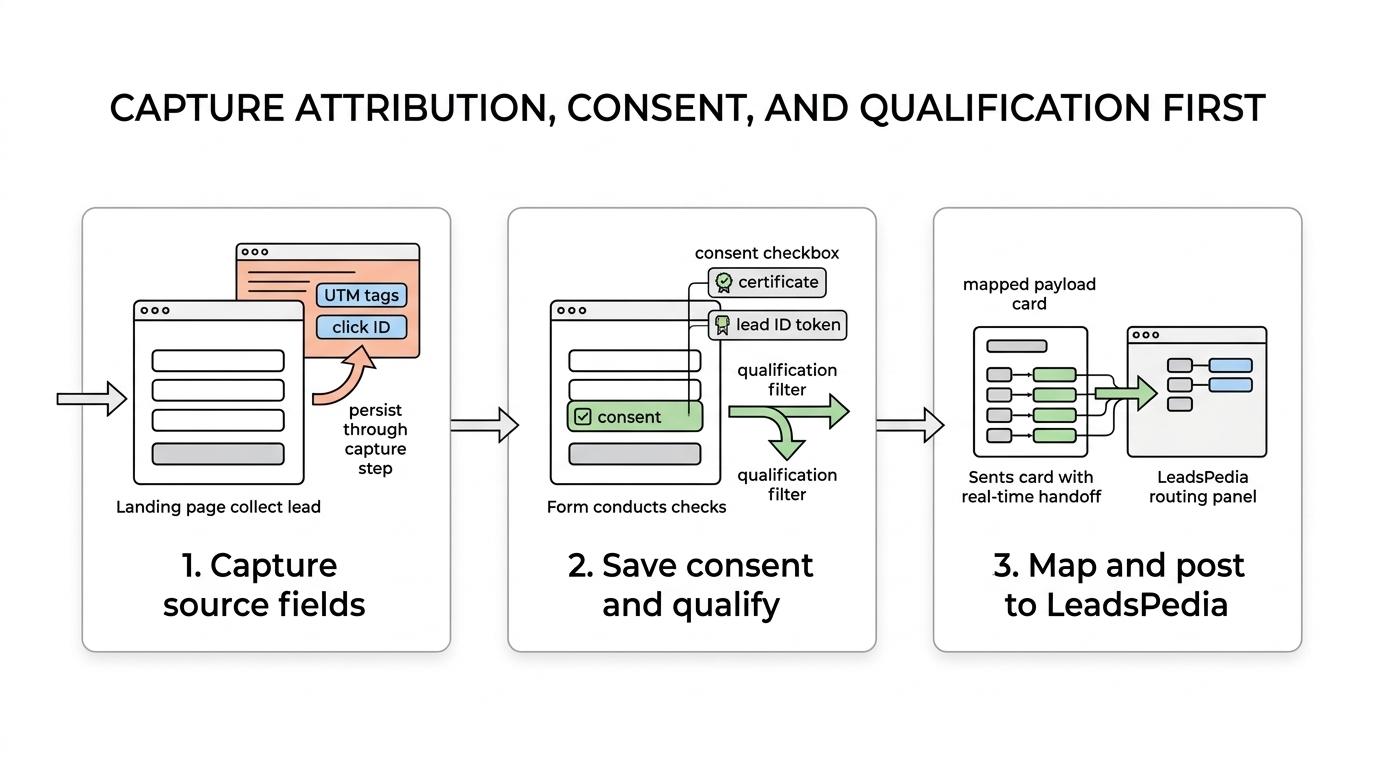
Step one is capture. Store UTMs, click IDs, source names, and any network sub-identifiers in hidden fields as soon as the visitor lands. If your form is multi-step, those values need to persist from step one to final submit.
Step two is normalization. Decide whether LeadsPedia will receive raw field names from the page or normalized internal names. If your media team uses utm_campaign and your buyer team expects campaign_id, map that intentionally. Keep both when possible, one raw and one normalized, so debugging is faster.
Step three is transport. Post the lead to LeadsPedia through the method that best fits your stack, whether that is direct web-form posting, server posting, or a webhook-to-middleware flow. If you already run enrichment, scoring, or suppression before routing, server-side transport usually gives you more control.
If you rely on Meta or Google optimization, test with real click parameters. A form can look perfect in preview mode and still drop gclid or fbclid in production.
How should you map TrustedForm, Jornaya, and duplicate-check fields into LeadsPedia?
Map compliance evidence before launch. Growform and LeadsPedia both support routing-ready capture, but the key is sending the exact consent and identity fields your buyers, carriers, or internal rules expect in 2026.
LeadsPedia’s docs are useful here because they surface the operational fields teams often forget. Its lead-generation settings include duplicate-check options and vertical settings for Jornaya Lead ID and Trusted Form Cert ID. That tells you something important: the router expects structured evidence, not vague consent text pasted into a comments field.
The clean workflow is straightforward. Capture the consent event at the form layer, store the right certificate or lead ID value, map it to the correct LeadsPedia field, and test whether the field arrives populated on every valid submission. If a buyer rejects on missing proof, a single broken mapping can turn a profitable campaign into a margin leak.
Duplicate checks alone do not solve quality. They only help once the lead has already reached the system. Phone, email, consent, and qualification checks should happen earlier whenever possible.
How do multi-step forms compare with single-step forms for paid traffic lead generation?
Multi-step forms usually win when you need more than six to eight meaningful fields, especially on mobile Meta and Google traffic. Single-step forms can still beat them when the offer is simple, the brand is trusted, or speed matters more than qualification depth.
The main benefit of multi-step design is perceived effort. A long form shown all at once feels heavier than the same questions split into short screens with a progress indicator. That matters in verticals like solar, final expense, mass tort, and roofing, where qualification is real and every extra field can reduce submit rate if it appears too early.
The trade-off is complexity. Multi-step flows create more places for attribution, consent, and validation bugs to hide. If your builder cannot reliably pass hidden fields across steps, a simple single-step form may produce better net economics despite lower raw conversion rate.
A useful rule is this: if you need to disqualify aggressively, go multi-step. If you need minimal friction and only a few fields, test single-step first. Do not assume multi-step always wins. It wins when the implementation is disciplined.
How do you reduce duplicates, fake leads, and bad contact data before routing?
Stop junk before it reaches the router. Duplicate checks in LeadsPedia help downstream, but upstream filters like phone verification, email validation, and disqualification logic protect margins earlier.
Think in layers. Layer one is format validation, which catches broken emails and malformed phone numbers. Layer two is live verification, often through tools like Twilio for phone or ZeroBounce for email. Layer three is business-rule qualification, where you reject non-serviceable ZIPs, wrong product intent, or clearly unworkable contact windows before the lead enters buyer rotation.
This matters because bad leads create false signals. A campaign with cheap CPL can still be unprofitable if contact rate, acceptance rate, or issued-policy rate collapse after routing. Measure filtered-lead percentage and accepted-lead yield together. If filtering drops raw volume but raises accepted output, the form is doing its job.
Which form builder fits your stack: aggregator, in-house team, or GHL agency?
Different operators need different builders. A LeadsPedia aggregator cares about acceptance rates and clean posting, an in-house solar or insurance team cares about CPL and CRM visibility, and a GoHighLevel agency cares about speed, client reuse, and embed flexibility.
If you are an aggregator or lead seller, choose for routing readiness first. You probably need hidden fields, compliance evidence, duplicate discipline, and delivery into LeadsPedia, Boberdoo, or Phonexa without custom dev bottlenecks. Design matters, but acceptance rate matters more.
If you are an in-house demand team, you may care more about how the form connects to HubSpot, Salesforce, Meta Conversions API, and internal follow-up workflows. In that case, a builder that balances conversion with CRM cleanliness usually wins.
If you are a GHL agency, the decision is often about operational speed. Native GHL forms are convenient, but if client funnels need better mobile UX, multi-step logic, or cleaner embeds on WordPress and Webflow, a specialist builder can save time and improve consistency. If you are an in-house solar or insurance team, you usually want stronger compliance capture and better front-end qualification than generic forms provide.
What tests should you run before sending live traffic into LeadsPedia?
Run posting, routing, and evidence tests before launch. One successful form submission is not enough. You need to confirm field integrity, duplicate behavior, buyer rules, alerting, and speed-to-lead across the full stack.
A solid pre-launch routine includes a few non-negotiable checks:
- Field integrity: Confirm that every visible and hidden field lands in the correct LeadsPedia destination field.
- Attribution survival: Test UTMs,
gclid,fbclid, and affiliate sub-IDs with live-style URLs. - Compliance evidence: Verify TrustedForm and Jornaya values populate correctly on accepted submissions.
- Duplicate behavior: Send a known duplicate and confirm the rule behaves as expected.
- Routing outcome: Check caps, geo rules, and buyer criteria with test data from more than one scenario.
One more tip: test failure paths, not just success paths. What happens if the webhook times out, the phone number fails verification, or the ZIP code is outside buyer coverage? Those paths often matter most in production.
What mistakes break LeadsPedia form workflows most often?
Most routing failures come from bad naming, missing hidden fields, weak consent capture, and late validation. The dangerous part is that the form can look fine to a user while silently dropping revenue-critical data behind the scenes.
The recurring problems are predictable:
- Wrong field names: The form submits, but LeadsPedia receives blank or mismatched values.
- Missing click data: The lead routes, but source optimization breaks because
gclid,fbclid, or sub-ID fields never arrive. - Compliance gaps: Consent text is present, yet the expected certificate ID or lead ID field is empty.
- Late filtering: Junk leads make it into routing, then get rejected after you already paid for the click.
If your team keeps seeing buyer disputes, low contact rates, or unexplained media inefficiency, inspect the capture layer before blaming the router. In many stacks, the form is where revenue quality is won or lost.
Related articles

7 best form builders for Boberdoo lead routing flows
November 4, 2026
7 best form builders for Phonexa lead routing teams
November 3, 2026

7 best form builders with server-side tracking for lead gen
October 29, 2026